Tiramisu hands you the placeholder path .. for isl, and its newest tagged release is from 2018
A polyhedral compiler for expressing fast and portable data parallel algorithms
At a glance
- What is it?
- Tiramisu is a polyhedral-model compiler for data parallel algorithms, written in C++ and built from source with cmake over submodules for isl, LLVM, and Halide. Three build paths are documented in detail. Two of them end in a snippet that sets the isl directories to a literal two-dot placeholder, and the version history stopped in 2018 while the default branch kept moving until July 2026.
- Who is it for?
- Tiramisu is a research compiler with a build that has to be assembled rather than installed, and the assembly instructions are the weak point rather than the compiler itself. Use it if you already have a working LLVM, Halide, and isl toolchain, or if you are prepared to build LLVM from source and wait out the hours that costs.
- Can I use it commercially?
- Yes. MIT is a permissive licence: you can use, modify and sell software built on it, as long as you keep its copyright and licence notices.
- Is it still maintained?
- Yes. The repository last received commits 117 days ago.
- What is it written in?
- Mainly C++, according to GitHub's language statistics.
Answers come from the project's GitHub data, last synced on November 15, 2026, and from our analysis. They are not legal advice.
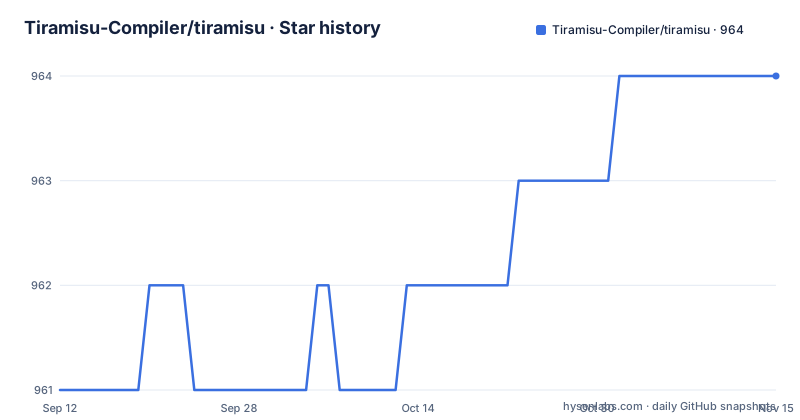
Star history
- Tiramisu-Compiler/tiramisu964 ★ · +3
| Repository | 2026-09-12 | 2026-11-15 |
|---|---|---|
| Tiramisu-Compiler/tiramisu | 961 | 964 |
3 Stars in the last 64 days, measured from the daily GitHub snapshot. Compare with other projects
Editorial analysis
The newest tag is Version 0.2 from 2018 and the branch was pushed in July 2026
The version history and the development line describe two different projects. Two releases exist, Version 0.1 dated 2018-07-17 and Version 0.2 dated 2018-07-26, both from the same week eight years ago. The default branch is master and its last recorded push is dated 2026-07-21. Nothing in the build instructions resolves that gap, because all three documented paths start from a git clone of the repository rather than from a release artifact. So a Version 0.2 build and a current master build are not the same thing, and the tag names give no hint of which one you have. Two smaller signals point the same way. The project is licensed MIT and the LICENSE file sits at the root next to the usual build machinery. Its homepage is tiramisu-compiler.org over plain HTTP, with no HTTPS form offered, which is an odd choice for a project whose own README links to apt.llvm.org and packages.spack.io over TLS. For anyone evaluating maintenance by looking at release pages, this repository will look abandoned; the branch tells a different story, and the branch is the only thing you can build from the documentation provided.
The worked example stops inside the parallelize call
The single code example is where a new reader starts, and it ends mid-statement. The program includes tiramisu/tiramisu.h, brings the tiramisu namespace into scope, and calls tiramisu::init("foo") to name the function being generated. Two iterators are declared, i and j, each bounded 0 to 100. A computation is then defined over both iterators initialised to zero, and the comment above it spells out the equivalent plain C triple loop. The last line shown is the start of the optimizations section, C.parallelize(i, with the call unclosed. So the example never shows a tiling or vectorization directive, never shows how the expression is built and emitted, and never shows the schedule object that ties the optimizations to the computation. Anyone copying from the documentation has to supply the rest of the loop nest structure themselves. Two other loose ends sit nearby. The badge block at the top of the file contains a Travis CI link that has been commented out, while a .travis.yml configuration file still exists at the repository root, so the continuous integration setup is present but no longer advertised. And the closing section offers a prebuilt virtual machine disk image hosted on an MIT group page, a distribution route from the era of the 2018 tags, with the link text itself ending mid-phrase.
Both dependency guides set the isl directories to a literal two-dot placeholder
The isl directories are threaded through the whole cmake invocation as variables, and neither guide fills them in. The Homebrew path installs and links its dependencies like this:
brew install cmake
brew install llvm@14
brew install halide
brew install isl
brew link halide
brew link isl
and then tells you that if any of these ask you to update your path, do so, offering the isl lookup as the example:
brew info isl
ISL_INCLUDE_DIRECTORY=..
ISL_LIB_DIRECTORY=..
The Ubuntu and Debian path does the same thing with dpkg. The two-dot value is a placeholder, not a directory, and it is what lands in the variables unless you overwrite it. Those variables then go straight into the configure step verbatim:
cmake . -B build -DISL_LIB_DIRECTORY=$ISL_LIB_DIRECTORY -DISL_INCLUDE_DIRECTORY=$ISL_INCLUDE_DIRECTORY -DPython3_EXECUTABLE=`which python3`So a reader who runs the three snippets in order hands cmake a relative path of two dots for both isl directories and finds out at configure time rather than from a stated error message. The apt route has its own weight. It downloads an LLVM installer script, makes it executable, runs it under sudo with the version and all as arguments, and then makes four separate sudo apt-get calls, the last of which passes llvm14-* as a pattern rather than a package list. Six lines of privilege escalation before a single build flag is set.
Three build paths, three different answers to who compiles LLVM
The required prerequisites are CMake 3.22 or greater, autoconf with libtool, and ninja, and the optional ones map onto the backends: OpenMPI with OpenSSH for distributed code, the CUDA Toolkit for CUDA code, and Python 3.8 or higher with pybind 2.10.2, Cython, and numpy for the bindings. On top of that there are three build methods, and the documentation's own framing is that the last two differ only in how they set up dependencies. The differences are larger than that. Method one is a single spack command, and spack builds everything from source. Method two uses system package managers, so Homebrew or apt supply LLVM 14, Halide, and isl, and cmake does the rest. Method three uses the project's own script to fetch and build the submodules, which are isl, LLVM, and Halide under a 3rdParty directory:
./utils/scripts/install_submodules.sh <TIRAMISU_ROOT_DIR>The argument has to be an absolute path, the file states, and the step is warned as taking anywhere from a few minutes to a few hours because building LLVM is time consuming. That warning is the real difference between the methods: the first two take minutes because a package manager supplies LLVM, and the third does not. The installation was tested on Ubuntu 18.04 and MacOS 13.0.1, which is itself a useful signal about how old the tested configuration is compared to the 2026 branch.
configure.cmake is edited in place and holds the three backend switches
Configuration is not done with command line flags alone. The file configure.cmake at the repository root is edited directly, and it is where the optional backends live. USE_GPU set to TRUE selects the GPU backend, and if the CUDA library is not found automatically during the build the user is prompted for its path. USE_MPI set to TRUE selects the distributed backend, and when MPI is not located automatically three variables have to be filled in by hand: MPI_INCLUDE_DIR, MPI_LIB_DIR, and MPI_LIB_FLAGS. USE_AUTO_SCHEDULER set to TRUE builds the autoscheduler module. The description of each variable, the documentation says, is provided in comments inside configure.cmake, which means the reference material for the build is a tracked source file rather than a document. Two consequences follow. First, a local configuration is an edit to the working tree, so a build directory that is not isolated from the checkout accumulates diffs against a file that is nominally shared. Second, the same file appears in both manual methods as an optional step needed only when generating MPI or GPU code, running the BLAS benchmarks, or building the autoscheduler, so a plain X86 build can ignore it entirely. Install locations are handled separately, with CMAKE_INSTALL_PREFIX for a general install and Tiramisu_INSTALL_PYTHONDIR to say where the Python package lands, after which PYTHONPATH and LD_LIBRARY_PATH have to be set by the user.
Everything is cmake except the autoscheduler, which is a make target
The two manual methods do not even agree on where cmake is invoked from. Method two configures from the repository root with a source directory of a dot and a binary directory of build, in one command. Method three changes into the build directory first, runs cmake with a source directory of two dots, then runs cmake --build with a dot. Both work, and they leave CMakeCache.txt in different relationships to the source tree, which matters if you alternate between methods or script a build. The Halide integration is a separate manual step in the third method, where Halide's cmake package has to be put on the prefix path:
export CMAKE_PREFIX_PATH=<TIRAMISU_ROOT_DIR>/3rdParty/Halide/build/:$CMAKE_PREFIX_PATHThe trailing slash before the colon creates an empty path element in the variable, harmless in most cmake searches but not what was intended. The clearest inconsistency in the build story is the autoscheduler. Once the main library is built, the documented command is not a cmake command at all:
make tiramisu_auto_schedulerSo the one component that generates schedules, which is the part of a polyhedral toolchain most likely to need its own dependencies, is built through a Makefile target in a project that otherwise builds through cmake, and no prerequisites for it are listed beyond setting USE_AUTO_SCHEDULER. The benchmarks directory and the tests directory exist at the root, but the build section describes no target that runs either.
Four targets are advertised and three of them have a switch
The overview names four execution targets: multicore X86 CPUs, Nvidia GPUs, Xilinx FPGAs through Vivado HLS, and distributed machines using MPI. The optional prerequisites section lines up with three of them, OpenMPI with OpenSSH, the CUDA Toolkit, and the Python stack for bindings, and configure.cmake carries a switch for GPU, MPI, and the autoscheduler. There is no Vivado or Vitis prerequisite in the list and no corresponding variable named for the FPGA path in the three switches that are documented. So the FPGA target appears in the description of what the compiler can generate, while the build documentation gives no way to turn it on, and anyone who needs it has to find the flag themselves. The areas the compiler is aimed at are named as linear and tensor algebra, deep learning, image processing, stencil computations, and machine learning, all of which are stencil or dense linear algebra shapes where the polyhedral model applies. The Python bindings are the other integration surface worth understanding, because they are the route by which a Python project would drive the compiler, and their wiring is manual: cmake is passed the interpreter with a Python3_EXECUTABLE argument, the package destination comes from Tiramisu_INSTALL_PYTHONDIR, and the resulting paths have to be added to PYTHONPATH and LD_LIBRARY_PATH yourself.
Editorial conclusion
Tiramisu is a research compiler with a build that has to be assembled rather than installed, and the assembly instructions are the weak point rather than the compiler itself. Use it if you already have a working LLVM, Halide, and isl toolchain, or if you are prepared to build LLVM from source and wait out the hours that costs. Before you start, check three things. Read configure.cmake directly, because USE_GPU, USE_MPI, and USE_AUTO_SCHEDULER are edited in that tracked file rather than passed on the command line, and the only description of each variable is comments inside it. Replace the two-dot placeholders for ISL_INCLUDE_DIRECTORY and ISL_LIB_DIRECTORY with real paths, since the snippets that set them are illustrations and the cmake line that follows consumes them. And build from the default branch rather than from a tag, because the newest published release is Version 0.2 from 2018-07-26 and the branch itself was pushed on 2026-07-21. If you only need a working polyhedral toolchain, spack is the one path documented as a single command.
Frequently asked questions
What is Tiramisu-Compiler/tiramisu?
It is an MIT licensed C++ compiler built on the polyhedral model for expressing data parallel computations, with algorithms written through a C++ API of Tiramisu expressions plus scheduling directives. It targets multicore X86 CPUs, Nvidia GPUs, Xilinx FPGAs through Vivado HLS, and distributed machines using MPI.
What are the required build dependencies for Tiramisu?
CMake 3.22 or greater, autoconf and libtool, and ninja. Optional ones are OpenMPI and OpenSSH for distributed code, the CUDA Toolkit for CUDA code, and Python 3.8 or higher with pybind 2.10.2, Cython, and numpy for the Python bindings.
How does Tiramisu document its three build methods?
One is spack, run as spack install tiramisu, which builds everything from source. The second uses system package managers, Homebrew or apt, to supply LLVM 14, Halide, and isl before cmake runs. The third runs ./utils/scripts/install_submodules.sh with an absolute path argument to build the isl, LLVM, and Halide submodules itself, which the documentation warns can take from minutes to hours.
How are the GPU and distributed backends turned on in Tiramisu?
By editing configure.cmake at the repository root: USE_GPU set to TRUE for the GPU backend, USE_MPI set to TRUE for the distributed backend, and USE_AUTO_SCHEDULER set to TRUE for the autoscheduler. If the CUDA library is not found automatically you are prompted for its path, and for MPI you set MPI_INCLUDE_DIR, MPI_LIB_DIR, and MPI_LIB_FLAGS.
What are the newest releases published for Tiramisu?
Version 0.1 dated 2018-07-17 and Version 0.2 dated 2018-07-26. The default branch is master and its last recorded push is dated 2026-07-21, so the tags sit well behind the branch.
How is the Tiramisu autoscheduler module built?
Set USE_AUTO_SCHEDULER to TRUE in configure.cmake, build the main library with cmake, and then build the module with the Makefile target make tiramisu_auto_scheduler, which is the only build step in the documentation that is not a cmake command.
Official sources
Add this badge to your README
If you maintain this project, the badge below links readers to this analysis and shows its maintenance status from the daily GitHub snapshot. Paste the markdown into your README; add ?metric=license or ?metric=stars to the image URL for a different field.

[](https://hysenlabs.com/projects/tiramisu-compiler-tiramisu)Star history chart for your README
[](https://hysenlabs.com/projects/tiramisu-compiler-tiramisu)Was this useful?