ZED SDK: the repository holds samples, the library itself is a vendor download, and two releases shipped ninety minutes apart
⚡️The spatial perception framework for rapidly building smart robots and spaces
At a glance
- What is it?
- The ZED SDK is Stereolabs' cross-platform library for its stereo cameras, and this repository is the companion sample set: tutorials plus one directory per module, from depth sensing to body tracking. The SDK binaries are not here, so nothing in the tree builds without a download. What the readme does give you is a precise account of the most recent release, and one link bug in the overview table.
- Who is it for?
- Zed SDK suits a team that has decided to build on this specific stereo camera and wants the official samples rather than a neutral abstraction. It does not suit someone shopping for a perception stack, because the choice of hardware is made before any code is written.
- Can I use it commercially?
- Yes. MIT is a permissive licence: you can use, modify and sell software built on it, as long as you keep its copyright and licence notices.
- Is it still maintained?
- Yes. The repository last received commits 25 days ago.
- What is it written in?
- Mainly C++, according to GitHub's language statistics.
Answers come from the project's GitHub data, last synced on November 15, 2026, and from our analysis. They are not legal advice.
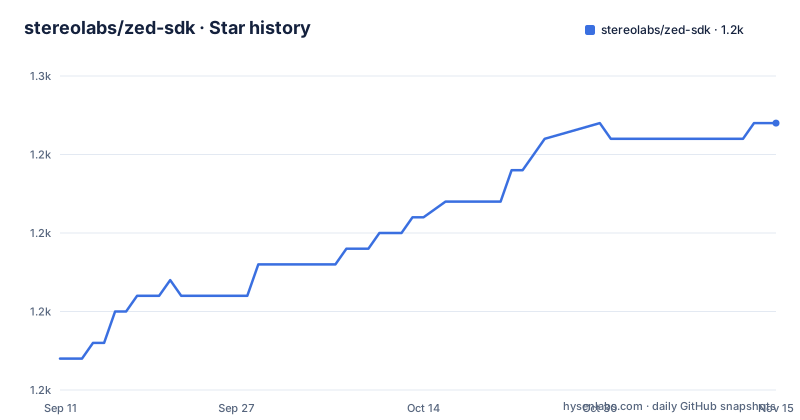
Star history
- stereolabs/zed-sdk1,247 ★ · +15
| Repository | 2026-09-11 | 2026-11-15 |
|---|---|---|
| stereolabs/zed-sdk | 1.2k | 1.2k |
15 Stars in the last 65 days, measured from the daily GitHub snapshot. Compare with other projects
Editorial analysis
This repository holds samples and the library is a download
The very first paragraph settles what you have cloned. The SDK is described as a cross-platform library designed to get the best out of the ZED cameras, and then the sentence that matters: in this project, the vendor provides tutorials and code samples to get started using the API. So the code in this tree is example code, and the library it calls is a separate artifact. The getting started section confirms it as a four step sequence: get a camera from the vendor's store, download the SDK from the downloads page on their developer site, install it with the instructions for your platform, then start from the tutorials. The installation targets named are Windows, Linux and Jetson, each with its own instruction page. One detail makes the ambiguity concrete: the badge row links to the stargazers page of a different repository under the same organisation, which suggests the samples were moved at some point and this file still reads as though they live here.
Thirteen sample directories have spaces in their names
Look at the top level listing and the path convention is unusual:
body tracking/
camera control/
camera streaming/
depth sensing/
Almost every sample directory is written with spaces rather than hyphens or underscores, including camera control, camera streaming, depth sensing, global localization, object detection, body tracking, plane detection, positional tracking, recording and spatial mapping. Two more carry a space and a number or a word, virtual stereo and zed one. The readme's own links have to encode them, which is why the samples list points at paths such as a camera control link and a depth sensing link with the space written as an escaped character. Spaces in source paths are legal and mostly harmless, but they are the kind of thing that needs quoting in a shell command, that breaks an unquoted path in a build file, and that has to be escaped in a URL. Two of the sample directories avoid the problem entirely and use underscores, sensors api and the tutorials directory, which shows the convention was not applied consistently even within one repository.
Four sample directories are undocumented and the platform list never arrives
The samples section enumerates ten things: tutorials, camera control, camera streaming, depth sensing, positional tracking, global localization, spatial mapping, object detection, body tracking and recording. The tree contains fourteen sample style directories. The four that no bullet describes are plane detection, virtual stereo, zed one and sensors api. Plane detection is arguably covered by the overview table, which links a documentation page for it, but the other three appear nowhere in the visible text, and a sensors directory in particular suggests a hardware interface that a reader would want described. The supported platforms section has the same problem in a different form. It introduces itself as the list of all supported operating systems for the latest version, then stops mid sentence asking the reader to find the information elsewhere. So the only concrete platform statements in the file are the three installation targets and whatever the release notes mention, including an experimental tier for ARM desktop systems.
A patch release and a feature release shipped ninety minutes apart
The release history is compressed on one afternoon. Three tags exist in the recent list: 5.3.0 in late April 2026, then 5.3.1 at 12:40 on 2026-06-18 and 5.4.0 at 14:10 the same day. A patch fix and a feature release ninety minutes apart, and the most recent commit to the default branch at 15:04 the same day, which is fifty minutes after the feature tag. The readme celebrates only the 5.4 release and points to the release notes page for the rest, which is the right division of labour but means this file carries no changelog for the patch that preceded it. Two structural notes for anyone tracking versions. The default branch is master rather than main. And the package has no version string in the tree at all, because the library version is whatever you downloaded, so a project that vendors this code has no in-tree marker of which SDK release it was written against.
The newest release claims the same outputs for less time
The headline item is a performance change to the built in neural depth models: an optimized inference path giving up to twenty percent quicker depth inference and around fifteen percent lower GPU load on one embedded platform, with the readme saying the gains carry over to other embedded and desktop hardware and that the largest wins come on heavier pipelines with more cameras or concurrent recording. The clause that matters for anyone with a regression suite is the last one, that outputs are unchanged. So this is a cost change, not a behaviour change, and a test comparing frames before and after should not need updating. The rest of the release follows the same pattern of moving work rather than adding capability. Recording and outbound streaming now run entirely from the camera read call, and stereo rectification happens on demand, so a pipeline that only records no longer pays for a step it did not need. A new polling API returns already encoded video packets from any stream direction without opening a second encoding session.
Custom depth is the experimental door into the whole pipeline
The most interesting change is the one that gives the pipeline away:
DEPTH_MODE::CUSTOMInstead of the SDK computing depth, an externally computed disparity or depth map can be fed in each frame, for example from your own stereo network, and the readme states that the full pipeline then runs on the ingested data. That includes the point cloud, spatial mapping, object detection and plane detection, which is the interesting part: you are not losing the downstream modules, you are replacing one stage. A companion overload pre-processes both rectified views in a single fused GPU pass and produces inference-ready tensors, and the readme names the framework they are meant to bind to. The label attached to the depth mode is experimental, so the contract can change. What is not stated anywhere is what the SDK does with a depth map that is malformed, misaligned or out of range, which is the first thing to test before building on it.
Two links in the overview table are bare paths with no site
The overview is a three by three table of the product areas, and it links two of them differently from the other seven. Depth sensing, object detection, body tracking, positional tracking, spatial mapping, camera control and plane detection all point at full addresses on the vendor's documentation site. Global localization and multi camera fusion point at bare paths with no domain, the first written with its space escaped:
/global%20localization
/fusion
Those two only resolve on the documentation site itself, so pasted into a terminal, an issue or a wiki they go nowhere. It is a small blemish, and it is the kind of one that survives because the file renders fine in a browser and nobody reads the raw text. The same table also has empty image cells in the source, so the icons are loaded from elsewhere. None of this affects the code, and all of it is a reason to link the documentation site rather than this readme when you file anything upstream.
Recorded files are the only documented way to run without hardware
One sample in the list is described differently from all the others, and the difference is the useful part. The recording sample records and plays back video files in the vendor's own recorded format, and the readme explains that those files let you use all the SDK features without having a ZED connected. That single sentence converts the whole repository from something you can only run next to a camera into something you can run anywhere, including in continuous integration, which is why it is worth finding the recorder first. Everything else in the list needs hardware: streaming over a local network, capturing a point cloud with OpenGL, fusing tracking with satellite navigation data for global positioning, mesh and point cloud fusion for mapping. The overview table also lists capabilities with no matching sample directory at all, among them multi camera fusion, which the tree does not appear to contain.
Editorial conclusion
Zed SDK suits a team that has decided to build on this specific stereo camera and wants the official samples rather than a neutral abstraction. It does not suit someone shopping for a perception stack, because the choice of hardware is made before any code is written. Four things to check before you commit. Where the library comes from, since the repository holds samples and the getting started path is buy a camera, download the SDK, install it for your platform, then run the tutorials, which means the build in this tree is not the product. What you can do without hardware, because recorded files in the vendor's own format are documented as a way to use the features with no camera connected, and that is the only hardware-free path the readme offers. Which release you target, since a patch and a feature release went out on the same afternoon ninety minutes apart. And what the experimental surface is, because the newest release adds a depth mode where you supply your own disparity or depth map and the rest of the pipeline runs on it, plus a server platform tier and a monotonic clock option, all labelled experimental in places and stable in others.
Frequently asked questions
What is the zed sdk?
It is Stereolabs' cross-platform library, described as designed to get the best out of the ZED cameras. This repository holds the tutorials and code samples for getting started with its API, while the library itself is distributed as a download.
how to install zed sdk on linux
Download the SDK from the downloads page on the vendor's developer site, then follow the Linux installation instructions linked from the getting started section. No package manager command appears in this repository's own documentation.
how to install zed sdk on jetson
The same two steps with the Jetson installation page instead, since the getting started section names Windows, Linux and Jetson as the documented install targets. The release notes also describe performance results on specific Jetson hardware.
is zed sdk open source
The repository carries an MIT license and contains sample code, but the library you call is obtained as a download from the vendor rather than built from this tree. Nothing in the getting started steps suggests compiling the SDK from source.
how to use zed sdk
Get a camera from the vendor store, download and install the SDK for your platform, then work through the tutorials. The samples are organised one directory per module, and recorded video files let you use the features with no camera connected.
Official sources
Add this badge to your README
If you maintain this project, the badge below links readers to this analysis and shows its maintenance status from the daily GitHub snapshot. Paste the markdown into your README; add ?metric=license or ?metric=stars to the image URL for a different field.

[](https://hysenlabs.com/projects/stereolabs-zed-sdk)Star history chart for your README
[](https://hysenlabs.com/projects/stereolabs-zed-sdk)Was this useful?