hassio-ecoflow-cloud: putting EcoFlow power stations into Home Assistant
EcoFlow Cloud Integration for Home Assistant
At a glance
- What is it?
- hassio-ecoflow-cloud is a Home Assistant custom integration that monitors and controls EcoFlow devices over the vendor MQTT broker, exposing batteries, sockets and charge settings as entities. It offers two API modes, an unofficial private one that mirrors the app and a public one that is safer but thinner, and it is explicit that it was built for personal use rather than full device coverage.
- Who is it for?
- hassio-ecoflow-cloud suits a Home Assistant user with an EcoFlow power station who wants battery level, input and output power and charge settings as entities rather than reading them off the vendor app, and the HACS install makes that a few clicks.
- Can I use it commercially?
- Yes. Apache-2.0 is a permissive licence: you can use, modify and sell software built on it, as long as you keep its copyright and licence notices.
- Is it still maintained?
- Yes. The repository last received commits 5 days ago.
- What is it written in?
- Mainly Python, according to GitHub's language statistics.
Answers come from the project's GitHub data, last synced on November 7, 2026, and from our analysis. They are not legal advice.
Star history
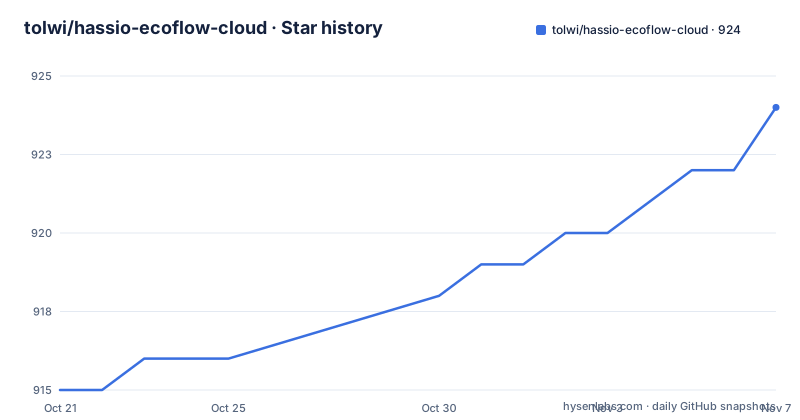
- tolwi/hassio-ecoflow-cloud924 ★ · +9
| Repository | 2026-10-21 | 2026-11-07 |
|---|---|---|
| tolwi/hassio-ecoflow-cloud | 915 | 924 |
9 Stars in the last 17 days, measured from the daily GitHub snapshot. Compare with other projects
Editorial analysis
A Home Assistant integration over the vendor MQTT broker
hassio-ecoflow-cloud is a Home Assistant integration for EcoFlow devices, described as EcoFlow Cloud Integration for Home Assistant. The mechanism is stated plainly in the project description: this integration uses EcoFlow MQTT Broker mqtt.ecoflow.com to monitor and control the device.
That single sentence decides what kind of project this is. It is a client for a vendor cloud service, not a local integration. The device talks to EcoFlow's own servers, and this integration subscribes to the vendor's MQTT topic and publishes commands back, turning that into Home Assistant entities.
The project says it was inspired by hassio-ecoflow and by an MQTT Prometheus exporter, which tells you where the ideas came from and also that this is a community integration for hardware whose manufacturer already provides a cloud.
The audience is specific: a Home Assistant user who owns an EcoFlow power station, a portable generator or one of the smaller devices, and who wants their battery level, charge state and power figures in the same dashboard as the rest of the house. The alternative is opening the vendor app and reading a number there.
The disclaimer section is unusually honest for a custom integration. It says the project was originally developed for personal use without a goal to cover all available device attributes. That single sentence explains most of the rough edges you will meet, including the per-device entity lists that differ in size and coverage from one model to the next.
Two API modes, and the same device looks different in each
The integration supports two EcoFlow cloud API modes, and they expose different data, so the same physical device can have different entities depending on the mode selected during setup.
The private_api mode uses the same internal cloud endpoints as the EcoFlow app. It usually exposes more telemetry and controls, but it is unofficial and can change when EcoFlow updates app-side protocols.
The public_api mode uses EcoFlow's public developer API. The documentation calls it the safer default when the device is supported there, but it can expose fewer fields, update some values on a schedule, or report aggregate values differently from the app.
Those three caveats for public_api are worth separating. Exposing fewer fields is the obvious one. Updating some values on a schedule means a sensor may lag behind reality rather than being wrong, which is a different failure and easier to tolerate in a dashboard. Reporting aggregate values differently from the app means the number is correct but computed differently, which is the one that generates support questions, because the app and Home Assistant disagree and both look right.
The troubleshooting advice follows from this design. If an entity is missing or behaves differently from the EcoFlow app, the instruction is to check the API mode you configured first. And when reporting a bug, you are asked to include the API mode, the device model, the firmware version, and a diagnostic download from Home Assistant.
That bug report template is a good indicator of how this project is maintained. It assumes the reporter knows which mode they are in, that firmware version matters, and that the diagnostics carry information worth attaching.
Region decides whether you can log in at all
One configuration detail causes more failed setups than anything else, and the project documents it in a section marked as important for European users.
EcoFlow strictly separates accounts by region. If you encounter the error Account doesn't exist or incorrect password during the integration setup, the instruction is to verify your api_host setting. The two documented hosts are api.ecoflow.com for Global and US, which is the default, and api-e.ecoflow.com for Europe.
The reason this bites is that the failure message is misleading. A user in Europe who enters correct credentials into the global endpoint gets told the account does not exist or the password is incorrect, and the natural reaction is to reset the password, which changes nothing. The real problem is that accounts do not cross region boundaries, so the global endpoint simply does not know about a European account.
This is also a fair piece of evidence for the wider design of the integration. Because it authenticates against a vendor cloud rather than talking to the device over the local network, the region is part of your identity in a way that it would not be for a local integration. Anyone whose use case is local control, for example putting a power station on a local network so it works without the internet, is looking at the wrong project.
The repository carries a diag/ directory, which is the diagnostic data referenced in the bug report instructions, and a debug.init.py at the root, which suggests a debug entry point that can be run against a live account.
Installing through HACS, and what the entity lists actually show
The quickest install path is HACS, the Home Assistant Community Store. You add the repository as a custom repository through the My Home Assistant badge, restart Home Assistant, and then use Add Integration and pick EcoflowCloud.
The alternative is manual: download and extract into the custom_components directory, then restart and add the integration the same way. Both routes end in a restart, which is normal for a custom component because Home Assistant loads them at startup.
The repository layout matches the conventions of a HACS custom integration. There is a custom_components/ directory holding the integration itself, a hacs.json file describing it for the store, and a pyproject.toml, a uv.lock and a mise.toml for the tooling. There is also a docs/ directory whose device_management.md covers adding, removing and configuring devices.
The per-device entity listings are the most informative part of the documentation, and they are honest in a way most integration docs are not. The ALTERNATOR entry lists 17 sensors, 1 switch, 4 sliders and 1 select, with several sensors marked disabled, such as Alternator Rated Power, Charging Power Limit and the status code. The DELTA_2 entry lists 47 sensors, 8 switches, 6 sliders and 5 selects, and the entity names include energy statistics with a per-device name, Total In Energy, Total Out Energy, AC In Energy, AC Out Energy and Solar In Energy.
Those annotations carry real meaning. A sensor marked disabled is one the integration exposes but does not enable by default, and the underscore notation on the slave battery entries, such as Slave Battery Level, suggests the slave unit reports automatically where others need a setting. For a user with a multi-battery setup, that difference decides whether the extra pack shows up in the dashboard without configuration.
The dependency set and what it implies about the implementation
The pyproject.toml pins the runtime dependencies and they explain most of the implementation.
homeassistant is pinned exactly, at 2026.8.0. An exact pin on the host framework is unusual for a library but normal for a Home Assistant custom integration, because Home Assistant releases monthly and a custom component that drifts out of step with the core API breaks in ways that are hard for a user to diagnose. The cost is that every Home Assistant update may require an integration update.
paho-mqtt at 2.1.0 is the MQTT client, which is the expected choice for an integration that subscribes to a broker.
protobuf at 6.32.0 or newer and below 8 is the interesting one. EcoFlow's MQTT payloads carry binary protobuf messages rather than JSON, so the integration decodes protobuf. That is what jsonpath-ng at 1.7.0 or newer is for: once the protobuf is decoded into a dictionary, jsonpath expressions pick out the fields, which is how the same code can map many device models onto a common entity set despite the models exposing different attribute sets.
That combination explains the entity counts in the documentation. The per-device lists are not hand written per model, they are the result of selecting fields from a decoded payload, so a device with more attributes yields more entities and a device with fewer yields fewer, and some attributes are exposed but disabled because they are not meaningful for that model.
The development tooling is ruff for linting with a line length of 120 and an indent width of 4, and mypy for type checking with allow_untyped_calls and check_untyped_defs enabled. The mypy configuration excludes config_flow.py, which is where the Home Assistant configuration flow lives. Excluding it means the setup wizard is the part of the code that is not type checked, which is a common compromise and also a place where errors are more annoying because they surface during user setup rather than in tests.
Editorial conclusion
hassio-ecoflow-cloud suits a Home Assistant user with an EcoFlow power station who wants battery level, input and output power and charge settings as entities rather than reading them off the vendor app, and the HACS install makes that a few clicks. It does not suit someone who needs every device attribute covered, since the project states it was originally developed for personal use without a goal to cover all available device attributes, and it does not suit a setup that must avoid the vendor cloud entirely. Before installing, check your regional API host, since EcoFlow separates accounts by region and the wrong api_host produces a login error, and decide between the two API modes deliberately, because the same physical device exposes different entities in each.
Frequently asked questions
How do I install the hassio-ecoflow-cloud integration?
The quickest way is via HACS: add the repository as a custom integration, restart Home Assistant, then use Add Integration and select EcoflowCloud. The manual alternative is to download and extract the files into the custom_components directory and restart Home Assistant.
What is the difference between private_api and public_api in hassio-ecoflow-cloud?
private_api uses the same internal cloud endpoints as the EcoFlow app and usually exposes more telemetry and controls, but it is unofficial and can change when EcoFlow updates app-side protocols. public_api uses EcoFlow's public developer API, is the safer default when the device is supported there, but can expose fewer fields, update some values on a schedule, or report aggregate values differently from the app.
Why does EcoFlow Cloud setup fail with an account or password error?
EcoFlow strictly separates accounts by region, so the api_host setting must match your region. Use api.ecoflow.com for Global and US accounts, which is the default, and api-e.ecoflow.com for Europe. The error Account doesn't exist or incorrect password is what you get when the host is wrong.
Which EcoFlow devices does hassio-ecoflow-cloud support?
The documentation lists per-device entity coverage, with ALTERNATOR, DELTA_2 and DELTA_3 among the models detailed, each with its own counts of sensors, switches, sliders and selects. The project notes that it was originally developed for personal use without a goal to cover all available device attributes, so coverage varies by model.
What should I include when reporting a bug in hassio-ecoflow-cloud?
The project asks for the API mode you configured, the device model, the firmware version, and a diagnostic download from Home Assistant. The repository includes a diag/ directory for that purpose.
Official sources
Add this badge to your README
If you maintain this project, the badge below links readers to this analysis and shows its maintenance status from the daily GitHub snapshot. Paste the markdown into your README; add ?metric=license or ?metric=stars to the image URL for a different field.

[](https://hysenlabs.com/projects/tolwi-hassio-ecoflow-cloud)Star history chart for your README
[](https://hysenlabs.com/projects/tolwi-hassio-ecoflow-cloud)Was this useful?