xiaozhi-android-client: an Android client by name, a Flutter app by tree, and two products in one page
An Android/iOS voice chat app built on Xiaozhi and xiaozhi-server, supporting real-time voice interaction and text chat. Now a Flutter version covering both iOS and Android.
At a glance
- What is it?
- The repository behind the Xiaozhi voice assistant client is a Flutter application with platform directories for six targets, licensed Apache-2.0, and its README sells two products at once: an open Flutter client and a commercial edition that also grants native Android and HarmonyOS builds. The page contains no build recipe, no Flutter version and no installation section, so what you can verify from the tree is narrower than what the page claims.
- Who is it for?
- This is an open source client for a commercial service, and that pairing decides everything else. The Flutter source is readable and the license is clear, so if you want to see how a voice assistant client handles barge in, MQTT long connections, Live2D models, voiceprint capture and memory display, this is a legitimate tree to read.
- Can I use it commercially?
- Yes. Apache-2.0 is a permissive licence: you can use, modify and sell software built on it, as long as you keep its copyright and licence notices.
- Is it still maintained?
- Yes. The repository last received commits 58 days ago.
- What is it written in?
- Mainly Dart, according to GitHub's language statistics.
Answers come from the project's GitHub data, last synced on November 15, 2026, and from our analysis. They are not legal advice.
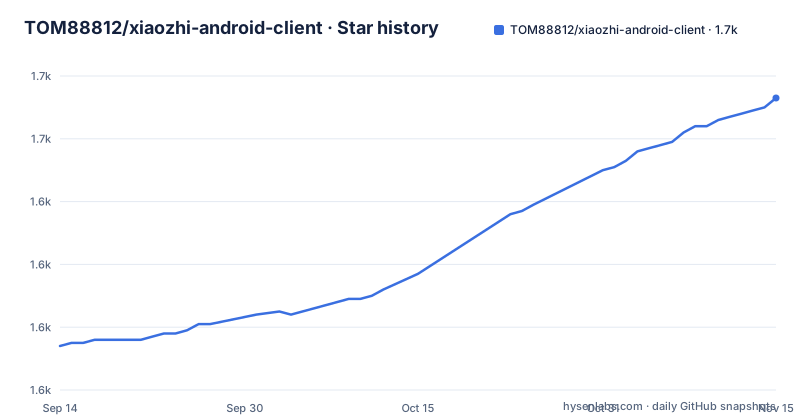
Star history
- TOM88812/xiaozhi-android-client1,673 ★ · +79
| Repository | 2026-09-14 | 2026-11-15 |
|---|---|---|
| TOM88812/xiaozhi-android-client | 1.6k | 1.7k |
79 Stars in the last 62 days, measured from the daily GitHub snapshot. Compare with other projects
Editorial analysis
An Android client by name, a six directory Flutter tree by content
The repository name says Android. The tree says something else. Alongside `lib/`, `test/` and `pubspec.yaml` there are six platform directories: `android/`, `ios/`, `linux/`, `macos/`, `web/` and `windows/`. The primary language is Dart, the app is Flutter, and the project's own description admits the pivot in plain words, saying it is now the Flutter version and bridges the iOS and Android ends. The name and the description are simply the oldest surviving part of how this project presents itself.
The header makes a wider claim than the tree supports. The platform line lists seven targets: Android, iOS, HarmonyOS, Web, Windows, macOS and Linux. Six of those have a directory. HarmonyOS does not, and neither does anything resembling an `ohos/` platform folder, even though the page states twice that the Flutter client adapts to HarmonyOS and can compile HAP packages. There is an `ohos-v1.jpg` at the top level, which is a picture about the native V1 HarmonyOS client rather than a platform directory, so the HAP claim cannot be checked from the repository at all.
There is a plausible reason, since Flutter's HarmonyOS support lives in a forked SDK rather than upstream, and a fork's tooling is what would generate that directory. That is still worth knowing before you plan a build: the seventh platform is the one platform whose build you cannot inspect in this tree.
Two products are sold on one page, and one of them is not in the tree
The page opens a section on version guidance and states plainly that the project contains two product lines with different positions, and that you should choose by scenario. The first is the V1 native client, pure Android plus pure HarmonyOS, positioned for AI terminals, AI hardware and agent devices, with foldable and secondary screen adaptation. That one is marked as a gift with the commercial version, so purchasing the commercial edition is what gets you the native clients.
The second is the V3 commercial client, the Flutter one, positioned as a full function cross platform client, covering the seven targets and deeply adapted to the self developed server. So the repository you can read, Apache-2.0 with a LICENSE file at the top, is the Flutter line, and the native Android and HarmonyOS line that the name of the repository advertises is not in it.
What that does to a reader is subtle. The feature lists are organised by product line and by theme, not by what a given reader can obtain, so the same page carries claims about IoT control, hardware interoperation and AI driven 3D models next to the note that the native versions arrive with a purchase. Nothing is hidden, but nothing is filtered either. Plan on the assumption that the open tree gives you a client and the rest is a service relationship.
The invitation to send pull requests is struck through
The news block at the top of the Chinese README is four lines, and the second one is the one to notice. It announces that echo cancellation for Flutter on iOS and Android has been implemented, and then the invitation to contribute, the words welcoming pull requests, is struck through with the strikethrough formatting and left visible rather than deleted. The next line is about Dify supporting image interaction and adding several Xiaozhi agents to the chat list. The last asks readers to donate.
A struck through invitation to contribute is a specific kind of signal. It says the merge path is not the plan right now, without ever writing that sentence. The tree backs up the mixed picture rather than settling it: there is a `test/` directory and an `analysis_options.yaml`, which is the Dart analyzer configuration, so the project has the two pieces an outside contributor would need, and there is no CONTRIBUTING file anywhere at the top level to tell them what is expected.
There is also a `.github/` directory, so the repository is not ignoring the conventions. Whether pull requests are welcome is answered only by that struck through line, which is the kind of question a project settles in one commit whenever it wants to.
Six loose images at the root, and a header of links with no labels
The top level of the repository is where the file list stops looking like a Flutter project. Alongside the usual entries sit four images with no descriptive names, `1234.jpg`, `2345.jpg`, `robot_3.png` and `zsm.jpg`, plus two more that are at least named for what they show, `ohos-v1.jpg` and `v3.jpg`. There is also a `yuandan-update.md` update note, three README files, a `documents/` directory, `.metadata`, a committed `pubspec.lock`, and `analysis_options.yaml`.
Committing the lock file and the analyzer config is right for an application. Committing six screenshots, four of them numbered, is what happens when image links get fixed by hand instead of by a folder. It is not a functional problem, but it is the kind of thing that tells you the repository is maintained by one person doing quick edits rather than by a review process.
The header has a related problem in the markup. Four anchors point at the latest release page, the Apache-2.0 license text, the stargazer list and a wiki page, and none of them carries any text of its own, so in the rendered page they are four links with no label and no accessible name. The version guidance below is worse for a text reader: it is a two column HTML table with fixed height cells holding video links to Bilibili for the demo, and the demo exists only as those videos.
Sixteen server features, all marked available, and two numbers with no method
The longest table on the page belongs to the server, and it is explicitly the commercial version's server. Sixteen rows, every one of them marked available. The ones a phone user would feel are the timing rows: first sentence response under one second, and average conversation response under two seconds on a public CDN network, with an extreme case of 800 milliseconds on a local intranet. No method, no sample size and no definition of first sentence are attached to either figure, so they are product claims in a feature table rather than measurements you can check.
The rest of the table tells you what the service does with your voice and your hardware. Voice cloning through Volcano Engine, speech recognition, bidirectional streaming through Volcano's streaming playback, long term memory extracted from conversations, and function calling. Two rows belong to MCP: a per role MCP tool access point synced with a named third party service, and an MCP Hub over SSE or HTTP for third party integrations. Three rows are about devices rather than people: online theme and sticker configuration for ESP32 devices, and OTA firmware upload with automatic upgrade and remote device management.
And one row is the business model: a membership system that sets token counts per tier, monthly or yearly, with online payment through Alipay, WeChat and PayPal. Two more rows are monitoring, a dashboard tracking token use, conversation duration and device activity by day, week and month, and chat frequency charts. Everything in this table is the part you do not get from the repository.
The phone records your voiceprint, the server clones your voice
The client side of that arrangement has its own privacy surface, and the page is straightforward about it. Voiceprint management is listed as a phone side feature: record a voiceprint so the assistant understands you better. Speech recognition and voice cloning are listed as server side features, with cloning routed through Volcano Engine. Long term memory is also server side, described as pulling key information out of conversations and managing it as memory. The client displays the results: memory pages, recent conversation history, and a user information panel showing membership expiry, conversation count, number of bound devices, number of voiceprints, quota usage and the most recently active device.
So the picture a reader can assemble from the page is that a voiceprint is captured on the phone, sent to a service that can clone voices through a third party engine, and kept alongside a membership record with a token quota. None of that is hidden and none of it is explained further, which is why it belongs in a review: the app's account features are not just convenience screens, they are the visible face of a server that holds a biometric.
The model side is broader. OpenAI style providers are supported, including OpenAI thinking mode, web search through the OpenAI interface, an interface speed test, HTML code preview for code the model writes, and playback of video the model returns. Live2D is supported with multiple models and importing your own, and the V1 native line adds 3D model support that is explicitly not a webview, with AI driven models that can sing and dance.
Two transports, IoT calls into the phone, and three pages that do not exist
Under connection and protocol the list is short and specific. Two transports are supported: WS for WebSocket services, and MQTT for long connections with server initiated wake. Several Xiaozhi services can be added, which the page frames as one person with several assistants, and there is hardware interoperation with separate memory per side.
Then there is the IoT row, and it is the one that reaches furthest into the device. It says the client can call phone functions, navigation and music listening. That is a real capability statement rather than a slogan: the assistant is positioned as a controller for the phone it runs on, which is the same positioning the V1 line claims for AI terminals and family hubs, only aimed at a handset instead of a speaker.
Against that, three pages are declared as reserved. Accounting, to do lists and a diary are listed as reserved page UI, to be filled in later by wiring in backend capabilities. It is a small honesty in a list that is mostly checkmarks, and it is the clearest signal in the whole document about how the feature list should be read: the checked items describe the commercial client, and the reserved items are the ones with a frame and nothing behind it.
Also worth noting for anyone reading the source: the tree holds `lib/`, which is where all of the above lives, and `test/`, and `documents/`, whose contents are not described on the page.
No build recipe, no Flutter version, and a release from March 2025
This page has no installation section. There is no clone command, no build command, no Flutter version, no Dart SDK constraint and no platform toolchain note anywhere in it. The most you get is the header's link to the latest release. That is not an oversight to be papered over, so the honest answer to how you get this running is that the page does not say, and you would be choosing a Flutter version yourself before you found out which one the project expects.
The page is also the Chinese one. The main README is written in Chinese, and it links two siblings at the very top, an English version at `./README_EN.md` and a Vietnamese one at `./README_VI.md`, both of which sit in the repository alongside a separate update note at `yuandan-update.md`.
For orientation outside the repository, the page points at a homepage, a wiki page hosted with it, and a contact block with an email address, a WeChat handle and an offer of custom client development by WeChat. The server side has its own channel: a graphical server deployment tool is promoted through a Bilibili space and a separate blog, which tells you where the operations tooling for the server lives, and it is not in this repository either.
The version picture has a gap worth naming. Three releases are published: v2.1 on 2025-03-31, v1.9.5 on 2025-03-21 and v1.9 on 2025-03-14. The last push to the default branch is dated 2026-09-18. Whatever has changed on the branch in the seventeen months since v2.1 is not available as a tagged release.
Editorial conclusion
This is an open source client for a commercial service, and that pairing decides everything else. The Flutter source is readable and the license is clear, so if you want to see how a voice assistant client handles barge in, MQTT long connections, Live2D models, voiceprint capture and memory display, this is a legitimate tree to read. Four things decide whether you can actually run it. First, there is no build recipe: no Flutter version, no Dart constraint and no command, so you are guessing at a toolchain before you start. Second, the HarmonyOS claim cannot be checked, because the page promises HAP compilation while the tree has no HarmonyOS platform directory. Third, the features worth having, server side response time, voice cloning, membership quotas, the MCP hub and device firmware upgrades, live on a paid server rather than in this repository, and the client is written against that server's protocol. Fourth, the client records voiceprints on the phone and the server does voice recognition and voice cloning, which is worth understanding before you point it at a real voice. For a developer studying the client, clone it and read lib/. For anyone planning to depend on the service, check the current membership terms and the current server documentation, because the last published release here is v2.1 from 2025-03-31 and the page has kept moving since.
Frequently asked questions
What is TOM88812/xiaozhi-android-client?
A Flutter client for the Xiaozhi voice assistant ecosystem, written in Dart and licensed Apache-2.0, with platform directories for Android, iOS, Linux, macOS, Web and Windows in the tree.
Is the whole xiaozhi-android-client open source?
The repository is, but the page describes two product lines. The native Android and HarmonyOS clients are gifts with a commercial purchase, and the Flutter client is described as the commercial V3 edition, so the readable tree is the Flutter line.
Does xiaozhi-android-client build for HarmonyOS?
The page says the Flutter client adapts to HarmonyOS and can compile HAP packages, and that a native HarmonyOS client exists in the V1 line. The repository tree has android, ios, linux, macos, web and windows directories and no HarmonyOS one, so that claim cannot be checked there.
Can I still send pull requests to xiaozhi-android-client?
The news block strikes through the line that invites pull requests, immediately after announcing that echo cancellation is implemented. The tree does contain a test directory and analysis_options.yaml, but there is no CONTRIBUTING file at the top level.
Which protocols does xiaozhi-android-client speak?
Two are named for the client, WS for WebSocket services and MQTT for long connections with server initiated wake. The commercial server adds an MCP Hub over SSE or HTTP for third party integrations.
Official sources
Add this badge to your README
If you maintain this project, the badge below links readers to this analysis and shows its maintenance status from the daily GitHub snapshot. Paste the markdown into your README; add ?metric=license or ?metric=stars to the image URL for a different field.

[](https://hysenlabs.com/projects/tom88812-xiaozhi-android-client)Star history chart for your README
[](https://hysenlabs.com/projects/tom88812-xiaozhi-android-client)Was this useful?