ChatMCP: A Flutter MCP Client That Spawns Your Servers Locally
ChatMCP is an AI chat client implementing the Model Context Protocol (MCP).
At a glance
- What is it?
- ChatMCP is a cross-platform Dart/Flutter chat client that speaks the Model Context Protocol over stdio and SSE, with local SQLite storage and LAN sync. It is a desktop and mobile front end for MCP servers you install yourself, not a hosted service.
- Who is it for?
- Adopt ChatMCP if you want a GUI for MCP servers you already run locally and you are comfortable installing uvx or npx first. Skip it if you need a hosted, multi-user, or audited deployment, since the README describes a single-user client with local storage.
- Can I use it commercially?
- Yes. Apache-2.0 is a permissive licence: you can use, modify and sell software built on it, as long as you keep its copyright and licence notices.
- Is it still maintained?
- Yes. The repository last received commits 4 days ago.
- What is it written in?
- Mainly Dart, according to GitHub's language statistics.
Answers come from the project's GitHub data, last synced on November 15, 2026, and from our analysis. They are not legal advice.
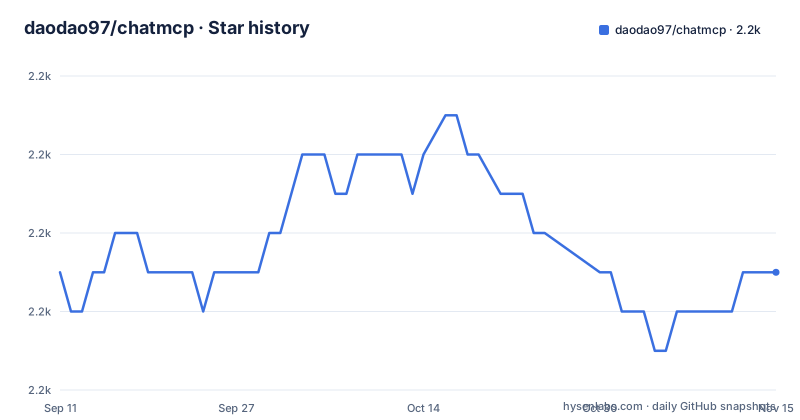
Star history
- daodao97/chatmcp2,225 ★ · +0
| Repository | 2026-09-11 | 2026-11-15 |
|---|---|---|
| daodao97/chatmcp | 2.2k | 2.2k |
0 Stars in the last 65 days, measured from the daily GitHub snapshot. Compare with other projects
Editorial analysis
What ChatMCP Is Actually For
The Model Context Protocol defines how a model talks to external tools and data sources, but the protocol itself ships no user interface. ChatMCP fills that gap: it is a chat client that connects to MCP servers, so you can drive tools from a conversation window instead of writing a script for each one. The README describes it as a "Cross-platform Macos | Windows | Linux | iOS | Android | Web AI Chat Client", and the repository topics list it as an mcp-client.
The intended user is someone who already has MCP servers, or wants to try them, and would rather click through a settings page than wire up a custom integration. The README's usage flow is three steps: configure your LLM API key and endpoint in the Setting page, install an MCP server from the MCP Server page, then chat. That ordering matters. ChatMCP is not an MCP server itself, and it does not bundle one. It is the client half of the protocol, plus an LLM provider configuration screen.
How the Client Talks to Servers: stdio and SSE
The README documents two transport modes for MCP servers, and the preview assets are named for them: mcp_stdio and mcp_sse. A stdio server is a local process the client launches and communicates with over standard input and output. An SSE server is reached over HTTP using Server-Sent Events. Both are exposed as separate configuration paths in the MCP Server page, which is why the README shows two screenshots rather than one.
That distinction drives most of the practical behaviour. stdio servers are child processes on your machine, so they inherit your filesystem and your environment. SSE servers can live elsewhere, but the client needs a reachable URL. The README also includes previews for MCP tools, MCP InMemory, and an MCP workflow view, which suggests the app surfaces tool listings and some notion of server state, though the README does not document the internals of those screens.
Because stdio servers are external programs, ChatMCP does not ship their runtimes. The README states plainly: "Make sure you have installed uvx or npx in your system." Those two commands are the common launchers for Python and Node MCP servers respectively. If neither is on your PATH, the install step for many servers will not work.
Getting It Running on Each Platform
Installation is a download per platform rather than a package manager command. The README's table points macOS, Windows, Linux, and Android at GitHub Releases, iOS at TestFlight, and Web at GitHub Pages. The Web build "runs entirely in your browser with local storage for chat history and settings", so it does not touch a server-side database.
Before installing servers, you need uvx or npx. On macOS the README gives brew install uv and brew install node. On Linux it gives curl -LsSf https://astral.sh/uv/install.sh | sh for uv, and sudo apt update followed by sudo apt install nodejs npm for Node.
Linux desktop users have an extra step the README spells out. For the AppImage or DEB on Ubuntu 22.04 and 24.04, you need runtime packages: libfuse2 for FUSE, libgtk-3-0, X11 and SQLite libraries, and EGL/GL packages whose names differ between the two Ubuntu versions. On 22.04 the README lists libegl1-mesa; on 24.04 it lists libegl1. The install lines are given in full, for example sudo apt install -y libfuse2 libgtk-3-0 libegl1 libgles2 libgl1-mesa-dri libglx-mesa0 libx11-6 xdg-utils libsqlite3-0 libsqlite3-dev on 24.04. Missing these is the most likely reason a Linux launch fails before any MCP code runs.
Where Your Data Lives, and How to Delete It
ChatMCP stores everything locally. The README documents a unified directory per platform: ~/Library/Application Support/ChatMcp/ on macOS, %APPDATA%\ChatMcp\ on Windows, and ~/.local/share/ChatMcp/ on Linux, which honors $XDG_DATA_HOME when set. Mobile uses the application documents directory. On Linux there is a second path, ~/.local/share/run.daodao.chatmcp, described as a Flutter dependency.
Inside that directory are logs, chatmcp.db (SQLite, holding chat history and messages), shared_preferences.json for settings, and mcp_server.json for server configurations. The README also provides reset commands, such as rm -rf ~/Library/Application\ Support/ChatMcp on macOS and rm -rf ~/.local/share/ChatMcp plus rm -rf ~/.local/share/run.daodao.chatmcp on Linux.
Two consequences follow. First, chat history is a plain SQLite file you can copy, inspect, or back up without the app. Second, deleting that directory deletes your LLM API key configuration and every MCP server definition along with the conversations. There is no export command documented in the README. The README does mention that ChatMCP applications "can sync data within the same local area network", with a data-sync preview, but it does not document the protocol, the port, or whether the traffic is encrypted. Treat LAN sync as a feature to investigate before relying on it.
Building From Source and the Formatting Gate
ChatMCP is a Flutter application, so development requires the Flutter SDK; the README points to the official installation guide and suggests verifying with flutter --version. Dart is the primary language, and the repository enforces formatting on every commit.
A versioned Git hook lives at .githooks/pre-commit. On commit it runs dart format ., re-adds changed files, and then performs a no-output check to confirm nothing remains unformatted. The README states that unformatted commits are rejected locally and that CI fails unformatted pull requests. Setup is one command, make setup-git-hooks, or manually git config core.hooksPath .githooks and chmod +x .githooks/pre-commit. At least one of Dart SDK or Flutter must be on PATH.
If you plan to contribute, this hook is not optional. Cloning without running make setup-git-hooks means your first commit may be rejected by CI even though it built fine locally. That is a deliberate trade: a stricter contribution path in exchange for a consistent diff history.
Where ChatMCP Is the Wrong Choice
The README describes a single-user client with local storage. There is no mention of accounts, roles, audit logs, or a server-side component for team use. If you need several people sharing one curated set of MCP servers with access control, ChatMCP's model of per-machine mcp_server.json files does not provide that. You would be distributing configuration by hand.
The dependency on uvx or npx is a second constraint. A stdio MCP server that is distributed only as a compiled binary, or that expects a custom launcher, will not fit the install flow the README describes. And on Linux, the runtime package list is version-specific; a distribution outside the Ubuntu family is untested territory per the README, which says "Tested on major distributions: Ubuntu, Fedora, Arch Linux, openSUSE" without giving per-distribution package names.
There is also a security surface worth naming. A stdio MCP server is an arbitrary process the client starts on your machine, and the README does not describe a sandbox or a permission prompt. Installing a server from the MCP Server page is closer to running a program than to enabling a plugin. The README's own step order, install the server then chat, gives no review step in between.
How It Differs From a Terminal MCP Client
The obvious alternative for many engineers is a command-line MCP client, or a general-purpose agent framework that speaks MCP directly. The difference is the surface area. A CLI client gives you scriptability and a composable pipeline; ChatMCP gives you a GUI with artifact rendering, which the README previews under names like Artifact Display, LaTeX Support, HTML Preview, and Mermaid Diagram.
If your work is a one-shot tool call inside a build script, a CLI is a better fit, because ChatMCP has no documented non-interactive mode. If your work is reading a model's output that contains a diagram, a rendered formula, or an HTML fragment, a terminal client will show you raw text and ChatMCP will render it. The README also previews a Thinking Mode and image generation, which are client-side presentation features rather than protocol features.
The other axis is provider choice. ChatMCP asks you to set an LLM API key and endpoint in the Setting page, which means it is provider-agnostic by configuration rather than tied to one vendor. A CLI client usually reads the same kind of environment variables, so this is not a differentiator by itself. The rendering layer is.
Licence, Releases, and Upgrade Cost
ChatMCP is licensed under Apache-2.0, which permits commercial use and modification and includes a patent grant. It also requires that you preserve copyright and licence notices and state significant changes if you redistribute a modified version. That is a summary of the licence text, not legal advice; read the LICENSE file in the repository for the binding terms.
Release cadence is visible from the tags. v0.0.76 was published on 2025-08-25, with v0.0.74 five days earlier and v0.0.73 ten days before that. The version numbers are still in the 0.0.x range, which is a reasonable signal that interfaces and storage layout may change between releases. For a local client that is mostly harmless, but it argues against building automation on top of the app's on-disk files.
The upgrade path is a download, not a package manager. There is no documented migration step between versions, and the database is SQLite at a fixed path. If you customize mcp_server.json by hand, an upgrade that changes its schema is a risk you carry. Keep a copy of the data directory before upgrading, and check the release notes for the version you are moving to.
Editorial conclusion
Adopt ChatMCP if you want a GUI for MCP servers you already run locally and you are comfortable installing uvx or npx first. Skip it if you need a hosted, multi-user, or audited deployment, since the README describes a single-user client with local storage. Before committing, verify two things on your own machine: that your target MCP server starts under uvx or npx, and that the app's data directory (for example ~/.local/share/ChatMcp/ on Linux) is somewhere you are willing to keep chat history in plain SQLite.
Frequently asked questions
What is ChatMCP?
It is an Apache-2.0 licensed AI chat client built with Flutter and Dart that implements the Model Context Protocol, published for macOS, Windows, Linux, iOS, Android and the web from one repository. The page describes it as a cross-platform chat client, with readmes in English, Simplified Chinese and Turkish.
How do I install ChatMCP on each platform?
macOS, Windows, Linux and Android all install from the releases page. iOS installs from a TestFlight link, and the web version is served from GitHub Pages and runs entirely in the browser. On Linux you additionally need runtime packages, including a FUSE library, GTK 3, graphics packages whose names differ between Ubuntu 22.04 and 24.04, X11 utilities and SQLite.
Where does ChatMCP store my chats and settings?
In one directory per platform: the application support folder on macOS, the roaming app data folder on Windows, and a local share path on Linux that honours the XDG data directory variable, while mobile uses the application documents directory. Inside are a logs folder, a SQLite database with chat history and messages, a JSON settings file, and a JSON file holding MCP server configurations.
How do I completely reset ChatMCP?
Delete the platform data directory recursively, which removes all chat history, settings and configurations, and on Linux also remove the second runtime path belonging to a dependency. The page gives a remove command for macOS, a recursive directory removal for Windows, and two for Linux. The web version is not covered, since its history and settings live in the browser's local storage.
Does ChatMCP support stdio MCP servers?
It supports both stdio and SSE MCP servers, and the usage flow is to set your model API key and endpoint on the settings page, install a server from the MCP server page, then chat with it. A stdio server is a program the client launches locally, which is why the stored server configuration, with its commands and environment, is the file to look at before trusting a new server.
How do I set up the git hooks for ChatMCP development?
Run the make target for git hook setup, or point the repository at the dot-githooks directory with git config and make the pre-commit file executable. Either the Dart SDK or Flutter must be on your path. The hook formats the tree on commit, re-stages the changed files and fails if anything remains unformatted, and a workflow enforces the same check on pushes and pull requests.
Official sources
Add this badge to your README
If you maintain this project, the badge below links readers to this analysis and shows its maintenance status from the daily GitHub snapshot. Paste the markdown into your README; add ?metric=license or ?metric=stars to the image URL for a different field.

[](https://hysenlabs.com/projects/daodao97-chatmcp)Star history chart for your README
[](https://hysenlabs.com/projects/daodao97-chatmcp)Was this useful?