tonistiigi/binfmt: QEMU Emulators for Docker Platforms
Cross-platform emulator collection distributed with Docker images.
At a glance
- What is it?
- tonistiigi/binfmt packages QEMU user-mode emulators in a privileged container that installs handlers for Linux binfmt_misc. It suits Docker and BuildKit users who need to run images for selected architectures, but kernel registration introduces host-level constraints.
- Who is it for?
- Adopt tonistiigi/binfmt when a Docker or BuildKit workflow needs selected QEMU user-mode architecture handlers and the host permits privileged binfmt_misc registration. Do not adopt it for native acceleration, BuildKit helper binaries, or systems where kernel configuration and container privileges prevent registration.
- Can I use it commercially?
- Yes. MIT is a permissive licence: you can use, modify and sell software built on it, as long as you keep its copyright and licence notices.
- Is it still maintained?
- Yes. The repository last received commits 14 days ago.
- What is it written in?
- Mainly Go, according to GitHub's language statistics.
Answers come from the project's GitHub data, last synced on October 23, 2026, and from our analysis. They are not legal advice.
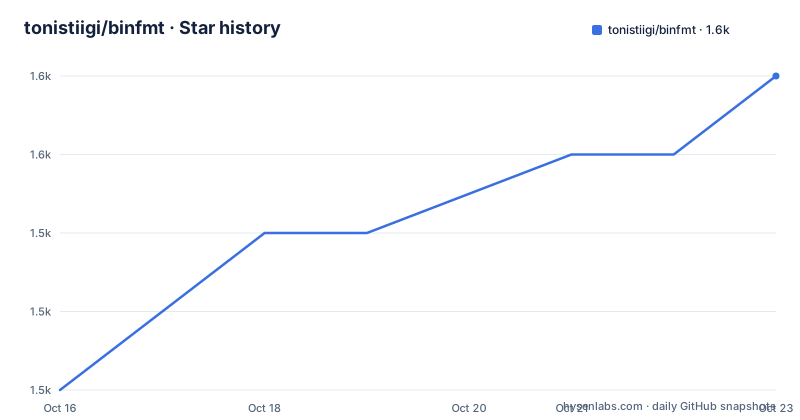
Star history
- tonistiigi/binfmt1,551 ★ · +4
| Repository | 2026-10-16 | 2026-10-23 |
|---|---|---|
| tonistiigi/binfmt | 1.5k | 1.6k |
4 Stars in the last 7 days, measured from the daily GitHub snapshot. Compare with other projects
Editorial analysis
Why tonistiigi/binfmt Exists for Multi-Architecture Docker
tonistiigi/binfmt addresses a specific gap between a Docker host and an image built for another Linux architecture. A container image can declare support for `linux/arm64`, `linux/arm/v7`, or another platform, but the host still needs a way to execute its binaries. This project distributes QEMU user-mode emulator binaries through Docker images and provides commands that register or remove them with Linux `binfmt_misc`.
The intended users are Docker users running cross-platform images and BuildKit users working with automatic platform emulation. It is not a general-purpose virtual machine manager. It does not create a full virtual CPU, disk, or guest operating system. Instead, the collection supplies architecture-specific emulators that the kernel can invoke when it encounters an executable for a registered format.
The README lists support shown by its test image as `linux/amd64`, `linux/arm64`, `linux/riscv64`, `linux/ppc64le`, `linux/s390x`, `linux/386`, `linux/arm/v7`, and `linux/arm/v6`. Its emulator output includes `qemu-aarch64`, `qemu-arm`, `qemu-i386`, `qemu-ppc64le`, `qemu-riscv64`, and `qemu-s390x`. The project accepts architecture selections such as `all`, `arm64`, `riscv64`, and `arm`, which lets an administrator avoid registering every format when only selected emulation is needed.
This distinction matters for adoption. If a build pipeline needs one or two foreign architectures, targeted registration is more appropriate than an indiscriminate installation. If the requirement is an isolated virtual machine with its own kernel, this repository solves the wrong problem.
The binfmt_misc Registration Flow in tonistiigi/binfmt
The normal execution path starts with Docker selecting a platform such as `linux/arm64`. The binfmt database can then associate that executable format with a QEMU user-mode emulator. When Linux encounters a matching binary, the registered handler translates and executes it through the emulator. The project supplies the emulator binaries and the containerized command used to install or remove their registrations.
The README makes the privilege requirement explicit in every installation and uninstallation command:
docker run --privileged --rm tonistiigi/binfmt --install allThe `--privileged` option grants the container enough privilege to change the host's emulator registration. `--rm` removes the transient container after its task finishes. The image command performs registration rather than starting a long-running service, so the expected result is a short-lived container that exits after installation.
Selective installation follows the same mechanism but limits the requested formats:
docker run --privileged --rm tonistiigi/binfmt --install arm64,riscv64,armRemoval is also performed through the image. A single named emulator can be removed:
docker run --privileged --rm tonistiigi/binfmt --uninstall qemu-aarch64Wildcards can remove all architectures associated with a named emulator:
docker run --privileged --rm tonistiigi/binfmt --uninstall qemu-*The documentation says emulator names can be found in status output. That makes the status command the practical first check when a target is already installed and the exact removal identifier is uncertain. Registration is host kernel state, not state confined to the utility container, which explains why uninstallation is also privileged and why a Compose restart policy can cause repeated setup actions.
Checking tonistiigi/binfmt Status and Emulator Names
The image reports supported platforms and registered emulators when it is run without an install or uninstall argument. The README shows output containing a `supported` array and an `emulators` array. The supported list describes platforms recognized by that image, while the emulator list identifies handler names available for removal.
The documented status command is:
docker run --privileged --rm tonistiigi/binfmtReaders should see JSON-like output with supported platform identifiers such as `linux/arm64` and emulator names such as `qemu-aarch64`. The exact values can vary with the image and host state, so the README example should be treated as an illustration rather than a fixed status contract.
A version query is also available:
docker run --privileged --rm tonistiigi/binfmt --versionThe README sample prints values in this form:
binfmt/9a44d27 qemu/v6.0.0 go/1.15.11That sample is not proof of the versions in the current image. The repository's `go.mod` declares Go `1.25.5`, while the Dockerfile declares `GO_VERSION=1.26`, and its QEMU default is controlled by `QEMU_VERSION=HEAD`. A deployment record should therefore use the version command for the image actually pulled rather than copying the old README sample.
Status output is especially useful before uninstallation. Passing an architecture name and passing an emulator name are different interfaces: installation examples use targets such as `arm64`, while the documented uninstall example uses `qemu-aarch64`. The README also documents the `qemu-*` pattern for broad emulator removal, so operators should verify the selected target carefully.
Installing Emulators with Docker Compose
tonistiigi/binfmt can run as a one-shot Compose service. The repository provides this configuration:
version: "3"
services:
  emulator:
    image: tonistiigi/binfmt
    container_name: emulator
    privileged: true
    command: --install all
    network_mode: bridge
    restart: "no"
Compose starts the image with `--install all` and grants `privileged: true`. Because installation is completed as the container's main task, `restart: "no"` is important. The README warns that any other container restart policy will cause Docker to keep restarting the emulator container after the install command exits.
This model has two operational consequences. First, successful startup is not the same as successful registration, so a separate status check is still required. Second, a Compose deployment that repeatedly applies `all` may leave broader host changes than intended. If the workload needs only selected architectures, the service command should use the same targeted syntax accepted by the image, such as the documented `arm64,riscv64,arm` selector, rather than automatically copying `all`.
The example does not document health checks or a persistent state service. Based on the repository layout and documented commands, the useful state is the emulator binaries and kernel registrations managed outside the short-lived container.
Testing Registered Architectures with Docker
After installation, the README suggests checking real platform execution with Alpine containers. These commands request specific Docker platforms and print kernel information:
docker run --rm --platform linux/arm64 alpine uname -a
docker run --rm --platform linux/arm/v7 alpine uname -a
docker run --rm --platform linux/ppc64le alpine uname -a
docker run --rm --platform linux/s390x alpine uname -a
docker run --rm --platform linux/riscv64 alpine uname -a
These are functional checks rather than image-only tests. A successful command indicates that Docker could start the requested image through the host's execution path. It does not establish acceptable performance for an application, because QEMU user-mode emulation adds translation overhead compared with native execution. The project provides no benchmark data, so the documentation does not support claims about relative speed or production suitability.
The tests also cover only some formats shown in the status example. Readers who depend on another listed platform should avoid assuming that the displayed support list proves its runtime behavior on their host.
For local development, the repository offers a separate build path:
docker buildx bakeAccording to the README, this builds QEMU user-mode emulator binaries for the local platform into the `bin` directory. Building and testing a custom image uses Docker buildx as well:
REPO=myuser/binfmt docker buildx bake --load mainline
docker run --privileged --rm myuser/binfmt
The first command selects the image name through `REPO`, builds the `mainline` bake target, and loads it into the local Docker image store. The second runs that local image so its status can be inspected. This path is useful to maintainers, but it is more involved than pulling and running the published image.
BuildKit Helpers Are a Separate binfmt_misc Path
The repository includes BuildKit-specific helper binaries in addition to the general emulator collection. The README points to BuildKit's automatic emulation support and gives a firm operational boundary: these binaries are BuildKit specific and must not be installed in the kernel with `binfmt_misc`.
That warning prevents two mechanisms from being confused. The normal `--install` interface described by the README manages QEMU user-mode emulators. The BuildKit helper binaries serve a different integration path and should remain with BuildKit. An operator who sees multiple helper binaries in the repository should not treat every executable as a kernel emulator or attempt to register all of them by wildcard.
The Dockerfile and `go.mod` also show that this is not just a shell wrapper around prebuilt binaries. The project is written in Go, depends on containerd platform handling and BuildKit, builds QEMU from source, applies patches, and uses `tonistiigi/xx` for cross-compilation. The source build declares tools such as `git`, `patch`, and `meson` inside its build stage. This matters for maintainers because custom image builds involve dependency fetching, QEMU source selection, and patch application rather than simply compiling a small Go installer.
The default build arguments also affect upgrade planning. `QEMU_VERSION=HEAD` selects a moving QEMU reference unless a build overrides it, while patch groups can be changed through `QEMU_PATCHES` and `QEMU_PATCHES_ALL`. Reproducible private image builds would therefore need controlled build arguments, but the README does not prescribe an upgrade procedure or rollback process.
Privileges, Kernel Support, and Licensing Boundaries
The main limitation is the need for privileged host changes. Installation uses `docker run --privileged`, and the Docker Compose example also sets `privileged: true`. On hosts that restrict privileged containers or do not expose a usable `binfmt_misc` interface, the documented workflow cannot complete as written. The repository's test command carries a comparable warning: `./hack/install-and-test` should run only on nodes where installing emulators in the kernel is allowed.
Host architecture also constrains local binary production. The README says `docker buildx bake` creates emulators for the local platform in `bin`, while the `xx` build stage is described as a cross-compilation helper. The documentation does not claim that every host can produce every target through the same plain command. Maintainers should inspect the bake targets in `docker-bake.hcl` before treating a local build as a universal release procedure.
The Go module identifies the project as `github.com/tonistiigi/binfmt` and declares Go `1.25.5`. The repository is MIT licensed, with details in `LICENSE`. The README separately directs readers to the QEMU license, so the complete image includes third-party licensing considerations rather than only the repository's MIT grant. This is a licensing inventory point, not legal advice.
The repository is not archived, and the last push was on 2026-10-09. Releases named `desktop/v10.2.3-67`, `deploy/v10.2.3-68`, and `buildkit/v10.2.3-66` were published on 2026-06-08. Those facts indicate recent repository activity, but the README still leaves image upgrade and rollback procedures undocumented.
Choosing tonistiigi/binfmt Instead of BuildKit-Only Automation
BuildKit automatic emulation and tonistiigi/binfmt's kernel-emulator route overlap at the user goal of building or running cross-architecture containers, but they act at different layers. The repository describes itself as a BuildKit helper for automatic emulation support, yet it also distributes general QEMU user-mode emulators that can be registered with `binfmt_misc`.
A Docker operator who needs explicit host-level format handlers can use the documented `--install` and `--uninstall` commands. This approach gives a status view of supported formats and emulator names. Its cost is a privileged container and persistent kernel registration that must later be considered during upgrades or cleanup.
A BuildKit-focused workflow can instead use the BuildKit-specific helper binaries for automatic emulation. The README explicitly says those binaries should not be installed in the kernel with `binfmt_misc`. This option stays within BuildKit's own integration model rather than registering the general QEMU collection globally.
The repository does not provide a detailed performance or operational comparison between these paths. Therefore, the choice should follow the integration boundary. Use the general installer when explicit `binfmt_misc` registration is intended. Keep the BuildKit helpers within BuildKit when that is the only consumer. Neither path should be presented as a substitute for native hardware support.
Editorial conclusion
Adopt tonistiigi/binfmt when a Docker or BuildKit workflow needs selected QEMU user-mode architecture handlers and the host permits privileged binfmt_misc registration. Do not adopt it for native acceleration, BuildKit helper binaries, or systems where kernel configuration and container privileges prevent registration. Before installation, verify that the requested architectures match your workload, review the privilege requirement, and use the status output to confirm both supported platforms and installed emulator names.
Frequently asked questions
How do I install QEMU architecture emulators with tonistiigi/binfmt?
Run the documented privileged container with `--install all`, or pass selected architectures such as `arm64,riscv64,arm`. The operation modifies host emulator registration, so the container requires privileged access.
How do I see which platforms and emulators tonistiigi/binfmt supports?
Run `docker run --privileged --rm tonistiigi/binfmt`. The documented output contains `supported` platform identifiers and `emulators` names that can also be used to plan uninstallation.
Can tonistiigi/binfmt helper binaries be installed with binfmt_misc?
The general QEMU emulators have documented `--install` and `--uninstall` commands. The README separately states that the BuildKit-specific helper binaries must not be installed in the kernel with `binfmt_misc`.
Official sources
Add this badge to your README
If you maintain this project, the badge below links readers to this analysis and shows its maintenance status from the daily GitHub snapshot. Paste the markdown into your README; add ?metric=license or ?metric=stars to the image URL for a different field.

[](https://hysenlabs.com/projects/tonistiigi-binfmt)Star history chart for your README
[](https://hysenlabs.com/projects/tonistiigi-binfmt)Was this useful?