JMComic-qt: three desktop platforms, three build scripts, and a licence badge pointing at another repository
A Qt-based PC client for JMComic (18comic), supporting Windows, Linux and macOS.
At a glance
- What is it?
- JMComic-qt is a Qt desktop client written in Python and shipped for Windows, Linux and macOS, with a zip for Windows and a dmg for macOS. Its readme gives no local build instructions at all, only a link to the Git Actions results, and the licence badge in its header points at a file in a different repository.
- Who is it for?
- Treat JMComic-qt as a downloadable desktop client rather than a project you build. Download a release for your platform and expect the platform specific steps in the readme to be necessary, since the macOS one removes the quarantine attribute and the Linux one installs a Qt library package by hand.
- Can I use it commercially?
- Yes, with conditions. LGPL-3.0 is a weak copyleft licence: you can use it inside commercial and closed-source software, but if you distribute changes to its own files, you must publish those changes under the same licence.
- Is it still maintained?
- Yes. The repository last received commits 12 days ago.
- What is it written in?
- Mainly Python, according to GitHub's language statistics.
Answers come from the project's GitHub data, last synced on November 13, 2026, and from our analysis. They are not legal advice.
Star history
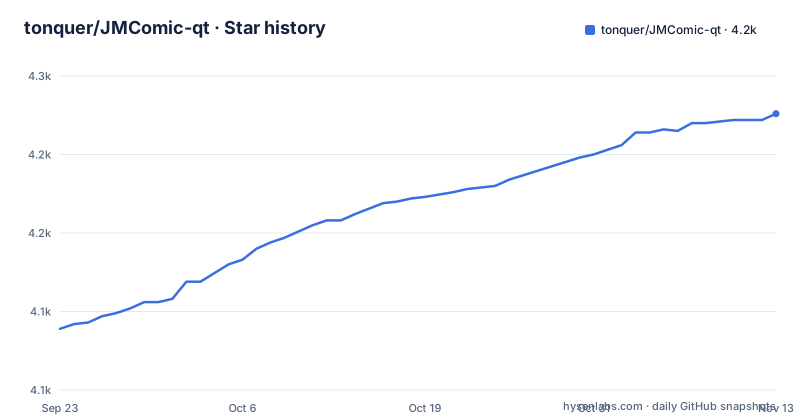
- tonquer/JMComic-qt4,226 ★ · +137
| Repository | 2026-09-23 | 2026-11-13 |
|---|---|---|
| tonquer/JMComic-qt | 4.1k | 4.2k |
137 Stars in the last 51 days, measured from the daily GitHub snapshot. Compare with other projects
Editorial analysis
There are no local build instructions, only a link to the build results
The section on compiling has one subsection and one link. The subsection is titled using Git Actions to build, and the link goes to the repository's Actions page described as the build results.
So the project does not document how to build it yourself. There is no Python version, no Qt version, no dependency install step and no command to run, for any of the three platforms.
That is consistent with the shape of the repository, which is a Python Qt application rather than a library: there is no `requirements.txt` at the root and no setup script, and the top level has `src/`, `ui/`, `lib/`, `res/`, `script/` and `translate/` directories alongside three build shell scripts.
The three scripts are the closest thing to a build recipe and they are named after the platforms they target: `build_appimage.sh`, `build_ubuntu.sh` and `build_uos.sh`. An AppImage is a single file that runs without installation, while the other two are named for Ubuntu and UOS; UOS is one of the two systems the readme singles out for the Qt dependency step.
So the build knowledge exists in the repository, in scripts aimed at three targets, and the readme chooses not to point at them.
Each platform section names the version it was tested on
The installation instructions are three numbered lists, and each heading carries the version it was tested against.
Windows was tested on Windows 10. The steps are download the latest version from the releases page, unzip it, and open `start.exe`. The fourth step is the maintenance model: when there is an update, download the new version and overwrite the original directory.
macOS was tested on macOS 10.15.7. Download the latest version, open the dmg, drag JMComic into Applications in the Finder sidebar, and launch it from Launchpad.
Linux was tested on Deepin 20.2, and only Deepin and UOS users are told to install the Qt dependency first.
Stating the tested version on each is genuinely useful, because it tells you the floor rather than the ceiling. A zip with an executable and a drag-and-drop dmg are both simple formats, and neither depends on a package manager, so the version note is about what was verified rather than what is required.
Both platform fixes are workarounds for something the build does not include
Two of the three platform sections end with a repair step, and both are for problems the distributed build does not solve.
On macOS, if a damaged file warning appears, the instruction is to run `sudo xattr -r -d com.apple.quarantine /Applications/JMComic.app`. That removes the quarantine attribute macOS sets on downloaded applications, which is what produces the warning for anything not signed through the App Store path. It is a standard step for any unnotarised macOS build and it requires sudo because the application is in a system location.
On Linux, the Qt dependency is installed by downloading a Debian package directly and installing it.
wget http://ftp.br.debian.org/debian/pool/main/x/xcb-util/libxcb-util1_0.4.0-1+b1_amd64.deb
sudo dpkg -i ./libxcb-util1_0.4.0-1+b1_amd64.deb
That URL points at a pool path for a specific architecture build of one library, version 0.4.0, for amd64. It is a Debian package, so it is of limited use on a distribution with a different package format, and it will not track security updates to that library.
So the readme asks only Deepin or UOS users to install this dependency.
The Windows failure mode names two runtimes and a specific library
The fifth step of the Windows list is the diagnostic one. If Waifu2x fails to initialise and you get a DLL error, you are told to install the Visual Studio runtime and the Vulkan runtime, both linked to specific downloads.
Those two are exactly what a neural upscaler built on Vulkan needs. The upscaling is not written in this repository: the credits name `waifu2x-ncnn-vulkan` and its NCNN Vulkan build, plus `Real-ESRGAN`, plus `realcugan-ncnn-vulkan`, and then a project of the author's own called `sr-vulkan`.
So the Windows failure is not a bug in the client. It is a missing GPU runtime that the upscaling component depends on, and the readme tells you to install it rather than to turn the feature off.
The site logic is credited to another project and the rest to four
The acknowledgements section is organised by function, and the first line is the one that tells you where the client gets its data.
Under the heading for the site itself, the readme credits `hect0x7/JMComic-Crawler-Python`. So the readme credits the site-related work to someone else's crawler project.
Under the heading for the upscaling feature, four projects are named: `nihui/waifu2x-ncnn-vulkan`, `xinntao/Real-ESRGAN`, `nihui/realcugan-ncnn-vulkan`, and `sr-vulkan` by the same author as this client.
Then a section for the author's other projects, two of them: `picacg-qt` and `ehentai-qt`.
The licence badge in the header points at a different repository
The badge at the top of the readme links to a file named `LICENSE.txt` at a path beginning `tonquer/picacg-windows`, which is not this repository. This one is `JMComic-qt`.
The repository records LGPL-3.0, and there is a `LICENSE` file in the root, so the terms are available here.
So the badge points at a sibling project, and it is the first link in the file. Anyone checking the licence from the readme lands on another repository's copy of the text.
Worth noting alongside it: the second and third badges in the header both point at the same releases page.
The rest of the file is short. Two feature claims, three platform sections, a build section with one link, a screenshot section naming five screens, and the acknowledgements.
Releases move every few weeks and the last commit is newer than the last tag
The three most recent releases are v1.3.5 on 14 September 2026, v1.3.6 on 21 September 2026 and v1.3.7 on 7 October 2026.
That is a cadence of weeks between patch versions.
The last push to the default branch main is dated 2 November 2026, nearly four weeks after the most recent tag, and the repository is not archived. There is also a `CHANGELOG` file at the root, which for a project that does not document its build is where to look for what a given release changed.
So the two things a user needs, what changed and how to build it, are split: the changelog is in the repository and the build instructions are not.
Editorial conclusion
Treat JMComic-qt as a downloadable desktop client rather than a project you build. Download a release for your platform and expect the platform specific steps in the readme to be necessary, since the macOS one removes the quarantine attribute and the Linux one installs a Qt library package by hand. Read the credits before you judge the code, because the readme credits the site work to another project and the upscaling to four others. And check which licence applies yourself, since the badge in the readme points at a file in a different repository.
Frequently asked questions
how to install JMComic-qt on Windows
Download the latest version from the GitHub releases page, unzip it and open `start.exe`. It was tested on Windows 10. When a new version appears, download it and overwrite the original directory. If Waifu2x fails to initialise with a DLL error, install the Visual Studio runtime and the Vulkan runtime, which is what the upscaling component needs.
how to install JMComic-qt on macOS
Download the latest version, open the dmg and drag JMComic into the Applications folder from the Finder sidebar, then launch it from Launchpad. It was tested on macOS 10.15.7. If macOS reports the file as damaged, run `sudo xattr -r -d com.apple.quarantine /Applications/JMComic.app` in a terminal to clear the quarantine attribute.
how do I build JMComic-qt from source
The readme does not give local build instructions. It points at the GitHub Actions results page. The repository does contain three build scripts, build_appimage.sh, build_ubuntu.sh and build_uos.sh, and the top level also has lib/, script/, res/, ui/ and translate/ directories, but no Python or Qt version requirement is stated anywhere in the readme.
Official sources
Add this badge to your README
If you maintain this project, the badge below links readers to this analysis and shows its maintenance status from the daily GitHub snapshot. Paste the markdown into your README; add ?metric=license or ?metric=stars to the image URL for a different field.

[](https://hysenlabs.com/projects/tonquer-jmcomic-qt)Star history chart for your README
[](https://hysenlabs.com/projects/tonquer-jmcomic-qt)Was this useful?