PyGithub: Auth.Token, an /api/v3 base_url, and a library that is still seeking maintainers
Typed interactions with the GitHub API v3
At a glance
- What is it?
- PyGithub is a Python library for typed interactions with the GitHub REST API v3, and its README is a hundred words plus a demo that shows three things a caller has to get right: authentication through the Auth module, a base_url for GitHub Enterprise, and closing connections when finished. The repository root also carries an ARCHITECTURE.md, an OPENAPI.md and a MAINTAINERS file, which is the combination that tells you how a wrapper library stays in step with an API it does not control.
- Who is it for?
- PyGithub suits a Python service that wants objects instead of HTTP calls against GitHub's REST API, with types checked by mypy and stubs shipped in the package.
- Can I use it commercially?
- Yes, with conditions. LGPL-3.0 is a weak copyleft licence: you can use it inside commercial and closed-source software, but if you distribute changes to its own files, you must publish those changes under the same licence.
- Is it still maintained?
- Yes. The repository last received commits 1 day ago.
- What is it written in?
- Mainly Python, according to GitHub's language statistics.
Answers come from the project's GitHub data, last synced on November 13, 2026, and from our analysis. They are not legal advice.
Star history
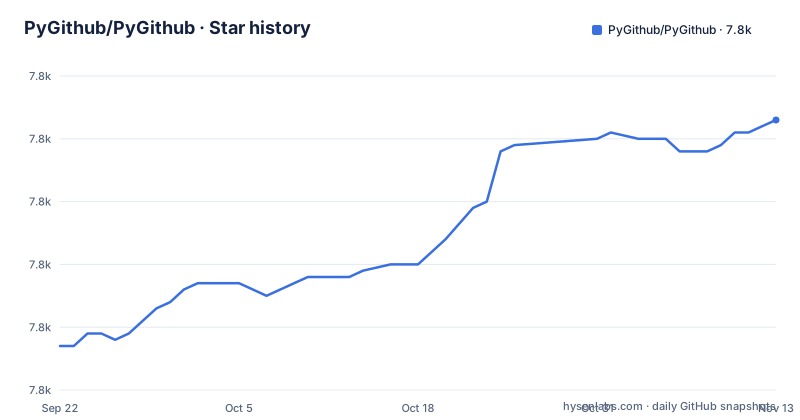
- PyGithub/PyGithub7,813 ★ · +36
| Repository | 2026-09-22 | 2026-11-13 |
|---|---|---|
| PyGithub/PyGithub | 7.8k | 7.8k |
36 Stars in the last 52 days, measured from the daily GitHub snapshot. Compare with other projects
Editorial analysis
The demo is four decisions, not four lines of API
The Simple Demo is the most information-dense part of the README. It opens with the import and the authentication object:
from github import Github

# Authentication is defined via github.Auth
from github import Auth

# using an access token
auth = Auth.Token("access_token")
Then two ways to construct the client, and the labels are the point:
# Public Web Github
g = Github(auth=auth)

# Github Enterprise with custom hostname
g = Github(base_url="https://{hostname}/api/v3", auth=auth)
The README's GitHub Enterprise example passes the full API path, `https://{hostname}/api/v3`, as `base_url`.
Then the ordinary usage and the part people leave out:
for repo in g.get_user().get_repos():
    print(repo.name)

# To close connections after use
g.close()
That last call matters more than it looks. The client holds a connection pool, and in a long-running process a library that never closes them is a library that leaks sockets.
Five runtime dependencies, and two of them are for authentication
The dependency list in pyproject.toml is five entries, and two of them exist for credentials rather than for HTTP:
dependencies = [
  "pynacl>=1.4.0",
  "requests>=2.14.0",
  "pyjwt[crypto]>=2.4.0",
  "typing-extensions>=4.5.0",
  "urllib3>=1.26.0",
]
`requests` and `urllib3` are the transport. `pyjwt[crypto]` handles JSON Web Tokens with a crypto backend, and `pynacl` is a cryptography library.
Every dependency has a floor and no ceiling, which is a deliberate choice in a library that a lot of applications pin. `typing-extensions` is there so the type annotations work on the older interpreters in the supported range.
Note the ordering of the two auth-related packages against `requests`: this is a synchronous, requests-based client. Anything asynchronous is built on top of it by the caller, not by the library.
Types are enforced, not just shipped: mypy, black and package data
The typing story has three parts and all three are visible in the manifest.
First, the package ships its own types. `[tool.setuptools.package-data]` declares `github = ["py.typed", '*.pyi']`, so the `py.typed` marker and the stub files are inside the wheel rather than in a separate stubs package. A consumer with mypy enabled gets the types without installing anything else.
Second, the library holds itself to a stricter rule than consumers get. Under `[tool.mypy.overrides]` the module `github.*` has `check_untyped_defs = true` and `disallow_untyped_defs = true`, meaning every function in the package has annotations and every function body is checked, while the top-level `ignore_missing_imports = true` stays permissive about other people's code. `python_version = '3.12'` is the version mypy analyses against.
Third, the README carries a badge linking to ruff (astral-sh/ruff).
ARCHITECTURE.md and OPENAPI.md are how the wrapper tracks the API
The root listing has two documents whose purpose is to explain how this library stays in step with an API it does not control.
`OPENAPI.md` sits next to an `openapi/` directory, which is the schema source. A wrapper library around a REST API faces a specific problem: the API gains an endpoint, and the wrapper either has a method for it or does not. Keeping an OpenAPI description in the tree is how you can diff the API against the methods you expose.
`ARCHITECTURE.md` is the companion, and by its name it describes how the library is put together. That is the document to read before extending the library rather than working around it.
Then there is `DEPLOY.md`, `scripts/`, `requirements/`, `doc/`, `tests/` and `tox.ini`. The `requirements/` directory separated from `pyproject.toml` is a sign that several environments are installed from the same source, and tox is what runs them.
Python 3.10 to 3.15 in the classifiers, and a version from setuptools_scm
The supported surface is declared in the classifiers: Python 3.10, 3.11, 3.12, 3.13, 3.14 and 3.15, with `requires-python = ">=3.10"`.
That is a wide range, and it is worth pairing with the release history: v2.10.0 on 2026-08-20, v2.9.1 on 2026-04-14 and v2.9.0 on 2026-03-22, with the last push on 2026-10-13.
The version number itself is not in the file. `[project]` lists `dynamic = ["version"]` and `[tool.setuptools_scm]` is what fills it, so the version comes from the git tag. Two build requirements support that, `setuptools>=64` and `setuptools_scm>=7`, and the build backend is `setuptools.build_meta`.
One consequence is worth noting for anyone packaging an application that depends on this library. A version derived from tags means a source install that has no tag produces a different version string than the same commit from a release, which is exactly the behaviour you want for a library and occasionally surprising for an application.
The README asks for maintainers, and names the file to write to
The Maintainership section is the most unusual thing in the README. It says the project is actively seeking maintainers that will triage issues and pull requests and cut releases, and then it gives an instruction: if you work on a project that depends on PyGitHub and have a vested interest in keeping the code alive and well, send an email to someone in the MAINTAINERS file.
A `MAINTAINERS` file at the repository root is the mechanism, and naming a file rather than a person in the README is deliberate: the set of people changes and the file is the stable reference.
So read that section as a statement about the project's bus factor rather than as a recruiting message. A library at version 2.10 with commits landing recently still has gaps in its release history: just over four months between 2.9.1 on 2026-04-14 and 2.10.0 on 2026-08-20.
The rest of the governance is conventional: issues for long-term discussion and bug reports, pull requests for code review, and CONTRIBUTING.md for the detail.
Licensing is LGPL with both licence files in the tree
The licence is the GNU Lesser General Public License, and both halves of the GPL and LGPL text are present as separate files, `COPYING` and `COPYING.LESSER`, which is the conventional layout for an LGPL project.
The classifier states it as `License :: OSI Approved :: GNU Library or Lesser General Public License (LGPL)`, and the README carries a badge linking to the LGPL on Wikipedia rather than to the repository's own file.
For a library that most consumers use as a dependency in an application, the practical consequence is that linking it does not force the application itself to be LGPL. That is the difference between the LGPL and the GPL, and it is why a hosted service can use it without publishing its own source.
The author of record in the manifest is Vincent Jacques, and the package name is PyGithub with the name in the project table written as `name = "PyGithub"`, which is what you pass to pip.
Editorial conclusion
PyGithub suits a Python service that wants objects instead of HTTP calls against GitHub's REST API, with types checked by mypy and stubs shipped in the package. It does not suit you if you need GitHub's GraphQL API or want a Git implementation rather than a GitHub client, since it targets REST API v3, and it does not suit you if a stalled release train is a risk, because the README says the project is actively seeking maintainers to triage issues, review pull requests and cut releases. Verify three things before you depend on it: that your Python clears the declared floor of 3.10, that the version you install matches the API version you need, since the description is Use the full Github API v3, and which base_url you pass, because the README's GitHub Enterprise example uses the full https://{hostname}/api/v3 path.
Frequently asked questions
how to install pygithub
Run `pip install PyGithub`. Python 3.10 or newer is required, and the runtime dependencies are pynacl, requests, pyjwt with the crypto extra, typing-extensions and urllib3. The package ships its own type information, since the py.typed marker and the .pyi files are included as package data.
how to use pygithub
Create an Auth object first, for example `from github import Auth` and `auth = Auth.Token("access_token")`, then build the client with `Github(auth=auth)` for github.com or `Github(base_url="https://{hostname}/api/v3", auth=auth)` for GitHub Enterprise, use it, and call `g.close()` when finished so the connection pool is released.
Is there a Git library for Python?
PyGithub is a library for the GitHub REST API, not for Git itself. Its description is Use the full Github API v3, and it manages GitHub resources such as repositories, user profiles and organizations. If you want to read or write a repository's objects, history or working tree, that is a different library, and if you want GitHub's GraphQL API rather than REST, the README points at the REST documentation instead.
Official sources
Add this badge to your README
If you maintain this project, the badge below links readers to this analysis and shows its maintenance status from the daily GitHub snapshot. Paste the markdown into your README; add ?metric=license or ?metric=stars to the image URL for a different field.

[](https://hysenlabs.com/projects/pygithub-pygithub)Star history chart for your README
[](https://hysenlabs.com/projects/pygithub-pygithub)Was this useful?