nuclei-wordfence-cve: WordPress vulnerability templates for nuclei
80k+ WordPress Nuclei templates, updated daily from Wordfence intel—filter by severity/tags/CVE and scan in one line. 🚀🔒
At a glance
- What is it?
- This repository is a collection of more than eighty thousand Nuclei templates for WordPress, generated every day from the vulnerability intelligence Wordfence publishes, with each template tagged by severity, by whether it comes from the production or the candidate feed, and by whether it targets core, a plugin or a theme. It is a scanning tool, and the templates are the product.
- Who is it for?
- Adopt this collection if you run Nuclei and want broad WordPress coverage without maintaining templates yourself, and pin the template version you use so a daily regeneration does not change your results overnight. Do not adopt it as a vulnerability management programme, since it detects and does not prioritise or remediate, and do not run it against systems you are not authorised to test.
- Can I use it commercially?
- Yes. MIT is a permissive licence: you can use, modify and sell software built on it, as long as you keep its copyright and licence notices.
- Is it still maintained?
- Yes. The repository last received commits 1 day ago.
- What is it written in?
- Mainly Python, according to GitHub's language statistics.
Answers come from the project's GitHub data, last synced on November 6, 2026, and from our analysis. They are not legal advice.
Star history
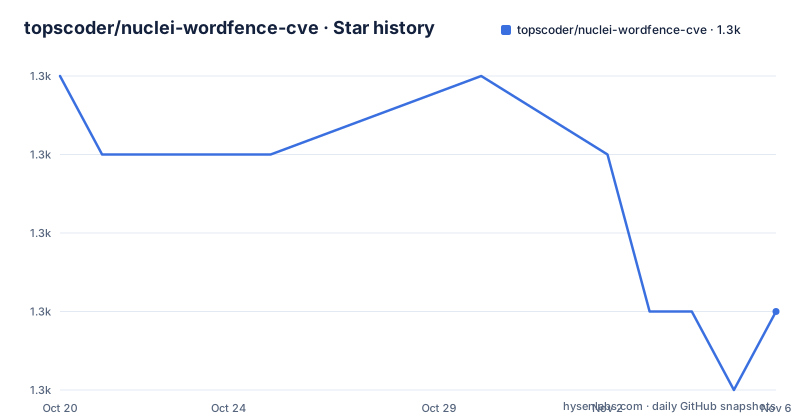
- topscoder/nuclei-wordfence-cve1,295 ★ · -3
| Repository | 2026-10-20 | 2026-11-06 |
|---|---|---|
| topscoder/nuclei-wordfence-cve | 1.3k | 1.3k |
-3 Stars in the last 17 days, measured from the daily GitHub snapshot. Compare with other projects
Editorial analysis
A template collection, and where the intelligence comes from
The project provides Nuclei templates for WordPress security scanning, built on the latest intelligence from Wordfence, and the README is explicit that the templates cover Core, plugins and themes. The count is stated in the header, 87,340 templates, and the description says they are updated daily from Wordfence intel.
The mechanism is a generator plus a generated artefact. The repository holds a src/ directory with the code that reads the Wordfence feeds and produces YAML, a nuclei-templates/ directory with the output, tests/ and a requirements.txt with argparse, requests, lxml, colorama and pyyaml, and a .pre-commit-config.yaml. So the templates are not hand-written by a community, they are produced from a feed, and the feed is the source of truth.
That is the right shape for this problem, because Wordfence's vulnerability database is where a WordPress-specific CVE shows up first, with the affected versions and the fixed versions, and transcribing that into a check for tens of thousands of plugins is not work a volunteer community can do by hand.
The target of the scan is a WordPress site, and the tool is the standard one for template-driven scanning, which means the templates inherit that tool's model: a request is sent, a response is matched, and a finding is reported.
The statistics table tells you what you are getting
The README carries a generated statistics table with the numbers broken down two ways, and it is worth reading before a scan, because the distribution tells you how the templates behave.
By category, there are 80,376 templates for plugins, 6,202 for themes and 768 for core, with none in the other bucket. Plugins dominate by a factor of more than ten, which is not a criticism of Wordfence's data, it is a reflection of where WordPress vulnerabilities live.
By severity the distribution is more surprising. There are 8,552 critical, 15,105 high, 23,387 medium, 40,296 low, and no info templates at all. The low band is nearly five times the size of the critical band, so an unfiltered scan produces mostly low findings.
That has a direct operational consequence. A scan of 87,340 templates against a site with a few dozen active plugins will report a large number of low and medium results, most of which will be about plugins that are installed but not in use, or about versions that are patched. This is why the examples in the README all narrow the scan, and it is the thing to plan for before running it against something you care about.
Getting the templates into nuclei
The quick start is two steps, and the first one is the part people miss.
You point Nuclei at the template repository and update:
export GITHUB_TEMPLATE_REPO=topscoder/nuclei-wordfence-cve
nuclei -update-templates
The environment variable tells Nuclei where the templates live, and the update command fetches them. After that, a scan references the same repository by its GitHub path:
nuclei -t github/topscoder/nuclei-wordfence-cve -u https://target.comSo the templates are not vendored into your scanning setup at build time, they are pulled by Nuclei itself at update time, and a scan always refers to the repository rather than to a local directory.
That has an upside and a downside. The upside is that a daily refresh means new vulnerabilities are covered without any action from you, which is the entire point of the project. The downside is that the content under that path changes without a version bump on your side, so two scans of the same site a week apart are not necessarily comparable, and a pipeline that parses findings needs to expect new finding identifiers to appear.
Two Wordfence feeds, and the tags that separate them
The most important piece of explanation in the README is about the two feeds Wordfence provides.
The first feed includes only production vulnerabilities, each with an assigned CVE. The second feed contains candidate vulnerabilities, which do not yet have a CVE assigned and may or may not be promoted to the production feed. To differentiate the templates generated from these feeds, a tag is assigned to each template, either production or candidate, which lets you target them with a tag filter.
So the two filters are:
nuclei -t github/topscoder/nuclei-wordfence-cve -tags production -u https://target.comand the same command with -tags candidate.
This distinction is the difference between a scan you can act on and a scan you cannot. A production template corresponds to a vulnerability with an identifier, which means it can be looked up, cross-referenced with other scanners, and reported with a CVE. A candidate template may describe a flaw that is later rejected, and it has no identifier to check it against.
For a scheduled scan whose output goes into a tracker, the production-only filter is the sane default, and the candidate set is better run occasionally by a human who can judge the finding.
Narrowing by severity, by tag and by CVE
The examples section shows the filters, and they are the practical part of using a collection this size.
A single CVE is selected with a template id, for example -template-id cve-2023-32961, which is the first thing to reach for when a specific vulnerability has been reported and you want to confirm or rule it out.
Severity is filtered with -severity, and critical is the example:
nuclei -t github/topscoder/nuclei-wordfence-cve -severity critical -u https://target.comThe three WordPress areas are filters as well, with -tags wp-core, -tags wp-plugin and -tags wp-theme, each scoped to one of the categories in the statistics table. A site that runs a small set of first-party plugins is a very different scan from the 80,000 template plugin set, and the tag filter is how you get from the second to the first.
The tags compose, since Nuclei accepts them as a list, so a scan for critical plugin vulnerabilities in production is a matter of combining the three filters. The README's last example, headed the way to go wild, is the combination of all of them.
The tool is ProjectDiscovery's nuclei, and the templates follow that format, which means the whole of the nuclei ecosystem, its reporters, its workflows and its rate limiting, applies without adaptation.
Where this collection is the wrong choice
The first wrong-tool case is a site you are not authorised to test. The tool sends crafted requests to a live WordPress instance and reports what it found, and running it against infrastructure you do not own is a legal problem before it is a technical one. The same applies to a hosted platform whose terms forbid scanning.
The second is a vulnerability management programme. This collection finds things. It does not tell you which of the found things is reachable in your configuration, which is exploitable, and which has a fix that is scheduled, and it does not track the state of the remediation. A scan that reports 40,296 low-severity items is a signal to start triaging, not a finished piece of work.
The third is an environment where false positives are expensive. The candidate feed, and any template derived from it, may describe a flaw that is later rejected, and a template that checks a version string is only as good as the version string the target reports. A plugin that hides its version defeats the check silently.
There is also the distribution question, which the README does not address. The templates are generated from Wordfence's vulnerability data and redistributed here, and whether that is permitted is a question for the terms of the source, not for the reader of this repository. MIT covers the generator code in this repository, and it is worth being clear that the licence of the code and the right to republish the data it produces are two different questions.
MIT, and a release line that names the data rather than the code
The project is licensed MIT, with the LICENSE file at the repository root, and it is a Python project whose main language is recorded as Python. The default branch is main, the repository is not archived, and the last push was on 2026-10-15.
The release versions are dated rather than numbered in the usual way: v2025.10.1 from October 2025, v2025.09.1 from September 2025, and v2024.05.2 from May 2024. A version that names its date is a good fit for a repository whose content is a snapshot of someone else's feed, because the version tells you how fresh the intelligence is.
That freshness is the operational point, and it cuts both ways. The templates are regenerated daily, so a scan tomorrow covers more than a scan today, which is what you want from a threat feed. It also means the repository is not a stable artefact you can vendor and diff, and a team that needs reproducibility has to pin a release and refresh it deliberately.
The remaining repository files support the pipeline rather than the scanning. There is a CODE_OF_CONDUCT.md, a CONTRIBUTING.md, a .pre-commit-config.yaml and an .editorconfig, which suggests the generated YAML is checked in and formatted automatically, and the README notes that the templates are open source so you can tweak one for a specific situation.
Editorial conclusion
Adopt this collection if you run Nuclei and want broad WordPress coverage without maintaining templates yourself, and pin the template version you use so a daily regeneration does not change your results overnight. Do not adopt it as a vulnerability management programme, since it detects and does not prioritise or remediate, and do not run it against systems you are not authorised to test. Before you use it, read the note about the candidate feed, because those templates cover vulnerabilities that have not been assigned a CVE and are more likely to be false positives, and check whether the Wordfence terms allow this redistribution of their data.
Frequently asked questions
What does the nuclei-wordfence-cve repository contain?
Nuclei templates for WordPress security scanning, 87,340 of them at the time of the README, generated daily from Wordfence vulnerability intelligence. They cover WordPress core, plugins and themes, and each one carries a severity, a production or candidate tag and a category tag.
How do I install these templates for use with nuclei?
Set GITHUB_TEMPLATE_REPO=topscoder/nuclei-wordfence-cve, run nuclei -update-templates, and then scan with nuclei -t github/topscoder/nuclei-wordfence-cve -u https://target.com. The templates are pulled by Nuclei at update time rather than vendored locally.
What is the difference between the production and candidate templates?
Wordfence provides two feeds. The production feed contains only vulnerabilities with an assigned CVE, and the candidate feed contains candidate vulnerabilities with no CVE yet that may or may not be promoted. Each template is tagged production or candidate, so you can target them with a tag filter.
How do I scan only critical WordPress plugin vulnerabilities?
Combine the filters, for example nuclei -t github/topscoder/nuclei-wordfence-cve -severity critical -tags wp-plugin -u https://target.com. A single CVE can be selected with a template id such as -template-id cve-2023-32961.
What licence is nuclei-wordfence-cve released under?
MIT, with the LICENSE file at the repository root, and the generator code is Python with argparse, requests, lxml, colorama and pyyaml in its requirements. The release versions are dated, v2025.10.1 being the most recent, and the last push was on 2026-10-15.
Official sources
Add this badge to your README
If you maintain this project, the badge below links readers to this analysis and shows its maintenance status from the daily GitHub snapshot. Paste the markdown into your README; add ?metric=license or ?metric=stars to the image URL for a different field.

[](https://hysenlabs.com/projects/topscoder-nuclei-wordfence-cve)Star history chart for your README
[](https://hysenlabs.com/projects/topscoder-nuclei-wordfence-cve)Was this useful?