vim-eunuch adds UNIX file commands to Vim
eunuch.vim: Helpers for UNIX
At a glance
- What is it?
- vim-eunuch provides Vim commands for deleting, moving, and permission-changing files, plus quickfix integration for `find` and `locate`. It suits Vim users who want these operations to follow buffer state instead of separating shell and editor actions.
- Who is it for?
- Adopt vim-eunuch if your Vim workflow repeatedly moves between buffers, quickfix lists, and UNIX file operations. Do not choose it if packaged UNIX commands are undesirable or if your license review requires an explicit standalone license grant.
- Can I use it commercially?
- Not without permission. GitHub finds no licence file in the repository, and without a licence all rights are reserved by default: you may read the code but not reuse it. Check the README, or ask the authors, before using it.
- Is it still maintained?
- Yes. The repository last received commits 73 days ago.
- What is it written in?
- Mainly Vim Script, according to GitHub's language statistics.
Answers come from the project's GitHub data, last synced on October 24, 2026, and from our analysis. They are not legal advice.
Star history
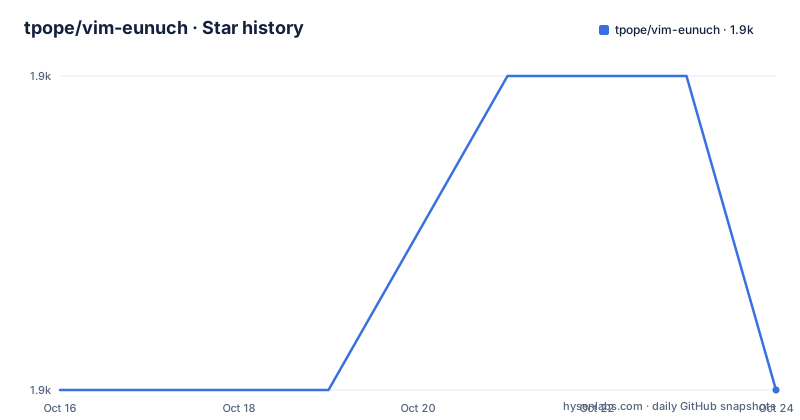
- tpope/vim-eunuch1,885 ★ · +0
| Repository | 2026-10-16 | 2026-10-24 |
|---|---|---|
| tpope/vim-eunuch | 1.9k | 1.9k |
0 Stars in the last 8 days, measured from the daily GitHub snapshot. Compare with other projects
Editorial analysis
Why vim-eunuch belongs in a Vim file workflow
vim-eunuch addresses a small but persistent mismatch in terminal-based editing. Vim tracks buffers and windows, while UNIX tools operate on filesystem paths. Moving, deleting, or changing permissions from a separate shell can leave Vim displaying a path that no longer exists or no longer corresponds to the intended file. The plugin places common UNIX actions inside Vim's command model, reducing that coordination problem.
The documented commands cover several distinct needs. `:Remove` deletes the file while retaining the buffer, specifically avoiding the `E211: File no longer available` condition described in the README. `:Delete` removes both the disk file and its buffer. `:Move` renames the file and buffer together. Related commands include `:Rename`, `:Copy`, and `:Duplicate`, although the README does not provide their full syntax or option lists.
This is a plugin for users who already work in Vim and need UNIX filesystem operations near the editing session. It is not a general-purpose file manager, replacement shell, or background task runner. Its scope is deliberately narrow: commands such as `:Chmod`, `:Mkdir`, `:Wall`, `:SudoEdit`, and `:SudoWrite` connect Vim state with common administrative actions. That makes it relevant to editing scripts, configuration files, and source files where deletion, relocation, executable permissions, or privileged writes would otherwise require leaving the editor.
The plugin's Vim and UNIX data flow
The repository is organized as a Vim plugin, with implementation files under `plugin/` and documentation under `doc/`. Its public interface is a set of Ex commands rather than a standalone executable. The README describes commands that act on the current file or current Vim state, then delegate the underlying operation to UNIX utilities such as `find`, `locate`, `chmod`, `mkdir`, and `sudo`.
Buffer synchronization is the central design decision. With `:Remove`, Vim retains the buffer after deleting its file. That distinction is important because a plain deletion would otherwise leave Vim pointing at missing content. `:Delete` deliberately keeps disk and buffer state aligned by deleting both. `:Move` applies the same alignment concept to renaming: the file changes on disk and the buffer is renamed in Vim.
The quickfix commands create a second path into Vim's result interfaces. `:Cfind` runs `find` and loads its results into the quickfix list, while `:Clocate` does the same with `locate`. `:Lfind` and `:Llocate` follow the same result-loading concept but use the location list. The plugin also provides `:Wall`, which writes every open window. That command is relevant when several buffers need to reach disk before an external tool reads them.
One automatic behavior is tied to script recognition. Typing a shebang line causes Vim to re-detect the file type, and the next write automatically runs `chmod +x` on the file. The README does not describe configuration switches for disabling this behavior, so users who manage executable bits through another system should account for that automatic action.
Installing eunuch.vim with Vim package support
The README gives a built-in Vim package installation procedure. It creates a start package directory, clones the repository into that directory, and generates help tags for the plugin's documentation. The following commands are reproduced from the README:
mkdir -p ~/.vim/pack/tpope/start
cd ~/.vim/pack/tpope/start
git clone https://tpope.io/vim/eunuch.git
vim -u NONE -c "helptags eunuch/doc" -c q
The directory name places the repository under the `tpope` package namespace, where `start` tells Vim to load it automatically as a start package. The final command opens Vim without the user's normal configuration, generates help tags for `eunuch/doc`, and exits. The README also says that installation through a favorite package manager is supported, but it does not name a specific manager or provide manager-specific configuration.
After installation, a first filesystem action can be as direct as opening the file you intend to delete and invoking the documented command:
:DeleteAccording to the README, `:Delete` removes the file from disk and its buffer from Vim. That makes it a suitable first check because the result involves both sides of the plugin's core model. An accidental invocation cannot be undone through an eunuch-specific rollback command because the README documents none. The GitHub repository has no releases, so installation through the documented Git clone avoids assuming a versioned artifact.
Quickfix commands for find and locate results
vim-eunuch extends file discovery through Vim's quickfix and location-list mechanisms. The README distinguishes four commands by search program and result destination:
:Cfind
:Clocate
:Lfind
:Llocate
`:Cfind` runs the UNIX `find` utility and loads the returned paths into the quickfix list. `:Clocate` does the equivalent with `locate`. The `L` variants use Vim's location list instead. This is a real difference in behavior even though all four commands present file-oriented results inside the editor.
The distinction matters when a workflow already uses Vim error and search navigation. A quickfix list can retain results in a way associated with Vim's general result workflow, while a location list is window-local. The README confirms the destinations, but it does not document argument forwarding, result sorting, shell escaping, or whether environment-specific `locate` databases are checked first. It also does not say how a missing `locate` index is handled. The `find` path is therefore the more directly grounded choice when the system has a usable `find` command, while `locate` requires the platform's database to be present.
Because the README gives no command examples with path expressions, this review does not add speculative flags or quoting syntax. Users should consult `:help` for the installed command details and test the intended `find` expression through the exact configuration and shell available on their system.
Privileged writes and executable file handling
The plugin includes commands intended for files that Vim cannot write or rename under the current user's normal permissions. `:SudoWrite` writes a privileged file with `sudo`, and `:SudoEdit` edits a privileged file with `sudo`. The README names the commands and their purpose but does not provide their complete invocation syntax, prompts, error handling, or fallback behavior when `sudo` is unavailable.
That omission is a deployment constraint, not a reason to assume the commands are interchangeable with running Vim as root. The plugin's design is tied to invoking `sudo` for a specific operation. Authentication prompts, terminal support, password policy, and command availability all belong to the host environment. A reviewer should therefore validate these commands on a noncritical file before depending on them for system configuration.
The shebang behavior addresses a different permission change. When a shebang line is typed, eunuch.vim asks Vim to detect the file type again. After the next write, the plugin automatically makes that file executable with `chmod +x`. This can be convenient for scripts, but it changes filesystem metadata based on file content rather than an explicit `:Chmod` command. Projects that separate source files from executable artifacts, or that enforce executable permissions in a release pipeline, need to account for this automatic step.
The README does not document a setting to disable shebang detection or automatic executable-bit changes. That absence matters for shared repositories and generated files, where an unexpected mode change can appear in version-control metadata.
Maintenance, licensing, and the limits of the wrapper
The repository is not archived, and its last push was on 2026-08-12. That indicates recent repository activity, but GitHub reports no releases for the project. The README does not provide a release schedule, compatibility matrix, changelog, or migration guide. Upgrade work therefore depends on the chosen package manager or Git-based installation path. The documentation does not describe how to move between versions, pin a revision, or roll back an update.
The README states that the code is copyright Tim Pope and is distributed under the same terms as Vim itself, with the license available through `:help license`. The repository does not identify a separate standalone license identifier. Organizations that require an explicit SPDX-style grant or a distinct third-party license file should inspect Vim's license documentation and the plugin files before adoption. This is a licensing review point, not legal advice.
Compared with manually combining Vim Ex commands, `shell` calls, and `sudo`, eunuch.vim offers a narrower command interface that keeps file and buffer operations together. That convenience has a corresponding limitation: the README documents only a command list and does not expose configuration surfaces, rollback behavior, failure handling, or dry-run facilities. It is a useful companion for a Vim-centered UNIX workflow, but not a replacement for a shell when complex pipelines, error recovery, or scripted bulk operations are required.
Editorial conclusion
Adopt vim-eunuch if your Vim workflow repeatedly moves between buffers, quickfix lists, and UNIX file operations. Do not choose it if packaged UNIX commands are undesirable or if your license review requires an explicit standalone license grant. Verify first how your Vim installation loads the plugin, how `sudo` behaves in your environment, and whether the Vim-compatible licensing terms meet your organization's requirements. For a Vim-focused workflow, the documented `:Delete`, `:Move`, and `:Cfind` commands make it a focused fit.
Frequently asked questions
How do I install vim-eunuch using Vim's built-in package support?
Create `~/.vim/pack/tpope/start`, clone `https://tpope.io/vim/eunuch.git` into it, and generate help tags with `vim -u NONE -c "helptags eunuch/doc" -c q`. The README also mentions installation with a package manager.
What is the difference between :Remove and :Delete in vim-eunuch?
`:Remove` deletes the file on disk without the documented `E211: File no longer available` issue and retains the Vim buffer. `:Delete` deletes both the file on disk and its buffer.
Does vim-eunuch support quickfix and location lists?
Yes. `:Cfind` and `:Clocate` load results into the quickfix list, while `:Lfind` and `:Llocate` use the location list.
What does vim-eunuch do when a file contains a shebang?
Typing a shebang causes the file type to be detected again. After the next write, the plugin automatically makes the file executable with `chmod +x`.
Official sources
Add this badge to your README
If you maintain this project, the badge below links readers to this analysis and shows its maintenance status from the daily GitHub snapshot. Paste the markdown into your README; add ?metric=license or ?metric=stars to the image URL for a different field.

[](https://hysenlabs.com/projects/tpope-vim-eunuch)Star history chart for your README
[](https://hysenlabs.com/projects/tpope-vim-eunuch)Was this useful?