OpenAlice: Git workspaces and staged trades for AI agents
Your one-person Wall Street. An AI trading agent covering equities, crypto, commodities, forex, and macro — from research through position entry, ongoing management, to exit.
At a glance
- What is it?
- A local TypeScript workspace that connects the coding agents you already use to market data, tracked research, scheduled Issues, and broker accounts you approve yourself. Trading execution is beta and the send still belongs to a human.
- Who is it for?
- OpenAlice is a research workspace with a broker attached, not an autonomous trader. It earns its keep in the thesis workflow, Tracked, Issues, and Workspace files you can read without the app.
- Can I use it commercially?
- Yes, with strict conditions. AGPL-3.0 is a network copyleft licence: if people use a modified version over a network, for example as a hosted service, you must offer them its source code under the same licence.
- Is it still maintained?
- Yes. The repository last received commits 4 days ago.
- What is it written in?
- Mainly TypeScript, according to GitHub's language statistics.
Answers come from the project's GitHub data, last synced on November 14, 2026, and from our analysis. They are not legal advice.
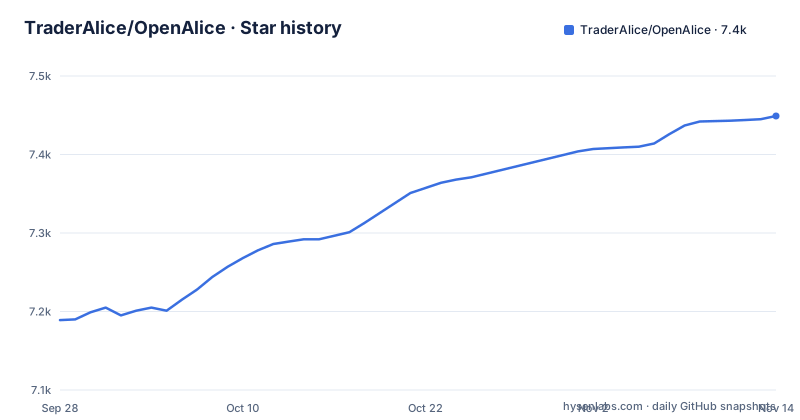
Star history
- TraderAlice/OpenAlice7,449 ★ · +260
| Repository | 2026-09-28 | 2026-11-14 |
|---|---|---|
| TraderAlice/OpenAlice | 7.2k | 7.4k |
260 Stars in the last 47 days, measured from the daily GitHub snapshot. Compare with other projects
Editorial analysis
The desktop app bundles Pi and a broker account is optional
Two install paths ship with the project, and the desktop one leads. Download the macOS or Windows build from the releases page, open it, and connect a model credential or a supported login, because the app bundles Pi and that is the agent you drive on a first run. The repository states plainly that you do not need a broker account, so the trading half of the product is opt-in rather than a prerequisite for research. Terminal and server users are pointed at docs/cli-installer.md and docs/remote-quickstart.md instead, and Windows installers sit in the tree as install.ps1 and install-preview.ps1. The suggested first task in Ask Alice is a thesis request: build one on NVDA, compare fundamentals with sector trends and price behavior, save it in the Workspace, and explain what would prove the thesis wrong. That last clause is the useful one, since it asks for disconfirming evidence while there is still no position to defend.
Workspaces are Git repositories, so the research stays readable
A Workspace is a directory and a Git repository you can inspect, edit and back up, and that is the whole storage model. Alice keeps its own state under ~/.openalice while your research files and their history sit on disk. Conversations, files and Git history are kept together in reusable Workspaces, so a session that ends does not take the work with it. Three kinds split by purpose: Chat for general research, AutoQuant for quantitative projects and experiments, and Auto Prediction for prediction-market research. The specialist Workspaces have their own Studio interfaces, and the documentation notes that the agent working inside one can develop them. The consequence for a reader is double edged. Your notes survive outside the app, and they are also plain files that your editor, your own scripts and your backups already know how to handle, which means any convention you want enforced has to come from the agent or from your hooks.
Native agents keep their own model loops and tool behavior
Alice does not replace your agent. Claude Code, Codex, OpenCode, Pi, Oh My Pi and other supported native agents work against Alice's market data, fundamentals, news and quantitative tools, and you can inspect the same markets yourself in the UI before asking an agent to investigate further. Two caveats matter when you wire this up. Available data depends on your configured providers, so an empty panel points at a missing provider rather than a missing feature. And native agents keep their own model loops and tool behavior, meaning the harness that governs an agent stays yours while Workspace files, skills and dedicated research projects supply the trading context. The orchestration layer therefore sits next to the agent rather than around it, which is also why the data coverage the description advertises, equities, crypto, commodities, forex and macro, is only as real as the providers behind it.
Tracked turns a thesis into an Issue with a schedule
Research worth returning to gets linked to assets and topics in Tracked, and follow-up work becomes Issues that carry instructions and a schedule: a morning scan, a weekly macro review, or a recurring check on one thesis. Scheduled runs use the Workspace's agent and context, and that is the detail to sit with before automating anything. Results land in Inbox, which collects reports, questions and updates from your Workspaces, and each item either opens the research file or replies to the Session that produced it. Workspace Manager is the place to check who owns what, review scheduled work, and coordinate across Workspaces when one conversation is no longer enough.
Trading as Git stages the operation and waits for approval
Execution has a different shape from research. Unified Trading Account connects supported brokers so you can inspect holdings, orders and account state. With AI trading enabled, agents stage proposed operations and commit their rationale, and you review and approve execution through Trading as Git. The project's caution block says trading execution is beta, tells you to start with simulator, paper, demo or testnet accounts, and states that OpenAlice is experimental software whose interfaces may change, with no guarantees of correctness, reliability, profitability or loss prevention, and real funds reserved for people who understand and accept the risks. The staging model is what limits exposure here: an agent can write down what it wants to do and why it wants to do it, while the send stays a human decision. Nothing in that flow stops a mistake once you approve it.
Credentials are sealed under ~/.openalice, providers stay remote
The local first claim has a boundary worth drawing. OpenAlice runs on your machine by default, Alice stores its own state under ~/.openalice, and broker credentials are sealed at rest. Your chosen agents and data providers still use their configured services, so local storage is not local execution: a market data provider, a model endpoint and the agent's own login all keep talking to whatever they talked to before. Two checks are worth doing before a real account is connected. The README states the sealing and then points to a data, credentials and backups page rather than describing the mechanism, so confirm it matches how you already keep secrets. And because Workspaces are Git repositories, anything an agent writes into one can be committed, which makes a review of what lands in .gitignore part of the setup rather than a later chore.
Four Vitest configs and a CLI that runs on Bun or Node
The repository is a pnpm and Turborepo monorepo: turbo.json and pnpm-workspace.yaml sit above apps/, packages/, services/, src/, ui/, scripts/ and tests/. The root package.json is named open-alice, carries version 0.95.0-beta and describes the project as a file-based trading agent engine. The terminal side has a conditional import: the entry #openalice/pty-backend resolves to src/workspaces/pty-bun.ts under Bun and to pty-node.ts by default, and a .bun-version file pins the runtime those scripts are written against. Development and first run from source:
git clone https://github.com/TraderAlice/OpenAlice.git
cd OpenAlice
pnpm install
pnpm dev
Then open the UI URL printed by the terminal. A source install needs at least one host agent CLI plus its model credentials or login, which is exactly what the desktop app hides by bundling Pi. Terminal users get the same binary through two scripts:
pnpm cli
pnpm remote
The cli script runs node packages/cli/bin/openalice.ts and the remote script adds --remote, while dev:no-relay runs the same guardian dev script with --no-relay. Four Vitest configs sit at the root, vitest.config.ts, vitest.external.config.ts, vitest.integration.config.ts and vitest.uta-live.config.ts, all sharing vitest.setup.ts. Only the last name points at a live environment, and the broker-packs scripts build, verify and smoke test the adapters under packages/uta-broker-* on their own.
AGPL-3.0 and a 0.x line that ships beta tags
Two numbers frame expectations. The license is AGPL-3.0, with THIRD_PARTY_NOTICES.md and a patches/ directory in the tree, and the published version is 0.95.0-beta, the same string package.json carries. Release v0.95.0-beta landed on 2026-10-04, v0.94.1 on 2026-09-24, and v0.94.1-beta.2 the same day, with the last push to the master branch on 2026-10-24. A 0.x line that ships beta tags, on an interface the project says may change, is a moving target, so pin the build you adopt and read what changed between betas. The copyleft license is the other half of that caution: anyone planning to modify this and host it themselves owes the license a closer reading than a tag in a repository header. The tree also carries AGENTS.md, CLAUDE.md, PLANS.md, plans/ and a vercel.json, so part of the repository is written to be read by agents as much as by people.
Editorial conclusion
OpenAlice is a research workspace with a broker attached, not an autonomous trader. It earns its keep in the thesis workflow, Tracked, Issues, and Workspace files you can read without the app. It is a poor fit if you want an agent to run a live book unattended, because execution approval is manual and the execution path is beta. Before connecting real funds, read the caution on trading execution, confirm your data providers are set, find out what sealing broker credentials at rest means for secrets you already hold, and pin one 0.95.0-beta build instead of tracking master.
Frequently asked questions
Is OpenAlice free?
OpenAlice is licensed AGPL-3.0, its desktop app is downloaded from the GitHub releases page for macOS or Windows, and the only credential asked for up front is a model credential or supported login for the bundled Pi agent.
How do you use OpenAlice?
Install the desktop app or the CLI, then work inside a Workspace: Chat for general research, AutoQuant for quantitative projects, Auto Prediction for prediction-market research. Link findings to assets in Tracked, turn follow-ups into scheduled Issues, read results in Inbox, and connect a broker through Unified Trading Account only when you want execution.
What is Open Alice?
OpenAlice is a local TypeScript trading workspace, described in its package.json as a file-based trading agent engine. It connects agents such as Claude Code, Codex, OpenCode, Pi and Oh My Pi to market data, research files, scheduled tasks and broker accounts, keeping its own state under ~/.openalice and sealing broker credentials at rest.
Official sources
Add this badge to your README
If you maintain this project, the badge below links readers to this analysis and shows its maintenance status from the daily GitHub snapshot. Paste the markdown into your README; add ?metric=license or ?metric=stars to the image URL for a different field.

[](https://hysenlabs.com/projects/traderalice-openalice)Star history chart for your README
[](https://hysenlabs.com/projects/traderalice-openalice)Was this useful?