lwc-recipes: three install paths, one pinned to a package id in a URL, and a hook install that swallows its own failure
A collection of easy-to-digest code examples for Lightning Web Components on Salesforce Platform
At a glance
- What is it?
- Salesforce's collection of Lightning Web Component examples, published under a public domain dedication with no releases at all. Installing it means either a scratch org driven by the command line, an unlocked package installed by clicking a link whose package id is hard coded, or a source-tracked deploy, and the sample only runs on the platform.
- Who is it for?
- lwc-recipes fits a developer who wants to see how a task is done in Lightning Web Components and copy the source, and it does not fit someone evaluating the framework without a Salesforce org. Four things to know.
- Can I use it commercially?
- Yes. CC0-1.0 is a permissive licence: you can use, modify and sell software built on it, as long as you keep its copyright and licence notices.
- Is it still maintained?
- Yes. The repository last received commits 14 days ago.
- What is it written in?
- Mainly JavaScript, according to GitHub's language statistics.
Answers come from the project's GitHub data, last synced on November 25, 2026, and from our analysis. They are not legal advice.
Star history
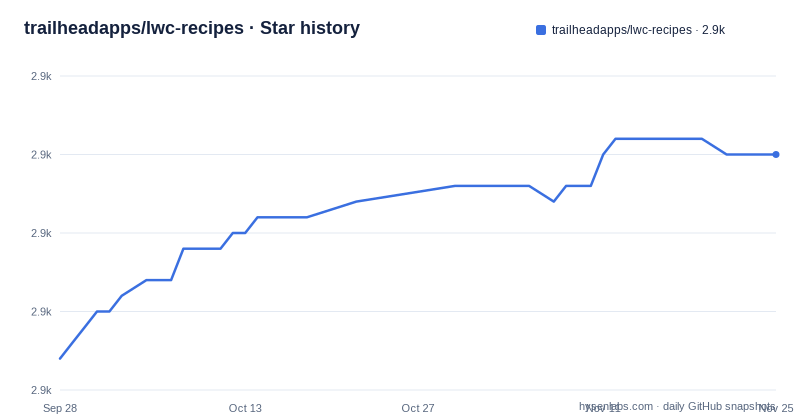
- trailheadapps/lwc-recipes2,900 ★ · +13
| Repository | 2026-09-28 | 2026-11-25 |
|---|---|---|
| trailheadapps/lwc-recipes | 2.9k | 2.9k |
13 Stars in the last 58 days, measured from the daily GitHub snapshot. Compare with other projects
Editorial analysis
Three installation paths, and one of them is pinned to a package id
The README documents three ways in, and they differ in what they assume of you. The scratch org path is called the recommended option and is for a developer who wants both the app and the code. The unlocked package path is for anyone who wants to see the app without installing local tooling, in a free Developer Edition org or a Trailhead Playground. The third path deploys the source into one of those same org types. Only the first two of those three require an explicit Dev Hub step, and the login flags differ between them: the scratch path authorizes a Dev Hub, while the developer org path uses a different flag on the same login command. Each path ends the same way, by activating one of two themes under Themes and Branding and then launching the app from the App Launcher. The command line path is eight steps:
sf org login web -d -a myhuborg
git clone https://github.com/trailheadapps/lwc-recipes
cd lwc-recipes
sf org create scratch -d -f config/project-scratch-def.json -a lwc-recipes
sf project deploy start
sf org assign permset -n recipes
sf data tree import -p ./data/data-plan.json
sf org open
The unlocked package path has no command line and imports data by hand
This is the path for someone with no local tooling, and every step is a click in the browser. You log in, click a packaging link, choose to install for all users, and then import Account and Contact records by hand: download a CSV from a raw file URL that points at the main branch, open the Data Import Wizard from Setup, choose Accounts and Contacts, add new records, drag the saved file into the upload area, and click through two Next buttons before starting the import. The permission set assignment is conditional, required only if you are working through the Trailhead Quick Start and skippable otherwise, which is the kind of instruction that ages badly once a tutorial's audience changes. Two details are worth noting. The link contains a fixed package version identifier, so it will not follow a future upload. And the CSV comes from the main branch rather than a tag, so the sample data and the app can drift apart.
The hook installation is written to fail silently
The manifest wires git hooks through husky, and the prepare script that installs them ends with a fallback that discards any error. In practice that means a contributor whose hook installation fails, which happens when the package is installed in a way that has no git directory or no write permission, gets a working tree with no hooks and no warning. Everything after that point is unenforced: the pre-commit hook name is configured but nothing else enforces it. Given that this repository's whole purpose is to be a set of best practice examples, an unenforced hook in a sample project is a small irony worth naming. It does not affect the sample app's behaviour in an org, but it does affect whether the code a reader clones has been linted and tested before its last commit.
Staged components run related tests with a flag that lets empty ones pass
The interesting part of the staged file configuration is the third entry. When files under a component directory are staged, the hook invokes the Lightning Web Component test runner with three switches: bail on the first failure, find related tests rather than only the staged file's own tests, and pass with no tests. The third switch is the one to understand, because it means a component that has no test file at all does not fail the commit. That is the right default for a repository of teaching examples, where a large share of components deliberately have no tests, and it also means the green hook says less than it looks. The first two entries are simpler: Prettier rewrites the staged files across a long extension list, and ESLint runs on staged JavaScript.
An Aura lint plugin sits in a repository built to replace Aura
Among the development dependencies is a Salesforce lint plugin for Aura, pinned at a beta version, in a repository that teaches the component model intended to succeed Aura. Its presence is not accidental: the ESLint configuration here also includes a dedicated Lightning plugin and the Lightning Web Components plugin and config, so a component that mixes frameworks can be checked in one place. But a beta dependency is a moving target, and a beta in a repository whose audience is people learning a framework is a slightly odd place to put one. The rest of the lint stack is conventional: the import plugin for module boundaries, the jest plugin for test files, and globals. Test infrastructure adds a canvas mock and an accessibility assertion library, which is discussed separately.
Accessibility assertions and canvas mocks are part of the unit test setup
The test story is short in the manifest and longer in practice. The test script runs the component test runner, with variants for watching, for debugging and for coverage. The dependency list includes a screen reader accessibility assertion library for Jest and a canvas mock, and the tree contains a setup file dedicated to the accessibility library plus a Jest configuration. For a repository of UI examples that is a meaningful choice: an example that renders markup can be asserted for accessible names and roles rather than only snapshotted. The formatter list is equally telling, since Prettier is pointed at a set of extensions that includes Apex classes and Visualforce pages alongside component, template, style, script and metadata files, with a dedicated XML plugin in the dependencies. So the sample formats the server side classes its Apex controllers depend on, not just the front end.
The sample runs on the platform, and a second repository runs elsewhere
The README is explicit about scope. This sample application is designed to run on Salesforce Platform, and anyone who wants to experience Lightning Web Components on any platform is directed to a separate documentation site and to a separate open source sample application in its own repository. That split matters for evaluation. Reading these recipes teaches you how the platform wants components written, including the parts that only make sense inside it, and the portable project is the one to clone if the question is how the framework behaves outside a platform. The repository also points at a Trailhead learning project and a short video for the guided route, and the table of contents promises code tours, which match a tours directory in the tree. The manifest itself is private and named as a scoped Salesforce package at version 0.1.0, so nothing here is published to a registry.
A public domain dedication, no releases, and a manifest version that never moves
The licensing is the most permissive thing in the repository and the easiest to state. The licence recorded for the project is CC0, the public domain dedication, and the manifest repeats it. That means the example code can be copied into a project without attribution and without the copyleft obligations a normal open source licence would attach, which is the right choice for reference code that people are meant to lift. The release story is the opposite of permissive in one respect: the repository publishes no releases, so there is no tag to install and no changelog to read, and the manifest version stays at 0.1.0 regardless of how many commits have landed. The last push on the main branch is dated 2026-10-01. If you need a stable copy of the recipes, pin the commit, and expect the scratch definition file and the sample data to be the parts that actually determine what you get.
Editorial conclusion
lwc-recipes fits a developer who wants to see how a task is done in Lightning Web Components and copy the source, and it does not fit someone evaluating the framework without a Salesforce org. Four things to know. This repository only runs on the platform; there is a separate sample application for running the components anywhere else, and the README sends you there. There are no releases, so the only way to pin a version of the sample app is to pin a commit, and the package install path embeds a fixed package id in its link. The pre-commit hook runs related tests for staged components but with a flag that lets a component with no tests pass, and the hook installation itself is written to fail silently. The licence is a public domain dedication, so the code is reusable without attribution.
Frequently asked questions
What is trailheadapps/lwc-recipes?
A collection of code examples for Lightning Web Components on Salesforce Platform, where each recipe shows how to do one task in the fewest lines of code possible while following best practices, with a View Source link for each. It is released under CC0, the public domain dedication, and publishes no GitHub releases.
How do I install lwc-recipes into a scratch org?
Authorize a Dev Hub org with an alias, clone the repository, create a scratch org from config/project-scratch-def.json with its own alias, run the project deploy command, assign the recipes permission set, import sample data from data/data-plan.json, and open the org. Then activate the Recipes Lite or Recipes Blue theme and launch the LWC app from the App Launcher.
What are the three ways to install lwc-recipes?
Into a scratch org, which the README calls the recommended option for developers who want the app and the code; into an unlocked package installed by clicking a packaging link in a Developer Edition org or Trailhead Playground, which needs no local tooling and a manual data import through the wizard; or by cloning and deploying the source into a Developer Edition org or playground, which uses a source-tracked deploy with the force-app directory.
Can I run lwc-recipes outside Salesforce?
Not this repository. The README says the sample application is designed to run on Salesforce Platform and points anyone who wants Lightning Web Components on any platform to a separate documentation site and a separate open source sample application repository.
Do lwc-recipes commits run component tests?
On staged component files the pre-commit hook runs the component test runner with bail, related tests and a pass-with-no-tests flag, so a component with no tests does not block a commit. The prepare script that installs the hooks ends with a fallback that discards any failure.
What linting and formatting does lwc-recipes enforce?
ESLint with the Salesforce Lightning Web Components config plus dedicated Lightning, LWC and Aura plugins, the import plugin and the jest plugin. Prettier runs over a file list that includes Apex class and Visualforce page extensions alongside component, template, style, script and metadata files, with a dedicated XML plugin, and it is applied to staged files through lint-staged.
Official sources
Add this badge to your README
If you maintain this project, the badge below links readers to this analysis and shows its maintenance status from the daily GitHub snapshot. Paste the markdown into your README; add ?metric=license or ?metric=stars to the image URL for a different field.

[](https://hysenlabs.com/projects/trailheadapps-lwc-recipes)Star history chart for your README
[](https://hysenlabs.com/projects/trailheadapps-lwc-recipes)Was this useful?