claude-code-config: a default delivered by a flag, pinned in a settings file
Opinionated defaults, documentation, and workflows for Claude Code at Trail of Bits
At a glance
- What is it?
- Trail of Bits publishes the configuration it uses for Claude Code, with a settings template, hook and rule directories, and a command that installs itself from inside a session. The most revealing entry is one that pins a subagent nesting limit, because the file explains that the default arrives through a remote feature flag rather than through documentation.
- Who is it for?
- This is worth reading as much for its reasoning as for its files, since several entries explain why a default is being pinned rather than just setting it, which is a habit worth copying whether or not you adopt the configuration. Three things to decide before you copy it.
- Can I use it commercially?
- Not without permission. GitHub finds no licence file in the repository, and without a licence all rights are reserved by default: you may read the code but not reuse it. Check the README, or ask the authors, before using it.
- Is it still maintained?
- Yes. The repository last received commits 82 days ago.
- What is it written in?
- Mainly Shell, according to GitHub's language statistics.
Answers come from the project's GitHub data, last synced on November 14, 2026, and from our analysis. They are not legal advice.
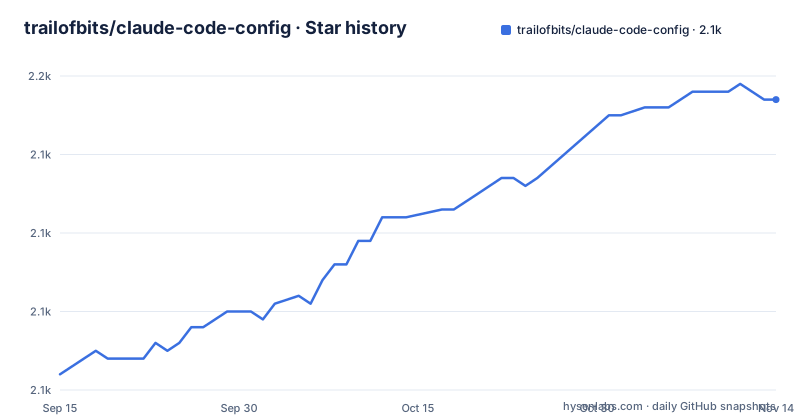
Star history
- trailofbits/claude-code-config2,147 ★ · +35
| Repository | 2026-09-15 | 2026-11-14 |
|---|---|---|
| trailofbits/claude-code-config | 2.1k | 2.1k |
35 Stars in the last 60 days, measured from the daily GitHub snapshot. Compare with other projects
Editorial analysis
The configuration installs itself from inside a session
Setup is three commands and then a slash command:
git clone https://github.com/trailofbits/claude-code-config.git
cd claude-code-config
claude
Starting the client in the cloned directory is what makes the rest work, because the next step runs inside that session rather than in your shell. The command walks you through installing each component, detects what you already have so it does not overwrite an existing setup, and self-installs itself so future runs work from any directory rather than only from the clone. The instruction to run it again after updates tells you the model is: this is a repository you re-apply, not a package you install once. That is a sensible design for a configuration whose whole value is the reasoning inside it, and it also means your own settings file ends up as a merge rather than a replacement, which the file says explicitly.
A default that arrives through a feature flag
One settings entry is worth reading twice, because the explanation is the useful part. The variable pins how many layers of subagents can nest below the main agent, set to three. The file says three is the current built-in default, so the setting changes nothing today, and then says why it is there anyway: the default is delivered by a remote feature flag, observed in the binary because the documentation does not mention it. Without pinning it, the effective nesting limit can move without a release. It is enforced when a subagent is spawned rather than being guidance in a prompt, and the file notes that the newest Claude models delegate more readily than earlier ones, so the limit is more likely to be reached. Set it to one and subagents cannot spawn their own. The companion variable capping concurrent subagents is deliberately left unset, on the grounds that the default of twenty is generous and anything lower is a throughput guess.
Three telemetry switches, and one to avoid
The privacy section turns off exactly three outbound streams by name rather than using a single umbrella switch, and then tells you not to use the umbrella. Statsig telemetry is disabled, error reporting to Sentry is disabled, and the feedback survey is disabled. The file's reason for avoiding the broader nonessential-traffic variable is that it also switches off auto-updates, so the narrow version costs you three analytics streams and keeps the ability to receive fixes. That is a small decision with a clear rationale, and it is the kind of entry that is easy to get wrong by copying a setting someone else recommended without reading why. The same file elsewhere turns on one experimental feature and another, so the settings template is not uniformly conservative; it is selective, and the reasoning is written down for each entry.
Permission prompts off, with the sandbox as the only guard
The shell setup adds one line to your profile:
alias claude-yolo="claude --dangerously-skip-permissions"The file's description is that this bypasses all permission prompts, calls it the recommended way to run for maximum throughput, and says to pair it with the sandboxing section below. That pairing is the whole safety argument. With prompts gone, the boundary between the agent and your filesystem is whatever the sandbox allows, and the two settings are far apart in the document: one in the shell setup near the top, the other in the configuration section further down. If you take this configuration wholesale, that ordering matters. A safer reading is to treat the alias as the last thing you enable rather than the first, since a permission prompt is the cheapest place to notice an agent about to do something you did not intend.
A terminal recommendation with a memory number
The prerequisites make a specific case for a specific terminal on performance grounds: native GPU rendering handles the high-volume text output of long sessions without lag or memory bloat, and the file puts a number on it, around five hundred megabytes against roughly eight gigabytes for two editor terminal sessions. It also claims the key bindings work with no extra setup step, and that built-in split panes replace a terminal multiplexer for running the client beside a development server. The installation is a single package-manager command, and the platform coverage is stated plainly: macOS only, with a separate install path documented for Linux and no Windows support yet, where another terminal is suggested. The tool list is the other half of this section, and it is long: search and lint tools, Python tools installed through a tool runner, a Rust toolchain installed by piping a script into a shell, two global Node tools, and a local model server installed the same piped way.
Local models through a wrapper function
For running against a model on your own machine, the shell setup adds a function rather than a flag:
claude-local() {
  ANTHROPIC_BASE_URL=http://localhost:1234 \
  ANTHROPIC_AUTH_TOKEN=lmstudio \
  CLAUDE_CODE_DISABLE_NONESSENTIAL_TRAFFIC=1 \
  claude --model qwen/qwen3-coder-next "$@"
}
Three things are happening at once: the base URL is pointed at a local server, the authentication token is the placeholder the local server expects rather than a real credential, and nonessential traffic is switched off because those requests would never reach the vendor anyway. Note that this uses the umbrella switch the settings section advises against, which is consistent, since there is nothing to auto-update when you are running a local model. The local server itself is installed by piping a script into a shell, and it provides a command-line client plus a headless daemon, with a desktop application offered if you would rather not live in a terminal.
An experimental flag that changes ordinary delegation
The agent-teams setting is the one to read with the most care, because the file describes a side effect beyond the feature itself. The variable enables multi-agent teams, where one session coordinates several teammates each with its own context window. The file marks it experimental and names the known limitations as session resumption and task coordination. Then it adds the part that is easy to miss: while the feature is on, a subagent that the model names on its own launches as a full teammate, so teams can form when you did not ask for one. That is a change to the default shape of every task the agent delegates, not a feature you opt into per session. The settings template also sets a project-level switch for MCP servers to false explicitly, which is already the default, with the stated reason that setting it makes it harder for something else to flip it later.
A repository of templates with no licence file
The top-level listing is what you would expect from a configuration repository and nothing more: a settings file, an MCP server template, a memory-file template, and directories for hooks, rules, commands, scripts and the client configuration itself. There is no licence file in that listing, and the repository metadata names no licence either, which is worth raising with the authors since the intent is explicitly for other people to copy these files into their own setup. The same is true of the sibling repositories linked at the top: a skills collection, a curated variant, a development container and a toolkit, each a separate project with its own terms. The reading list is also part of the deliverable. Before any of the configuration, the file asks you to read five things, two of them from the vendor, one from an outside writer on practical use, one from a consultancy on teams that cannot work that way, and one from a security researcher arguing that dismissing the tools is the mistake.
Editorial conclusion
This is worth reading as much for its reasoning as for its files, since several entries explain why a default is being pinned rather than just setting it, which is a habit worth copying whether or not you adopt the configuration. Three things to decide before you copy it. The setup recommends bypassing permission prompts entirely for throughput and pairs that with sandboxing, which makes the sandbox the entire safety story and puts the weight on one setting you have to get right. The subagent depth and the experimental agent-teams flag change how your agent spawns work, and the second of those can create teammates you did not ask for. And the repository carries no licence file and its metadata names none, so the terms for reuse are unstated even though the contents are meant to be copied into your own configuration.
Frequently asked questions
How do I install the Trail of Bits Claude Code config?
Clone the repository, change into the directory, and start the client there. Then run the configuration command inside that session: it walks through installing each component, detects what you already have so it does not overwrite your setup, and self-installs the command so later runs work from any directory. Run it again after updates.
What does the trailofbits Claude Code config do about telemetry?
It disables three outbound streams individually: Statsig telemetry, error reporting to Sentry, and the feedback survey. It explicitly advises against the broader nonessential-traffic variable, because that one also switches off auto-updates, so the narrow version keeps your client receiving fixes.
What is the claude-yolo alias in this config?
A shell alias that runs the client with the flag that skips all permission prompts. The file calls it the recommended way to run for maximum throughput and says to pair it with the sandboxing section, which makes the sandbox the only remaining boundary between the agent and your filesystem.
What does CLAUDE_CODE_MAX_SUBAGENT_SPAWN_DEPTH do?
It pins how many layers of subagents may nest below the main agent. The file says three is the current default but arrives through a remote feature flag observed in the binary rather than through the documentation, so pinning it stops the limit moving without a release. It is enforced when a subagent spawns, and setting it to one stops subagents creating their own.
Which terminal does the Trail of Bits config recommend?
Ghostty, for native GPU rendering of long sessions of high-volume output. The file cites roughly five hundred megabytes against about eight gigabytes for two editor terminal sessions, working key bindings without an extra setup step, and split panes instead of a terminal multiplexer. It is macOS only, with Linux instructions linked and another terminal suggested on Windows.
Official sources
Add this badge to your README
If you maintain this project, the badge below links readers to this analysis and shows its maintenance status from the daily GitHub snapshot. Paste the markdown into your README; add ?metric=license or ?metric=stars to the image URL for a different field.

[](https://hysenlabs.com/projects/trailofbits-claude-code-config)Star history chart for your README
[](https://hysenlabs.com/projects/trailofbits-claude-code-config)Was this useful?