Paseo: one daemon that runs Claude Code, Codex and other agent CLIs in parallel worktrees, reachable from desktop, phone and terminal
Orchestrate multiple coding agents from desktop and mobile
At a glance
- What is it?
- Paseo is a self-hosted agentic development environment from getpaseo: a local daemon manages coding agents, and desktop, mobile, web and CLI clients attach to it. It brings no model of its own, it trusts plugins with your machine, and it is still on 0.x releases shipped days apart.
- Who is it for?
- Paseo suits developers who already use one or more agent CLIs such as Claude Code or Codex and want to run several of them in parallel worktrees, steer them from a phone, and script them through a CLI or TypeScript SDK, all on hardware they control. It does not suit anyone looking for a hosted service with its own model, or a team that cannot vet third-party plugins that run with daemon access.
- Can I use it commercially?
- Check first. The repository uses a licence we do not classify automatically, so read its LICENSE file before any commercial use.
- Is it still maintained?
- Yes. The repository received new commits within the last day.
- What is it written in?
- Mainly TypeScript, according to GitHub's language statistics.
Answers come from the project's GitHub data, last synced on November 14, 2026, and from our analysis. They are not legal advice.
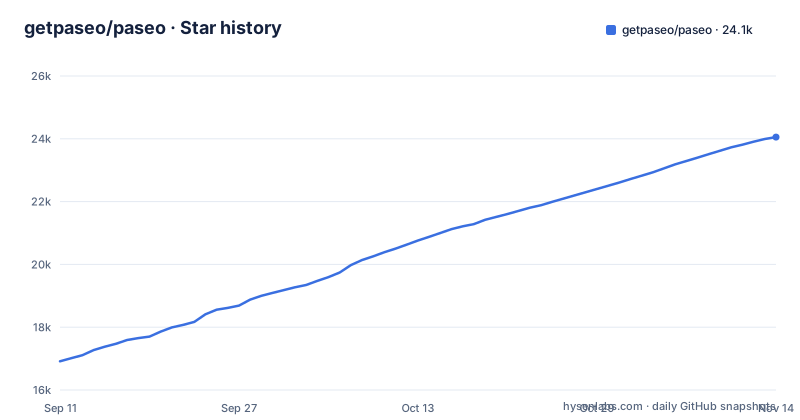
Star history
- getpaseo/paseo24,055 ★ · +7,140
| Repository | 2026-09-11 | 2026-11-14 |
|---|---|---|
| getpaseo/paseo | 16.9k | 24.1k |
7,140 Stars in the last 64 days, measured from the daily GitHub snapshot. Compare with other projects
Editorial analysis
Every client is a window onto one local daemon
Paseo is built around a local server called the daemon, which manages your coding agents. The desktop app, the mobile app, the web app, and the CLI are all clients that connect to it. That design is what lets you start work at a desk, check in from a phone, and script the same session from a terminal, because none of the clients owns the agents; the daemon does.
The desktop app is the recommended starting point. Download it from paseo.sh/download or from the GitHub releases page, open it, and the daemon starts automatically, with nothing else to install. The window holds agents, an editor, terminals, diffs, pull requests, and a browser, arranged in split panes you lay out yourself.
The mobile app is the full app rather than a companion, native on iOS and Android. To connect a phone, open Settings in the desktop app, choose your host, and select Pair Device. Voice mode lets you dictate tasks or talk through a problem when your hands are busy. Paseo has no telemetry, no tracking, and no forced log-ins, so pairing a device does not require creating an account.
Paseo brings no model; you supply the agent CLIs and their credentials
Paseo orchestrates agents; it does not include one. Before anything runs, you need at least one agent CLI installed and configured with your own credentials: Claude Code, Codex, GitHub Copilot, OpenCode, Pi, Antigravity, or Muse Code. All of them sit behind the same interface, so you can pick a different model for each job and mix providers in one workspace.
The consequence is that Paseo inherits every limit of the CLIs underneath it. Your subscription quotas, rate limits, and the capabilities of each agent are unchanged; Paseo gives you a way to run many of them side by side and talk to them from more places. If a provider's CLI is not installed or not logged in on the daemon machine, that provider is simply not available to any client, including your phone.
Agents run on your machine with your full development environment, your tools, your configs, and your skills. That is the self-hosted promise, and also the reason the daemon machine needs everything the agents will call.
On a server, the daemon asks one question about the relay
For a server, a VM, or any machine without the desktop app, install the CLI from npm and start the daemon:
npm install -g @getpaseo/cli
paseo
On first start, Paseo asks whether to enable the end-to-end encrypted relay for device pairing. This is the decision that shapes how your phone and laptop reach the daemon. Accept it and devices pair through the relay. Decline it and you connect directly over TCP, Tailscale, or another VPN, which means you are responsible for making the daemon's port reachable from your devices and for keeping it off the open internet. Either way, the desktop, mobile, and web apps connect to a server daemon exactly as they connect to any other host.
The connectivity guide at paseo.sh/docs/connectivity and the configuration reference at paseo.sh/docs/configuration cover the options beyond that first prompt. The workspace list in package.json includes a packages/relay package alongside packages/server and packages/cli, so the relay is part of the same open repository.
The Docker image starts empty of agents and with a placeholder password
Docker runs the daemon together with the self-hosted web UI:
read -rs -p "Choose a strong Paseo password: " PASEO_PASSWORD; echo
docker run -d --name paseo \
  -p 127.0.0.1:6767:6767 \
  -e "PASEO_PASSWORD=$PASEO_PASSWORD" \
  -v "$PWD/paseo-home:/home/paseo" \
  -v "$PWD:/workspace" \
  ghcr.io/getpaseo/paseo:latest
After it starts, the web UI is at http://localhost:6767. Two parts of that command need attention before you rely on it. The command prompts for your own password and binds the port to localhost. If remote access is needed, configure appropriate authentication and network controls. Docker documents a local-network exposure caveat for localhost-published ports on versions older than 28.0.0.
The second is that the base image does not bring your agents. You extend it with the agent CLIs you use, then provide their credentials either through environment variables or through the persistent /home/paseo volume, mapped here to paseo-home in the current directory. Without that step the web UI loads but has no provider to run. The current directory is mounted at /workspace, which is the path agents see for your code, and the command pulls the latest tag rather than a fixed version.
Each agent gets its own worktree, and agents can launch other agents
Parallel work is the core idea. Paseo runs many agents at once, each in its own git worktree, on one machine or several, so two agents editing the same repository do not overwrite each other's files. You review each agent's diff, run each app, and check it in the built-in browser before merging.
Orchestration goes a step further: agents inside Paseo can create worktrees, launch other agents, and talk to them, across providers. A Claude Code agent can hand a subtask to a Codex agent without you relaying the message.
Everything in the app is available from the terminal:
paseo run --provider claude/opus-4.6 "implement user authentication"
paseo run --provider codex/gpt-5.5 --worktree feature-x "implement feature X"

paseo ls                           # list running agents
paseo attach abc123                # stream live output
paseo send abc123 "also add tests" # follow-up task

# run on a remote daemon; --cwd is a path on that host
paseo run --host workstation.local:6767 --cwd /workspace "run the full test suite"
The --provider value pairs a provider with a model, and --worktree names the worktree. With --host, the --cwd path refers to the remote machine's filesystem, not your laptop's, which is easy to get wrong when the two have different directory layouts.
The TypeScript SDK talks to the daemon over a WebSocket
For integrations that go beyond the CLI, such as issue trackers, dashboards, or orchestration services, the @getpaseo/client package exposes the daemon programmatically:
import { createPaseoClient } from "@getpaseo/client";

const client = createPaseoClient({ url: "ws://127.0.0.1:6767/ws" });
await client.connect();

const agent = await client.agents.create({
  config: { provider: "codex/gpt-5.5" },
  cwd: "/Users/me/dev/storefront",
  prompt: "Review the current diff and name the riskiest change.",
});

const result = await agent.waitForFinish();
console.log(result.lastMessage);

await client.close();
The client connects to the daemon's WebSocket endpoint at /ws on port 6767, creates an agent with a provider, a working directory, and a prompt, waits for it to finish, and reads the last message. The cwd is a path on the daemon's machine, the same rule as the CLI's --cwd. The SDK quickstart and recipes live under paseo.sh/docs/sdk. Since the SDK drives the same daemon the apps use, an agent started from a script shows up in the desktop and mobile clients like any other.
Plugins run with your daemon's access, on every device
Plugins run on the daemon and appear in every connected client with the same UI on desktop, web, iOS, and Android. One plugin can add screens, sidebar items, workspace panels, Command Center items, slash commands, composer pills, attachment sources, timeline items, and themes. It can also hook into the agent lifecycle: change configuration, environment, and MCP servers, answer permission prompts, and follow up when a turn ends. A plugin can even add a coding agent as a new provider.
Install one from the registry with paseo plugin add owner/slug, or from Git or a local directory. The registry is browsable at paseo.sh/plugins.
That reach is also the risk. Plugins run with access to your daemon machine and inside connected clients, and the project's own advice is to install only code you trust. A plugin that can answer permission prompts can approve actions on your behalf, and one that changes environment or MCP servers can redirect what your agents talk to. Review a plugin's source before installing it on a machine that holds credentials for your agent CLIs.
Releases arrive days apart, and the license metadata does not agree
Paseo is moving quickly. v0.14.0 was published on October 29, 2026, v0.15.0-beta.1 on November 1, and v0.15.0 two days later; the last push to main was on November 1, 2026. The project is still on 0.x versions, so expect changes between releases and read CHANGELOG.md before upgrading a daemon that other devices depend on.
The license needs checking. GitHub does not detect a standard license for the repository and reports NOASSERTION, while the root package.json declares Apache-2.0. If licensing matters for your organization, read the LICENSE file in the repository itself rather than relying on either label.
The repository is a TypeScript monorepo with workspaces for the protocol, client, server, app, relay, website, desktop, CLI, and plugin packages. For contributors, npm run dev starts the server through scripts/dev-daemon.sh with PASEO_LISTEN set to 127.0.0.1:6768, which keeps it off 6767, the port used in the Docker and SDK examples.
Editorial conclusion
Paseo suits developers who already use one or more agent CLIs such as Claude Code or Codex and want to run several of them in parallel worktrees, steer them from a phone, and script them through a CLI or TypeScript SDK, all on hardware they control. It does not suit anyone looking for a hosted service with its own model, or a team that cannot vet third-party plugins that run with daemon access. Before adopting it, confirm the license in the LICENSE file, decide between the encrypted relay and a direct VPN connection, and change the Docker password from change-me.
Frequently asked questions
What is Paseo AI?
Paseo is an open source agentic development environment that runs coding agents such as Claude Code, Codex, Copilot, OpenCode, Pi, Antigravity, and Muse Code through one interface on desktop, mobile, web, and CLI.
How do I install Paseo?
Download the desktop app from paseo.sh/download or the GitHub releases page; it starts the daemon automatically. On a server, run npm install -g @getpaseo/cli and then paseo, or use the ghcr.io/getpaseo/paseo Docker image.
How do I use Paseo?
Install and log in to at least one agent CLI, open Paseo, and start agents in separate worktrees from the app or with paseo run. Pair a phone through Settings, your host, Pair Device.
What is Paseo the coding tool?
Paseo, from getpaseo at paseo.sh, is a self-hosted daemon plus desktop, mobile, web, and CLI clients for running many coding agents in parallel. It has no telemetry, tracking, or forced log-ins.
Official sources
Add this badge to your README
If you maintain this project, the badge below links readers to this analysis and shows its maintenance status from the daily GitHub snapshot. Paste the markdown into your README; add ?metric=license or ?metric=stars to the image URL for a different field.

[](https://hysenlabs.com/projects/getpaseo-paseo)Star history chart for your README
[](https://hysenlabs.com/projects/getpaseo-paseo)Was this useful?