Ten C projects and fifteen directories inside project-box
C projects: algorithms, games, and networking
At a glance
- What is it?
- TrisH0x2A/project-box is a pile of self-contained C programs covering hashing, sockets, compilers and terminal games. Its README gives you four navigation steps and not one build command.
- Who is it for?
- Adopt project-box if you already write C, want short self-contained reading on sockets, hashes and compiler front ends, and accept reading a separate README per project. Skip it if you wanted one runnable tool, a library with an API, or code you can ship: this collection is a study path and nothing more.
- Can I use it commercially?
- Yes. MIT is a permissive licence: you can use, modify and sell software built on it, as long as you keep its copyright and licence notices.
- Is it still maintained?
- Yes. The repository last received commits 15 days ago.
- What is it written in?
- Mainly C, according to GitHub's language statistics.
Answers come from the project's GitHub data, last synced on October 23, 2026, and from our analysis. They are not legal advice.
Star history
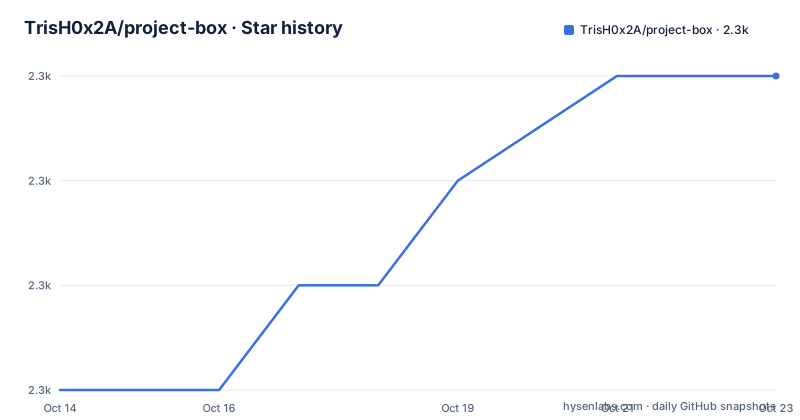
- TrisH0x2A/project-box2,262 ★ · +3
| Repository | 2026-10-14 | 2026-10-23 |
|---|---|---|
| TrisH0x2A/project-box | 2.3k | 2.3k |
3 Stars in the last 9 days, measured from the daily GitHub snapshot. Compare with other projects
Editorial analysis
Ten numbered projects against fifteen top-level directories
Ten projects carry numbers in the README, beginning with the SHA-512 Implementation and ending with the Asteroid Game, and each number points at a directory you can enter. Counting top-level entries gives a different total: fifteen directories sit beside three plain files, and five of them appear nowhere in the overview. `Notes Manager/`, `QR Generator/`, `ftp/`, `tcp-server/` and `url-shortener/` are named by nothing on the page except the file listing itself.
That gap is the first thing a reader trips over. Every project here is meant to stand on its own with its own documentation and build system, which makes the overview the menu. A menu that stops at 10 while the tree carries fifteen means your choice of what to build is decided partly by what you happen to notice in the listing. Nothing says whether `url-shortener/` is a service, a client for one, or an exercise in string handling.
No root build file leaves every project its own island
Everything at the top level is either a project directory or one of three plain files, so nothing at the root builds anything. There is no root Makefile and no root CMake configuration, which follows from the instruction to move into a project directory before doing anything else.
That cost lands on anyone who wants to check the collection over rather than a single project. You get 10 separate build invocations instead of one, and no way to sweep every directory in a single pass. Build-system choice stays hedged as well: each project is promised a Makefile or CMake configuration, leaving that or open. Someone who knows Make still has to open each project's own README.md to learn whether cmake is the entry point there, and the page never shows a single invocation of either tool.
The only startup instruction is four steps of navigation
Hunting through the README for a compile line is a short exercise, because there is none. No install command, no clone address, no compiler invocation, no sample output. All the startup sequence amounts to is this:
1. Navigate to the project directory
2. Read the project's README.md
3. Follow the build instructions
4. Run the program as described
Three of those four lines hand you back to the project you just opened, so the actual tutorial lives in ten per-project READMEs this page never shows. What you do get is the toolchain it expects, and the list runs longer than a C-only framing would predict:
- GCC compiler (for C projects)
- G++ compiler (for C++ projects)
- Make utility
- CMake (for C/C++ projects)
A G++ compiler is listed for C++ projects, yet the repository presents itself as C projects and never says which directories are the C++ ones. Beginner framing also sits awkwardly against a prerequisite asking for a basic understanding of C/C++ programming and, for the network directories, an understanding of basic networking concepts. Both are listed as things you bring.
Root privileges attach to raw sockets in two projects
Two directories carry a privilege warning, and it sits at the very bottom of the README rather than beside either project. Port Scanner and Ping need root or administrator privileges because of raw sockets, and the same note asks you to use them only on networks you have permission to test.
A gap opens for one of the two. In the overview, the Port Scanner is TCP socket programming with network scanning techniques, error handling and command-line argument parsing, and nothing says whether it opens raw sockets or ordinary TCP connections. A reader who wants to know whether privileges are required has to open the scanner's own README.md and find the flag list there, if one exists. Ping raises no such question: ICMP over raw sockets is the only practical route, which matches the overview listing the ICMP protocol and raw socket programming together.
The learning path names seven of the ten projects
Rising complexity is the promise, and five steps deliver it. Seven of the ten projects appear in that ladder: Tic-Tac-Toe, SHA-512, UDP Server-Client, HTTP Server, Chat System, Port Scanner, Ping. Lexical Analyzer, Arithmetic Compiler and Asteroid Game never enter it, so the route a beginner is told to follow stops short of both compiler projects and the terminal game.
Oddest is the first rung. Tic-Tac-Toe is introduced as the place to pick up basic programming concepts, while its own entry calls it a multiplayer game server that teaches socket programming. Step 1 of a ladder that claims to grow in complexity is therefore a networked program, sitting ahead of every networking lesson. UDP Server-Client for basic networking comes third, and the pair needing raw sockets closes the list at step 5. Nothing in those five steps says what to do with the three projects left out, or that this ordering is a suggestion rather than a curriculum.
The translation widget points at a different account
Twenty languages sit behind the switcher, and every link points into an external index carrying the query string `user=dexter-xD` and `project=project-box`. Its repository, by contrast, is TrisH0x2A/project-box. Alongside the widget, the page carries a Buy Me a Coffee link to buymeacoffee.com/trish07 and a short amzn.to address for the recommended book.
That is not a security question, it is a maintenance one. A widget produced by a third-party index sits outside the author's editing, so the twenty translated copies of this README can drift away from the English one, and nothing on the page says when they were produced. A handle mismatch also means a reader following one of those links lands on an index belonging to another account, which is worth knowing before trusting a translation over the source it came from.
Where a textbook route differs from this practice route
The README names its own alternative: The C Programming Language, reached through a short amzn.to link and offered as the place to pick up C fundamentals before touching any of this. What each route assumes is where the two differ. One supplies the language itself. Skipping it, the collection asks for a basic understanding of C/C++ programming, plus a grasp of basic networking concepts if you want the socket directories. Neither feeds the other, so the collection alone will not carry you through the language it is written in.
Inside it there is a cheaper second choice. If your goal is sockets, udp-server-client/ teaches message exchange over a client-server architecture with no privilege warning attached, while ping/ needs raw sockets and root. Step 3 of the ladder holds the UDP pair and step 5 the raw socket pair, so the page's own ordering agrees with starting there.
Upgrade cost sits in the per-project READMEs
Reuse here is governed by the MIT licence, and the last push landed on 2026-08-28. No GitHub releases exist, so there is no version to track and no upgrade to perform: changes arrive as edits inside individual directories, and anything you have modified locally has to be merged by hand.
In exchange you get a wishlist rather than a contribution process. Bug reports, improvement suggestions, new features, new projects and better documentation are all invited, with no review guide, no style rule and no test suite named anywhere. Nothing at the root checks that the C still compiles after an edit.
Editorial conclusion
Adopt project-box if you already write C, want short self-contained reading on sockets, hashes and compiler front ends, and accept reading a separate README per project. Skip it if you wanted one runnable tool, a library with an API, or code you can ship: this collection is a study path and nothing more. Before starting, open the directory you plan to build and check that its own build file is still there, since the overview covers ten of the fifteen top-level directories and two of them ask for root.
Frequently asked questions
How do I build one of the projects in TrisH0x2A/project-box?
The README gives no repository-level build command. It tells you to move into the project directory, read that project's README.md, follow its build instructions and run the program as described. Whether a given directory uses Make or CMake is only stated inside that project.
Which project-box projects need root, and why?
The closing note names Port Scanner and Ping, because both rely on raw sockets, and asks that they be used only on networks you have permission to test. The overview never says whether the scanner opens raw sockets, so its privilege requirement stays unconfirmed from this page alone.
Is every directory in project-box covered by the README?
No. The overview numbers ten projects while the top level carries fifteen directories. Notes Manager/, QR Generator/, ftp/, tcp-server/ and url-shortener/ appear in the file listing only.
Does project-box have tests or a continuous integration setup?
Nothing in the README mentions tests, and the top-level listing shows only .gitignore, LICENSE and README.md beside the project directories. Each project is described as self-contained, so any build check would live inside a directory rather than at the root.
What does The C Programming Language have to do with project-box?
The README lists it as a recommended book for learning C before starting on the projects, reached through a short amzn.to address. The projects assume that grounding: their prerequisites ask for a basic understanding of C/C++ programming.
Official sources
Add this badge to your README
If you maintain this project, the badge below links readers to this analysis and shows its maintenance status from the daily GitHub snapshot. Paste the markdown into your README; add ?metric=license or ?metric=stars to the image URL for a different field.

[](https://hysenlabs.com/projects/trish0x2a-project-box)Star history chart for your README
[](https://hysenlabs.com/projects/trish0x2a-project-box)Was this useful?