zvm: a Zig version manager that lives in $HOME/.zvm and swaps a symlink
zvm (Zig Version Manager) lets you easily install/upgrade between different versions of Zig.
At a glance
- What is it?
- zvm installs and switches between Zig versions by keeping them under one directory and pointing a symlink at the one you want. It is a static Go binary with no system dependencies, it verifies downloads with minisign, and it ships an agent skill so coding assistants stop unpacking Zig tarballs by hand.
- Who is it for?
- Adopt zvm if you keep more than one Zig version on the same machine, if you follow the master branch often enough that downloading and unpacking Zig by hand has become routine, or if you want coding agents in your workflow to install Zig correctly instead of improvising. Do not adopt it if you build one project against one pinned Zig version and your package manager already provides that toolchain.
- Can I use it commercially?
- Yes. MIT is a permissive licence: you can use, modify and sell software built on it, as long as you keep its copyright and licence notices.
- Is it still maintained?
- Yes. The repository last received commits 1 day ago.
- What is it written in?
- Mainly Go, according to GitHub's language statistics.
Answers come from the project's GitHub data, last synced on November 7, 2026, and from our analysis. They are not legal advice.
Star history
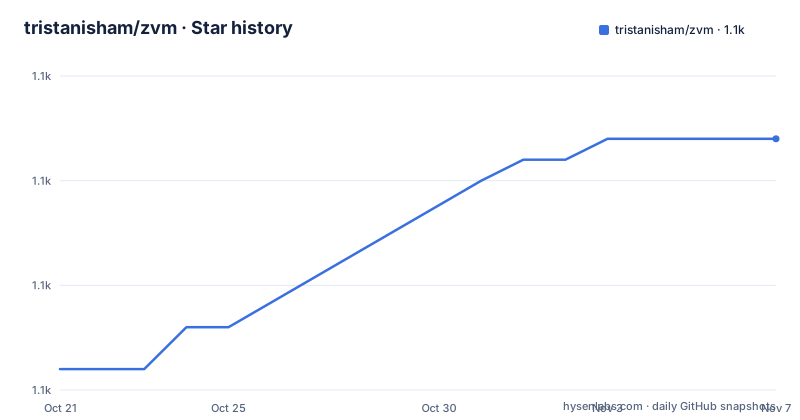
- tristanisham/zvm1,087 ★ · +11
| Repository | 2026-10-21 | 2026-11-07 |
|---|---|---|
| tristanisham/zvm | 1.1k | 1.1k |
11 Stars in the last 17 days, measured from the daily GitHub snapshot. Compare with other projects
Editorial analysis
Zig moves, and projects do not move with it
The problem zvm is built around is stated in the opening paragraph. Zig's standard library is under heavy development with a large feature roadmap, and the language is bound to keep changing: breaking existing builds, updating valid syntax, and introducing new features such as a package manager. For an individual developer that is interesting. For someone with several projects, or a project that has to keep building, it is a problem.
The manual alternative is described plainly: download Zig, scroll around to find the right version, decompress it, and put it on your path. With zvm, the same operation is `zvm i master`.
The claims in the README about what the tool is made of are worth quoting because they are specific. It is a static binary under a permissive licence, it supports more platforms than any other Zig version manager, and it has no system dependencies. The platform list is Windows, macOS, Linux, a flavour of BSD, and Plan 9.
Plan 9 is the item that says something about the design. It is not a platform you get by accident; it is the outcome of a binary that depends on nothing but the Go standard library, with the compression and signature libraries vendored in rather than shelled out to. The dependency list in `go.mod` confirms the shape: `github.com/ulikunitz/xz` for xz archives, `github.com/jedisct1/go-minisign` for signature verification, `github.com/schollz/progressbar/v3` for download progress, `github.com/charmbracelet/lipgloss` and `log` for the terminal output, `github.com/nyaosorg/go-windows-junction` for the Windows side of the symlink problem, and `github.com/urfave/cli/v3` for the command line itself. The module requires Go 1.26.
The licence is MIT, the last push was on 2026-10-12, and the recent releases are v0.9.1 from 2026-08-20, v0.8.29 which added Winget support, and v0.8.28 which added `ls-remote`, installation of dev versions of Zig, and colours.
Four installation routes, and two environment variables you have to set
On Linux, BSD and macOS, and anything else that runs a shell, the installer is a pipe into bash:
curl https://www.zvm.app/install.sh | bashOn Windows, PowerShell has its own script:
irm "https://www.zvm.app/install.ps1" | iexAnd the same script is reachable from the command prompt, through the PowerShell wrapper:
powershell -c "irm https://www.zvm.app/install.ps1 | iex"The project makes a point about the hosting: all installation scripts hosted on www.zvm.app are identical to, and automatically synced with, their copies on GitHub. The README states the equivalence directly, as `www.zvm.app/install.sh === ./install.sh`. That is a supply chain detail worth noticing, because piping a script from a website into a shell is a habit worth having or not having, and a stated sync with the repository is a reasonable answer to that concern.
If you already have a valid Go toolchain, you can build it yourself:
go install -ldflags "-s -w" github.com/tristanisham/zvm@latestOr clone and build, which also gives you the option to compile out the automatic self-update:
go build .
./zvmgo build -tags noAutoUpgrades .That build tag is a governance decision in the code. A tool that can replace its own binary is convenient until the day you want a fixed version in a reproducible environment, and the tag gives you that option.
The environment variables are the part people miss. `ZVM_INSTALL` has to point at `$HOME/.zvm/self`, and `$HOME/.zvm/bin` has to be on your path. On Unix the installer appends them to `~/.profile` or `~/.bashrc`, and the README gives the manual lines for `~/.bashrc`, `~/.zshrc` or `~/.profile` if you need to do it yourself. On Windows the equivalents are `%USERPROFILE%\.zvm\self` for `ZVM_INSTALL` and `%USERPROFILE%\.zvm\bin` plus `%ZVM_INSTALL%` appended to `PATH`.
Everything lives in $HOME/.zvm, and a symlink picks the version
The directory layout is the mechanism. ZVM lives entirely in `$HOME/.zvm` on every platform it supports. Inside that directory it downloads new Zig versions, and whichever version you name with `zvm use` is symlinked to `$HOME/.zvm/bin`. You put that folder on your path, and `zig` resolves to whichever version you last selected.
There is a second directory, `$HOME/.zvm/self`, which holds the zvm binary itself. The README says that after version 0.2.3, the installer adds ZVM to `$HOME/.zvm/self`, and that this directory should also be added as `ZVM_INSTALL`.
That gives the tool a way to update itself without touching the version directories, and it explains the `ZVM_INSTALL` variable's purpose. There is also a fallback: if you do not want to use `ZVM_INSTALL`, for example because you already keep zvm somewhere you like, then zvm will update the exact executable you called `upgrade` from. So the self-update mechanism has a fallback path for people who have moved the binary.
One more variable is for people who care about Linux conventions. `ZVM_PATH` overwrites the default location, and setting it to `$XDG_DATA_HOME/zvm` puts zvm under the XDG data directory specification instead of the hidden home directory.
On Windows, the symlink is a junction, which is why `github.com/nyaosorg/go-windows-junction` is in the dependency list. Windows symlinks need privileges that a normal user often does not have, and a directory junction avoids that.
Versions, shorthands and aliases, including the moving targets
Installing a version uses `install` or its short form `i`:
zvm i 0.13.0      # Install an exact version
zvm i master      # Install the current master nightly
zvm i stable
The three examples in the README cover the three kinds of target. An exact version is a fixed release. `master` is the current master nightly, which is the thing a developer following the language's development actually wants. `stable` is the current stable release. You can also pass a shorthand or an alias rather than an exact version, and the README links both concepts in its own anchor list.
The `ls-remote` command added in v0.8.28 is the companion to those: it lists what is available remotely, which is what you need when you do not know the exact version string and do not want to open a browser to find it. The same release added installation of dev versions of Zig, which is a separate notion again from the master nightly.
The upgrade command, mentioned in the section on `ZVM_INSTALL`, is what updates zvm itself, and the README notes that a release prints a notice for any command that is potentially on the chopping block. That is a useful convention for a pre-1.0 tool: the author says in the Contributing section that zvm is stable software, and that before v1.0.0 any breaking changes will be clearly labelled.
For the record, the community package on the Arch User Repository is described as community-maintained and potentially out of date, which is a reason to prefer the project's own installer if you want the current version.
Downloads are checked with minisign and unpacked with xz
The dependency list contains two libraries that are about the supply chain rather than about version management, and they are the most interesting entries in `go.mod`.
`github.com/jedisct1/go-minisign` is an implementation of the minisign signature scheme, and `github.com/ulikunitz/xz` handles xz compressed archives, which zvm uses when unpacking Zig downloads. So zvm both verifies and unpacks what it downloads, using libraries built into the binary rather than by calling out to `xz` or `gpg` on the host.
That combination is what makes the no-system-dependencies claim hold on Plan 9 and on a minimal BSD install, and it is also the reason a static binary is possible. The cost is a larger binary and a dependency on a third party implementation of the signature scheme.
The progress bar library explains what the download experience looks like, and the two Charm libraries, lipgloss for styled output and log for logging, are the reason the v0.8.28 release could add colours without pulling a framework.
The README does not describe the verification behaviour in detail: it does not say where the public key comes from, whether verification failures are fatal, or how key rotation is handled. That is a gap in the documentation rather than a claim that verification is missing, and it is the first thing to check in the source if signature checking matters to your threat model.
The agent skill teaches assistants to use zvm run, not zvm use
One of the more unusual features is a portable agent skill. ZVM ships a skill with plugin manifests for Claude Code and Codex, and the repository carries a `.claude-plugin/` directory, a `.codex-plugin/` directory with a manifest at `.codex-plugin/plugin.json`, and a `skills/` directory whose `skills/zig-versions/` subdirectory uses the portable Agent Skills layout, so other skill-compatible agents can load it directly.
Installation for Claude Code is two commands:
/plugin marketplace add tristanisham/zvm
/plugin install zvm
The same is available from a shell, as `claude plugin marketplace add tristanisham/zvm` and `claude plugin install zvm@zvm`.
The point of the skill is stated plainly. It teaches coding agents to reach for zvm instead of a distribution package or a hand unpacked tarball, and to drive it correctly when they do. Two conventions in it matter for a team with agents in the loop: how to find the version a repository actually wants, which it identifies as the `//! zvm-lock:` comment in `build.zig` and the `.minimum_zig_version` field in `build.zig.zon`, and why agents should prefer `zvm run` over `zvm use` so they never repoint your global Zig without being asked.
That distinction is a real design decision. `zvm use` changes the global symlink, which is exactly what you do not want an assistant doing behind your back, while `zvm run` executes a command against a chosen version without touching the global state.
The README also notes that the command reference in the skill is generated from zvm's own CLI definition, so it cannot drift from the binary. The repository layout supports that claim, with a `cli/` directory and a `main_test.go` alongside `skill_test.go`, which is a test that checks the skill against the CLI.
Man pages, a Nix flake, and a Go binary with a Deno build script
The repository layout is a mixture of ecosystems, and each piece has a reason.
There is a `man/` directory with a `man_test.go` beside it, so the project ships manual pages and tests them. There is a `flake.nix` and a `flake.lock` for Nix users. There is an `installer/` directory, which is the shared logic behind the shell and PowerShell installers, and `install.sh` and `install.ps1` at the root.
Then there are the TypeScript and Deno files: `build.ts`, `pkg.ts`, `deno.jsonc` and `deno.lock`, with `pkg_test.ts` next to them. The Go module is `github.com/tristanisham/zvm` with `main.go` at the root and the `cli/` directory holding the command definitions, and the Deno tooling appears to exist to package the release artefacts, since the project ships Windows and Unix binaries that need to be assembled and checksummed.
The documentation of the project itself is split between the README, `AGENTS.md`, `CLAUDE.md`, `CONTRIBUTING.MD` and `RELEASING.md`. The presence of an agent instruction file at the root, and a test that compares the agent skill against the CLI definition, both point at the same idea: this is a project that expects to be used by tools as much as by people.
The channel for problems is a GitHub issue, and the README points at the issue creation page directly.
Where zvm is the wrong tool
The first wrong case is a single project with a single pinned Zig version. If your toolchain comes from your operating system, from Nix, or from a container, there is nothing for a version manager to switch between, and zvm adds a directory in your home, a shell startup edit and a symlink layer for no benefit.
The second is a reproducible build environment. A tool whose model is "download a version, then point a symlink at it" is a developer workstation tool. It is not what you want in a container image or a CI runner where the Zig version should be an input, pinned and verifiable, rather than the result of a symlink pointing into a home directory. The `zvm-lock` and `.minimum_zig_version` conventions in the agent skill are the right direction, but a build system still needs its own answer.
The third is an environment where a symlink in the home directory is unwelcome. Some managed workstations, some CI sandboxes and some container base images restrict writes to the home directory or disallow symlinks in it, and the Windows junction path has its own constraints.
The fourth is a team that wants an audited supply chain. The binary verifies downloads with minisign, but the README does not document where the verification key comes from, what happens on a failure, or how the key is rotated. For a team that has to answer those questions for an auditor, that is a code review task rather than a documentation one.
One smaller caveat: the Arch User Repository package is described as community-maintained and possibly out of date, so on Arch the project installer is the way to get the current release.
Editorial conclusion
Adopt zvm if you keep more than one Zig version on the same machine, if you follow the master branch often enough that downloading and unpacking Zig by hand has become routine, or if you want coding agents in your workflow to install Zig correctly instead of improvising. Do not adopt it if you build one project against one pinned Zig version and your package manager already provides that toolchain. Before installing, note that the installer writes to your shell startup file and that `ZVM_INSTALL` must point at `$HOME/.zvm/self`, and read the release notes if you rely on automatic self-updates, since that behaviour can be compiled out with the `noAutoUpgrades` build tag.
Frequently asked questions
How do I install zvm on Linux or macOS?
The README gives `curl https://www.zvm.app/install.sh | bash`, or you can build it yourself with `go install -ldflags "-s -w" github.com/tristanisham/zvm@latest` if you already have a valid Go toolchain. The installer adds the required environment variables to your shell startup file.
Where does zvm keep the Zig versions it installs?
Everything lives in `$HOME/.zvm` on every supported platform. New versions are downloaded there, and the version you select with `zvm use` is symlinked to `$HOME/.zvm/bin`, which has to be on your path. The zvm binary itself lives in `$HOME/.zvm/self`, referenced by the `ZVM_INSTALL` variable.
How do I install a specific Zig version or the nightly build with zvm?
Use `zvm install` or `zvm i` with a version, for example `zvm i 0.13.0` for an exact release, `zvm i master` for the current master nightly, or `zvm i stable` for the current stable release. The `ls-remote` command lists what is available.
Can I stop zvm from updating itself?
Yes. The README says you can build the app with `go build -tags noAutoUpgrades .` to disable the automatic self-update behaviour, and it also notes that if you do not use `ZVM_INSTALL`, zvm will update the exact executable you called `upgrade` from.
Official sources
Add this badge to your README
If you maintain this project, the badge below links readers to this analysis and shows its maintenance status from the daily GitHub snapshot. Paste the markdown into your README; add ?metric=license or ?metric=stars to the image URL for a different field.

[](https://hysenlabs.com/projects/tristanisham-zvm)Star history chart for your README
[](https://hysenlabs.com/projects/tristanisham-zvm)Was this useful?