Trongate: a PHP framework with no Composer and no dependencies
The Trongate PHP framework
At a glance
- What is it?
- Trongate is a PHP 8 framework that ships its own CSS and JavaScript libraries, installs by extracting a release into the document root, and routes with a single rule, {module}/{method}/{...params}. There is no Composer, no autoloader to configure and no vendor directory, which is the feature and the constraint at the same time.
- Who is it for?
- Adopt Trongate if you want a small PHP framework you can drop into a shared host without a build step, and if you are comfortable owning the framework layer yourself rather than assembling one from packages. Do not adopt it for a large team that needs a conventional dependency manager, a standard ORM and a large talent pool, and do not expect the built-in front end libraries to match a modern component library.
- Can I use it commercially?
- Check first. The repository uses a licence we do not classify automatically, so read its LICENSE file before any commercial use.
- Is it still maintained?
- Yes. The repository last received commits 10 days ago.
- What is it written in?
- Mainly PHP, according to GitHub's language statistics.
Answers come from the project's GitHub data, last synced on November 7, 2026, and from our analysis. They are not legal advice.
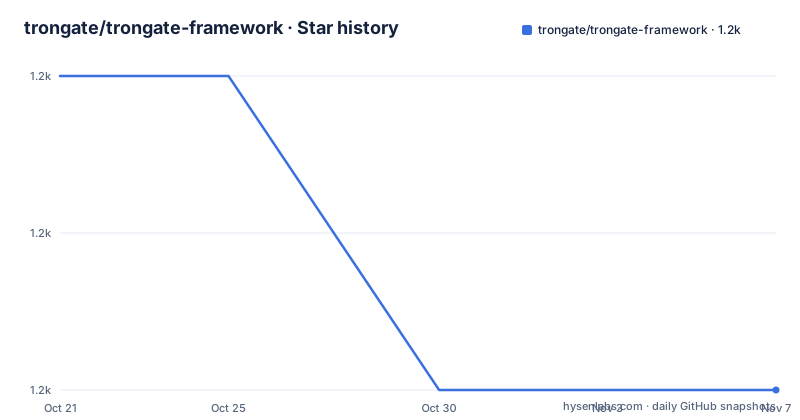
Star history
- trongate/trongate-framework1,150 ★ · -2
| Repository | 2026-10-21 | 2026-11-07 |
|---|---|---|
| trongate/trongate-framework | 1.2k | 1.2k |
-2 Stars in the last 17 days, measured from the daily GitHub snapshot. Compare with other projects
Editorial analysis
No Composer, and that is the design
Trongate is described as a zero-dependency PHP framework that includes CSS and JavaScript libraries, and the reasons the README gives for choosing it are high performance, stability focus, zero dependencies and no Composer.
That last one changes how you work with the framework. There is no vendor directory, no lock file, no autoloader configuration and no update command, because there is nothing to resolve. You download a release, extract it, and the framework is the thing that is running.
The reasoning is consistent with the rest of the design. A framework that ships its own CSS and JavaScript is making a choice about what a page looks like, and if that choice is baked in then the whole stack can be a single extracted directory with nothing else to install. The cost is that you are not choosing your own charting, your own date picker or your own component library, and that the framework's conventions are the ones you will be writing in.
The performance claim is backed by a link to benchmarks on the project site, which is worth reading before you take the word for it, since a framework that includes its own front end libraries is comparing against stacks that do not.
The requirements are short. PHP 8 or newer, the gd module loaded in php.ini for the image uploader, the intl module loaded in php.ini for the url_title() string helper, and MariaDB or MySQL.
Installation is a file copy and one config edit
The installation is described in a way that assumes no package manager, because there is none.
Download the latest release from the Trongate GitHub repository and extract it into the document root of your web server, for example C:\xampp\htdocs on Windows or /var/www/html/ on Linux. Then rename the extracted folder to something simple, like trongate. Then edit config/config.php and set BASE_URL to the URL where the framework will run, for example http://localhost/trongate/, making sure it ends with a forward slash.
That trailing slash is called out explicitly, and it is the kind of detail that costs an afternoon if you miss it, since the framework builds URLs from that constant and every link in the application is affected.
The requirement is PHP 8 with the gd and intl extensions, MariaDB or MySQL, and a web server that will run the extracted files. There is no build step, which is what makes the framework usable on a shared host where the only thing you can do is copy files into a directory and edit a configuration file.
The repository layout is small and matches that story. There is config/ for the configuration, engine/ for the framework itself, public/ for the web root, modules/ for the application, a .htaccess at the root, a CHANGELOG.md and the license file.
Apache needs nothing, Nginx needs a block
The web server section is short because one of the two cases is free.
For Apache, no changes are required, because the included .htaccess files handle routing. For Nginx, you have to add a location block to the server configuration in /etc/nginx/sites-available/default:
location /trongate/ {
    alias /var/www/html/trongate/public/;
    try_files $uri $uri/ /trongate/index.php;
    location ~ \.php$ {
        include snippets/fastcgi-php.conf;
        fastcgi_pass unix:/run/php/php8.4-fpm.sock;
        fastcgi_param SCRIPT_FILENAME $request_filename;
    }
}
The block does three things. The alias points the URL prefix at the public/ directory, which is the part of the framework the browser is allowed to see, and try_files sends anything that is not a real file to the front controller, which is how the routing rule in the next section works without every URL mapping to a directory.
The inner location passes PHP to the FastCGI socket, and the SCRIPT_FILENAME parameter is what tells PHP which file to run, with the path built from the request filename.
One thing to notice is that the socket path names a specific PHP version, php8.4-fpm.sock. That is a detail of one machine, and it is the kind of line that has to change on every host, which is a fair summary of what running a framework with no installer asks of you.
Create a database user before you create a database
The database section exists because of a specific Linux behaviour, and it is the kind of detail that separates a framework that has been used in production from one that has only been developed on a laptop.
On Linux, the root user often cannot connect over TCP, so the instruction is to create a dedicated database user:
sudo mariadb
CREATE USER 'trongate'@'localhost' IDENTIFIED BY 'secret';
GRANT ALL PRIVILEGES ON demo.* TO 'trongate'@'localhost';
FLUSH PRIVILEGES;
The values are placeholders to replace with your own credentials, and then you update config/database.php accordingly. The grant is scoped to a single database, which is the pattern to copy for every application you install this way.
The README also points at a pre-launch checklist before deploying to production, which is the right instinct for a framework where configuration lives in a file you edited by hand. The checklist is the place to verify the things the quick start does not cover, and given that there is no installer to complain to, it is the safety net.
One routing rule, and a controller that does the work
Trongate apps use modules containing controllers and optional views, and the routing is a single shape, {module}/{method}/{...params}, mapping to a controller method.
The worked example in the README is a complete cycle, and it is short enough to read in one pass. The module goes in modules/demo, with a note that module names must not include hyphens or the string _module. The database and table are created with a plain SQL script, and the controller extends Trongate:
class Demo extends Trongate {
    public function index(): void {
        $data['records'] = $this->db->get('id', 'demo_table', 'ASC', 'array');
        $this->templates->public($data);
    }

    public function create(): void {
        $this->validation->set_rules('name', 'name', 'required|min_length[3]');
        if ($this->validation->run() === true) {
            $this->db->insert([
                'name' => post('name', true)
            ], 'demo_table');
        }
        redirect('demo');
    }
}
The API is worth noticing, because it is an opinion rather than a necessity. The database is reached through $this->db with a get, an insert and a delete that take a table and a payload, and there is no query builder and no model class, so the shape of your data is the shape of your SQL. Validation goes through $this->validation with a pipe-separated rules string, and post() is called with a second argument that means the value is filtered, and the run() call also checks CSRF, which is the kind of default that is worth having on by default.
Views are plain PHP files in the module's views directory, and the templates->public() call wraps the default index view with an HTML template, so a view does not have to be a complete page.
Trongate MX, escaping, and the CSRF token
The view in the README shows the front end conventions, and they are the part of the framework a newcomer has to learn.
The markup uses Trongate CSS classes for the container, and the escaping is explicit, with the out() helper used to print a value from the database. The interactive parts are attributes rather than JavaScript, with mx-post naming the endpoint, mx-trigger naming the event and mx-target naming the element to replace, and the library itself is imported with a script tag pointing at js/trongate-mx.js.
So a delete button is a button with an mx-post attribute, and a form is a form with an mx-post attribute and an action of #, and the response replaces part of the page without a page load. That is the whole model, and it explains why the framework can ship its own JavaScript: there is a small, fixed set of attributes it interprets, and it does not need a general purpose front end framework to do it.
The form ends with form_close(), and the comment marks it as the CSRF token, which is the counterpart of the check that the validation run performs on the server side. The escaping of printed values and the CSRF token are both handled by helpers rather than by discipline, which is the right way round.
The result of the example is a module that reads from the database, displays the records, validates input, inserts and deletes, reachable at http://localhost/trongate/demo, and that is the whole tutorial in one file pair.
Where Trongate is the wrong choice
The first wrong-tool case is a team that needs a conventional PHP stack. Without Composer there is no dependency graph, no lock file and no way to pin a version of a third-party library, and for a team of more than a couple of people that is a real cost. The ecosystem expectations of a PHP project in 2026 are built around packages, and a framework that opts out of them is opting out of a large part of the ecosystem.
The second is a project that needs its own front end. The framework's CSS and JavaScript libraries are part of the deal, and a team with a design system built in React or Vue, or with a build step, will fight the included assets rather than use them. The mx- attribute model is small and pleasant, and it is also a different programming model from the one a modern front end team has in mind.
The third is an application with real data modelling needs. The database layer is a thin wrapper over queries with no models, no relations and no migrations in the examples, and a project with a schema that changes will want more than that.
There is also the operational consequence of the install model. Extracting a release into the document root means no way to roll back to a previous version without keeping a copy of it, and no way to see what changed between versions except by reading the CHANGELOG.md, which the repository does carry.
Editorial conclusion
Adopt Trongate if you want a small PHP framework you can drop into a shared host without a build step, and if you are comfortable owning the framework layer yourself rather than assembling one from packages. Do not adopt it for a large team that needs a conventional dependency manager, a standard ORM and a large talent pool, and do not expect the built-in front end libraries to match a modern component library. Before you deploy, work through the pre-launch checklist the README points at, set BASE_URL with its trailing slash, and give the database its own user rather than reusing a root account.
Frequently asked questions
What is Trongate?
A zero-dependency PHP framework that includes its own CSS and JavaScript libraries, requires PHP 8 or newer with the gd and intl modules, and uses MariaDB or MySQL. The README gives its reasons as high performance, stability focus, zero dependencies and no Composer.
How do I install Trongate?
Download the latest release from the GitHub repository, extract it into the web server document root, rename the folder to something simple like trongate, and edit config/config.php to set BASE_URL to the URL where the framework will run, making sure it ends with a forward slash.
How do I configure Nginx for Trongate?
Add a location block in the server configuration that aliases the URL prefix to the public/ directory and uses try_files to send unmatched requests to the front controller, with an inner location block passing PHP to the FastCGI socket and setting SCRIPT_FILENAME. Apache needs no changes because the included .htaccess files handle routing.
How does routing work in Trongate?
Apps use modules containing controllers and optional views, and the routing is {module}/{method}/{...params}, mapping to a controller method. Module names must not include hyphens or the string _module.
What licence is Trongate released under?
The MIT License, with details in the license.txt file at the repository root, and the README links the MIT license text. The most recent listed release is 1.3.3063 from 2025-05-23, and the last push was on 2026-09-27.
Official sources
Add this badge to your README
If you maintain this project, the badge below links readers to this analysis and shows its maintenance status from the daily GitHub snapshot. Paste the markdown into your README; add ?metric=license or ?metric=stars to the image URL for a different field.

[](https://hysenlabs.com/projects/trongate-trongate-framework)Star history chart for your README
[](https://hysenlabs.com/projects/trongate-trongate-framework)Was this useful?