tus-js-client's readme still describes version 4 while its default branch ships a 5.0.0 prerelease
A pure JavaScript client for the tus resumable upload protocol
At a glance
- What is it?
- tus/tus-js-client implements the tus resumable upload protocol for browsers, Node, React Native and Cordova. The manifest on the default branch carries 5.0.0-pre3 while the documentation paragraph still says the branch contains v4, the flagship example stops in the middle of a console call, the package ships four build outputs chosen by a conditional exports map, and the Makefile in the root is a vendored wrapper that reads the package scripts instead of holding any of them.
- Who is it for?
- Use this client when you need interrupted uploads to resume rather than restart, since that is the one thing the protocol exists for and the implementation covers the environments most web and mobile apps run in. Three things to check before you depend on it.
- Can I use it commercially?
- Yes. MIT is a permissive licence: you can use, modify and sell software built on it, as long as you keep its copyright and licence notices.
- Is it still maintained?
- Yes. The repository last received commits 2 days ago.
- What is it written in?
- Mainly JavaScript, according to GitHub's language statistics.
Answers come from the project's GitHub data, last synced on November 25, 2026, and from our analysis. They are not legal advice.
Star history
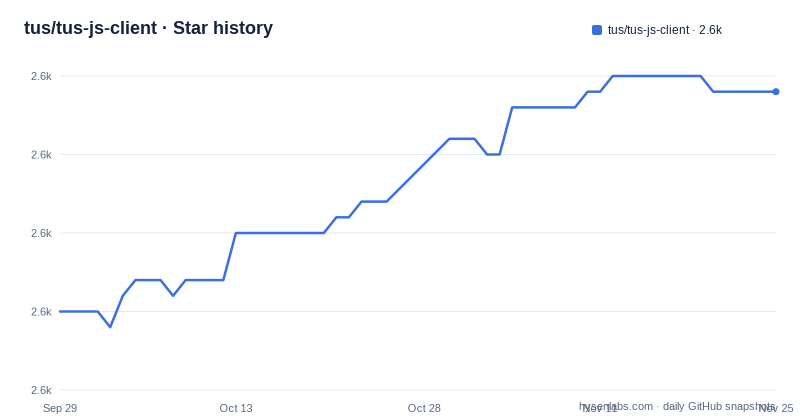
- tus/tus-js-client2,639 ★ · +14
| Repository | 2026-09-29 | 2026-11-25 |
|---|---|---|
| tus/tus-js-client | 2.6k | 2.6k |
14 Stars in the last 57 days, measured from the daily GitHub snapshot. Compare with other projects
Editorial analysis
The readme describes a different version than the branch it sits on
The version story is stated in the wrong order. The manifest on the default branch declares 5.0.0-pre3, and a prerelease of that name was published on the same day as the branch's last commit. The documentation paragraph, however, says this branch contains version 4, and then points readers who want the release before the breaking changes at the 3.1.3 tag. So the page describes a version line one major behind the code it ships with, and its advice about breaking changes points at a line two behind. The release list makes the gap concrete: the newest stable is 4.3.1 from January 2025, and the two 5.0.0 prereleases sit eight months apart, one in January 2026 and one at the end of September 2026. A reader has to assemble that picture themselves before deciding which line to install.
The flagship example stops in the middle of a console call
There is exactly one code block on the page, and it is the one a reader copies first. It wires a change listener on a file input, reads the selected file, constructs an upload with an endpoint, a retry delay array, metadata carrying the file name and type, an error handler and a progress handler. The progress handler computes a percentage with two decimal places and then calls a console logging function, and that call is where the block ends, mid statement. Everything before it is complete and correct, so the damage is confined to the last line, but a reader following the example literally gets a syntax error in the one place they were most likely to type along. The retry array beside it is the more informative half of the example: five delays, starting at zero and then three, five, ten and twenty seconds. Here is the block as it stands, ending where the page ends:
var upload = new tus.Upload(file, {
  endpoint: 'http://localhost:1080/files/',
  retryDelays: [0, 3000, 5000, 10000, 20000],
  metadata: {
    filename: file.name,
    filetype: file.type,
  },
  onError: function (error) {
    console.log('Failed because: ' + error)
  },
  onProgress: function (bytesUploaded, bytesTotal) {
    var percentage = ((bytesUploaded / bytesTotal) * 100).toFixed(2)
The usage document linked below it is where the finished version of this example lives, which makes it a documentation routing problem rather than a missing feature.
Four builds are shipped and a resolver picks between them
The manifest describes two module formats crossed with two environments, which is four files before you count the type declarations. Each has its own entry point under a common directory prefix, one for the browser and one for Node, one modern and one legacy. The package is marked as a module package, and the conditional exports map is what selects the right pair: a branch for when the resolver reports Node, and a default branch for everything else, each with separate entries for importing and for requiring. The older manifest fields point at the legacy build and its declarations, which is what a tool that ignores the exports map will resolve to. The manifest itself is also exported as a subpath, which is a small courtesy that lets tooling read the package's own version and metadata without reaching into the file system.
Node-only internals are exposed as named subpaths
Three subpaths in the exports map name pieces of the Node implementation directly: a stream file source, a file URL storage helper, and an HTTP stack. Each has the same four entries as the main export, with types and code for both module systems, which means they are first class parts of the package's surface rather than internal files that happen to be reachable. The reason they need naming is the same conditional map: a Node build is only selected when the resolver reports Node, so anything a Node consumer needs has to be reachable through a path that exists in both branches. The cost is that these names are part of the public API and therefore part of what a future major version has to keep or deliberately break, which is part of why the prerelease line has stayed in preview for months.
The Makefile is vendored third-party tooling, not project logic
The build file in the root carries a header explaining that it is not the project's: it credits its author, cites a year, names the upstream repository it came from, and asks that changes be proposed upstream instead of edited here. It works by reading the package manifest at parse time with a short inline script, listing every script name, turning the colons into dashes, and generating a Make target for each. So the Makefile contains no build steps of its own, and deleting it would lose nothing except the convenience of typing a dash instead of a colon. The wrapper explains its own reasoning in the header, arguing for keeping the scripts in the manifest because that file is more portable, that Makefiles and Windows are harder to mix, and that tab completion is better than what the package runner offers.
The command runner is decided by whichever lockfile exists
The same wrapper picks the package runner by testing for one lockfile before anything else runs. If a lockfile from the yarn client is present on disk, the targets invoke yarn; otherwise they invoke npm. That is a two line piece of logic with a real consequence: a contributor who installs with yarn creates the file that flips every Make target to yarn, and a contributor who deletes it flips them back. The repository ships the npm lockfile and no yarn lockfile, so the default path is npm. It is a tidy solution to a real portability problem and it also means the command in a contributor's terminal is not determined by the project but by the state of someone's working directory, which is worth knowing when a build behaves differently than the documentation suggests.
Pure JavaScript with three TypeScript configs and shipped declarations
The description says pure JavaScript, and the runtime artifact is JavaScript. The build configuration tells a longer story: three TypeScript configuration files in the root, one for the whole project and one each for the two module formats, and declarations shipped for every one of the four entry points. That combination is what lets a TypeScript consumer get types for whichever build the resolver picks, and it is why the library's own type declarations exist as files rather than as comments. It also means the readme's one line description is about what consumers load rather than about how the package is built. The rest of the page is documentation routing: installation and requirements, usage and examples, an API reference, contribution guidelines, and a separate document for common issues, all as separate files in the repository rather than as pages on a site.
Editorial conclusion
Use this client when you need interrupted uploads to resume rather than restart, since that is the one thing the protocol exists for and the implementation covers the environments most web and mobile apps run in. Three things to check before you depend on it. Decide which line you want, because the newest stable release and the newest prerelease are a year apart and the documentation does not make that obvious. Read the installation document rather than the readme, since the version guidance there is the part that has aged. And if you run it outside a browser, plan for the module resolution details, because the Node build is only reachable through conditional exports and a few of its internals are exposed under explicit subpaths.
Frequently asked questions
What is tus-js-client?
A client for the tus resumable upload protocol, usable in browsers, Node.js, React Native and Apache Cordova applications, implementing protocol version 1.0.0. It handles the upload lifecycle, retry delays, metadata and progress reporting.
What does the tus protocol do?
It makes file uploads resumable. An upload can be interrupted at any moment and resumed without sending the earlier data again, whether the interruption is a deliberate pause or the result of a network problem or a server outage.
Which version of tus-js-client is current?
The manifest on the default branch carries 5.0.0-pre3, published 2026-09-30. The newest stable is v4.3.1 from 2025-01-16, and the readme still says the branch contains version 4 while pointing readers at the 3.1.3 tag for earlier breaking changes.
How does tus-js-client retry a failed upload?
You pass an array of delays to the upload constructor, and the example uses five: immediately, then three, five, ten and twenty seconds. An error handler is passed the same way, alongside a progress handler that receives bytes uploaded and total.
Does tus-js-client work in Node.js and React Native?
Yes. The package ships separate builds for browsers and for Node and selects between them with a conditional exports map, with type declarations for each, and the readme names browsers, Node.js, React Native and Apache Cordova as supported environments.
Where is the tus-js-client documentation?
In the repository, split into separate documents: installation and requirements, usage and examples, an API reference, the contribution guidelines, and a document covering common issues.
Official sources
Add this badge to your README
If you maintain this project, the badge below links readers to this analysis and shows its maintenance status from the daily GitHub snapshot. Paste the markdown into your README; add ?metric=license or ?metric=stars to the image URL for a different field.

[](https://hysenlabs.com/projects/tus-tus-js-client)Star history chart for your README
[](https://hysenlabs.com/projects/tus-tus-js-client)Was this useful?