The manifest says 4.3.5 and the newest release tag says 4.0.20
The most no-nonsense, locally or API-hosted AI code completion plugin for Visual Studio Code - like GitHub Copilot but 100% free.
At a glance
- What is it?
- twinnydotdev/twinny is a VS Code extension for code completion, chat, inline edit and code review against a model server you choose. It is MIT licensed and sends no telemetry, and the team gateway bolted onto it is neither free nor telemetry-free once you switch a feature on.
- Who is it for?
- twinny suits a developer who wants completion, chat and review without handing their code to a hosted vendor, and who already runs a model server or is willing to. Three things to check before you point a team at it.
- Can I use it commercially?
- Yes. MIT is a permissive licence: you can use, modify and sell software built on it, as long as you keep its copyright and licence notices.
- Is it still maintained?
- Yes. The repository last received commits 3 days ago.
- What is it written in?
- Mainly TypeScript, according to GitHub's language statistics.
Answers come from the project's GitHub data, last synced on November 15, 2026, and from our analysis. They are not legal advice.
Star history
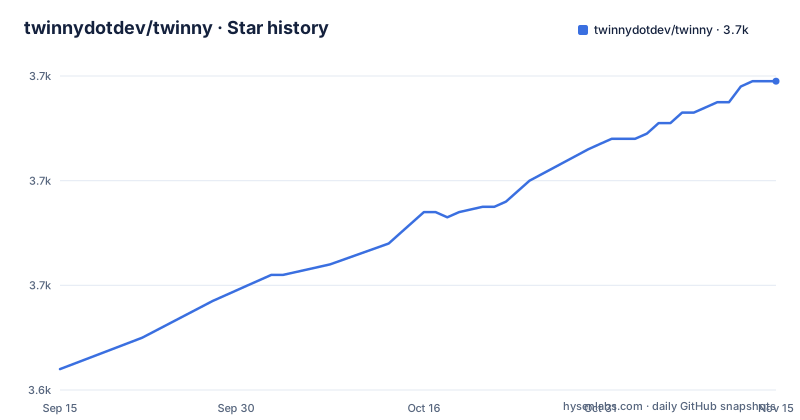
- twinnydotdev/twinny3,699 ★ · +55
| Repository | 2026-09-15 | 2026-11-15 |
|---|---|---|
| twinnydotdev/twinny | 3.6k | 3.7k |
55 Stars in the last 61 days, measured from the daily GitHub snapshot. Compare with other projects
Editorial analysis
The extension version and the release tags have drifted apart
The version in the package manifest is 4.3.5. The newest published release tag is v4.0.20, dated 2026-09-22, and the one before it is v4.0.3 from 2026-09-08. So the manifest sits ahead of any tag, and the tag sequence itself is irregular, jumping seventeen patch numbers in two weeks before a version that has never been tagged caught up and passed it. A CHANGELOG.md is linked from the header and the repository root carries a What's new page, so the history exists; what does not line up is the version number itself. If you are pinning the extension, pin deliberately rather than assuming the manifest version has a corresponding release. Two facts about the packaging are unambiguous and consistent between the docs and the manifest: the extension requires VS Code 1.93 or newer, written as ^1.93.0 in the engines field, and it is published under the MIT license with a single author and publisher.
Free for five seats, licensed after that, and a description that says free
The repository description calls the extension 100% free, and the extension itself is MIT. The team layer is a different commercial proposition, and the boundary is worth drawing precisely because the pricing sits in the same README. The gateway, called twinny-server, is free for five developers forever. Beyond that a licence bought by card adds seats and switches on the policy, recording and plugins features, and the headline price quoted is $6 a seat a month after the first five. The setup is one command:
npx twinny-server quickstartThat command finds your model server, writes a configuration, makes an admin key and starts serving, after which the admin page sets team default models and issues invite links. A 30-day trial token carrying every feature is issued by email with no card required. So the extension costs nothing forever, and the coordination features that make the extension usable by a team are the part that becomes paid at six seats.
Agent mode can be told to stop asking before it runs a command
The experimental agent mode is the part of this extension with the widest reach, and its consent model has two settings rather than one. The mode is reached from a switch in the chat or with Shift+Tab, and it lets the model read, search and edit files and run commands in the workspace, with each step shown in the reply. Commands ask first unless you say otherwise, which means there is a setting that removes the per-command prompt. The visible step list is the only audit trail offered, and it appears inside the conversation rather than in a separate log. Two adjacent features widen the same boundary. The terminal tool writes a command from a description, shows it before it runs, and on failure locates the file and line and offers a correction. Fix with twinny offers the same repair from any diagnostic. The scope is the workspace and the shell you already have, so this is a consent-configuration question rather than a privilege-escalation one, but it is worth deciding which of the two settings you want before you open a large repository.
The workspace index is shared across the team, so one developer's files can reach another's chat
The retrieval layer is local and reranked. The workspace index is described as hybrid keyword and vector search over the workspace, reranked before it reaches the prompt and updated on save, with sources listed under replies. For a single user that is a private index of their own checkout. Under a licence it becomes one shared context index for every developer's chat, which is listed among the plugin features. That is the single most consequential line in the README for anyone evaluating this for a team, because a shared index does not partition by author: a file opened by one developer can be retrieved as context for a prompt typed by another, and the sources list will show it. The completions context is narrower and stays local, drawn from open files, imports, the language server and recent edits. Chat attachments are broader still and are chosen per request with an @ symbol, covering files, symbols, the problems panel, the git diff, the terminal, and a search of the workspace index.
Recording is a paid feature that stores prompts and replies on the gateway
The privacy claims are specific and, read carefully, they hold for the default configuration. The extension sends no telemetry, requires no sign-in, and stores keys as hashes rather than plaintext, with usage, failures and tokens tracked per person and per model and explicitly not the content. Admin changes go into a hash-chained audit log, admin keys can be read-only, and licence validation is described as happening locally with the gateway never phoning home. What changes when you buy a licence is that recording exists at all: keeping prompts and replies on the gateway, disclosed to every developer and exportable as training data. That is the design's deliberate escape hatch for building a dataset from team usage, and it is off until paid for. Sign-in also arrives with the team layer rather than the extension, through single sign-on against any OpenID Connect provider, alongside invite links and per-developer keys that can be revoked live.
A VS Code extension that also installs a command named twinny-node
The manifest does more than register an extension. It declares a binary:
  "bin": {
    "twinny-node": "./out/node/cli.js"
  },
So installing the extension from the Marketplace also puts a twinny-node command on your path, which is how the gateway side gets driven without a separate global install. The entry point is shared, with both main and browser set to ./out/index.js, so the desktop and web builds start from the same file. Activation is not lazy either. The activation events are onStartupFinished and onUri, meaning the extension finishes activating on every window start rather than waiting for you to open a completion, chat, or a file it recognises. For an extension whose selling point is staying inside your network, that is the behaviour to be aware of: it is resident from startup, though it sends nothing until you use a feature. The manifest also carries twenty search keywords and nine categories, including Education, Debuggers, and Linters, which are broader than a completion tool needs.
The gateway can pool a developer's laptop GPU and post reviews back to a forge
Two team features move the blast radius outside your own network, and both sit behind the licence. The first lets a developer share their own computer as compute: they flip Share this computer and their local server serves the whole team through the gateway, with no port to open. So a laptop GPU becomes shared infrastructure, which means a developer who closes a lid or loses Wi-Fi is now a factor in everyone else's completions, and the person who owns the machine may not be the person who approved the configuration running on it. The second is the plugins feature, which lists pull requests and issues from GitHub, GitLab, Gitea and Bitbucket on the admin page, reviews them with your own models, posts the review back to the host, and shares the results with the developers you choose. Code review otherwise stays read-only, covering the working tree, a branch against its base, or a pull request, and commit messages are generated from the staged diff. Writing back to a forge is the difference.
Editorial conclusion
twinny suits a developer who wants completion, chat and review without handing their code to a hosted vendor, and who already runs a model server or is willing to. Three things to check before you point a team at it. Read the licence terms for the gateway rather than the extension, because the extension being MIT and free forever says nothing about the six-dollar seat that unlocks policy, recording and plugins. Decide what happens to your shared context index, since one index serving every developer's chat is not partitioned by author. And confirm whether the code review plugin should be allowed to post back to GitHub, GitLab, Gitea or Bitbucket, because that turns a read-only review into a write against a repository you share.
Frequently asked questions
Is twinny available for Visual Studio Code?
Yes. twinny is a Visual Studio Code extension, installed from the Marketplace, and it requires VS Code 1.93 or newer, declared in the manifest as ^1.93.0. It activates on startup finished and on opening a URI, so it is resident from launch.
Which model servers can twinny connect to?
It can use a server on your own machine, including Ollama, LM Studio, llama.cpp, QVAC, Oobabooga, LiteLLM, Open WebUI, or any OpenAI-compatible server, several of which are found on their usual ports at first start. It can also pair with another of your computers over an encrypted peer-to-peer link, use a hosted API, or connect to a team gateway.
Does twinny send telemetry or require an account?
The extension sends no telemetry and requires no sign-in, and everything runs against a server you control. Team keys are stored as hashes, and usage, failures and tokens are tracked per person and per model but never the content. Keeping prompts and replies is instead a paid recording feature.
Is the twinny team gateway free?
The gateway is free for five developers forever, and a licence bought by card adds seats and switches on the policy, recording and plugins features at $6 a seat a month after the first five. A 30-day trial token with every feature is issued by email with no card required.
Official sources
Add this badge to your README
If you maintain this project, the badge below links readers to this analysis and shows its maintenance status from the daily GitHub snapshot. Paste the markdown into your README; add ?metric=license or ?metric=stars to the image URL for a different field.

[](https://hysenlabs.com/projects/twinnydotdev-twinny)Star history chart for your README
[](https://hysenlabs.com/projects/twinnydotdev-twinny)Was this useful?