Swift-Agent-Skills is a list where the trust decision stays with the reader
A curated directory of open-source AI agent skills for Swift and Apple platform development.
At a glance
- What is it?
- twostraws/Swift-Agent-Skills is a README of links to community-maintained agent skills for Swift and Apple platform work, grouped into nineteen topic sections. The repository ships no code, no installer and no per-skill licence or version, and it states plainly that being listed is not an endorsement.
- Who is it for?
- Use this repository as a map, not as a dependency. It costs nothing to read and it gives you a topic index into work other people have already published, but every entry is a separate repository you have to visit, read and judge yourself, and the directory states in as many words that listing is not endorsement.
- Can I use it commercially?
- Yes. MIT is a permissive licence: you can use, modify and sell software built on it, as long as you keep its copyright and licence notices.
- Is it still maintained?
- Yes. The repository last received commits 71 days ago.
- What is it written in?
- GitHub does not report a main language for this repository.
Answers come from the project's GitHub data, last synced on November 14, 2026, and from our analysis. They are not legal advice.
Star history
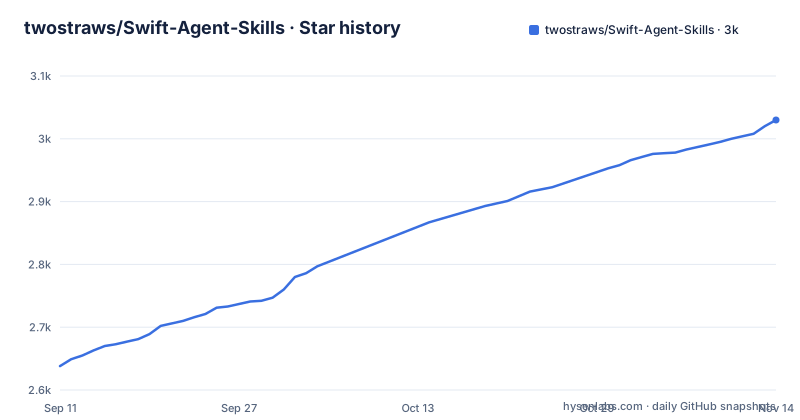
- twostraws/Swift-Agent-Skills3,030 ★ · +392
| Repository | 2026-09-11 | 2026-11-14 |
|---|---|---|
| twostraws/Swift-Agent-Skills | 2.6k | 3k |
392 Stars in the last 64 days, measured from the daily GitHub snapshot. Compare with other projects
Editorial analysis
The repository holds a list and nothing else
The top level of this repository is .gitignore, CODE_OF_CONDUCT.md, LICENSE, README.md and an assets directory. There is no source directory, no package manifest, no build file and no test suite, and the language the repository is filed under is not recorded at all. There are no releases either.
The README says what it is in one sentence: this repository contains links to community-maintained agent skills across a range of topics, organized by framework and area. Every entry is a skill name, a repository URL and an author, and following a link takes you to somebody else's project. The listed tools it is meant for are Claude Code, Codex, Cursor, Windsurf and other AI coding tools, with SwiftUI, Swift concurrency and SwiftData named as the areas the skills cover.
So the unit of value here is judgement, not code. What you get is a topic index maintained by one person, pointing at work maintained by many, and the only thing this repository itself can guarantee is that a link was there on the day it was written.
How to install a skill is a video link, not a README section
There is no installation section. The single pointer to getting started is a sentence wrapped around a link: learn how to install and use agent skills with Xcode, Claude Code, Codex, and more, and that link goes to a YouTube video.
So the mechanics of adding one of these skills to a project are not written down in the repository at all. No directory layout is given for where a skill is supposed to live, no command copies a skill into a project, no configuration key registers one, and there is no example project showing a skill in use. The tools named in the README are Claude Code, Codex, Cursor and Windsurf, four different clients, and the instructions that would apply to all four are the ones in the video.
The page also opens with an empty paragraph block where a badge or image used to sit, and the safety heading carries warning symbols. Those are cosmetic, but they line up with the larger pattern: this is a hand-maintained index page, so what it can lose between edits is exactly the kind of detail that changes without anyone noticing.
The safety note hands the trust decision to the reader
The most direct paragraph on the page is the one about not trusting it. It asks you, before installing a third party agent skill, to make sure you have read it thoroughly and that you trust the author, and then says the important part: being listed here is not an endorsement, and you need to exercise your own judgement.
The rest of the note adds that the listed skills are open source, so take the time to read through them and check that they benefit you before using them, and that you can consider creating your own skill from them while respecting the licences.
That last sentence is where the licensing gap sits. The MIT licence in this repository covers this list. Each skill listed is a separate project with its own licence, and the entries carry no licence field, no version, no date and no commit reference, so nothing in the list lets you check which version you are about to install or under what terms. The page tells you to read the licences yourself, which is the correct instruction and also an admission that the list cannot do it for you.
Nineteen sections, seventeen entries in the table of contents
The table of contents names seventeen topic groups: SwiftUI, SwiftData, Swift Concurrency, Swift Testing, Swift Language, Accessibility, App Intents, App Store, Architecture, Background Execution, Core Data, Focus Management, Observability, Performance, Security, Tool, User Interface and Widgets. A second group underneath covers AGENTS.md files, more links to read and contributing.
The body of the page carries one more section than that list does. Codebase Audit Skills sits between Security Skills and Tool Skills with a single entry in it, an iOS code audit skill by Chad Etzel, and no line in the table of contents points to it. Counting headings on the page gives nineteen topic sections against seventeen links, so a reader navigating by the table of contents misses one section entirely.
The categories themselves are Apple-framework shaped rather than general Swift. SwiftData, App Intents, Widgets, Core Data and Background Execution are all platform frameworks, and the grouping is by framework or area rather than by skill type, which means a skill that spans two of them has to pick one.
One repository supplies five entries and two titles appear twice
The list is organised by topic, not by repository, which shows up in the URLs. Five entries all point at Dimillian/Skills by Thomas Ricouard: SwiftUI UI Patterns, SwiftUI View Refactor, Swift Concurrency Expert, App Store Changelog and SwiftUI Performance Audit. One repository, five different skills, spread across three sections of the page.
That structure also produces a duplicate. Swift Concurrency Expert appears twice, once credited to Thomas Ricouard and once to Antoine van der Lee, who has his own repository for it. Nothing in the list says which one to prefer, and both carry the same skill name, so picking between them is another judgement call the directory leaves open.
Two entries are not repository roots at all. App Store Review is a path into a subdirectory of 3paws-ai/mobile-ai-skills, at skills/appstore-review, credited to Dann Beauregard, and Writing for Interfaces Skill is a path into andrewgleave/skills at writing-for-interfaces. Both are the only entries that deep link into someone else's tree, and both are also the entries where the credited author is not the owner of the repository being linked.
A few authors supply most of the entries
Counting the visible entries by author shows a directory carried by a handful of people. Thomas Ricouard has five. Paul Hudson, whose handle is twostraws and who maintains this directory, lists four: SwiftUI Pro, SwiftData Pro, Swift Concurrency Pro and Swift Testing Pro. Anton Novoselov has four as well, spread across four different sections with App Intents Skill, Background Execution Skill, Observability Skill and Swift FormatStyle Skill. Antoine van der Lee has three. Most other authors appear once.
The naming conventions differ per author rather than following a taxonomy. Hudson's four all carry a Pro suffix, van der Lee's three all carry Expert, and Novoselov's four carry no suffix at all and are titled as plain skills. Two of the entries break even their author's pattern, since Swift Testing Expert and Swift Testing Agent Skill come from two different authors with different suffixes for the same framework.
So the titles tell you about the author's branding, not about what a skill does. The section heading is the only reliable signal about scope.
The topics run past code into App Store operations
The App Store section is the clearest sign that this index is not only about writing Swift. Its four entries are a command line tool for App Store Connect by Rudrank Riyam, a changelog tool by Thomas Ricouard, an app store optimisation skill by Tim Broddin, and an app store review skill by Dann Beauregard. Three of those four concern getting an app published and ranked rather than how it is built.
Elsewhere the list reaches into tooling and process as well: an iOS Simulator skill and a Figma to SwiftUI skill under tools, a FocusEngine skill under focus management, an observability skill, a Swift security expert skill, a SwiftUI performance audit skill and an iOS code audit skill. The common thread is Apple platform development, but the work ranges from refactoring a view to reviewing an app against store guidelines.
Nothing in the list states which of these skills need a paid Apple developer account, which need a running simulator, or which only produce guidance text, so the practical cost of any single entry stays unknown until you open it.
Editorial conclusion
Use this repository as a map, not as a dependency. It costs nothing to read and it gives you a topic index into work other people have already published, but every entry is a separate repository you have to visit, read and judge yourself, and the directory states in as many words that listing is not endorsement. Before you install anything from it, open the skill, read it, check its licence, and remember that the MIT licence on this repository covers the list rather than the skills it points at. If you need a pinned, licensed, versioned component in your build, this is the wrong shape of tool.
Frequently asked questions
What is twostraws/Swift-Agent-Skills?
It is a curated collection of links to community-maintained agent skills for Swift and Apple platform development, organized by framework and area, for use with Claude Code, Codex, Cursor, Windsurf and other AI coding tools. The repository itself contains only README.md, LICENSE, CODE_OF_CONDUCT.md, an assets directory and .gitignore.
How do I install a skill from Swift-Agent-Skills?
The repository contains no installation command or section. Its only pointer is a link to a video described as learning how to install and use agent skills with Xcode, Claude Code and Codex, and each listed entry links to a separate repository you visit yourself.
Does being listed in Swift-Agent-Skills mean a skill is recommended?
No. The safety note says being listed is not an endorsement, asks you to read a third party skill thoroughly and trust the author, and tells you to exercise your own judgement before using one.
What licence applies to the skills listed in Swift-Agent-Skills?
The directory repository is MIT, which covers the list itself. Each linked skill is a separate open source project with its own licence, and entries carry no licence, version or date, so the page asks you to read them yourself and to respect the licences if you create your own skill from them.
How is Swift-Agent-Skills organised?
By topic, across seventeen categories in the table of contents and nineteen section headings on the page, including one called Codebase Audit Skills that the table of contents omits. Further sections cover AGENTS.md files, more links to read and contributing.
Who maintains the skills listed in Swift-Agent-Skills?
They are community-maintained, and the directory is curated by Paul Hudson, whose handle is twostraws and who also authors four of the listed skills. Thomas Ricouard supplies five listed entries and Anton Novoselov four, with most other authors appearing once.
Official sources
Add this badge to your README
If you maintain this project, the badge below links readers to this analysis and shows its maintenance status from the daily GitHub snapshot. Paste the markdown into your README; add ?metric=license or ?metric=stars to the image URL for a different field.

[](https://hysenlabs.com/projects/twostraws-swift-agent-skills)Star history chart for your README
[](https://hysenlabs.com/projects/twostraws-swift-agent-skills)Was this useful?