docusaurus-theme-search-typesense: the Algolia fork Typesense ships
A fork of the awesome @docusaurus/theme-search-algolia library customized to work with Typesense
At a glance
- What is it?
- A Docusaurus search component that started life as a fork of the Algolia search theme and now depends on Typesense, with a compatibility table that pins Docusaurus and Node versions per release line, and a build script whose test entry is a stub that prints No Tests Found.
- Who is it for?
- This package fits a documentation team that has decided to run its own search rather than a hosted index, and that can accept owning the index as part of the deal. Three things to check before upgrading anything.
- Can I use it commercially?
- Yes. MIT is a permissive licence: you can use, modify and sell software built on it, as long as you keep its copyright and licence notices.
- Is it still maintained?
- Yes. The repository last received commits 80 days ago.
- What is it written in?
- Mainly TypeScript, according to GitHub's language statistics.
Answers come from the project's GitHub data, last synced on November 14, 2026, and from our analysis. They are not legal advice.
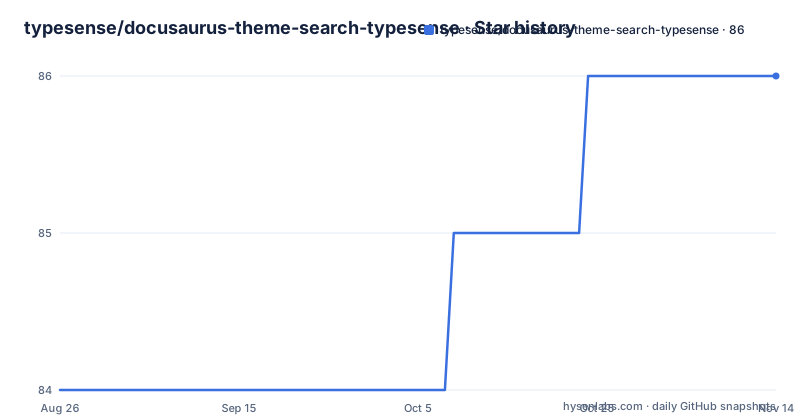
Star history
- typesense/docusaurus-theme-search-typesense86 ★ · +2
| Repository | 2026-08-26 | 2026-11-14 |
|---|---|---|
| typesense/docusaurus-theme-search-typesense | 84 | 86 |
2 Stars in the last 80 days, measured from the daily GitHub snapshot. Compare with other projects
Editorial analysis
A fork of the Algolia theme, with the Algolia helper still in it
The repository describes itself as a fork of the Algolia search theme for Docusaurus, customized to work with Typesense. That origin is still visible in the dependency list, which is the fastest way to understand the shape of the code. Alongside typesense-docsearch-react at ^3.4.1 and typesense-instantsearch-adapter there sits algoliasearch-helper at ^3.13.3, left over from the parent package. The rest of the dependencies are Docusaurus itself, the core, logger, plugin-content-docs, theme-common, theme-translations, utils and utils-validation, all at ^3.9.0, plus the usual utility set: clsx, eta for templating, fs-extra, lodash and tslib. So the component is a Docusaurus theme plugin that talks to a Typesense index through Typesense's own client packages rather than to Algolia.
Compatibility is pinned per release line, not per major
The compatibility table is the most useful thing in a package like this, because the fork has to move when Docusaurus moves. Version 0.27.x supports Docusaurus from 3.9.0 up to but not including 4.0.0, and needs Node 20 or newer. Line 0.26.x targets the 3.9.x series with the same Node 20 floor. Line 0.25.x targets 3.8.x and is the last line that accepts Node 18, while 0.24.x targets 3.7.x on Node 18 as well. Two consequences follow. A Docusaurus 4 upgrade is not something this package can absorb today, since no line covers it. And a team still on Node 18 is capped at the 0.25.x line, which also means an older Docusaurus, so the two constraints have to be solved together rather than one at a time.
The build is tsc, a copy step and prettier, and the test script is a stub
The npm scripts say how the package is produced and what is not covered.
"build": "tsc --build && node copyUntypedFiles.mjs && prettier --config .prettierrc --write \"src/**/*.{js,ts,tsx,css}\"",
"watch": "run-p -c copy:watch build:watch",
"test": "echo 'No Tests Found'",
"prepare": "npm run build"
Three things follow from those lines. The TypeScript compiler runs in project mode with tsc --build, which is why the repository carries tsconfig.json alongside tsconfig.client.json and tsconfig.server.json rather than one file. A separate Node script, copyUntypedFiles.mjs, runs after the compiler and before formatting, which is the step that moves files TypeScript does not emit. And the test script echoes a message instead of running anything, so there is no automated coverage behind this component.
Client and server are separate TypeScript projects and separate exports
The three tsconfig files are not tidiness. The package publishes two entry points through its exports map, and each points somewhere different. The subpath export serves the built client bundle from lib/client/index.js with its types at lib/client/index.d.ts. The root export serves the plugin itself from lib/index.js, and its types come from src/theme-search-typesense.d.ts, which points into the source tree rather than into the build output. The top level types field names the same source declaration file, and main is lib/index.js. Both lib and src are listed in the files array, so the published tarball carries the build output and the sources together. For a Docusaurus plugin, that split is what lets the browser bundle and the server side build be compiled and consumed independently.
CSS is marked as a side effect, and the published files are lib and src
The packaging metadata is short enough to read in full and says what a consumer gets. The name is docusaurus-theme-search-typesense at version 0.27.0, the description is a Typesense search component for Docusaurus, and the licence field is MIT. publishConfig sets access to public. The sideEffects array lists a single pattern, *.css, which tells a bundler not to drop the stylesheet when nothing imports it by name, the usual arrangement for a theme component that injects CSS as a side effect of being loaded. A .npmignore sits at the root next to the files array, and the repository tracks a yarn.lock while the scripts themselves call npm, so the published package is built with npm run but the lock file in the tree is yarn's.
Setup is two steps, and the README holds no install command
There is no npm or yarn install line anywhere in this README, and the reason is that installing the plugin is only the second half of the process. The documentation link goes to the DocSearch guide at typesense.org/docs/guide/docsearch.html, which the README describes as step by step instructions for setting up the DocSearch scraper first and then installing this plugin. That same URL is the repository homepage. The order matters, because a search component pointed at an index that nobody has scraped returns nothing, so the scraper has to exist before the theme can be trusted. It also means the configuration keys for the Typesense host, port and API key are documented on the Typesense side rather than here, and this README stays a compatibility table, a fork note and a link.
Where Typesense sits: an open source alternative to Algolia
The package inherits its upstream project's pitch, and it is worth reading as positioning rather than as benchmark. Typesense is described as an open source search engine that is simple to use, run and scale, with clean APIs and documentation. The README frames it in two directions at once: an open source alternative to Algolia, and an easier to use, batteries included alternative to ElasticSearch. That framing is the reason this fork exists. A documentation team that wants self hosted search and does not want to operate an ElasticSearch cluster can put Typesense behind a Docusaurus site using this theme, and the Algolia heritage shows up mainly as the retained helper dependency and the shared package structure.
Releases move in step with Docusaurus, and support runs through issues
The release history follows the compatibility table rather than the other way round. Version 0.27.0 was published on 26 August 2026, the same day as the last recorded push, which is where the plugin stands now. The line before it, 0.26.0, dates from 10 November 2025 and was preceded by a 0.26.0-0 prerelease on 7 November 2025, so the prerelease and the release landed three days apart. The default branch is master rather than main, the licence is MIT with LICENSE at the root, and the help section has one instruction: open a GitHub issue with the question or the problem, and the maintainers will try to help. There is no chat channel, no forum and no support contract listed, which is worth knowing before you depend on it.
Editorial conclusion
This package fits a documentation team that has decided to run its own search rather than a hosted index, and that can accept owning the index as part of the deal. Three things to check before upgrading anything. The compatibility table is per release line, so a Docusaurus version outside the range for your line means moving to a matching plugin release rather than patching around it, and Node 18 support stops at 0.25.x. The README carries no install command of its own, because the documented path is a two step one: set up the DocSearch scraper first, then install the plugin, both explained in the Typesense guide. And the test script prints No Tests Found, so the safety net on a search component is the scraper setup and a manual pass over your own index rather than a test suite. Version 0.27.0 shipped on 26 August 2026, the licence is MIT, and support questions go to GitHub issues.
Frequently asked questions
What is Typesense used for?
It is an open source search engine, described as simple to use, run and scale, with clean APIs and documentation. This package is its Docusaurus search component, a fork of the Algolia search theme that puts a Typesense index behind the search box of a documentation site.
Is Typesense free to use?
The README describes Typesense as an open source search engine and positions it as an open source alternative to Algolia. This component itself is distributed under the MIT License, with LICENSE at the repository root and the MIT field in package.json.
Which Docusaurus versions does docusaurus-theme-search-typesense support?
Line 0.27.x supports Docusaurus from 3.9.0 up to but not including 4.0.0 with Node 20 or newer, 0.26.x targets the 3.9.x series, 0.25.x targets 3.8.x on Node 18 or newer, and 0.24.x targets 3.7.x on Node 18.
How do I add search to a Docusaurus site with this plugin?
In two steps, both documented in the Typesense DocSearch guide the README links to: set up the DocSearch scraper first, then install this plugin. The README carries no install command of its own, and the configuration for the Typesense host and API key lives in that guide.
Does docusaurus-theme-search-typesense have tests?
No. The test script in package.json is echo 'No Tests Found'. The build script runs tsc --build, then node copyUntypedFiles.mjs, then Prettier over the src directory, and watch runs the copy and build watchers together.
Official sources
Add this badge to your README
If you maintain this project, the badge below links readers to this analysis and shows its maintenance status from the daily GitHub snapshot. Paste the markdown into your README; add ?metric=license or ?metric=stars to the image URL for a different field.

[](https://hysenlabs.com/projects/typesense-docusaurus-theme-search-typesense)Star history chart for your README
[](https://hysenlabs.com/projects/typesense-docusaurus-theme-search-typesense)Was this useful?