Needle generates Swift dependency injection so a missing scope fails the compiler
Compile-time safe Swift dependency injection framework
At a glance
- What is it?
- Needle is Uber's dependency injection framework for Swift, where scopes are Swift classes and a separate executable emits the wiring that the compiler then type checks. It suits iOS application teams that want a bad edge to fail at build time, at the price of a code generation step and a generator binary tracked in the repository.
- Who is it for?
- Needle fits iOS application teams that already write layered object graphs and want a missing dependency to surface as a compiler error instead of a runtime nil, particularly where Cleanse or Swinject left them hunting registrations. It does not fit a small app, a library, or anything outside an app target: the generator, the committed binary in Generator/bin/ and three version placeholders add machinery a small project never uses.
- Can I use it commercially?
- Yes. Apache-2.0 is a permissive licence: you can use, modify and sell software built on it, as long as you keep its copyright and licence notices.
- Is it still maintained?
- Yes. The repository last received commits 177 days ago.
- What is it written in?
- Mainly Swift, according to GitHub's language statistics.
Answers come from the project's GitHub data, last synced on October 23, 2026, and from our analysis. They are not legal advice.
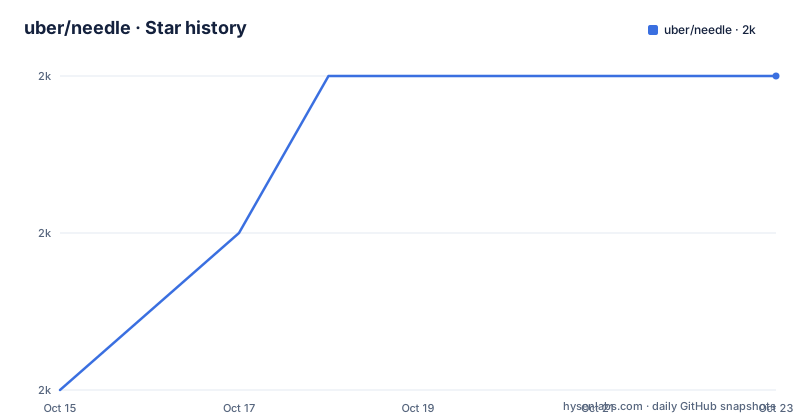
Star history
- uber/needle2,018 ★ · +2
| Repository | 2026-10-15 | 2026-10-23 |
|---|---|---|
| uber/needle | 2k | 2k |
2 Stars in the last 8 days, measured from the daily GitHub snapshot. Compare with other projects
Editorial analysis
Compile-time safety comes from a generator, not a container
Needle exists because a runtime graph is assembled when an object is requested, so a missing edge shows up at the call site instead of where it was declared. It ships in two pieces: the NeedleFoundation framework an app links against, and a separate executable that reads sources and writes the wiring between scopes. A scope is not a table of string keys looked up at runtime. It is a Swift class conforming to `Component<MyDependency>`, and the generator emits initialisers that the compiler type checks, so a dependency nobody provides arrives as a build error rather than as a nil discovered later. Three goals are stated for the system: injection code that is safe at compile time, generator speed on codebases with millions of lines, and compatibility with every iOS application architecture, RIBs and MVx among them. The repository settings carry no homepage, and the build badge still points at travis-ci.com rather than a GitHub Actions workflow.
A protocol for what a scope borrows, a class for what it adds
Each scope declares a protocol listing what it inherits from ancestors, and the component class takes that protocol as the generic parameter of `Component`. The link between protocol and class is Swift generics, not an annotation or a comment, so renaming a dependency breaks the build in the declaration that names it. A child scope is never resolved; the parent builds it inside a computed property, which fixes the order in which scopes appear. In the snippets below, `hotChocolate` is new to this scope and reaches descendants through their own dependency protocols, while chocolate and milk are borrowed from above. The generator reads this shape and writes the plumbing around it, so the declarations are the part a person maintains.
/// This protocol encapsulates the dependencies acquired from ancestor scopes.
protocol MyDependency: Dependency {
    /// These are objects obtained from ancestor scopes, not newly introduced at this scope.
    var chocolate: Food { get }
    var milk: Food { get }
}class MyComponent: Component<MyDependency> {
/// A new object, hotChocolate, is added to the dependency graph. Child scope(s) can then
/// acquire this via their dependency protocol(s).
var hotChocolate: Drink {
return HotChocolate(dependency.chocolate, dependency.milk)
}
/// A child scope is always instantiated by its parent(s) scope(s).
var myChildComponent: MyChildComponent {
return MyChildComponent(parent: self)
}
}Installing NeedleFoundation through Carthage, SPM or CocoaPods
Both parts are needed before any DI code compiles, and they travel by different routes. With Carthage you add a git requirement on the needle repository and supply the version yourself, because the README leaves a token where the number belongs.
github "https://github.com/uber/needle.git" ~> VERSION_OF_NEEDLEUnder Swift Package Manager the same repository becomes a package dependency, and your target pulls the framework in by name.
dependencies: [
    .package(url: "https://github.com/uber/needle.git", .upToNextMajor(from: "VERSION_NUMBER")),
],
targets: [
    .target(
        name: "YOUR_MODULE",
        dependencies: [
            "NeedleFoundation",
        ]),
],
CocoaPods users take the `NeedleFoundation` pod described by `NeedleFoundation.podspec`. The generator is a separate problem: a Carthage checkout already holds the executable for your framework version at `Carthage/Checkouts/needle/Generator/bin/needle`, and the README states that any project can install it with Homebrew instead.
brew install needleThe generator binary is built, moved and tracked in the repository
The generator is not built on your machine by default. A Makefile at the root overrides the sandbox, compiles with optimisations switched on and targets two architectures in one pass, arm64 and x86_64, so a single artifact serves Apple silicon and Intel hosts alike.
BINARY_FOLDER_PREFIX?=/usr/local
SWIFT_BUILD_FLAGS=--disable-sandbox -c release --arch arm64 --arch x86_64
The install target depends on `archive_generator`, which moves the built executable out of the `swift build` output path into `Generator/bin/`, and uninstall deletes it from the binary prefix folder that defaults to /usr/local. Because that binary is committed to the tree, Carthage users never compile it themselves, and anyone reproducing a build runs the same make target. A separate publish target bumps the Homebrew formula with `brew bump-formula-pr` and pushes the pod with `pod trunk push --allow-warnings`, which leaves both distribution channels under a hand run command instead of under CI.
Three version placeholders and one sed rewrite of the podspec
Versioning is the least obvious part of the setup. The Carthage line carries the token `VERSION_OF_NEEDLE`, the package manager line carries `VERSION_NUMBER`, and the Makefile substitutes the literal string `__VERSION_NUMBER__` into `Version.swift.template` to produce `Version.swift` beside the other generator sources. Three spellings of one placeholder means three edits before a build, and nothing in the repository checks that they agree.
The dates around those tags do not line up either: the last push was on 2026-04-29, while the newest tag v0.25.1 carries the date 2024-09-06, and the two tags before it, v0.24.0 and v0.23.0, are dated 2023-08-21 and 2023-04-28.
The target that stamps a tag also rewrites the version inside `NeedleFoundation.podspec` with sed before moving the binary into `Generator/bin/` and committing both files, which is exactly where the framework version and the generator version can drift apart.
Sample apps cover MVC, pluginized builds and SwiftUI MVVM
Three applications sit under `Sample/`, one for MVC, one named Pluginized, and one for SwiftUI with MVVM, with a shared `Sample/copyright_header.txt` beside them. Nothing in that list is a command line tool or a server package, so the stated compatibility with every iOS architecture comes with no example of the generator running outside an app target. A Korean translation of the same page is kept at `./Documents/ko_KR/README.md`, and three sibling projects from the same team are listed as related work.
One badge on that page points somewhere else entirely. The status image above the terms link resolves to a FOSSA project for uber/swift-concurrency, and both the image path and the link target end in swift-concurrency rather than needle, so the scan result on display describes a different codebase. The code is distributed under Apache-2.0, and the badge in that section links out to the terms on opensource.org.
Where generated wiring is the wrong tool
The compile time guarantee is paid for with a build step and a binary in your repository, and that trade goes the wrong way in several cases. The framework version is resolved by your package manager while the generator version comes from a separately installed executable, so only the Carthage route keeps the two matched, since that path uses the executable of the corresponding version sitting in the checkout. Installing the generator through Homebrew gives that guarantee away, and a mismatch shows up as generated code that references an API the resolved framework does not carry.
A small app holding a handful of services does not need a generated graph at all. A library that other teams consume is a worse fit still, because consumers inherit the generated files without owning the generator step that keeps them correct.
The routing documents stay thin as well. `GENERATOR.md` and `API.md` are linked for generator integration and API details, and neither one covers where generated files are written or how to remove them after a component is deleted.
Runtime containers versus generated graphs in Swift
Needle names two runtime DI systems on the same page, Cleanse and Swinject, and puts itself closer to `Dagger for the JVM`, which also generates code before compilation. The difference that matters to a Swift team is where a mistake surfaces. With a runtime container the graph is assembled at the moment something asks for an object, often far from the code that configured it, and the failure report reads like a nil. With generated code the compiler names the missing dependency in the declaration that should have supplied it. The cost lands on your build instead: the graph becomes source you must regenerate, the tool becomes part of every compile, and the root directory shows how much of that stays manual, a Makefile target, a template file, a podspec edit and a committed binary.
Editorial conclusion
Needle fits iOS application teams that already write layered object graphs and want a missing dependency to surface as a compiler error instead of a runtime nil, particularly where Cleanse or Swinject left them hunting registrations. It does not fit a small app, a library, or anything outside an app target: the generator, the committed binary in Generator/bin/ and three version placeholders add machinery a small project never uses. Before adopting, check that the generator version you install matches the NeedleFoundation version your package manager resolves, because Homebrew and Carthage pin them independently.
Frequently asked questions
What does Needle need before any dependency injection code will compile?
Two things: the NeedleFoundation framework and the code generator executable. A Carthage checkout already contains the generator at Carthage/Checkouts/needle/Generator/bin/needle, while projects on Swift Package Manager or CocoaPods install it separately, for example with brew install needle.
How is Needle different from Swinject or Cleanse?
Those are runtime containers, so a missing registration is discovered when an object is requested. Needle generates the wiring ahead of compilation and lets the Swift compiler reject a dependency that does not exist.
Does Needle work outside iOS applications?
Nothing in the repository demonstrates it. The Sample folder holds MVC, Pluginized and SwiftUI-MVVM, and the stated compatibility covers iOS application architectures only.
How do I pin a Needle version?
Replace the placeholder in your manifest, VERSION_OF_NEEDLE for Carthage or VERSION_NUMBER for Swift Package Manager. The generator version is pinned separately, so the Homebrew formula and the framework your project resolves can disagree.
How current is uber/needle?
The repository is not archived, the last push was on 2026-04-29, and the newest tag v0.25.1 carries the date 2024-09-06.
Official sources
Add this badge to your README
If you maintain this project, the badge below links readers to this analysis and shows its maintenance status from the daily GitHub snapshot. Paste the markdown into your README; add ?metric=license or ?metric=stars to the image URL for a different field.

[](https://hysenlabs.com/projects/uber-needle)Star history chart for your README
[](https://hysenlabs.com/projects/uber-needle)Was this useful?