unbrowse: an open-source client for a service that stays hosted
Unbrowse — api native browser Skill/CLI/MCP/SDK for any agent. Auto-discovers APIs from browser traffic, generates skills on the fly to call APIs directly 100x faster, 80% cheaper locally.
At a glance
- What is it?
- unbrowse-ai/unbrowse is the TypeScript SDK and command line client for a hosted service that turns websites into APIs by recording browser traffic and replaying the site's own first-party HTTP requests, where the repository ships the client and the capabilities live on the server, npm latest may still target an older version of that service, and a run only counts as successful once its result has been verified.
- Who is it for?
- unbrowse is worth an afternoon if the idea of an agent driving a browser for every page view bothers you, because the mechanism is specific: record the traffic once, replay the first-party requests afterwards, and never open a browser again for that site. The client is fully open and MIT licensed, the exit codes are documented well enough to script against, and passwords never touch the CLI.
- Can I use it commercially?
- Yes. MIT is a permissive licence: you can use, modify and sell software built on it, as long as you keep its copyright and licence notices.
- Is it still maintained?
- Yes. The repository last received commits 3 days ago.
- What is it written in?
- Mainly TypeScript, according to GitHub's language statistics.
Answers come from the project's GitHub data, last synced on November 15, 2026, and from our analysis. They are not legal advice.
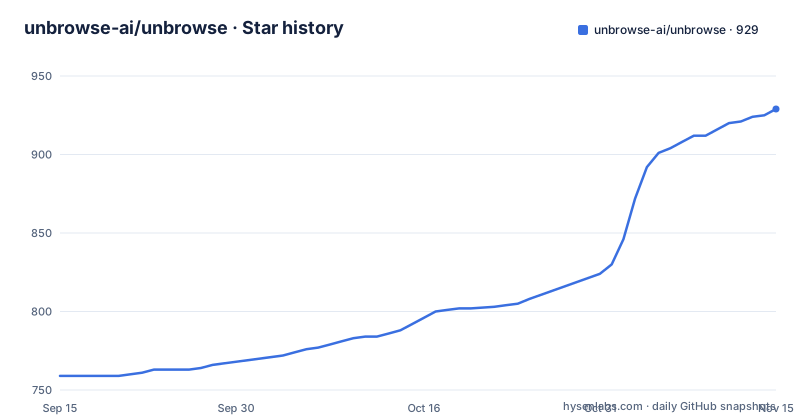
Star history
- unbrowse-ai/unbrowse929 ★ · +170
| Repository | 2026-09-15 | 2026-11-15 |
|---|---|---|
| unbrowse-ai/unbrowse | 759 | 929 |
170 Stars in the last 61 days, measured from the daily GitHub snapshot. Compare with other projects
Editorial analysis
The repository is the client, the capabilities are on the server
The framing sentence is the most important thing in the documentation, and it is easy to skim past. This is the open-source client for a hosted service, consisting of the `@unbrowse/sdk` TypeScript client for its REST API and the `unbrowse` command line tool built on top of it. Both the REST API and the model context protocol endpoint live at `unbrowse.ai`. So when you install this you are getting a well-made client for someone else's API, and the compiled capabilities, the recorded browser, and the verification that a run succeeded are all server-side. The project is explicit about that boundary and keeps a documentation page titled as a question about what is here and what stays hosted, which is the page to read before you evaluate it. One command works without an account at all: the registry listing of public compiled sites, so you can see what already exists before deciding anything.
It replays the site's own requests instead of driving a browser
The design claim is in the second step of how it works. When a capability matches, it replays the site's own first-party HTTP requests, and there is no browser involved. That is where the speed and cost figures in the project description come from, and they are the author's claims rather than something the client can demonstrate. The interesting constraint is the next sentence: a run succeeds only when its result is verified. Verification is not a report you read afterwards, it is the definition of success, and it has its own exit code. That design choice propagates through the whole tool. The SDK does not return a result directly, it hands back a run identifier and then waits for it, and the identifier is generated with a random UUID passed as an idempotency key so a retried request does not start a second run. The site never sees an automated browser, and the service can tell whether the answer it got back is right.
Learning a capability means uploading two HAR recordings
When nothing matches, there are two paths and they are asymmetric in effort. The first is to let an agent do the task once inside Unbrowse's recorded cloud browser, reached over the protocol, which captures the traffic without you doing anything. The second is the one that gives you control: you upload two HAR recordings, the standard browser export format, and the service compiles the recorded requests into a single-call capability. After that, the same task is step two, which is the fast path. The number two is not arbitrary in the instructions, since one recording would show you the happy path and the second gives the service a request that differs, which is what makes compilation into a general capability possible rather than a replay of one session. The compiled result becomes something you can look at, name, and invoke again, which is the difference between a one-off scrape and a tool.
npm latest may still target the older service
There is one warning in bold and it is a version-skew hazard rather than a security note. For the command line tool or the SDK, use the pinned hosted-client release named in the installation guide, because the npm `latest` tag may still target the older service. In other words the newest published client can be built against a version of the backend that is no longer current, and nothing in the package metadata tells you which. That is worth taking seriously for anything scheduled, because the failure mode is a client that authenticates and then behaves oddly rather than one that refuses to start. The release history shows why the instruction exists: v11.7.0 and v11.7.1 were published on the same day roughly eleven hours apart, then the next tag is v12.1.2, a jump that includes a major version change. The newest tag also carries a timestamp later than the last push to `main`, so the tag and the branch tip are not the same moment.
Four non-zero exit codes, and one of them means the answer was wrong
The command surface is short and the error handling is specified, which is more than most clients manage. The commands are login, which does browser-based OAuth or stores an API key, discover, which searches your private capabilities and then the public registry, run, which executes a task and waits for a verified result, resume, which answers whatever a running task asked for on that same run, learn, which compiles two recordings, logins, which lists saved logins masked, and registry, which lists public compiled sites with no account. Alongside them are five exit codes, and the mapping is what makes the tool scriptable:
unbrowse login [--key ub_live_…]    sign in (browser OAuth) or store an API key
unbrowse discover <query>           your capabilities, then the public registry
unbrowse run <task…> [--set k=v]    run a task from your IP (--from-unbrowse: from Unbrowse); waits for a verified result
unbrowse resume <runId> k=v…        answer what the run asked for, on the same run
unbrowse learn a.har b.har          compile two recordings into a capability
unbrowse logins                     saved logins, masked
unbrowse registry [query]           public compiled sites (no account)
Zero is success, one is a generic error, two means input is required, three means sign-in or a login is needed, and four means the result was not verified. That last code is the one that distinguishes this from a scraper.
Passwords stay on the server and never reach the CLI
One sentence covers the credential handling, and it is a strong one: passwords stay in the Unbrowse password manager, and the CLI never takes one. That matters for a tool whose whole job is authenticating to third-party sites on your behalf. You authenticate to Unbrowse once, through the browser-based OAuth flow or by storing an API key, and everything else happens server-side against sites you have authorised there. The `logins` command exists for inspection and shows the stored values masked, which is the right behaviour for a list you might paste into a support ticket. The privacy shape to understand is that credentials are held by the service rather than by your machine, so the trade is not local control against remote control but a narrower client surface against a hosted credential store.
Four plugin directories are generated and then checked
The repository root is mostly distribution surface. There are four plugin or agent directories, `.agents/`, `.claude-plugin/`, `.cursor-plugin/`, and `.grok-plugin/`, plus a Gemini extension manifest, a server manifest, a skill directory, and a `plugins/` directory that bundles the skill for Claude Code, Codex, Grok Build, OpenClaw, Hermes, and elizaOS. Alongside them are `llms.txt` and an install document written for agents. Those directories are not hand-maintained: the workspace manifest has a `check:plugins` script that runs a sync tool in check mode, so drift between the copies fails rather than accumulating, and a separate `check:public` script validates the public surface. There is also a local bridge, `unbrowse mcp`, which runs a stdio proxy to the hosted protocol endpoint for hosts that need stdio or want plain tool names rather than the hosted set. The build itself is Bun-based and targets Node 18.17 or newer for the distributed CLI.
Editorial conclusion
unbrowse is worth an afternoon if the idea of an agent driving a browser for every page view bothers you, because the mechanism is specific: record the traffic once, replay the first-party requests afterwards, and never open a browser again for that site. The client is fully open and MIT licensed, the exit codes are documented well enough to script against, and passwords never touch the CLI. Two things to weigh. Most of the product is not in this repository, since the capabilities and the recorded browser are hosted, and the project keeps a page on exactly what stays hosted, so read that before you plan around it. And the install guide tells you to pin a hosted-client release because the npm latest tag may still target an older version of the service, which is the sort of skew that produces confusing failures rather than obvious ones. Check the version alignment between client and service before you wire it into anything scheduled.
Frequently asked questions
How do I install the Unbrowse skill for my agent?
Run `npx skills add unbrowse-ai/unbrowse-skill --skill unbrowse`, then connect the agent to the hosted endpoint with `claude mcp add --transport http unbrowse https://unbrowse.ai/mcp` and complete the OAuth sign-in in your client. The installation guide also asks you to pin a hosted-client release rather than take the npm latest tag.
What does Unbrowse do when it has no capability for a site?
Either an agent performs the task once inside Unbrowse's recorded cloud browser over MCP, or you upload two HAR recordings with `unbrowse learn` and the service compiles the recorded requests into a one-call capability. After that the task takes the fast path with no browser involved.
Does the Unbrowse CLI ever ask for my passwords?
No. Passwords stay in Unbrowse's password manager and the CLI never takes one. You sign in once through browser OAuth or store an API key, and the `unbrowse logins` command lists saved logins with the values masked.
What do Unbrowse's exit codes mean?
Zero is success, one is a general error, two means input is required, three means sign-in or a stored login is needed, and four means the result was not verified. That last code exists because a run only counts as successful once its output has been checked.
Official sources
Add this badge to your README
If you maintain this project, the badge below links readers to this analysis and shows its maintenance status from the daily GitHub snapshot. Paste the markdown into your README; add ?metric=license or ?metric=stars to the image URL for a different field.

[](https://hysenlabs.com/projects/unbrowse-ai-unbrowse)Star history chart for your README
[](https://hysenlabs.com/projects/unbrowse-ai-unbrowse)Was this useful?