Boss Room: reading a full co-op RPG built on Netcode for GameObjects
A small-scale cooperative game sample built on the new, Unity networking framework to teach developers about creating a similar multiplayer game.
At a glance
- What is it?
- Boss Room is Unity's own co-op RPG sample for Netcode for GameObjects, eight clients, a host that also plays, and a boss that has to stay in sync everywhere. Read closely, it teaches its patterns well and still leaves gaps worth catching, from phone-only minimum specs to badges that pin one editor build.
- Who is it for?
- Judge it as a reading project, not a code drop. Boss Room earns a place in your editor if you already run Netcode for GameObjects and want those patterns proven inside an eight-player raid; it does not earn one if you need the networking library itself, a headless test rig, or a clone that works without Git LFS.
- Can I use it commercially?
- Check first. The repository uses a licence we do not classify automatically, so read its LICENSE file before any commercial use.
- Is it still maintained?
- Yes. The repository last received commits 56 days ago.
- What is it written in?
- Mainly C#, according to GitHub's language statistics.
Answers come from the project's GitHub data, last synced on November 7, 2026, and from our analysis. They are not legal advice.
Star history
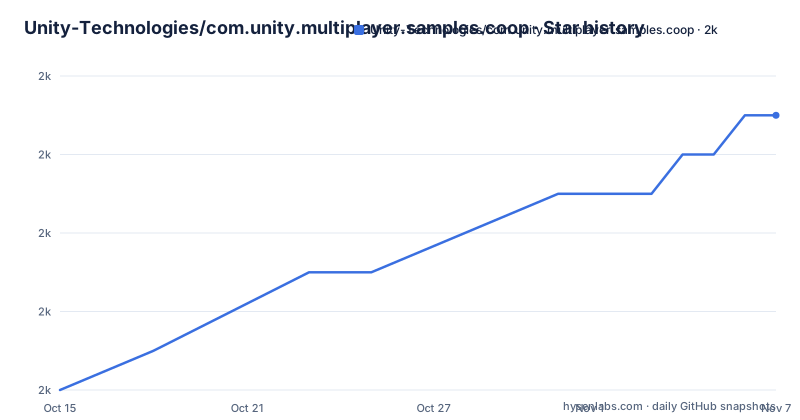
- Unity-Technologies/com.unity.multiplayer.samples.coop2,003 ★ · +7
| Repository | 2026-10-15 | 2026-11-07 |
|---|---|---|
| Unity-Technologies/com.unity.multiplayer.samples.coop | 2k | 2k |
7 Stars in the last 23 days, measured from the daily GitHub snapshot. Compare with other projects
Editorial analysis
Eight clients and one host, wrapped in a playable raid
Boss Room exists to make netcode patterns legible by embedding them in a game instead of presenting them as isolated snippets. Instead of explaining one RPC or one replicated variable at a time, the project puts character abilities, casting animations used to hide latency, replicated objects, RPCs, and integration with Multiplayer Services sessions and Authentication into a single cooperative experience. A team can take the whole project as a starting point for its own game or lift individual pieces out of it, and both routes are presented as supported.
That choice fixes the audience precisely. The intended reader already has Netcode for GameObjects in an editor and wants to see how the pieces behave under real gameplay pressure, which is latency, eight simultaneous players and a boss encounter that has to resolve everywhere at once. Anyone shopping for the networking layer is in the wrong repository. Boss Room consumes com.unity.netcode.gameobjects, and the requirements section makes that dependency explicit before any code is read: Netcode for GameObjects has to be in your environment first, with its own installation documentation and a Get Started With NGO tutorial offered as preparation.
Casting animations buy the latency hiding, click-to-move keeps input cheap
The gameplay description is short but load-bearing. Boss Room is an eight-player cooperative RPG where players fight imps and then a boss, each player picks a class whose skills were chosen for distinct networking characteristics, and control is click-to-move with skills fired from a mouse button or hotkey. One of the eight clients takes the host role, so a session is not a separate server process feeding eight viewers; the machine that owns the session also plays, which is the arrangement most small co-op projects end up with.
Underneath that description, the project groups its scripts into five buckets named in its contents list: Gameplay, Game Flow, Connectivity, Services for sessions and Authentication, and Tools and Utilities. That split is the fastest way into the repository, because it separates the code that decides what happens (abilities, spawning, the boss) from the code that moves data (the connectivity scripts) and from the code that talks to hosted services. The repository root backs this up: Assets, Packages, ProjectSettings, RepoUtilities and dotnet-tools sit next to the project files, and InitCodeMarker is a single loose entry that tells you the editor will run something on first open.
The Utilities package installs by git URL, not the Package Manager window
Alongside the game sits a package called Utilities, holding reusable sample scripts at Packages/com.unity.multiplayer.samples.coop. It is not fetched from a registry and it does not appear in a Package Manager search. The readme shows a manifest file entry that points Package Manager at the repository itself and names the subfolder to read:
"com.unity.multiplayer.samples.coop": "https://github.com/Unity-Technologies/com.unity.multiplayer.samples.coop.git?path=/Packages/com.unity.multiplayer.samples.coop",The query string is what makes that work: the part after ?path= tells Package Manager that the package root is the Packages folder inside the cloned repository, so Unity pulls the whole project repository to reach a handful of scripts. The trailing comma on the printed line is a matter of JSON syntax rather than netcode, since a trailing comma is only legal when another entry follows in the same manifest. Installing it gives you the scripts and nothing else. Boss Room itself still arrives as a full project that has to be opened in the Hub, so the package is for dropping individual patterns into a game you already have.
First launch is a full asset import, then an in-game host or join button
Two download routes are offered. One is a packaged build linked from the repository, and the other is the green `Code` button followed by the 'Download Zip' option, with a warning that this second route pulls the branch you happen to be viewing on GitHub. That distinction matters more than it looks: a zip taken from the main branch can sit ahead of the newest packaged build, so the download you have is not necessarily the version other people are discussing.
Every documented step after the download is a Hub action rather than a command. You add the project with the Add button, pointing it at the root folder of what you unpacked, and the first open imports all assets, which takes longer than usual. Then `Play` starts the game and the in-game UI lets you host a new game or join an existing one. Git LFS only enters the picture on the cloning route, because a downloaded project already contains the large files. Plan for one slow import before any judgement about how the sample performs, and note that none of this is scriptable from the command line.
Windows path length can spoil the zip before Unity sees it
Windows users hit a failure that has nothing to do with netcode. The built-in extraction tool can raise an 'Error 0x80010135: Path too long' window, and the readme is blunt that this can invalidate the extraction process itself, leaving behind a partly written project folder that Unity will only complain about later, after the import has already started. The documented workaround is to rename the download to a single character and move it to the shortest path on the machine:
c.zip
C:\
If renaming and relocating still fails, the second workaround is to extract the archive with 7zip instead of the built-in tool. Both steps are one-time operations that never touch code, and the order matters only in the sense that renaming is the cheaper attempt while 7zip is the fallback. On a machine with a deep user profile this is the single most common reason a clean download appears broken, and the error window is the giveaway.
Minimum devices name only phones, while desktop modules are mandatory
The requirements are uneven in a way worth catching before you commit a weekend to the setup. The tested platform list covers four targets:
Windows
Mac
iOS
Android
The only performance floor published is a pair of phones:
iPhone 6S
Samsung Galaxy J2 Core
Read those two lists beside the setup instructions, which twice tell you to include standalone support for Windows/Mac in your editor installation, and the gap is plain. Windows and Mac come first in the tested list and are the only targets the setup insists on, yet the minimum hardware published is mobile, with no processor or memory figure for a desktop anywhere. A developer targeting only phones still follows a desktop setup path, and a developer on a thin laptop gets no documented signal about whether the editor will survive a first full asset import of a project carrying its own art.
Badges pin one editor build and one Netcode build
The badges at the top carry the fastest numbers on the page: Unity Version 6000.0.52f1 LTS, Netcode Version 2.4.3, and v3.0.0 named as the newest packaged build. The first badge is the tighter of the two version claims, because the requirements paragraph talks about the latest Long Term Support stream, currently 6000.0 LTS, while the badge names one exact patch build. Copy the badge value when you want the setup that was actually tested.
The Netcode badge is the number that gets misread. It points at a build of com.unity.netcode.gameobjects, a separate repository with its own numbering, so 2.4.3 and v3.0.0 travel on two independent tracks and cannot be compared to each other. The last push was on 2026-09-13, the repository is not archived, and the packaged build history runs v3.0.0 on 2025-08-06, v2.5.0 on 2024-04-18 and v2.4.0 on 2023-12-13. Even the topic list lags the stack: it still carries mlapi and unity3d beside multiplayer and networking, names the requirements text never uses.
Bitesize samples and the Get Started With NGO tutorial as lighter paths
The project points at two lighter routes, and both say something about what Boss Room is not. Its contents list ends with 'Other samples' and a Bitesize Samples entry, while the requirements section offers the Get Started With NGO tutorial for anyone who wants the library itself before the game. A tutorial isolates one idea per sitting; Boss Room puts the same library under an eight-player raid where every pattern has to hold up against other players, which is exactly what makes it useful and exactly what makes it slow to read.
The entries for those other samples are named but not described, so nothing on this page tells you which one covers the mechanic you actually need. The conceptual writing sits off the repository as well. The link attached to the word patterns points at docs-multiplayer.unity3d.com rather than a file in the tree, the project homepage is that same documentation site, and the art side is covered separately in ART_NOTES.md. Clone the repository expecting explanations and you get code plus a separate document set to fetch.
Editorial conclusion
Judge it as a reading project, not a code drop. Boss Room earns a place in your editor if you already run Netcode for GameObjects and want those patterns proven inside an eight-player raid; it does not earn one if you need the networking library itself, a headless test rig, or a clone that works without Git LFS. Pin your editor to 6000.0.52f1 LTS before the first import, and before you reuse any script, read LICENSE.md on your own, since the project is filed under a custom licence GitHub cannot classify and it ships art next to the code.
Frequently asked questions
Is Boss Room a template I can build my own multiplayer game on top of?
Both routes are offered: using the project as a starting point for your own Unity game, or taking individual elements from it. A Utilities package at Packages/com.unity.multiplayer.samples.coop holds reusable sample scripts that you can add on their own.
Why does Boss Room need Netcode for GameObjects installed separately?
The requirements state that you also need Netcode for GameObjects to use the samples, and point at its installation documentation to prepare your environment. Boss Room is made with that package and includes utilities for it rather than shipping the package.
How many players can play Boss Room at once?
Eight players fight imps and then a boss, and one of those eight clients takes the host role. Players pick classes with skills that differ in networking characteristics, with click-to-move control and skills on a mouse button or hotkey.
Do I need Git LFS to use Boss Room?
Git LFS is only needed when cloning the repository locally, because a downloaded project already contains the large files. On Windows, use 7zip if the built-in extraction raises a path too long error.
Which Unity version does Boss Room require?
The editor badge pins Unity Version 6000.0.52f1 LTS, and the requirements ask for the latest Long Term Support editor, currently 6000.0 LTS, with standalone support for Windows/Mac included. Netcode for GameObjects is a separate requirement, with the badge pointing at build 2.4.3.
Official sources
Add this badge to your README
If you maintain this project, the badge below links readers to this analysis and shows its maintenance status from the daily GitHub snapshot. Paste the markdown into your README; add ?metric=license or ?metric=stars to the image URL for a different field.

[](https://hysenlabs.com/projects/unity-technologies-com-unity-multiplayer-samples-coop)Star history chart for your README
[](https://hysenlabs.com/projects/unity-technologies-com-unity-multiplayer-samples-coop)Was this useful?