Unity Input System: actions, devices, and installation
An efficient and versatile input system for Unity.
At a glance
- What is it?
- Unity Input System is a Unity package for configuring game actions, binding them to input devices, and handling input in a configurable way. It is suited to projects that need keyboard, mouse, gamepad, touch, XR, rebinding, or multiple-player input support.
- Who is it for?
- Adopt Unity Input System when a Unity project needs action-based input, runtime rebinding, custom device support, or several input methods. Do not treat the develop branch as a stable replacement for a released package.
- Can I use it commercially?
- Check first. The repository uses a licence we do not classify automatically, so read its LICENSE file before any commercial use.
- Is it still maintained?
- Yes. The repository last received commits 1 day ago.
- What is it written in?
- Mainly C#, according to GitHub's language statistics.
Answers come from the project's GitHub data, last synced on November 7, 2026, and from our analysis. They are not legal advice.
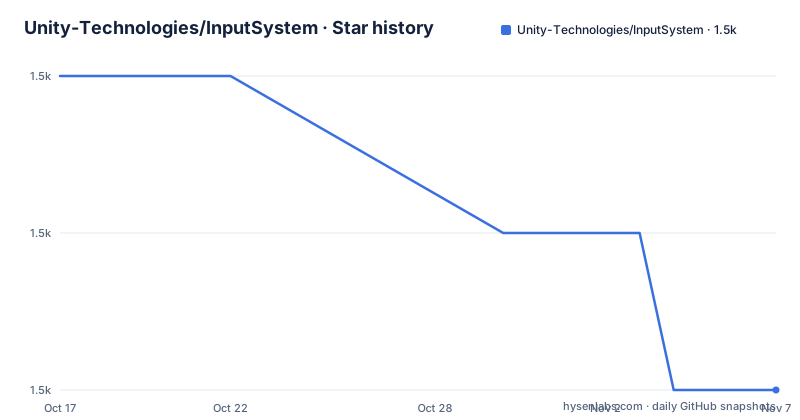
Star history
- Unity-Technologies/InputSystem1,526 ★ · -2
| Repository | 2026-10-17 | 2026-11-07 |
|---|---|---|
| Unity-Technologies/InputSystem | 1.5k | 1.5k |
-2 Stars in the last 21 days, measured from the daily GitHub snapshot. Compare with other projects
Editorial analysis
Why Unity Input System replaces direct device polling
Unity Input System addresses the problem of scattering input handling across device-specific code. Instead of asking the legacy `UnityEngine.Input` class for values tied to particular controls, the package provides a system for defining game actions and connecting those actions to input devices. The README identifies the package as a replacement for the `UnityEngine.Input` API, but it does not document a complete migration procedure in the repository text. That distinction matters. A project can adopt the package for new input handling without assuming that every legacy input call can be replaced automatically.
The intended audience is Unity developers building content that responds to multiple kinds of input. The package topics and samples cover gamepads, keyboards, mice, touch, VR and XR, visual feedback, rebinding, UI interaction, and local multiplayer. The sample list also includes a custom device, a custom composite, and device usage filtering. Those examples indicate that the package is designed for projects where input is part of application behavior rather than a single keyboard polling routine.
This approach changes the unit of design. A game can express an intention such as movement, interaction, or menu navigation, then assign physical controls to that intention through bindings. The README does not provide a complete C# example or a detailed action-asset schema, so the exact authoring sequence should be taken from the linked Input System Manual. The documented scope is still clear: action configuration and device access are the central problems this package solves.
Action assets, bindings, and device input flow
The repository presents the Input System as a configured pipeline between devices and Unity content. Actions represent what the application wants to do, while bindings connect those actions to controls exposed by supported devices. Device usages provide another layer of selection. The `Custom Device Usages` sample demonstrates tagging devices with custom usages and binding actions only to devices that carry those usages.
The package also includes samples for inputs that commonly create interaction problems. `UI vs Game Input` addresses ambiguity when UI elements are overlaid on the game view. `RebindingUI` configures bindings during runtime. `GamepadMouseCursor` uses gamepad input to drive a UI pointer. `OnScreenControls` sets up gamepad-like controls on screen. These are separate concerns, but they share the same underlying configuration model: input is described in terms of actions and bindings rather than only raw device values.
The repository also contains `InputEventTrace` and `InputRecorder` examples. The Input Recorder sample uses these APIs to record input events, while the Visualizers sample provides input data visualizations for common devices. The README does not state the retention format, playback guarantees, or performance characteristics of event traces, so recording should be understood as an example capability, not as a complete diagnostic workflow.
For projects with specialized hardware, the package exposes extension points. The `Custom Composite` sample implements and registers an `InputBindingComposite`. The `Custom Device` sample demonstrates how to add and author a device. These examples indicate that the package can represent controls and devices beyond its built-in support, although the README does not document compatibility requirements for every custom device.
Installing a released Input System package in Unity
For a normal project, the README directs developers to the Unity Package Manager and links to the Input System Manual installation instructions. It also states that all released versions are available through the Unity Package Manager. The README does not include a complete Package Manager dialog transcript, package path, or version-selection command.
Compatibility depends on the package version and Unity Editor version; check Unity's version-specific package documentation rather than treating an older repository prerequisites list as current. In the editor, open Window > Package Manager, select Unity Registry, choose Input System and install a compatible release. If prompted, enable the new input backend and restart the editor. Active Input Handling can also be configured under Edit > Project Settings > Player; select Both when the project needs both systems and the target platform supports that mode. The repository's own `Packages/com.unity.inputsystem/package.json` is the package manifest used by the repository project, but the README does not show the contents or tell a new user to enter a version number manually.
After installation, the repository provides concrete starting points in `Assets/Samples`. `SimpleDemo` shows a character controller using actions, an action asset, and the `PlayerInput` component. `SimpleMultiplayer` shows local split-screen multiplayer in which players join by pressing buttons on supported devices. `RebindingUI` is the relevant sample if the application must let users change controls while running. These samples are more useful as first exercises than a generic package import test because they show how the package's pieces are connected in a Unity project.
The README does not document rollback, uninstall, or migration from `UnityEngine.Input` in the text provided. Those topics should be checked in the linked manual or package release documentation before changing an established project.
Trying the develop branch without confusing it with a release
The README distinguishes released packages from unreleased development. It instructs contributors who want the latest changes to clone the `develop` branch, then add the local package to a Unity project by selecting `Packages/com.unity.inputsystem/package.json`. The same branch is intended to remain releasable, but the README explicitly warns that it reflects current development and may contain bugs or unexpected behavior.
That warning gives the branch a clear role. It is appropriate for evaluating pending changes, developing the package itself, or inspecting code that is not in the latest release. It is a poor default for a production project that needs a known package release and a predictable upgrade boundary. The repository also says that opening the repository root in the Unity Editor exposes tests and samples excluded when importing only the package into another project. That distinction favors full repository development for package contributors and a package import for application work.
The documented development test path is the Unity Test Runner. Open `Window > General > Test Runner`, select `Run All`, and choose the `PlayMode` or `EditMode` tests. The README does not provide a headless test command or a list of environment variables, so automation outside the Editor is outside the documented scope here. The top-level repository also contains platform-specific command scripts such as `AndroidBuildTests.cmd` and `AndroidRunTests.cmd`, but the README does not explain when those scripts should be used or what prerequisites they require.
Where Unity Input System is a poor fit
The package is not a universal input layer for every kind of Unity work. The README positions it as a configurable alternative to `UnityEngine.Input`, and it expects the Unity editor and the package's included tooling to compile and run the current version. A project that cannot add the package, use a supported Unity version, or work with action configuration should verify those constraints before migration.
The development branch is another clear boundary. The README says it may contain bugs or unexpected behavior, so it is not equivalent to the latest released version. The released package has documented availability through Unity Package Manager, whereas the branch requires a local clone and local package setup. For a project with strict release controls, choosing the branch means accepting a different upgrade model.
The documentation is also incomplete for some operational decisions. It does not specify a rollback procedure, an uninstall procedure, a complete migration map from `UnityEngine.Input`, or a formal performance benchmark. It does not document whether particular custom devices work on every target platform. Consequently, the package's feature list is not enough to establish fit for a hardware-heavy project. The relevant unknowns are Unity version, target platforms, device support, action design, and the project's release policy.
A further practical constraint is conceptual. Projects that only need a small amount of direct keyboard polling may gain little from redesigning input around actions and bindings. The README establishes the package's capabilities, but it does not claim that every simple project requires them.
Licence, upgrades, and repository change cost
The package is distributed under the `Unity Companion License for Unity-dependent projects`, with additional third-party licence terms applying specifically to `Assets/Samples/RebindingUI`. The repository also contains `Third Party Notices.md`. This is not a standard licence identifier that can be summarized from the README alone, and the repository description marks the licence as custom. Application owners should read `LICENSE.md` and `Third Party Notices.md` for the exact terms that apply to their use. This is a licence review, not legal advice.
Maintenance evidence is positive but limited to what the repository reports. The repository was not archived when reviewed in October 2026; check its current activity before choosing a version. Recent releases include `1.20.1` on 2026-10-05, `1.20.0` on 2026-07-21, and `1.19.0` on 2026-02-24. These dates show recent repository activity and published package versions, but the README does not promise a support policy, long-term-support branch, migration guide, or compatibility matrix for every Unity version.
Upgrading cost depends on whether a project imports only a released package or develops against `develop`. A released package can be managed through Unity Package Manager, but the actual upgrade process and any breaking changes are not documented in the README. Developers using the branch must account for local package setup, possible development defects, and the fact that repository tests and samples are available only when the repository is opened as a Unity project.
Editorial conclusion
Adopt Unity Input System when a Unity project needs action-based input, runtime rebinding, custom device support, or several input methods. Do not treat the develop branch as a stable replacement for a released package. Verify first that the selected package version is compatible with the project's Unity version, then inspect the required action assets, bindings, samples, and licence conditions before importing it.
Frequently asked questions
What problem does Unity Input System solve?
It provides configurable game actions and bindings for interacting with Unity content through input devices. The README positions it as a replacement for the legacy `UnityEngine.Input` API.
How do I install Unity Input System in a Unity project?
In Unity, open Window > Package Manager, choose Unity Registry, select Input System, and install a version compatible with your editor. If prompted, enable the new input backend and restart the editor. You can also check Active Input Handling in Edit > Project Settings > Player; select Both if your project needs the legacy and new systems together and the target platform supports it.
Can Unity Input System support custom devices and runtime rebinding?
Yes, the repository includes a `Custom Device` sample for authoring a custom device and a `RebindingUI` sample for changing bindings during runtime. The README also documents custom device usages and custom `InputBindingComposite` implementations.
Official sources
Add this badge to your README
If you maintain this project, the badge below links readers to this analysis and shows its maintenance status from the daily GitHub snapshot. Paste the markdown into your README; add ?metric=license or ?metric=stars to the image URL for a different field.

[](https://hysenlabs.com/projects/unity-technologies-inputsystem)Star history chart for your README
[](https://hysenlabs.com/projects/unity-technologies-inputsystem)Was this useful?