Unity UI Extensions for uGUI Controls and Effects
The Unity UI library of controls, components and other useful features for extending the Unity UI solution for Unity
At a glance
- What is it?
- Unity UI Extensions is an open-source C# collection that adds controls, components, and visual effects to Unity's uGUI system. It suits Unity 6 projects using the package version 3.0.0, while projects built around UI Toolkit need the separate UI Toolkit Extensions package.
- Who is it for?
- Adopt com.unity.uiextensions when a Unity project uses uGUI and needs controls beyond Unity's built-in set. Do not choose it for a UI Toolkit-based project, because the repository describes a separate companion package for that runtime.
- Can I use it commercially?
- Check first. The repository uses a licence we do not classify automatically, so read its LICENSE file before any commercial use.
- Is it still maintained?
- Yes. The repository last received commits 2 days ago.
- What is it written in?
- Mainly C#, according to GitHub's language statistics.
Answers come from the project's GitHub data, last synced on November 7, 2026, and from our analysis. They are not legal advice.
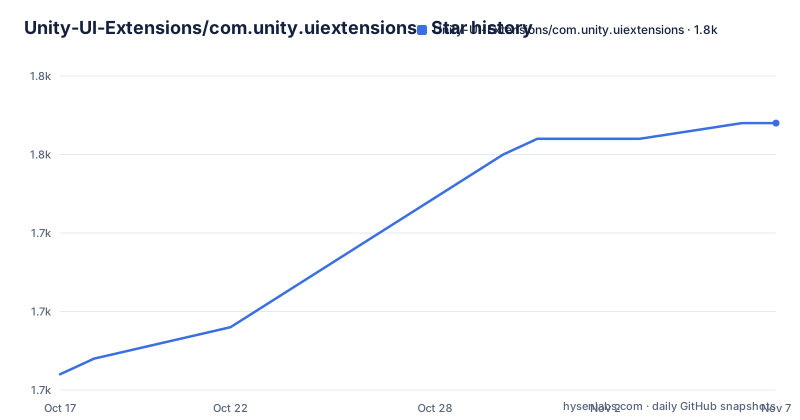
Star history
- Unity-UI-Extensions/com.unity.uiextensions1,752 ★ · +16
| Repository | 2026-10-17 | 2026-11-07 |
|---|---|---|
| Unity-UI-Extensions/com.unity.uiextensions | 1.7k | 1.8k |
16 Stars in the last 21 days, measured from the daily GitHub snapshot. Compare with other projects
Editorial analysis
What com.unity.uiextensions Adds to Unity uGUI
Unity UI Extensions addresses the repeated work involved in building uGUI controls that Unity does not include in its standard UI solution. The project targets Unity developers who need menu-like controls, layout helpers, input-related components, visual effects, and other reusable pieces for Unity UI scenes. Its scope is specifically uGUI, not Unity 6's UI Toolkit runtime. The package description identifies the project as an extension for the Unity3D UI system, while the README calls it a collection of more than 100 controls.
The package is aimed at developers assembling editor tools, game menus, settings screens, inventories, and other interfaces where a team would otherwise maintain custom scripts. The README says the scripts were gathered from several sources, including the Unity UI forum scripts thread, and were subsequently combined and improved. That history matters because the library is a collection of extensions rather than a replacement for uGUI. Existing `Canvas`, `Graphic`, layout, and event-driven UI code remains the base on which the additional controls are built.
The project also distinguishes the package from its companion. For Unity 6 projects using the modern UI Toolkit solution, the README points to `com.unity.uitoolkitextensions`. This boundary is important for package selection. Installing the uGUI collection does not make its controls available to UI Toolkit projects, and the repository does not claim that the two systems share a single component model.
The Package Layout and Dependency Contract
The repository is organized as a Unity package rather than a general-purpose .NET library. `package.json` names the package `com.unity.uiextensions`, gives it the display name `Unity UI Extensions`, and records version `3.0.0`. The manifest declares Unity `6000.0` as its minimum Unity version and lists `com.unity.ugui` version `2.0.0` as a dependency. The README describes version 3 as verified and updated for Unity 6, with legacy dependencies cleared out.
The top-level entries show the main implementation split. `Runtime/` contains the runtime extensions, `Editor/` contains editor-side additions, and `Examples~` contains the sample content. Unity package convention keeps examples separate from the imported package path, while the manifest exposes them as `UI Extensions Samples`. The repository also includes `Documentation~/`, `CHANGELOG.md`, and the licence file `LICENSE.md`.
That structure gives consumers a clear choice between source or package installation and a separate set of demonstrations. It also means compatibility is tied to the package manifest rather than to a broad statement that any Unity version will work. A project using an older Unity release should not infer support from the historical releases listed in the repository. The documented starting point for version 3.0.0 is Unity 6 with the matching uGUI dependency.
Controls, Effects, and Community-Directed Development
The package's value is breadth within a specific UI system. The README identifies controls and effects as the central categories, and version 3 adds `GridRawImage`, `UI Knob 2`, `UI Segmented Circle`, and a `UI Graphic Selector`. It also reports fixes to components including `Reorderable List`, `Scroll Snap`, `Infinite Scroll`, `Flow Layout Group`, and `UI Particle System`. `UILineConnector` receives particular attention in the release description, including pivot reference points, closing lines, and point-array calculations.
These examples show the type of work the package expects to remove from a project. A game interface may need a selectable knob, a segmented circular control, a grid-backed image, a scroll system with snapping, or a connector that draws relationships between UI elements. The repository presents these as existing extensions rather than as patterns that users must assemble from scratch. The README also states that the collection contains 21 example scenes, which gives engineers a way to inspect demonstrations before deciding how to use a component.
The project is community-driven and accepts code contributions, although the README explicitly says contribution is optional. Its assets and code are described as free, and the package manifest records `BSD-3-Clause`. However, the repository metadata classifies the licence as a custom licence and directs readers to `LICENSE.md`. The licence file, rather than the package metadata alone, is the source to inspect when determining what obligations apply to a particular distribution.
Getting Unity UI Extensions and Trying the Samples
The README does not provide a command-line installation sequence, so it does not document a command that should be copied into a terminal or an exact Unity Package Manager menu path. It says that users can download or fork the project, and it points to the Version 3.0 download page for pre-compiled Unity assets. The release archive remains available for previous versions, and GitHub releases are listed as another download route.
For an existing Unity project, the documented options are therefore package acquisition followed by importing the resulting Unity package or source content. The package name to look for is `com.unity.uiextensions`. After it is available in the project, the first useful review is the `Examples~` directory, which the package manifest names `UI Extensions Samples`. The README provides 21 example scenes, but it does not name a specific scene for a particular control, so a first-use walkthrough should not assume that one scene is the canonical entry point.
The package version and compatibility are explicit in `package.json`:
"version": "3.0.0",
"unity": "6000.0",
"dependencies": {
  "com.unity.ugui": "2.0.0"
}
This is the concrete version check to perform before opening the examples. If the project is not on Unity 6, or if its uGUI package version differs, verify compatibility through the repository documentation rather than assuming that the controls will import without changes.
The Main Limitation Is the UI System Boundary
The clearest limitation is also the package's defining constraint: this repository extends uGUI. A Unity 6 project that is built around UI Toolkit needs `com.unity.uitoolkitextensions` according to the README. UI Toolkit uses a different runtime UI approach, so the uGUI controls in this package should not be treated as interchangeable with UI Toolkit controls. Importing the package into the wrong project architecture can add assets that do not address the interface being built.
There is a second practical constraint. The README does not document a complete compatibility matrix for every control, every Unity release, or every platform. The manifest gives a Unity 6 target for version 3.0.0 and a required uGUI version, but that is not the same as a promise that every historical project or runtime configuration is supported. The documentation also does not provide a rollback procedure, migration guide for upgrading from an older release, or detailed support policy. Those omissions matter for established projects because an upgrade may require checking individual controls and sample scenes.
A real alternative is `com.unity.uitoolkitextensions`, the companion package for Unity 6's UI Toolkit. The difference is architectural rather than cosmetic. `com.unity.uiextensions` targets the established uGUI system, while `com.unity.uitoolkitextensions` targets UI Toolkit. A team should choose the package that matches the runtime already used by its scenes and scripts, not select one because it carries a similar Extensions name.
Maintenance, Releases, and Upgrade Work
The repository is not archived. Its last push was on 2026-10-13, and the listed version 3.0.0 release was published on 2026-06-19. That indicates recent repository activity, but the available documentation does not define a long-term maintenance guarantee for every control. The earlier listed releases are 2.3.2 from 2023-11-26 and 2.3.0 from 2023-02-07, so the project has a visible release history with a substantial interval between some releases.
Version 3 is described as a relaunch for Unity 6, with legacy dependencies cleared out and fixes across several components. That suggests an upgrade can involve more than copying files. Engineers should inspect `CHANGELOG.md` and compare the affected controls with their own UI setup, especially when the project previously used version 2.x. The README links to detailed release notes.
The package is not an external paid dependency, but the licence requires separate attention. `package.json` says `BSD-3-Clause`, while the repository metadata says the licence is custom and points to `LICENSE.md`. Read that file before shipping source, modified copies, or compiled assets. The presence of free downloads and community contributions does not by itself settle all distribution questions.
Editorial conclusion
Adopt com.unity.uiextensions when a Unity project uses uGUI and needs controls beyond Unity's built-in set. Do not choose it for a UI Toolkit-based project, because the repository describes a separate companion package for that runtime. Verify the Unity 6 target, the com.unity.ugui 2.0.0 dependency, the relevant example scene, and the repository's custom licence file before integrating it into a distributed product.
Frequently asked questions
What is Unity UI Extensions used for?
It is a C# collection of more than 100 controls, components, and effects for extending Unity's uGUI system. The package is intended for projects that want reusable UI pieces beyond Unity's built-in uGUI set.
Is Unity UI Extensions compatible with Unity 6?
Version 3.0.0 targets Unity 6 through the `6000.0` manifest value, and the README describes the release as verified and updated for Unity 6. It also declares a dependency on `com.unity.ugui` version `2.0.0`.
Can I use com.unity.uiextensions with UI Toolkit?
The README says this package is for Unity's established uGUI system. For Unity 6's UI Toolkit solution, it directs users to the separate `com.unity.uitoolkitextensions` package.
Where can I obtain Unity UI Extensions?
The README points to the Version 3.0 download page for pre-compiled Unity assets and also links to the GitHub releases page. It does not document a command-line installation command.
Official sources
Add this badge to your README
If you maintain this project, the badge below links readers to this analysis and shows its maintenance status from the daily GitHub snapshot. Paste the markdown into your README; add ?metric=license or ?metric=stars to the image URL for a different field.

[](https://hysenlabs.com/projects/unity-ui-extensions-com-unity-uiextensions)Star history chart for your README
[](https://hysenlabs.com/projects/unity-ui-extensions-com-unity-uiextensions)Was this useful?