UotanToolboxNT: five adjectives, two empty section headings, and binaries that live in another repository
A Modern Toolbox for Android & OpenHarmony Devices.
At a glance
- What is it?
- This is an Avalonia UI desktop application for Android and OpenHarmony devices, shipped as release archives rather than as a package. Its README names no individual tools, leaves the architecture and screenshots headings empty, and tells developers to fetch binaries from a second repository before they can debug anything.
- Who is it for?
- Judge this repository on what it delivers rather than on what its README promises, because the README describes a product and not a toolset: five adjectives, no named functions, and empty headings where the architecture and screenshots should be. What is verifiable is the packaging and the build, and there is real detail there.
- Can I use it commercially?
- Yes, with conditions. GPL-3.0 is a copyleft licence: if you distribute software that includes it, you must release that software's source code under the same licence. Running it internally without distributing it does not trigger that obligation.
- Is it still maintained?
- Yes. The repository last received commits 16 days ago.
- What is it written in?
- Mainly C#, according to GitHub's language statistics.
Answers come from the project's GitHub data, last synced on November 15, 2026, and from our analysis. They are not legal advice.
Star history
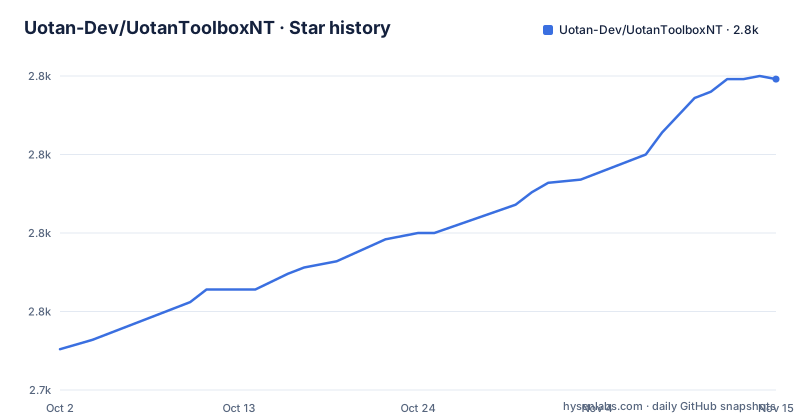
- Uotan-Dev/UotanToolboxNT2,824 ★ · +86
| Repository | 2026-10-02 | 2026-11-15 |
|---|---|---|
| Uotan-Dev/UotanToolboxNT | 2.7k | 2.8k |
86 Stars in the last 44 days, measured from the daily GitHub snapshot. Compare with other projects
Editorial analysis
The architecture and screenshot headings have nothing under them
The README is bilingual in its links but the structure is a shell. After the five feature bullets there are two headings with no content underneath them at all: one marked as the project architecture, one marked as screenshots. Both are followed immediately by the next heading. So the section a reader would use to understand how the code is organised is empty, and the section that would show what the application does is empty as well. What remains between the title block and the download instructions is the feature list, the two empty headings, and a link to the English version of the file. The repository description is bilingual in the same way, giving a Chinese line and an English line describing a modern toolbox for Android and OpenHarmony devices, and the primary README is the Chinese one with README-EN.md linked from the top and also present in the tree.
The feature list is five labels, and not one of them names a tool
The whole capability claim is five bullets: cross platform support, a one stop platform, multi language support, no ads, and more features in development. Read as written, four of them are properties rather than functions, and the fifth says the functions are not finished. No individual operation is named anywhere in the file, so a reader cannot tell from this repository what the application does to a device, which platforms it acts on, or which of its functions exist today. That is worth stating plainly rather than filling in, because the only other sources the file offers are a project website and a release archive. The name in the repository, UotanToolboxNT, and the Chinese product name in the release titles are the only other description of scope, and neither one narrows it.
Debugging needs binaries copied out of a second repository
The repository does not contain the binaries it uses. The README links a separate repository, UotanToolboxNT.Binary, as the place to get all of the binaries in use, and then gives a single instruction for anyone who wants to debug the project: put those binaries into this path.
UotanToolboxNT\UotanToolbox\bin\Debug\net8.0\binThree things follow from that path. The application targets .NET 8, at least for the debug configuration named in it. The expected layout is a nested project folder inside the repository root, so the binary drop-in is tied to one machine's build output shape rather than to a documented resource directory. And the binaries are fetched from a repository that is versioned separately from this source tree, with nothing in the README tying the two versions together. A contributor who clones only this repository has source code that will not run until they fetch the second one and place the files by hand.
The macOS launch step removes the quarantine flag with sudo
The getting started section has one command in it, and it is the security relevant line in the whole README. To run on macOS you are told to open a terminal and run:
sudo xattr -r -d com.apple.quarantine UotanToolbox.appThat removes the quarantine attribute recursively from the application bundle. The attribute is what makes macOS ask where a downloaded file came from before running it, and clearing it means the check no longer applies to this app or to anything inside it. The command needs root because the extended attributes are owned by the file, and it is recursive, so it applies to the entire bundle rather than to the outer file alone. There is no signing or notarisation step anywhere in the README to put alongside it, and no note about where to obtain the application other than the release list. Anyone following this instruction should decide first whether removing the gate is acceptable for that machine.
The LoongArch build names one environment as recommended and leaves the other open
Alongside the macOS and Windows notes there is one line about a third platform. A LoongArch version exists, the README says, and it is recommended for use with the newer environment, while it is not certain whether the older one works normally. That is the entire statement, and it is a useful one, because it separates the architectures that are treated as settled from the one that is not. Windows is not described that way, and macOS is not either: both get a concrete instruction. So the release archives carry at least a Windows build, a macOS build and a LoongArch build, and only the third comes with a caveat about the environment it expects. The project is written in Chinese, so the two environment names are given as new world and old world there.
Windows ships two archive formats and one of them needs a third-party tool
Windows users get a choice of two shapes, and the README warns about the first. A build with an installer is an installer. A build delivered as a ZIP should be opened with a third party extraction tool, which is an unusual instruction to have to give and suggests that the built archive is not in a format the platform handles cleanly. Nothing in the README says which extraction tool, or why the ZIP is the awkward one, so a user has to work that out from the download itself. The release list is where this matters: the three most recent versions are 3.7.2 on 2026-09-17, 3.7.1 on 2026-07-31 and 3.7.0 on 2026-06-14, spaced roughly six to seven weeks apart, so an upgrade path means picking one of two formats from a page that holds several builds of the same version.
The solution file uses the .slnx format and the package sources are redirected
Two files at the root of the repository say more about the build than any documentation would. The solution is UotanToolbox.slnx, which is the XML based solution format rather than the older .sln, and that choice tells you the project expects a recent Visual Studio. The development table names Visual Studio 2022 with an Avalonia for Visual Studio 2022 extension, which is the IDE side of the same arrangement, since Avalonia renders its interface from XAML and that extension is what gives the designer and the XAML tooling to an Avalonia project. There is also a nuget.config at the root, so package sources are being overridden for everyone who builds rather than left to the machine's default feed, and a Settings.XamlStyler file, which is a ReSharper side for formatting XAML on save.
Release titles carry a product name and the tags do not
Each release has two names. The tag is a bare version number, 3.7.2, while the release title carries the product name in Chinese ahead of the same number, which is why the release page reads as a named product rather than as a list of builds. The repository itself carries both a README.md and a README-EN.md, a description line in Chinese and English, and a licence file under GPL 3.0, so the project is bilingual throughout its metadata while its primary documentation is Chinese. The last push is dated 2026-09-18, one day after the 3.7.2 release, and the repository is not archived. Nothing in the README describes a support policy, a changelog or a list of issues, so the release notes are the only place a change would be recorded.
Editorial conclusion
Judge this repository on what it delivers rather than on what its README promises, because the README describes a product and not a toolset: five adjectives, no named functions, and empty headings where the architecture and screenshots should be. What is verifiable is the packaging and the build, and there is real detail there. Two decisions deserve a look before you commit. Debugging needs binaries copied out of a separate repository into a net8.0 output directory, so a clone of this repository alone will not run. And on macOS the documented launch step strips the quarantine flag with sudo, which is a deliberate reduction in a gate macOS puts on downloaded applications.
Frequently asked questions
What is UotanToolboxNT built with?
It is a C# project using Avalonia UI, developed in Visual Studio 2022 with the Avalonia for Visual Studio 2022 extension. The debug output path given in the README ends in net8.0, and the repository uses a UotanToolbox.slnx solution file.
Where do I get UotanToolboxNT?
From the GitHub Releases page, where the newest listed version is 3.7.2, released 2026-09-17. The README also points at a separate repository named UotanToolboxNT.Binary that holds the binaries the project uses.
How do I run UotanToolboxNT on macOS?
The README says to run `sudo xattr -r -d com.apple.quarantine UotanToolbox.app` in a terminal first. On Windows a build comes either with an installer or as a ZIP, and the README says the ZIP should be opened with a third party extraction tool.
What features does the UotanToolboxNT README list?
Five bullets: cross platform support, a one stop platform, multi language support, no ads, and more features in development. The sections headed project architecture and screenshots have no content under them, and no individual operation is named.
Does UotanToolboxNT have a LoongArch build?
Yes. The README mentions a LoongArch version, recommends the newer environment for it, and says it is not certain whether the older environment works normally.
Official sources
Add this badge to your README
If you maintain this project, the badge below links readers to this analysis and shows its maintenance status from the daily GitHub snapshot. Paste the markdown into your README; add ?metric=license or ?metric=stars to the image URL for a different field.

[](https://hysenlabs.com/projects/uotan-dev-uotantoolboxnt)Star history chart for your README
[](https://hysenlabs.com/projects/uotan-dev-uotantoolboxnt)Was this useful?