Stratum asks for one permission and no network access, and its backup format is documented in the repository
📱 Two-Factor Authentication (2FA) client for Android + Wear OS
At a glance
- What is it?
- Stratum is a GPL licensed two factor authentication app for Android with a Wear OS companion, written in C# and supporting TOTP and HOTP over SHA1, SHA256 or SHA512 plus Mobile-Otp, Steam and Yandex codes. Its most consequential details are operational: one permission for the camera, no internet access, an encrypted backup whose format is specified, and an F-Droid install that requires adding a third party repository first.
- Who is it for?
- Stratum fits someone who wants an authenticator that works with no network connection, keeps its codes in an encrypted backup they can move between phones, and is willing to read a backup format document before trusting a restore. It does not fit someone who needs their tokens synced to a desktop, since the repository describes an Android app and a watch companion rather than a multi-device system.
- Can I use it commercially?
- Yes, with conditions. GPL-3.0 is a copyleft licence: if you distribute software that includes it, you must release that software's source code under the same licence. Running it internally without distributing it does not trigger that obligation.
- Is it still maintained?
- Yes. The repository last received commits 14 days ago.
- What is it written in?
- Mainly C#, according to GitHub's language statistics.
Answers come from the project's GitHub data, last synced on November 14, 2026, and from our analysis. They are not legal advice.
Star history
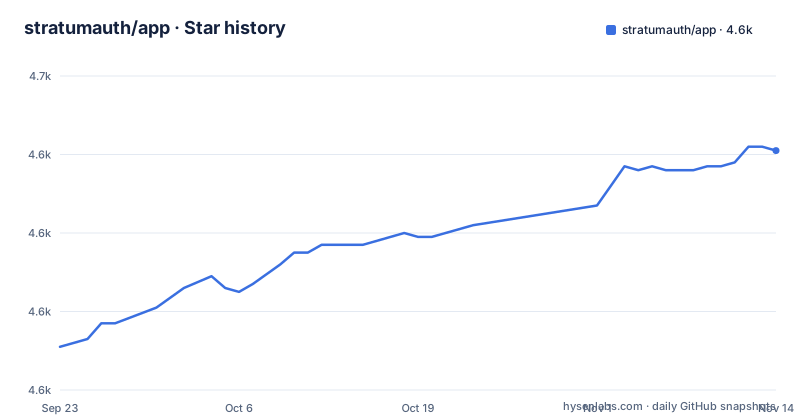
- stratumauth/app4,641 ★ · +50
| Repository | 2026-09-23 | 2026-11-14 |
|---|---|---|
| stratumauth/app | 4.6k | 4.6k |
50 Stars in the last 52 days, measured from the daily GitHub snapshot. Compare with other projects
Editorial analysis
One permission, and the app never needs the network
The feature list states two things in one line: Stratum only requires a single permission and does not require Internet access to function.
The Permissions section then names it: camera permission is required to add accounts through QR codes.
That is the entire permission surface, and it is a narrow one for an authenticator. Most authenticator apps of this kind hold the most sensitive data you own, since a code plus a shared secret is a login, so a permission list with one entry and no network is a claim worth checking rather than assuming.
The no-internet claim also has a practical consequence. Codes are computed locally from the secret and the clock, so nothing needs to be fetched, and the app keeps working on a plane, on a locked-down corporate network or with airplane mode on.
The trade is that there is no cloud token sync, which is the usual reason a competing app asks for network access. Stratum's answer to losing your phone is a backup file rather than a synced account, and the feature list describes that as saving to cloud storage or to your device.
So the design decision is legible from two lines of documentation: keep the app sealed, and make the backup file the portable artefact.
TOTP and HOTP with three hash choices, plus three vendor-specific formats
The supported algorithm list is one sentence and it has two halves.
It supports TOTP, time based, and HOTP, counter based, authenticators using either SHA1, SHA256 or SHA512 hashing algorithms. Those are the two RFC style algorithms and the three hash sizes, which covers essentially every service that hands out a standard enrolment secret.
Then: Mobile-Otp, also written mOTP, Steam and Yandex are also supported.
Those three are the reason the list is worth reading. mOTP is a time based code scheme that predates TOTP and uses a different derivation, Steam Guard issues its own alphanumeric codes over a custom protocol, and Yandex uses its own format as well. A service that does not hand you a plain TOTP secret is a service that a strictly RFC-only app cannot add, and these three are the cases Stratum covers.
Note that the compatibility claim in the feature list is careful: Stratum is compatible with most providers and accounts. Most is not all, and the README links wiki import guides for four named sources: Google Authenticator, Blizzard Authenticator, Steam and Authy.
For a source with its own format, the import guides matter as much as the algorithm support, since switching apps is where people lose access.
The backup file format has its own document in the repository
Backups are described as encrypted with strong encryption, and the point of the feature is stated plainly: in case you lose your or change phone, you can always gain access to your accounts.
What makes that claim checkable is a document. The README links a Backup File Format file in the repository's doc directory as a quick link, alongside a Frequently Asked Questions wiki page and a Contribution Guide.
A documented backup format is a larger deal than it sounds. It means the artefact is a format rather than an opaque blob.
This is also where the design decision from the first section pays off. No network access means no cloud sync, so the backup file is the only path off the device, which puts a lot of weight on that one document being accurate and on you having kept a copy.
The customisation feature, which covers setting icons, renaming and arranging authenticators in any order, is worth reading next to the backup file: it tells you what state exists that a restore needs to reproduce.
On F-Droid you must add a third party repository first
The download section has two store links and one instruction that people miss.
There is a store listing and an F-Droid listing. Then a note: Stratum is currently only available on the F-Droid client through the IzzyOnDroid repo, and you must first add this repository in the F-Droid client.
That is the whole caveat, and it is the kind of detail that turns into a support issue if it is not stated. A user searching F-Droid for the app and not finding it has not reached the wrong page, they have not added the repository the app is published through.
It also tells you something about the distribution model. The app is on the mainstream store and on an F-Droid repository, but not on the default F-Droid index, which is a choice about who curates the listing rather than about the build.
So there are three install paths and each has a different amount of setup: the mainstream store, the F-Droid client after adding a repository, and installing an APK yourself, which brings us to verification.
Three certificate digests are published so you can check the APK yourself
There is a Signature section, and its purpose is stated as verifying the authenticity of the APKs by comparing certificate signatures using `apksigner`.
The values are given as a code block:
SHA-256 digest: b975b325e4f39465df1034d6bc2c11a3926f60cc07b820c51fbe1c757555f28a
SHA-1 digest: b6a100cefaf7f4bc7d0879d71ad36c555a8b850e
MD5 digest: bb884532b0ee1b3f04dd9917409d5126
So one signature, three digests of it, in decreasing order of strength.
Why publish this at all? Because of the previous section. If you install an APK yourself rather than through a store, nothing else in the chain vouches for it, and an authenticator is a poor place to be trusting an unverified file. Publishing the digests lets you confirm the signing key matches the project rather than matching whoever handed you the file.
SHA-1 and MD5 are listed alongside SHA-256 for convenience, since `apksigner` prints all three. If you are verifying, compare the SHA-256 line and ignore the other two, since the shorter digests exist to make matching easier rather than to add assurance.
This is a small section and it is the one that protects every other promise the app makes.
The Wear OS app needs the phone, so it is a viewer rather than a vault
The watch app is a separate feature with its own caveat attached.
The feature list says you can quickly view your authenticators directly from your watch, and then adds: please note that a connection to your Android device is required.
That sentence decides what the watch app is. If it needs the phone, it is not holding your secrets independently, it is a second surface for reading what the phone holds.
The trade is deliberate. A watch that stored codes on its own would be a second device to lose, to protect and to revoke, and a watch with a short battery and no strong input method is not a good place for a shared secret. Requiring the phone keeps one copy of the secrets in one place and makes the watch a convenience surface.
The repository structure matches that reading. There is a Stratum.Core directory, a Stratum.Droid directory, a Stratum.Droid.Shared directory, a Stratum.WearOS directory and a Stratum.Test directory, all under Stratum.sln.
A shared core with a platform shell per surface is what lets the watch app read the phone's data through one implementation rather than duplicating the code and the format handling. The Wear OS companion also has its own screenshots section in the README, which is how you tell what it actually shows before installing it.
Icons are crowdsourced through an issue template and a CSV file
One feature has more supporting infrastructure than the rest, and that asymmetry is the interesting part.
Icons are described as finding your authenticators easily with recognisable brand logos and icons next to each code. The quick links include a Request Icons link that opens a new issue with the enhancement label and an icon request template already selected.
The repository carries an icons.csv file at the root, alongside icons/ and extraicons/ directories, which is a data-driven approach: the icon set is a list someone can extend rather than code someone has to write.
The customisation feature covers the rest of the interface: set icons and rename, and arrange your authenticators in any order you like so you can find them easily. So an entry has a label, an icon and a position, and all three are yours to set.
There is also a crowdin.yml at the root, and the README carries a Crowdin badge, which suggests the user-facing strings are managed outside the codebase, which fits an app whose audience spans languages.
The theme is described as a Material Design inspired look in either light or dark themes, with dark mode as its own feature entry.
Maintenance is current: the last push is dated 2026-11-01, with releases v1.7.0 in November 2026, v1.6.2 in May 2026 and v1.6.1 in March 2026, on a GPL-3.0 license.
Editorial conclusion
Stratum fits someone who wants an authenticator that works with no network connection, keeps its codes in an encrypted backup they can move between phones, and is willing to read a backup format document before trusting a restore. It does not fit someone who needs their tokens synced to a desktop, since the repository describes an Android app and a watch companion rather than a multi-device system. Before installing from F-Droid, add the IzzyOnDroid repository in the client first, verify the APK certificate digests the project publishes if you are installing outside a store, and check the Wear OS caveat, since the watch requires a connection to your Android device.
Frequently asked questions
What is Stratum and which codes does it support?
Stratum is a free open-source two factor authentication app for Android with a Wear OS companion. It supports TOTP, time based, and HOTP, counter based, authenticators using SHA1, SHA256 or SHA512, and Mobile-Otp, Steam and Yandex codes are also supported.
Does the Stratum authenticator need internet access?
No. The feature list states that Stratum only requires a single permission and does not require Internet access to function, and the Permissions section names that one permission as camera access, required to add accounts through QR codes. There is no cloud sync, so the backup file is the way to move accounts between devices.
How do I install Stratum from F-Droid?
Stratum is currently only available on the F-Droid client through the IzzyOnDroid repo, and you must first add that repository in the F-Droid client before the app appears. It is also listed on the mainstream app store, and installing an APK yourself is possible with the published certificate digests to verify it.
How do I verify a Stratum APK is authentic?
Compare the certificate signatures using apksigner with the digests published in the README: SHA-256 digest b975b325e4f39465df1034d6bc2c11a3926f60cc07b820c51fbe1c757555f28a, SHA-1 digest b6a100cefaf7f4bc7d0879d71ad36c555a8b850e, and MD5 digest bb884532b0ee1b3f04dd9917409d5126.
Can I use the Stratum Wear OS app without my phone?
No. The Wear OS feature states that a connection to your Android device is required, so the watch app is a viewer for what the phone holds rather than an independent store of your authenticators.
How do I move my accounts from another authenticator to Stratum?
The README links import guides for Google Authenticator, Blizzard Authenticator, Steam and Authy in the project wiki, and it links a Backup File Format document in the doc directory for the restore side. Icons for services that are missing can be requested through a dedicated issue template.
Official sources
Add this badge to your README
If you maintain this project, the badge below links readers to this analysis and shows its maintenance status from the daily GitHub snapshot. Paste the markdown into your README; add ?metric=license or ?metric=stars to the image URL for a different field.

[](https://hysenlabs.com/projects/stratumauth-app)Star history chart for your README
[](https://hysenlabs.com/projects/stratumauth-app)Was this useful?