@upstash/ratelimit: counting requests in Redis over plain HTTP
Rate limiting library for serverless runtimes
At a glance
- What is it?
- upstash/ratelimit-js keeps a request counter in Upstash Redis and reaches it over HTTP, so the same limiter runs in AWS Lambda, Cloudflare Workers and Vercel Edge where a TCP socket does not exist. A close read of the repository turns up a package.json still declaring 1.1.2, a README telling contributors to run pnpm test while the test script calls bun, and a Deno path pinned to @latest.
- Who is it for?
- Adopt @upstash/ratelimit when your handler runs somewhere a TCP socket to Redis cannot reach and one limiter has to work across Lambda, Workers and Vercel Edge. Leave it out when the server already holds a Redis connection, or when you need the throttled response emitted for you, since the example hands back only a boolean.
- Can I use it commercially?
- Yes. MIT is a permissive licence: you can use, modify and sell software built on it, as long as you keep its copyright and licence notices.
- Is it still maintained?
- Yes. The repository last received commits 3 days ago.
- What is it written in?
- Mainly TypeScript, according to GitHub's language statistics.
Answers come from the project's GitHub data, last synced on October 23, 2026, and from our analysis. They are not legal advice.
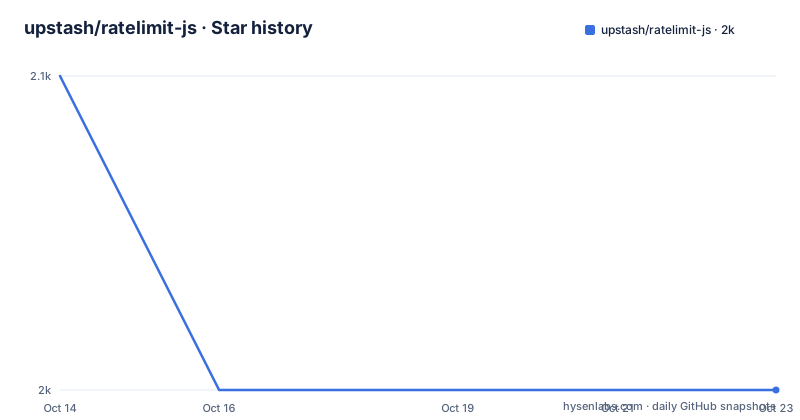
Star history
- upstash/ratelimit-js2,049 ★ · -1
| Repository | 2026-10-14 | 2026-10-23 |
|---|---|---|
| upstash/ratelimit-js | 2.1k | 2k |
-1 Stars in the last 9 days, measured from the daily GitHub snapshot. Compare with other projects
Editorial analysis
Connectionless counting for runtimes that have no socket
What the library is for is narrow and concrete: putting a request counter beside your handler when that handler has no long-lived socket. The README calls it the only connectionless (HTTP based) rate limiting library, and the environments it names are AWS Lambda, Cloudflare Workers and Pages, Vercel Edge, Fastly Compute@Edge, Next.js, Jamstack, client side web and mobile apps, and WebAssembly.
A counter held in memory dies with the instance that owns it, so the state has to live elsewhere. Here it lives in an Upstash Redis database that you create yourself through the Upstash console and then reach over HTTP. That makes the design decision architectural rather than algorithmic. One check costs one network request, and there is no local fast path for repeated hits from the same caller.
One entry in that runtime list deserves a second look. Client side web and mobile applications are named, yet the documented import path expects credentials in the environment through `Redis.fromEnv()`, so a browser bundle is not something the README shows you wiring up.
The constructor takes a redis client and a limiter function
Construction is where the design shows. The constructor takes a redis client, a limiter factory and a few options. The redis slot wants a client you own, so `Redis.fromEnv()` builds one from environment variables, and the manifest pins `@upstash/redis` at `^1.38.2` under peerDependencies. Nothing installs that client for you.
The limiter slot takes a named algorithm rather than a bare count. `Ratelimit.slidingWindow(10, "10 s")` is the only factory the README ever prints, and the comment beside it says it allows 10 requests per 10 seconds. Two other options show up immediately: `analytics: true` and `prefix`, which controls the Redis key namespace.
Two choices you make later decide how traffic gets grouped. `ratelimit.limit(identifier)` returns an object whose `success` field picks the branch, and the identifier is yours to supply. A constant string puts every caller in one shared limit, while a userID, an apiKey or an ip address separates them. The default `prefix` value is `@upstash/ratelimit`, offered for the case where one Redis instance is shared with other applications and keys could collide. That default is also what keeps two libraries aimed at the same database from overwriting each other's counters.
From npm install to a first rate-limited request
Installing for npm takes one command:
npm install @upstash/ratelimitThat installs the limiter, not the Redis client it expects. Deno has no install step at all, just an import from a CDN:
import { Ratelimit } from "https://cdn.skypack.dev/@upstash/ratelimit@latest";What that line does not give you is a version. The `@latest` tag on cdn.skypack.dev means the Deno build follows whatever the CDN serves, so a Deno deployment and an npm deployment in the same repository can drift apart without any lockfile noticing.
The first real use wires a client and a window together:
const ratelimit = new Ratelimit({
  redis: Redis.fromEnv(),
  limiter: Ratelimit.slidingWindow(10, "10 s"),
  analytics: true,
  prefix: "@upstash/ratelimit",
});
Then each incoming request becomes one call, and the quick start passes a constant string and branches on what comes back:
const identifier = "api";
const { success } = await ratelimit.limit(identifier);
A first run should show `success` holding true for the first 10 requests inside a 10 second window and false after that, with the example handler returning `Unable to process at this time` instead of running the expensive work behind it. No status code is set anywhere in that example, which is the first piece you have to add yourself.
Telemetry rides on the request header of your redis client
Requests your Redis client already makes carry a header reporting this SDK's name and version to Upstash. The header travels on the client you provide rather than through a separate channel, and the README is explicit that no personal data, keys or identifiers are collected.
Switching it off is a constructor option:
const ratelimit = new Ratelimit({
  redis: Redis.fromEnv(),
  limiter: Ratelimit.slidingWindow(10, "10 s"),
  enableTelemetry: false,
});
There is also `UPSTASH_DISABLE_TELEMETRY`, which is the route that works when the limiter is constructed deep inside a framework you do not control. One line is easy to skim: disabling telemetry on the redis client itself also disables it here, so setting the flag in only one of the two places leaves a state worth checking rather than assuming.
Analytics is a separate mechanism sitting next to it. `analytics: true` pulls in `@upstash/core-analytics`, declared as the single runtime dependency at `^0.0.10`. A zero-major pin carries a different stability promise from the `^1.38.2` peer range your own client has to satisfy, and what that package records about your traffic is not explained anywhere in the README.
The checked-in package.json still reads version 1.1.2
Two files in this repository disagree with each other. The manifest at the root declares the name `@upstash/ratelimit` with a version string of `1.1.2`, and that string is what a build taken from a checkout reports. The release record goes further, listing v2.2.0 on 2026-09-23, v2.1.0 on 2026-09-14 and v2.1.0-rc on 2026-08-07, while the README carries a note announcing GA stage.
The gap is a whole major version, and the committed manifest is the file you read when checking what the package will accept. The rest of it is unremarkable: `main` points at ./dist/index.js, `types` at ./dist/index.d.ts, the published `files` array is `dist`, the build runs through tsup, and lint runs eslint over src.
The repository is not archived and the last push was on 2026-09-25. So this is a live project whose committed metadata has drifted behind what the registry serves, which matters when you read a peer range or a supported platform out of the file instead of out of the published package.
Running tests needs bun, not the pnpm the README names
The contributing section says to set environment variables and then run a single command:
pnpm testThe manifest defines that script as `bun test src --coverage`, and the repository root carries a `bun.lockb` with no pnpm lockfile among the listed top-level entries. So the documented command runs a script that shells out to bun, and a contributor who has pnpm but no bun gets a missing binary instead of a test run. That section never mentions bun at all.
The variable list is the other half. Eight names are needed, a `UPSTASH_REDIS_REST_URL` and token pair followed by the same pair under the `US1_UPSTASH_REDIS_REST_URL`, `APN_UPSTASH_REDIS_REST_URL` and `EU2_UPSTASH_REDIS_REST_URL` prefixes for three regions. Then the README says a single Upstash Redis can supply its URL and token for all four above, a count that does not match the eight names just listed.
Underneath sits a real constraint for anyone sending a patch. The suite reaches three regional endpoints rather than a local Redis you could start in a minute, and the same README section does not say how to point the tests at a database you already own.
Adapters the README points at but does not print
Several promises in the documentation have no body behind them. The import line in the quick start carries the comment "see below for cloudflare and fastly adapters", and there is no such section below it. Fastly Compute@Edge is named in the list of environments the library is designed for, yet the examples tree carries no fastly folder. `examples/cloudflare-workers/`, `examples/vercel-edge/` and `examples/with-vercel-kv/` are there, among nine folders in total.
What the limiter does not do is produce a response. The example assigns `success` and then returns a string, leaving status codes, headers and any backoff hint to the caller, and the README never mentions a throttled status anywhere. Retry timing is undocumented for the same reason, so clients that need guidance on when to try again are your problem.
The structural gaps are quieter. The repository root carries `cmd/`, `skills/` and `context7.json`, and nothing in the README accounts for them, so their purpose has to be guessed from names. Anything deeper than the quick start is documented on Upstash's own docs site rather than in this repository, which means the full set of limiter algorithms is not something this README will hand you.
Why the transport matters more than the counting algorithm
The real choice is not which counter to write but how the counter reaches its store. On a long-lived Node server that already holds a Redis connection, the HTTP round trip this package requires is extra work for a job a socket client does in one call. Nothing published lets you weigh that. No throughput figure or latency number appears in the manifest, the README or the example folders.
What does separate the two approaches is how far the same code travels. The examples tree carries a folder named with-vercel-kv, the only sign in the file listing that the client is swappable, and the design claim rests on HTTP beating TCP for the runtimes named at the top of the README.
Choose this library when one limiter has to run unchanged across Lambda, Workers and Vercel Edge. Leave it out when the deployment already has a stable socket, when you want a fixed-window or token-bucket algorithm the README never prints, or when you need the throttled response emitted for you rather than a boolean handed back.
Editorial conclusion
Adopt @upstash/ratelimit when your handler runs somewhere a TCP socket to Redis cannot reach and one limiter has to work across Lambda, Workers and Vercel Edge. Leave it out when the server already holds a Redis connection, or when you need the throttled response emitted for you, since the example hands back only a boolean. Verify three things first: that @upstash/redis at ^1.38.2 is installed beside it, whether telemetry stays on, and which algorithm you actually need, because the README only ever prints one.
Frequently asked questions
Does @upstash/ratelimit install @upstash/redis for me?
No. The manifest lists @upstash/redis at ^1.38.2 under peerDependencies, so you install it yourself and pass an instance such as Redis.fromEnv() into the redis option of the constructor.
Which version of @upstash/ratelimit should I install?
The release record lists v2.2.0 on 2026-09-23 as the newest tag, while the package.json in the repository still declares 1.1.2. Read the version from what the registry serves rather than from the manifest in a checkout.
How do I disable telemetry in @upstash/ratelimit?
Pass enableTelemetry: false to the Ratelimit constructor, or set the UPSTASH_DISABLE_TELEMETRY environment variable. Disabling telemetry on the redis client itself also turns it off here, so setting it in one place is enough.
Can @upstash/ratelimit run on Cloudflare Workers and Vercel Edge?
Both are named in the README's list of environments the package is designed for, and the examples tree holds folders for both. The README itself does not print a Cloudflare or Fastly adapter, only a comment pointing at one that is not there.
How does @upstash/ratelimit decide who shares a limit?
You pass an identifier string to ratelimit.limit(identifier). The quick start uses a constant string for one shared limit, while a userID, an apiKey or an ip address gives you limits per caller.
Can two applications share one Upstash Redis with @upstash/ratelimit?
Yes, by setting the prefix option, which defaults to @upstash/ratelimit and is described as a way to avoid key collisions when an instance is shared with other applications.
Official sources
Add this badge to your README
If you maintain this project, the badge below links readers to this analysis and shows its maintenance status from the daily GitHub snapshot. Paste the markdown into your README; add ?metric=license or ?metric=stars to the image URL for a different field.

[](https://hysenlabs.com/projects/upstash-ratelimit-js)Star history chart for your README
[](https://hysenlabs.com/projects/upstash-ratelimit-js)Was this useful?