urob/zmk-config: Reproducible ZMK Builds for Multiple Keyboards
Personal ZMK firmware configuration for various boards (34-keys, Glove80, Planck)
At a glance
- What is it?
- urob/zmk-config is a personal ZMK firmware workspace built around a 34-key keymap for Corneish Zen, Glove80, and Planck boards. It combines a top-down West manifest, exact dependency revisions, a Nix build environment, and repeatable `just` commands, but its custom keymap and hardware assumptions make it primarily useful as a reference or starting point for ZMK users.
- Who is it for?
- Adopt this repository if you want a documented, reproducible starting point for a multi-board ZMK keymap and can accept adapting its 34-key assumptions. Do not adopt it unchanged if your keyboard has a different matrix, shield, or layout.
- Can I use it commercially?
- Not without permission. GitHub finds no licence file in the repository, and without a licence all rights are reserved by default: you may read the code but not reuse it. Check the README, or ask the authors, before using it.
- Is it still maintained?
- Yes. The repository last received commits 6 days ago.
- What is it written in?
- Mainly C++, according to GitHub's language statistics.
Answers come from the project's GitHub data, last synced on November 7, 2026, and from our analysis. They are not legal advice.
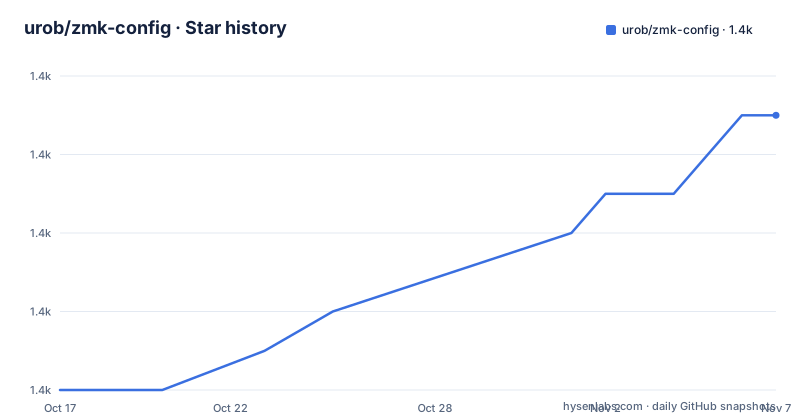
Star history
- urob/zmk-config1,395 ★ · +7
| Repository | 2026-10-17 | 2026-11-07 |
|---|---|---|
| urob/zmk-config | 1.4k | 1.4k |
7 Stars in the last 21 days, measured from the daily GitHub snapshot. Compare with other projects
Editorial analysis
A 34-key workspace for several ZMK boards
urob/zmk-config solves a specific firmware organization problem for a keyboard user who works across boards with different sizes and layouts. Its base keymap has 34 keys and is adapted for a Corneish Zen, Glove80, and Planck. The repository is therefore not a general-purpose keyboard layout library. It is a personal ZMK configuration presented as a reproducible workspace, with enough documentation for another user to study and adapt.
The keymap includes homerow mods, combos instead of a symbol layer, Numword and smart-mouse layers, a leader key, Unicode input sequences, and a navigation cluster. It also uses helper macros from `zmk-helpers`. These features target interaction design and typing efficiency, while the workspace structure targets build consistency. Keeping those two concerns separate matters because a user may want the layer model without adopting the exact layout or the repository's dependency set.
The documented audience includes people adapting the configuration for their own keyboard. The README points users to Part III for adaptation, but that section is not included here. It is also clear that the author expects familiarity with ZMK, West, Nix, `direnv`, and `just`. A first-time firmware user may find that the workspace is easier to copy than to understand.
Top-down dependency resolution through `config/west.yml`
The central design choice is a top-down ZMK workspace. The README contrasts this with the recommended local setup, where ZMK itself is the workspace root and additional repositories are added manually. In this repository, `config/west.yml` is the single manifest for ZMK, Zephyr, and every module. The workspace directories such as `zmk/`, `zephyr/`, and `modules/` are generated from that manifest rather than being separately cloned and coordinated.
This arrangement gives the repository a specific data flow. A user starts with the cloned configuration repository, runs `just init`, and West materializes the pinned dependencies. The build then uses those local sources. The manifest records not only exact revisions but also the branch being tracked and the date associated with each pin. That gives a reader a way to inspect why a dependency revision exists instead of treating it as an unexplained commit.
The tradeoff is deliberate. Exact commits improve reproducibility, but they can delay access to upstream changes. The project addresses that delay with `just bump-west` and a scheduled weekly workflow that updates pins and opens a pull request. The workflow is a release process for dependency revisions, not a GitHub release. The repository has no published GitHub releases, so users should treat the manifest and pull requests as the relevant update mechanism.
Nix and `just` make local builds repeatable
Local development is handled by a Nix-powered environment. The README says the environment sets itself up when the user enters the workspace and remains isolated from the rest of the system. The documented initial commands are short because the repository carries the toolchain definition in `flake.nix` and the recipes in `Justfile`.
The first local sequence requires prerequisites that are not fully enumerated in the README, so it would be inaccurate to invent installation commands for Nix, `direnv`, or `just`. Within the repository, the documented sequence is:
cd zmk-workspace
direnv allow
just init
`direnv allow` permits the workspace environment to activate. `just init` bootstraps the West workspace from `config/west.yml`. The README says `firmware/` is generated by `just build`, while `modules/`, `zephyr/`, and `zmk/` are generated by initialization. Running `just` without arguments lists the available recipes.
Cloud builds use the same Nix environment according to the README. This is a useful consistency choice because a local Nix build and a GitHub Actions build are intended to derive from the same environment definition. It does not eliminate hardware differences, though. A build can still fail when the selected board definition, shield, or target is not supported by the configuration.
The keymap favors homerow mods, combos, and temporary layers
The interaction model is more opinionated than the build system. The README calls the homerow mods “timeless,” indicating that the design avoids timing problems associated with some home-row modifier approaches. Combos replace a separate symbol layer. Numword and smart-mouse are temporary layers that turn off automatically, which can reduce the need to leave a permanent navigation or numeric mode active.
The Magic thumb position is documented as four functions: Repeat, Sticky-shift, Shift, and Capsword. The leader key supports Unicode input and system commands. The navigation cluster doubles as `home` and `end`, and long presses map to beginning or end of document. Shifted behavior is also customized for punctuation, including `<kbd>`, `<kbd>.`, and `<kbd>?` mappings.
These are concrete choices that affect how a keyboard feels. A user who expects a conventional symbol layer may need to learn the combo sequence first. A user with a different key count may also find that a 34-key layout does not map cleanly to another layout. The repository includes draw configuration under `draw/`, but the README does not explain how every generated drawing should be customized.
Cloud Actions are the low-setup build path
For users who do not want to configure a local Nix environment, the README documents the usual GitHub Actions path. A user pushes changes, opens the repository's `Actions` tab, and downloads the resulting firmware. The repository keeps a stock ZMK workflow available for reference and says it can also be run through manual dispatch. The build workflow runs in the same Nix environment as the local setup, according to the README.
There is one operational caveat. GitHub disables Actions on newly created forks by default, so the fork owner must enable Actions from the fork's `Actions` tab before the first push. That makes the cloud route convenient once configured, but it is not a zero-step installation for a fresh fork.
The cloud route also inherits the same manifest and build targets. If a pinned dependency or board-specific configuration is wrong, moving the build to GitHub Actions does not correct the firmware definition. Cloud execution changes where compilation happens, not which source revisions or hardware targets are selected.
Hardware compatibility and maintenance boundaries
The main limitation is hardware specificity. The base keymap is 34 keys and is currently adapted for three named boards. The README warns that less common hardware may require extending the Zephyr import allowlist. It does not claim that arbitrary keyboards are supported. A different shield, encoder layout, display, pointing device, or matrix may require changes in `config/`, `build.yaml`, or related Devicetree files.
The repository was not archived, and the last push was on 2026-10-12. That indicates recent repository activity, but it does not by itself establish compatibility with every board or guarantee support for a particular ZMK change. There are no GitHub releases, so there is no documented release channel or stable version label in the repository documentation.
The license is listed as unknown. The repository therefore does not provide enough information to assess redistribution conditions or derivative-use permissions. Users who need a licensed redistribution path must determine the licensing status from authoritative project sources before shipping modified firmware or configuration beyond their own use.
Editorial conclusion
Adopt this repository if you want a documented, reproducible starting point for a multi-board ZMK keymap and can accept adapting its 34-key assumptions. Do not adopt it unchanged if your keyboard has a different matrix, shield, or layout. Check `config/west.yml`, `build.yaml`, and the board-specific keymap files first, then verify that the pinned dependency revisions build for your hardware.
Frequently asked questions
What boards does urob/zmk-config support?
The README says the 34-key keymap is currently adapted for a Corneish Zen, Glove80, and Planck. It does not claim support for arbitrary keyboards, so other boards may require configuration changes.
How do I initialize a local urob/zmk-config workspace?
The README documents entering the cloned workspace, running `direnv allow`, and then running `just init`. The latter bootstraps the workspace from `config/west.yml`.
How are ZMK dependencies kept reproducible?
The West manifest pins ZMK, Zephyr, and the modules to exact revisions while recording their tracked branches and pin dates. The documented `just bump-west` command refreshes those pins, and a weekly workflow opens a pull request for updates.
Official sources
Add this badge to your README
If you maintain this project, the badge below links readers to this analysis and shows its maintenance status from the daily GitHub snapshot. Paste the markdown into your README; add ?metric=license or ?metric=stars to the image URL for a different field.

[](https://hysenlabs.com/projects/urob-zmk-config)Star history chart for your README
[](https://hysenlabs.com/projects/urob-zmk-config)Was this useful?