Valkey's default branch is called unstable, and make distclean is the command you will type most
A flexible distributed key-value database that is optimized for caching and other realtime workloads.
At a glance
- What is it?
- Valkey is the BSD-licensed fork of Redis taken before Redis moved to source-available terms, a C data structure server for key/value workloads with an extensible plugin system, built with a Makefile whose dependency and option caching is its sharpest edge. Two details set expectations: the default branch is named unstable with three release lines in flight, and forced build options survive a git pull until you run make distclean.
- Who is it for?
- Valkey fits a team that wants a permissive in-memory store with the Redis command surface and a plugin system for new data structures, and that is prepared to read DEVELOPMENT_GUIDE.md before its first build. It does not fit a sentinel deployment that needs TLS loaded as a module, since that combination is excluded.
- Can I use it commercially?
- Yes. BSD-3-Clause is a permissive licence: you can use, modify and sell software built on it, as long as you keep its copyright and licence notices.
- Is it still maintained?
- Yes. The repository received new commits within the last day.
- What is it written in?
- Mainly C, according to GitHub's language statistics.
Answers come from the project's GitHub data, last synced on November 13, 2026, and from our analysis. They are not legal advice.
Star history
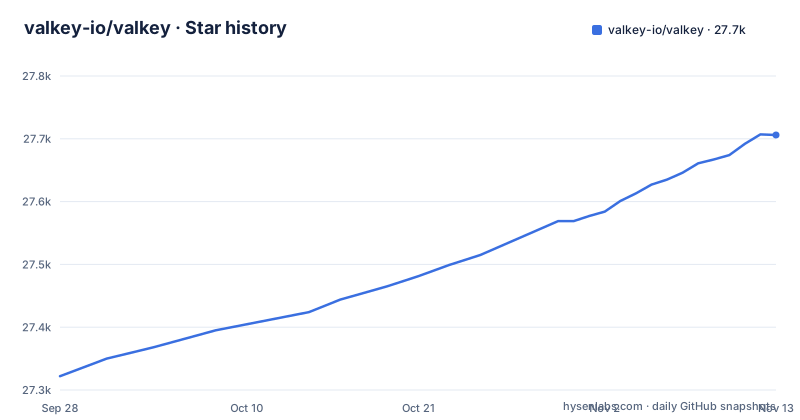
- valkey-io/valkey27,706 ★ · +384
| Repository | 2026-09-28 | 2026-11-13 |
|---|---|---|
| valkey-io/valkey | 27.3k | 27.7k |
384 Stars in the last 46 days, measured from the daily GitHub snapshot. Compare with other projects
Editorial analysis
The fork was taken before the licence change, not after
The first line of the README answers the question everyone asks about this project: it was forked from the open source Redis project right before the transition to their new source available licenses.
That timing is the whole story about why the two projects exist, and it is worth stating precisely rather than as a feature comparison. What it describes is a high-performance data structure server that primarily serves key/value workloads, with a wide range of native structures and an extensible plugin system for adding new data structures and access patterns.
The practical consequence for an adopter is that this is a code drop with a governance change attached, so the question to ask is not what the fork does better but what your operational tooling expects. Client libraries, dashboards and the command surface are what you inherited, and the plugin system is the part that is genuinely the fork's own direction.
The default branch is unstable and three lines ship in parallel
The repository's default branch is named `unstable`, and the release list shows why that name is not a warning so much as a description. The most recent releases are 9.0.7, tagged on 2026-10-27, and 8.1.11 and 8.0.12, tagged on 2026-10-26.
So there are at least three maintenance lines, all in the same repository, and the last push was on 2026-11-02 with the repository not archived. The cost of that shape is real: `latest` is an ambiguous word here, and a deployment that follows a floating tag can move between lines without anyone deciding to.
The project publishes the tooling to see what you would be getting. There is a performance overview for comparing throughput across Valkey versions, and a public dashboard tracking the performance of all commits in the unstable branch, described as there so contributors can validate improvements and identify regressions quickly. Reading that dashboard is how you answer the question a release note leaves open, namely whether a change helped or hurt.
make distclean, because make will not rebuild your dependencies
This is the section of the README most likely to save an afternoon. Some dependencies live in the `deps` directory, and `make` does not automatically rebuild them even when something in their source changes. The documented cure is `make distclean`, which cleans jemalloc, lua, libvalkey, linenoise and the other bundled dependencies.
The instruction is attached to `git pull`. If you update the source and rebuild without cleaning, you can be running old dependency code against new Valkey code, and nothing tells you.
The same section warns about a second cache: forced build options such as a 32-bit target or disabled C compiler optimisations for debugging are cached indefinitely until you issue `make distclean`. That is why going back from a 32-bit build to a 64-bit one also requires a distclean in the root of the distribution. Two caches, one command, and the failure mode of both is a build that looks current and is not.
The build flags are a menu, and one choice excludes sentinel
The build surface is a set of make variables, and each one changes what is compiled in rather than what is configured later.
TLS comes in two forms, and the difference has a consequence the README states in one line: `make BUILD_TLS=yes` builds it in, `make BUILD_TLS=module` builds it as a module, and sentinel mode does not support the TLS module. So a cluster with sentinel in the picture has to take the built-in form.
The rest follow the same pattern. RDMA is experimental and needs RDMA development libraries, `librdmacm-dev` and `libibverbs-dev` on Debian and Ubuntu, and takes `BUILD_RDMA=yes` or `=module`. `USE_SYSTEMD=yes` links against systemd. `USE_LIBBACKTRACE=yes` gives stack traces with file names and line numbers for all functions including static ones. `BUILD_LUA=no` drops the Lua engine. `make PROG_SUFFIX="-alt"` renames the programs, which is the clean way to keep two builds side by side.
Compression has its own note. Streaming RDB and replication compression can use Zstandard 1.4.7 or newer, and its static archive is required because Valkey uses Zstandard's static-linking-only custom allocator APIs so that codec allocations count towards memory accounting. `make BUILD_ZSTD=yes` enables it, with `ZSTD_PREFIX` for a custom installation.
jemalloc on Linux, libc malloc elsewhere
The allocator is chosen at build time through the `MALLOC` variable, and the default is not the same on every platform. Valkey is compiled and linked against libc malloc by default, with the exception of jemalloc on Linux systems, and the README gives the reason: jemalloc has proven to have fewer fragmentation problems than libc malloc.
Forcing the other direction is one flag, `make MALLOC=libc`, and on macOS, where jemalloc is not the default, `make MALLOC=jemalloc` is how you get the Linux behaviour.
That asymmetry is the part to keep in mind. A memory profile taken on a Linux host and a memory profile taken on a macOS developer machine are measuring two different allocators, so a fragmentation difference between environments may be a build difference rather than a workload difference. The same logic applies to the `V=1` flag for verbose build output, which is what you want when a compile failure needs reading rather than guessing.
Time comes from the processor clock unless you stop it
Valkey reads the processor's internal instruction clock for monotonic time by default, the TSC on x86 and CNTVCT on ARM, and the README quantifies it: roughly 10 to 30 nanoseconds per read against about 100 for POSIX `clock_gettime`, which it describes as approximately three times faster.
That default is enabled on supported architectures, x86 Linux and aarch64, and it falls back to POSIX `clock_gettime` automatically on systems that are not supported, so a platform where the instruction clock cannot be trusted is not your problem to solve. The override exists for the cases where the default is wrong rather than absent, and it is a compiler flag rather than a configuration setting:
% make CFLAGS="-DNO_PROCESSOR_CLOCK"The reason it is on by default is performance. The README links a write-up on the pitfalls of TSC usage for anyone who needs the detail behind the choice.
The top-level Makefile forwards, and five scripts run the tests
The top-level Makefile is three targets and a comment, and the comment says the real magic is in `src/Makefile`: the default target and the install target both change into `src` and re-invoke make there. A `CMakeLists.txt` and a `cmake/` directory sit alongside it, so there are two build systems in the repository.
Testing is organised by harness rather than by one command. `make test` runs the main integration tests, and four more targets narrow the scope: `make test-unit` for unit tests, `make test-modules` for the module API, `make test-sentinel` for the Sentinel integration tests and `make test-cluster` for the cluster integration tests. The corresponding harnesses are visible at the repository root as `runtest`, `runtest-cluster`, `runtest-moduleapi`, `runtest-rdma` and `runtest-sentinel`, and the detail lives in `tests/README.md` and `src/unit/README.md`.
The rest of the root is governance and configuration: `valkey.conf` and `sentinel.conf` as the shipped configuration files, `00-RELEASENOTES`, `DEVELOPMENT_GUIDE.md`, `GOVERNANCE.md`, `MAINTAINERS.md`, `SECURITY.md`, a `design-docs/` directory, and `REUSE.toml` with a `LICENSES/` directory for licence headers. The licence is BSD-3-Clause, with `COPYING` at the root.
Editorial conclusion
Valkey fits a team that wants a permissive in-memory store with the Redis command surface and a plugin system for new data structures, and that is prepared to read DEVELOPMENT_GUIDE.md before its first build. It does not fit a sentinel deployment that needs TLS loaded as a module, since that combination is excluded. Before deploying, run make distclean after any pull, choose BUILD_TLS=yes rather than the module if sentinel is in the picture, and decide whether the jemalloc default on Linux is the behaviour you want to test.
Frequently asked questions
Why Valkey instead of Redis?
The README states that this project was forked from the open source Redis project right before the transition to their new source available licenses. Beyond that origin, it describes itself as a high-performance data structure server for key/value workloads with an extensible plugin system for new data structures and access patterns.
What is Valkey used for?
It primarily serves key/value workloads and is optimized for caching and other realtime workloads. It supports a wide range of native data structures, and its plugin system is the extension point for adding new structures and access patterns.
Is Valkey free?
It is released under the BSD 3-Clause licence, with the COPYING file at the repository root. The README also notes that it is a fork of the open source Redis project, taken before that project moved to source-available licences.
How do I install the Valkey command line client?
The README is a build-from-source quick start rather than a package-manager guide. It documents running `make` and then starting the server from the source directory with `./valkey-server`, and the supported platforms for that build are Linux, macOS, OpenBSD, NetBSD and FreeBSD.
How do I build Valkey on Ubuntu?
Linux is a supported platform and the basic build is `make`. Building with TLS on Debian or Ubuntu needs the OpenSSL development libraries, libssl-dev, and then `make BUILD_TLS=yes` for TLS built in or `make BUILD_TLS=module` for TLS as a module, with sentinel mode not supporting the module form.
Official sources
Add this badge to your README
If you maintain this project, the badge below links readers to this analysis and shows its maintenance status from the daily GitHub snapshot. Paste the markdown into your README; add ?metric=license or ?metric=stars to the image URL for a different field.

[](https://hysenlabs.com/projects/valkey-io-valkey)Star history chart for your README
[](https://hysenlabs.com/projects/valkey-io-valkey)Community discussions
Was this useful?