ValveSoftware/wine: the loader, Winelib, and the build you actually get
Wine with a bit of extra spice
At a glance
- What is it?
- ValveSoftware/wine hosts the Wine compatibility layer, a program loader plus a library that implements Windows API calls on Unix, X11 or Mac equivalents, under a default branch called proton_11.0. Its README is Wine's own, describing a build that starts at ./configure with a clang 3.8 and MacOSX10.13.sdk floor on macOS and never mentions the autogen.sh shipped in the tree.
- Who is it for?
- Adopt this project when one specific Windows binary must run on a Unix host, or when Windows source can be linked against Winelib to produce a native Unix executable. Leave it alone where a guaranteed desktop environment matters, because the README says some programs crash and NTFS does not provide every file system feature an application needs.
- Can I use it commercially?
- Check first. The repository uses a licence we do not classify automatically, so read its LICENSE file before any commercial use.
- Is it still maintained?
- Yes. The repository last received commits 1 day ago.
- What is it written in?
- Mainly C, according to GitHub's language statistics.
Answers come from the project's GitHub data, last synced on October 22, 2026, and from our analysis. They are not legal advice.
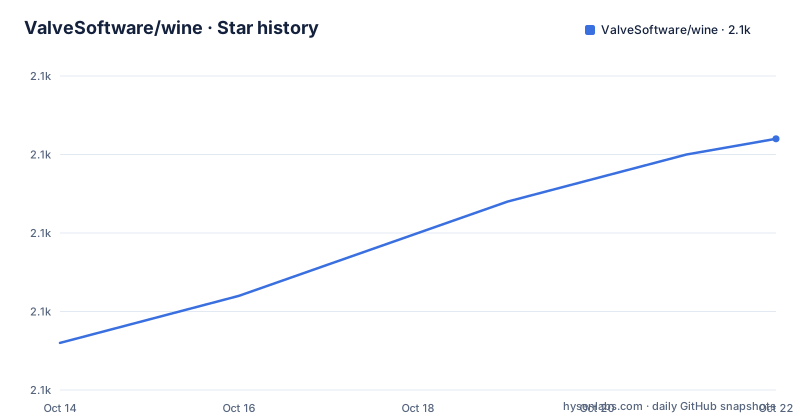
Star history
- ValveSoftware/wine2,096 ★ · +13
| Repository | 2026-10-14 | 2026-10-22 |
|---|---|---|
| ValveSoftware/wine | 2.1k | 2.1k |
13 Stars in the last 8 days, measured from the daily GitHub snapshot. Compare with other projects
Editorial analysis
A loader plus Winelib, not a virtual machine
A Windows compatibility layer sits between two instruction sets, and this repository splits that job in two parts. Wine is a program loader which loads and executes a Microsoft Windows binary, and a library, called Winelib, that implements Windows API calls using their Unix, X11 or Mac equivalents. The formats it names cover DOS, Windows 3.x, Win32 and Win64 executables, so one loader spans software written across three decades of Windows versions.
The tree matches that split. Two directories named `loader/` and `loader64/` sit beside `dlls/`, `libs/` and `include/`, which puts the 32-bit and 64-bit load paths in separate pieces of code rather than one binary behind a flag. The top level also carries `server/`, `programs/`, `tools/`, `fonts/`, `nls/` and `documentation/`. Written in C, the build is autotools driven: `configure.ac`, `aclocal.m4` and `autogen.sh` all sit next to the README, yet the quick start begins at `./configure` and never mentions `autogen.sh`, so a tree that ships only those inputs gives you nothing to run on the first attempt.
The README calls Wine free software under the GNU LGPL and sends you to the LICENSE file, while this repository ships LICENSE and LICENSE.OLD beside COPYING.LIB and its licence field reads Other.
Compiling from source across five Unix targets
The supported host list is short and the stated reason is architectural: Wine requires kernel-level thread support to run, so only Linux 2.6.22 or later, FreeBSD 12.4 or later, Solaris x86 9 or later, NetBSD-current and macOS 10.12 or later are in scope, while other operating systems with kernel threads are left for a later time. From the top-level directory of the source, the one containing the README, two commands produce the loader and the libraries:
./configure
make
What comes out is the program `wine`, numerous support libraries and binaries, and `libwine`, also called Winelib. Configure prints notices for every optional library it cannot find, and the package names for those sit on the Building-Wine wiki page rather than in the README. On 64-bit platforms you must also install the 32-bit versions of the same libraries, which is where most of the missing-package reports come from.
./configure --helpThen either install the result, which places the wine executable, the libraries, the Wine man page and other needed files where other tools can find them:
make installOr skip the install entirely while you are still changing source, and run the loader straight out of the build directory:
./wine notepadBuild tools are not optional on any of the five targets: the X11 development include files, called `xorg-dev` in Debian and `libX11-devel` in Red Hat, make, flex version 2.5.33 or later, and bison.
The macOS SDK floor sits above the stated host minimum
The requirements list names macOS 10.12 or later as a supported system, then the macOS notes set a higher bar for building on it. You need Xcode, the Xcode Command Line Tools or Apple cctools, and the stated minimum for compiling is clang 3.8 with the MacOSX10.13.sdk and mingw-w64 v12 for 32-bit wine. The MacOSX10.14.sdk and later can build 64-bit wine, so the newest of the two SDKs is not optional for anyone who wants a 64-bit build.
Put the two statements next to each other and the floor contradicts itself. The host version listed as supported, 10.12, is older than the SDK that either build target requires, 10.13 for 32-bit or 10.14 for 64-bit, so a Mac that satisfies the supported-systems line cannot satisfy the compiling line for 64-bit output. Nobody reading only the bullet list gets that result.
The other targets carry traps of the same shape. On NetBSD, the kernel needs the USER_LDT, SYSVSHM, SYSVSEM and SYSVMSG options turned on before anything will run. On Solaris you need the GNU toolchain, gcc and gas among them, and the note warns that installing gas does not ensure gcc uses it, with recompiling gcc after installing gas or symlinking cc, as and ld to the gnu tools said to be necessary. Linux 2.6.22 is a floor from an era before most current distribution baselines.
The registry search path picks the file before Wine does
You may specify the entire path to an executable, or a filename only, and the filename form depends on the registry. A bare name with no directory component is located through the search Path as specified in the registry, which is why `wine notepad` and `wine notepad.exe` are the forms worth remembering:
wine notepad
wine notepad.exe
Two other syntaxes reach the same program by naming the file directly instead of going through that path. DOS filename syntax uses backslashes, and Unix filename syntax reaches into the prefix directory:
wine ~/.wine/drive_c/windows/notepad.exe
wine notepad.exe readme.txt
The last line hands a file to the program as an argument, exactly the way the program would receive it when started from Windows. Once the install step is done, the winecfg configuration tool is where the registry gets edited by hand, with configuration hints on the Support area at winehq.org.
Kernel threads and NTFS decide where it will run
Two limits are stated plainly rather than left open. The first is kernel-level thread support, which is why the supported list stops at five Unix systems and no others are claimed today. The second is the file system: Wine should run on most file systems, a few compatibility problems have been reported using files accessed through Samba, and NTFS does not provide all the file system features needed by some applications. A native Unix file system is what the project recommends, which matters for anyone planning to put a Windows install on an NTFS volume mounted from Linux.
Installing over an existing copy is the other practical hazard, and the instruction is to uninstall any conflicting previous Wine installation first, whether that copy came from a distribution package named `wine` or from a source tree. Three commands cover the common cases:
dpkg -r wine
rpm -e wine
make uninstall
Missing optional packages follow the same pattern of small separate pieces. Configure reports what it cannot find, the wiki page lists what to install, and on a 64-bit platform the gap is frequently the 32-bit half of a library that is already installed. Solaris adds a fourth layer, since the toolchain itself may need rebuilding.
On upgrades, the project is quiet. The README does not document rollback, does not describe how to move an installed prefix from one version of this repository to another, and does not explain what changes between commits.
Winelib links your source and skips the loader
Wine has two consumption models and they are not interchangeable. In the loader model the Windows binary stays untouched: `loader/` and `loader64/` read it and Winelib resolves each API call against Unix, X11 or Mac equivalents at run time, and a program that reaches for something unimplemented can crash, which is why a crash log is produced for the bug report. In the library model, `libwine`, also called Winelib, is used to compile and link Windows source code under Unix, and the same library can be used for porting Windows code into native Unix executables. There the build output is a Unix executable and no Windows binary is loaded at all.
That is the real alternative, and the difference is where you do the work. With the loader, an unsupported Windows feature is discovered when the program runs, and the crash log becomes your evidence. With Winelib, the ported source is source you can edit and recompile on the host, which suits teams already holding Windows code they intend to maintain.
A third route sits outside the source tree: distribution packages named `wine`, which the setup notes tell you to remove with `dpkg -r wine` or `rpm -e wine` before installing a build of your own, so a package install and a source build are mutually exclusive on the same machine.
Search the bugzilla before you file the report
The support path starts with a database search, not a submission. Report bugs to Wine Bugzilla at bugs.winehq.org, and search the bugzilla database to check whether the problem is already known or fixed before posting a report. A crash log produced by a failed run belongs in that report, and attaching it is the difference between a report a maintainer can act on and one that gets closed.
The same set of pages carries everything else: the FAQ and the wiki live on gitlab.winehq.org, development is hosted there as well, mailing lists are indexed through the forums wiki, and live help sits on channel `#WineHQ` at irc.libera.chat. winehq.org also holds the guides and the application database, which is where the configuration hints behind `winecfg` live.
On maintenance, the repository is its own version marker. The last push on this branch landed on 2026-10-06 and the project publishes no GitHub releases, so there is no tagged artifact to pin, and a tree listing carries VERSION and ANNOUNCE.md at the top level next to the build system. Read VERSION before building if the exact version matters to you.
Editorial conclusion
Adopt this project when one specific Windows binary must run on a Unix host, or when Windows source can be linked against Winelib to produce a native Unix executable. Leave it alone where a guaranteed desktop environment matters, because the README says some programs crash and NTFS does not provide every file system feature an application needs. On a Mac, check the SDK floor first: the supported-systems line names 10.12, yet 64-bit output needs the MacOSX10.14.sdk. Before building, read VERSION and confirm which branch you are compiling.
Frequently asked questions
What does Wine actually do on Unix?
It is a program loader that loads and executes a Microsoft Windows binary, plus a library called Winelib that implements Windows API calls using their Unix, X11 or Mac equivalents. The executable formats named are DOS, Windows 3.x, Win32 and Win64.
How do I build Wine from source?
From the top-level directory of the source, run ./configure and then make. The result is the wine program, support libraries and libwine, and you can install it with make install or run the loader directly from the build directory with ./wine notepad.
Can Wine be built on macOS?
macOS 10.12 or later is listed as supported, and compiling there needs Xcode, the Xcode Command Line Tools or Apple cctools. The stated minimum is clang 3.8 with the MacOSX10.13.sdk and mingw-w64 v12 for 32-bit wine, while the MacOSX10.14.sdk and later can build 64-bit wine.
Which file systems does Wine run on?
Wine should run on most file systems, but a few compatibility problems have been reported with files accessed through Samba, and NTFS does not provide all the file system features needed by some applications. A native Unix file system is recommended.
What do I do before installing over an existing Wine installation?
Uninstall the conflicting previous installation first, with either dpkg -r wine, rpm -e wine, or make uninstall. After installing, the winecfg configuration tool is where you edit the registry.
Official sources
Add this badge to your README
If you maintain this project, the badge below links readers to this analysis and shows its maintenance status from the daily GitHub snapshot. Paste the markdown into your README; add ?metric=license or ?metric=stars to the image URL for a different field.

[](https://hysenlabs.com/projects/valvesoftware-wine)Star history chart for your README
[](https://hysenlabs.com/projects/valvesoftware-wine)