H3: sixteen resolutions on a hexagonal grid that only subdivides approximately
Hexagonal hierarchical geospatial indexing system
At a glance
- What is it?
- A close look at uber/h3: how a latitude and longitude become a hierarchical hexagonal index, what the CMake build and the ./bin tools actually give you, and which questions the repository leaves unanswered.
- Who is it for?
- H3 fits a specific job: putting many points into comparable cells at a resolution you choose, then aggregating them, with a hierarchy that lets a coarse summary and a fine point share one scheme. Before committing, check the two things this repository cannot answer: which release the binding in your language is built against, and what CHANGELOG.md says between your version and v4.5.0.
- Can I use it commercially?
- Yes. Apache-2.0 is a permissive licence: you can use, modify and sell software built on it, as long as you keep its copyright and licence notices.
- Is it still maintained?
- Yes. The repository last received commits 1 day ago.
- What is it written in?
- Mainly C, according to GitHub's language statistics.
Answers come from the project's GitHub data, last synced on November 14, 2026, and from our analysis. They are not legal advice.
Star history
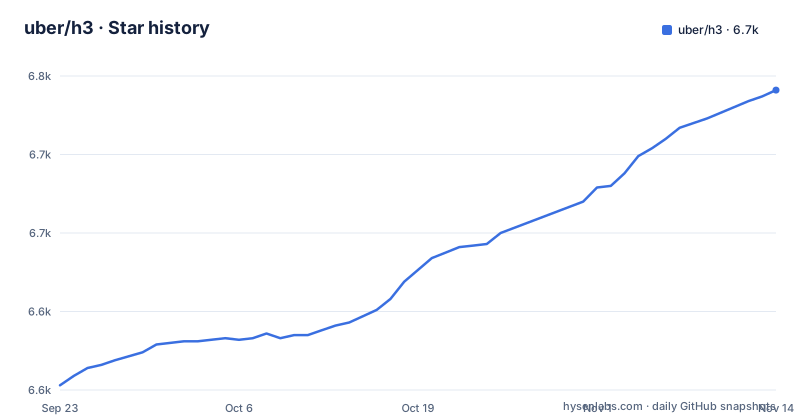
- uber/h36,741 ★ · +188
| Repository | 2026-09-23 | 2026-11-14 |
|---|---|---|
| uber/h3 | 6.6k | 6.7k |
188 Stars in the last 52 days, measured from the daily GitHub snapshot. Compare with other projects
Editorial analysis
Sixteen resolutions on a grid that subdivides only approximately
H3 indexes the world on a hexagonal grid, and that grid can be subdivided into finer and finer hexagonal grids. The word carrying the weight is approximately: the README does not promise that a parent hexagon and its children tile space exactly. What it does state is the combination of two ideas, a hexagonal grid plus the hierarchical subdivisions H3 takes from S2. Resolutions run from 0, the coarsest, to 15, the finest, so any point can be placed at 16 different sizes, and subdividing means the finer cell belongs to the coarser one you already had. That nesting is the reason the hierarchy exists: an area summary and a point inside it can share one scheme instead of two indexes.
The examples all use resolution 10.
brew install h3 is one line, the rest is a CMake project
H3 is a C library, and the maintainers would rather you did not build it. Prebuilt bindings exist for Java, JavaScript, Python and a longer list collected under community bindings, and on macOS the whole thing is one command:
brew install h3Building the C library needs a C compiler (the README says gcc and clang are both tested), CMake and Make. The per platform build dependencies are short lists. Alpine takes cmake, make, gcc, libtool and musl-dev through apk. Debian and Ubuntu install cmake, make, gcc and libtool through apt, then clang-format, cmake-curses-gui, lcov and doxygen for development. FreeBSD installs bash, cmake, gmake, doxygen and lcov through pkg. Windows is the exception: it needs CMake and Visual Studio including the Visual C++ compiler, and the README sends you to a separate Windows build document instead of giving the recipe inline.
Getting the sources right comes next. A fresh checkout of the Git repository is the latest development version, not a release, and applications are pointed at a tag instead:
git checkout v$(<VERSION)From the repository root the build lives in its own directory:
mkdir build
cd build
cmake -DCMAKE_BUILD_TYPE=Release ..
make
Two details catch people out. Every later make command has to be run from inside that build directory. `sudo make install` copies the result system wide, and `rm -rf build` from the repository root is the documented way to throw the artifacts away.
A git checkout hands you the development version, not v4.5.0
The three most recent releases are v4.5.0 on 21 May 2026, v4.4.1 on 12 November 2025 and v4.4.0 on 7 November 2025. Between those tags and the default branch there is a moving target: the last push to master landed on 1 November 2026, about five months after v4.5.0 was cut. That gap is the whole reason the install notes insist on checking out a tag. Clone master, build it with the three commands above, and you are running whatever the C sources said that day, without the review a release tag has been through.
The top level tree helps you judge what you are building. CHANGELOG.md, RELEASE.md and a VERSION file sit next to CMakeLists.txt and CMakeTests.cmake. The badge row at the top of the README links to the repository's Actions runs and to Coveralls, and the tree carries .clang-format, .clang-tidy and .cmake-format.yaml, so the formatting and lint configuration sits in your checkout instead of on a wiki.
H3 is Apache-2.0 licensed and the repository is not archived.
Every make target assumes you never left the build directory
After the library builds, the targets divide by what you changed. `make test` runs the suite and `make test-fast` runs the faster one that excludes the most expensive tests, which is the pair to use while iterating. `make benchmarks` produces timing numbers and the README ties it to a Release build, so the timings come from the tree you configured with `-DCMAKE_BUILD_TYPE=Release`, not from your working build.
`make coverage` is stricter. It needs lcov installed and a tree configured with `CMAKE_BUILD_TYPE=Debug` and `ENABLE_COVERAGE=ON`, then `make coverage` writes an HTML report you open at coverage/index.html. You cannot get that report out of a Release build directory, and the README warns that some versions of clang generate annotations lcov cannot read, which is why gcc is the suggested compiler for this one target.
`make docs` needs Doxygen to have been installed when CMake ran, not afterwards, and the index lands at dev-docs/_build/html/index.html. `make kml` writes files into the KML directory so you can look at the grid in a map tool, and the documentation website itself is a separate build driven from the `website/` directory.
The center coordinate is not the point you asked about
The command line tools are the fastest way to see what an index is. Give a latitude, a longitude and a resolution and you get the index back:
./bin/latLngToCell --resolution 10 --latitude 40.689167 --longitude -74.044444The worked example returns `8a2a1072b59ffff` for the Statue of Liberty at resolution 10, and that string is the handle everything else takes. Two more tools turn it back into geometry. `--index` on cellToBoundary prints the six vertices of the hexagon:
./bin/cellToBoundary --index 8a2a1072b59ffffand cellToLatLng prints one coordinate for the whole cell:
./bin/cellToLatLng --index 8a2a1072b59ffffwhich yields `40.6894218437 -74.0444313999`, a value that is not the input point. The README introduces it as the center coordinate of the hexagon, so it is the cell's center rather than your input point. If you store point data and later need the original location, the cell boundary is the only firm limit on what came back.
Six example programs, one of them explained
examples/ holds five C files plus a CMakeLists.txt: index.c, distance.c, edge.c, neighbors.c and compactCells.c. The README walks through exactly one of them, index.c, compiled by hand against an installed library:
cc -lh3 examples/index.c -o example
./example
The program prints the index, six boundary vertices and the center coordinate, the same information the ./bin tools give you in three separate invocations. The `-l` flag means the library has to be on the system already, so a source build has to have ended with `sudo make install`, or you point the linker at your own build directory.
The names of the other four point at distance measurement, edge traversal, neighbor lookup and compact cell sets.
The language bindings live in other repositories
What you build from this repository is the C library. Everything else is somewhere else: Java in h3-java, JavaScript in h3-js, Python in h3-py, and the remaining languages collected on the bindings page at h3geo.org. Pinning both ends is your decision.
Documentation is layered the same way. The site at h3geo.org is the public entry point, developer documentation in Markdown lives in the dev-docs directory, and the API reference is generated by Doxygen during your own build rather than published from the checkout. Support runs through the GitHub issues page for bug reports and feature requests, the H3 tag on StackOverflow for questions, and an H3 Slack workspace for everything else. None of those channels is tied to a release, so the answer to whether something you hit is a 4.5 regression is found by reading the changelog rather than by asking.
Editorial conclusion
H3 fits a specific job: putting many points into comparable cells at a resolution you choose, then aggregating them, with a hierarchy that lets a coarse summary and a fine point share one scheme. Before committing, check the two things this repository cannot answer: which release the binding in your language is built against, and what CHANGELOG.md says between your version and v4.5.0. Then build the C library from a tag rather than from master.
Frequently asked questions
What is H3 resolution?
It is the size level of the hexagon you ask for, from 0 (coarsest) to 15 (finest), so 16 levels are available. You pass it to the command line tool as a flag, for example `--resolution 10` with latLngToCell, and finer grids nest inside coarser ones.
How does H3 work?
It lays a hexagonal grid over the world and subdivides it into finer and finer hexagonal grids, approximately rather than exactly. The design combines the hexagonal grid with the hierarchical subdivisions H3 takes from the S2 geometry library, so each resolution nests inside the next coarser one.
What is the H3 index and how is it used?
It is the string that identifies one hexagon, for example `8a2a1072b59ffff`. You obtain it from a latitude and longitude with latLngToCell, then feed it to cellToBoundary for the six vertices or cellToLatLng for one coordinate. The same index is the input to the C API and to the language bindings.
Is Uber H3 open source?
Yes. The repository is licensed under Apache-2.0, is not archived, and its last push to master was on 1 November 2026. The C library lives here while the Java, JavaScript and Python bindings are separate repositories, and the newest release tag is v4.5.0 from 21 May 2026.
Official sources
Add this badge to your README
If you maintain this project, the badge below links readers to this analysis and shows its maintenance status from the daily GitHub snapshot. Paste the markdown into your README; add ?metric=license or ?metric=stars to the image URL for a different field.

[](https://hysenlabs.com/projects/uber-h3)Star history chart for your README
[](https://hysenlabs.com/projects/uber-h3)Was this useful?