Vditor: the three edit modes, the CDN with no version pin, and the cache rule the constructor will not enforce for you
A browser-based Markdown editor supporting WYSIWYG (rich text), instant rendering (Typora-like) and split-view preview modes.
At a glance
- What is it?
- Vditor is a TypeScript Markdown editor that runs in the browser and offers split view, instant rendering and WYSIWYG as three separate surfaces chosen at construction time. Its npm package declares one runtime dependency, its HTML snippet loads from unpkg with no version in the URL, and its Chinese typography rules sit next to a CommonMark compliance claim.
- Who is it for?
- Vditor fits a product that wants to ship its own Markdown surface in Vue, React, Angular or Svelte and is willing to own the parts the library leaves open: the upload endpoint for pasted and dragged images, the diagram and math renderers it names but does not depend on, and the CDN version pin its own snippet warns you about.
- Can I use it commercially?
- Yes. MIT is a permissive licence: you can use, modify and sell software built on it, as long as you keep its copyright and licence notices.
- Is it still maintained?
- Yes. The repository last received commits 2 days ago.
- What is it written in?
- Mainly TypeScript, according to GitHub's language statistics.
Answers come from the project's GitHub data, last synced on November 25, 2026, and from our analysis. They are not legal advice.
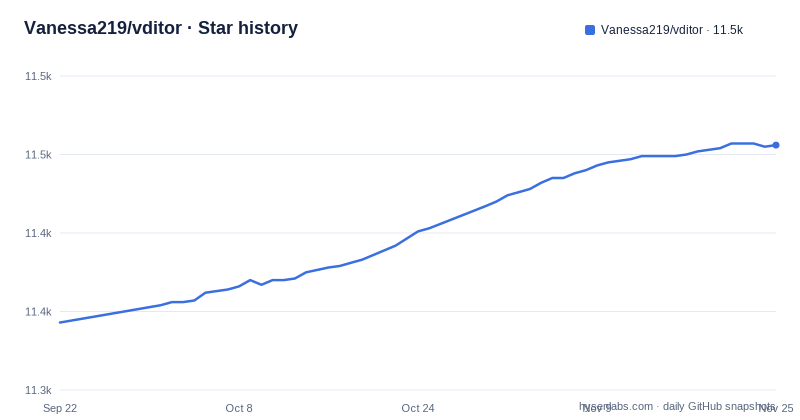
Star history
- Vanessa219/vditor11,456 ★ · +113
| Repository | 2026-09-22 | 2026-11-25 |
|---|---|---|
| Vanessa219/vditor | 11.3k | 11.5k |
113 Stars in the last 64 days, measured from the daily GitHub snapshot. Compare with other projects
Editorial analysis
options.mode picks one of three surfaces and the constructor fixes it for the life of the instance
Vditor ships three editing surfaces and picks one at construction time. The mode option accepts sv, ir or wysiwyg, and its default is ir. The README frames the three modes as three different kinds of user. Traditional Markdown users get split view, where the edit area and the preview area are separate and the layout suits a large screen. People who do not know Markdown get WYSIWYG. Users who have internalised the syntax get instant rendering, described in the documentation as the most elegant way to write.
The argument the README makes against the alternatives is worth reading as a design brief: existing editors either offer split view only, or offer WYSIWYG and split view together but cannot fully support Markdown layout inside WYSIWYG, and Typora-like instant rendering is close to absent.
The mode sits in the options object passed to the constructor, so the surface is chosen when the editor is created and every document opened in that instance gets the same one. Alongside it the option list carries height defaulting to auto, width defaulting to auto and accepting percentages, minHeight, placeholder defaulting to an empty string, typewriterMode defaulting to false, an undoDelay that sets the history interval, and an after callback that fires once the asynchronous render finishes.
The unpkg snippet in the README ships without a version, which is the warning in its own comment
There are two documented ways in. The npm route installs the package and imports it from source:
npm install vditor --saveimport Vditor from 'vditor'
import "~vditor/src/assets/less/index"
const vditor = new Vditor(id, {options...})The second route is a stylesheet and a script tag, and the comment sitting above them in the README is the whole caution: in production, specify a version number, with an example URL of the form https://unpkg.com/[email protected]/dist. The snippet that follows does not follow its own advice:
<!-- ⚠️生产环境请指定版本号,如 https://unpkg.com/[email protected]/dist... -->
<link rel="stylesheet" href="https://unpkg.com/vditor/dist/index.css" />
<script src="https://unpkg.com/vditor/dist/index.min.js"></script>
Both URLs resolve to whatever is latest at request time. There is a related option for this: cdn configures your own CDN address and defaults to https://unpkg.com/vditor@${VDITOR_VERSION}, which does interpolate a version. So the library gives you a version-aware switch and a version-free snippet, and the snippet is the one people copy.
One runtime dependency, while seven named renderers are somebody else's problem
package.json declares a single runtime dependency, diff-match-patch at ^1.0.5. The feature list tells a different story about weight: outline, math formulas, mind maps, charts, flowcharts, Gantt charts, sequence diagrams, digital waveforms, staff notation, speech reading, heading anchors, code highlighting and copy, Graphviz rendering and PlantUML diagrams.
The syntax section names who does that work. Flowcharts, sequence diagrams and Gantt charts go through Mermaid. Line charts, pie charts and mind maps go through ECharts. Digital waveforms go through WaveDrom, staff notation through abc.js, math through MathJax and KaTeX, and Graphviz has its own renderer. None of those appear in the dependencies block, so the README is not promising them as part of the package. Budget for wiring that yourself.
What ships is worth knowing too. The files array publishes dist/*, src/index.ts, src/method.ts, src/ts/* and src/assets/*, main points at dist/index.js and types at dist/index.d.ts. On the release side, package.json sits at 4.0.1, matching the v4.0.1 tag dated 2026-10-18. The tag before it, v4.0.0, is dated 2026-08-30, and the one before that, v3.11.3, is dated 2026-08-11.
Three theme layers, three different option paths, and a README that counts them differently in two places
Theming is not one setting. The editor theme is the chrome around your text, with two built-ins, classic and dark, set through options.theme at init or through setTheme afterwards, and customisable by editing variables in src/assets/less/index.less.
The content theme is the styling of the HTML your Markdown produces, with four built-ins: ant-design, light, dark and wechat. It needs the display element to carry class="vditor-reset", it is set through options.preview.theme when the editor starts or through IPreviewOptions.theme when a content renderer starts, and afterwards through setTheme or setContentTheme.
The code theme is a third layer with 36 sets including github, controlled by options.preview.hljs or IPreviewOptions.hljs, which also switch line numbers and whether highlighting is on at all, and changed later with setTheme or setCodeTheme.
Here is the inconsistency worth knowing before you plan a theme rollout. The feature list says three themes are built in, described as black, white and green. The theme section says two editor themes, four content themes and 36 code themes. Same document, two different counts, and nothing explains which list is current.
Pass an HTMLElement instead of an id and the cache silently loses its anchor
The id parameter accepts either an element id or the HTMLElement itself, and the documentation attaches a warning to the second form. When you pass the element rather than its id, you have to set options.cache.id, or set options.cache.enable to false.
That matters because real-time saving of content is on the feature list, described as preventing accidental loss. The cache is where that saved copy lives, so the two branches behave differently: with an id, the editor has something to key its saved content on; with a bare element and no cache configuration, the feature the README advertises has no identifier to attach to. Turning the cache off is the documented escape hatch, and it means you own persistence rather than inheriting it.
The rest of the option table is small enough to read in one pass. Events fire as input, focus, blur, keydown, esc, ctrlEnter, select and unSelect, tab is configurable as a string and accepts a tab character, debugger defaults to false, value seeds the editor, and icon chooses between ant and material with ant as the default. Language is set by lang, which accepts twelve locales from de_DE through zh_CN and zh_TW, defaulting to zh_CN.
The CommonMark claim sits next to Chinese punctuation rules that rewrite what you typed
The syntax section claims all CommonMark syntax, from thematic breaks and both heading styles through fenced and indented code blocks, link reference definitions, block quotes, lists, backslash escapes, HTML entities, emphasis, links, images, inline HTML and hard breaks. On top of that sits all GFM syntax, namely tables, task list items, strikethrough, autolinks and XSS filtering. Common extensions cover footnotes, a table of contents and custom heading ids, and YAML front matter is supported.
Then there is the group labelled Chinese context optimisation, which is not a Markdown feature at all. It inserts a space between Chinese and Western text, corrects term spellings, and replaces English commas and full stops that follow Chinese with their Chinese equivalents. The lang default is zh_CN, one of twelve accepted locales including en_US.
Those two halves pull in opposite directions for a product outside Chinese. CommonMark compliance is a claim about what parses and what serialises; the typography group lists text edits (inserting spaces between Chinese and Western text, correcting term spellings, replacing punctuation), which change the text rather than only the rendering. A document that has to come back out identical to what was typed may not round-trip if those rules are enabled. The README says most of the listed features can be switched on or off.
The toolbar has 36+ items and every one of them is replaceable, including its handler
The toolbar carries more than 36 actions, and the point of that count is that you can rewrite each entry rather than hide it. For every item you can set the keyboard shortcut, the tooltip text, where the tooltip appears, the icon, the click event, the class name and a sub-toolbar. The README also lists emoji, @ mention and topic autocompletion extensions.
Rendering is extensible too, through a customRenders option that takes an array of language and render function pairs, the render function receiving an element and the editor instance. There is also a customWysiwygToolbar option keyed by toolbar type.
Media is where an integrator inherits real work. Uploads are handled by drag and drop and by paste, with live progress, and cross-origin upload is supported over CORS. Pasting HTML converts it to Markdown automatically, and if the pasted content contains external images they can be sent to a server through a specified interface. That interface is yours to provide: nothing in the repository runs storage.
Editorial conclusion
Vditor fits a product that wants to ship its own Markdown surface in Vue, React, Angular or Svelte and is willing to own the parts the library leaves open: the upload endpoint for pasted and dragged images, the diagram and math renderers it names but does not depend on, and the CDN version pin its own snippet warns you about. It does not fit a team that wants a WYSIWYG surface to round-trip CommonMark byte for byte, because the Chinese typography rules can change the typed text and the default language is zh_CN. Before you ship, pin the version in the CDN URL, pass an element id rather than an HTMLElement unless you configure options.cache, and confirm which of the named renderers you are loading yourself.
Frequently asked questions
Is there a Wysiwyg editor for Markdown?
Vditor has one, and it is one of three modes rather than the default. The mode option accepts sv, ir or wysiwyg and defaults to ir, with wysiwyg described as the surface aimed at people who are not familiar with Markdown.
Which Vditor mode should I pick for a documentation site?
Split view is described as fitting Markdown editing on a large screen, since the edit area and the preview area are separate. WYSIWYG is aimed at users who do not know the syntax, and instant rendering is the default for users who do.
Does the vditor npm package pull in Mermaid, ECharts or MathJax?
No. package.json lists one runtime dependency, diff-match-patch at ^1.0.5. Mermaid, ECharts, WaveDrom, abc.js, MathJax, KaTeX and Graphviz are named as the renderers behind the diagram, chart, notation and math features, so an application has to load them.
Can I change a single Vditor toolbar button without rebuilding the whole toolbar?
Yes. Each of the 36+ toolbar items can have its shortcut, tooltip text, tooltip position, icon, click event, class name and sub-toolbar customised individually, and customRenders accepts your own render functions keyed by language.
Official sources
Add this badge to your README
If you maintain this project, the badge below links readers to this analysis and shows its maintenance status from the daily GitHub snapshot. Paste the markdown into your README; add ?metric=license or ?metric=stars to the image URL for a different field.

[](https://hysenlabs.com/projects/vanessa219-vditor)Star history chart for your README
[](https://hysenlabs.com/projects/vanessa219-vditor)Was this useful?