Vann-Dev proxy-list: scraper, checker, and four text files
List of public proxies, and checked to some domain like Google, Facebook, Twitter
At a glance
- What is it?
- This repository is two Python scripts and a set of text files: one scrapes public proxies by protocol, the other checks a list against a site you name and drops the dead ones. It is a fork of iw4p's proxy-scraper with added features, the checked output is committed as http-tested and https-tested directories, and the Socks support is asymmetric in a way the documentation mentions once.
- Who is it for?
- This repository is useful for learning how a proxy list is built and why almost every entry in one is dead, which is a better reason to run it than to route real traffic through the results.
- Can I use it commercially?
- Not without permission. GitHub finds no licence file in the repository, and without a licence all rights are reserved by default: you may read the code but not reuse it. Check the README, or ask the authors, before using it.
- Is it still maintained?
- Yes. The repository received new commits within the last day.
- What is it written in?
- Mainly Python, according to GitHub's language statistics.
Answers come from the project's GitHub data, last synced on October 22, 2026, and from our analysis. They are not legal advice.
Star history
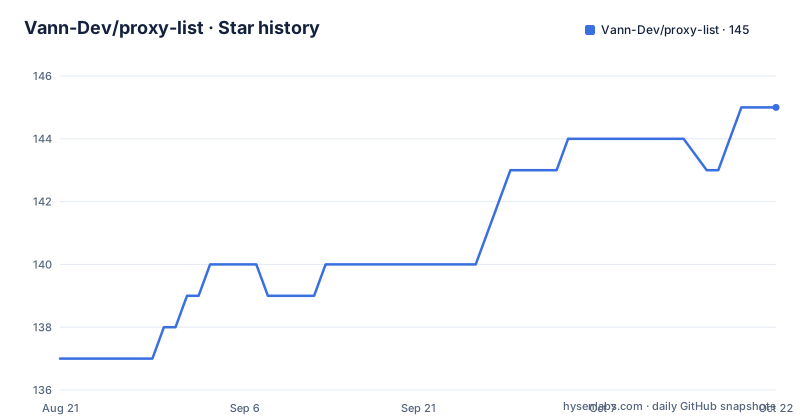
- Vann-Dev/proxy-list145 ★ · +8
| Repository | 2026-08-21 | 2026-10-22 |
|---|---|---|
| Vann-Dev/proxy-list | 137 | 145 |
8 Stars in the last 62 days, measured from the daily GitHub snapshot. Compare with other projects
Editorial analysis
Two scripts, and the split is the design
The repository contains a scraper and a checker as separate programs, and keeping them apart is what makes the results reproducible. `proxyScraper.py` collects proxies of a given protocol and writes them to a text file. `proxyChecker.py` takes a list, tests each entry against a website, and writes out the ones that answered. The two commands are:
python3 proxyScraper.py -p http
python3 proxyChecker.py -t 20 -s google.com -l output.txt
Dependencies go in with a single install step, `pip3 install -r requirements.txt`. Running them as separate steps means you can scrape once and check repeatedly, or check a list somebody else published, which is how the committed tested files are produced. Both accept the same help flag, and the documentation's own description of it, showing help to whoever did not read the README, tells you what kind of documentation this is. A shell script for daily updates and a user agent file sit alongside them, so the intended operating rhythm is a scheduled scrape and check rather than a one-off manual run.
Six protocol values, and only two of them get checked
The scraper's protocol option accepts six values: HTTP, HTTPS, Socks covering both 4 and 5, Socks4 and Socks5. The checker takes the same option but its documented default is HTTP, and the important limitation is stated in a single line: the scraper is able to scrape Socks, but the checker only checks HTTP and HTTPS proxies. So a Socks run produces a list that nothing in this repository will validate. That asymmetry is easy to miss and it shapes what you can do with the output, so the practical sequence is to scrape with an HTTP or HTTPS value, check that list, and treat the Socks options as a collection feature for a different tool. The output flag is what connects the two halves, defaulting to a file called `output.txt`, which is the same default the checker's list flag expects, so the documented pipeline works without naming paths.
The checker is where the flags actually matter
The checker's options are the ones you will end up tuning. A timeout flag sets how long a proxy gets before it is dismissed, defaulting to twenty seconds, and that value is the difference between a long run and a practical one given how many entries a scrape returns. A site flag names the URL to test against, defaulting to a well-known search engine, which is the part of the tool that makes it configurable rather than a liveness ping. A random user agent flag picks a different user agent per proxy, which matters if the target site responds differently to different clients. The list flag points at the file to read, and the proxy flag selects which kind to check. Verbose mode adds detail per proxy. The two extra flags on the scraper side, output and verbose, are the same shape, so the two programs feel like one tool once you have used both.
Four published files, two raw and two tested
The published data is four destinations, and the distinction between raw and tested is the whole editorial policy of the repository. A raw HTTP file holds proxies as collected, with no validation at all. A tested HTTP file holds the subset that answered a check. There is an HTTPS pair with the same two states. The tested versions live in directories rather than single files, which is what makes them a set of snapshots over time rather than one current answer, so a consumer can pick a recent one or compare. Since the checker's site and timeout are parameters, a tested file also encodes the conditions it was produced under, and that is worth keeping in mind when a list stops working: the difference between a file failing and a proxy list being wrong is often the check target, not the entries.
Dead entries are deleted, so a list is a snapshot
One line in the documentation describes the retention policy: dead proxies will be removed and only alive proxies will stay. That is a simple design and it has a consequence for how you read a list file. A file is the result of one run at one moment, with failures already stripped out, so it cannot tell you how many candidates were tried to produce it, and there is no record of a proxy that was alive last week and is not today. It also means a committed file is regenerated rather than edited, which is why a daily update script exists. For anyone reasoning about proxy list quality, the absence of history is the real limitation: the interesting number, the survival rate, is thrown away by the very cleanup that makes the file convenient. If you want that number, you would have to run the two scripts yourself and keep the input list.
A fork with a pinned and partly unpinned dependency set
Provenance is stated at the top: the repository was originally created by another author and this one adds features to it, with a pointer back to the original that the documentation asks you to check too. The dependency file is where the age shows. Four libraries are pinned to exact versions, including a requests release and a urllib3 release that are well behind current ones, plus a pinned HTML parser and a colour library. The fifth entry, an HTTP client, is unpinned. That mixture is the sort of thing that works and then quietly holds you back: a pinned transitive set avoids surprise upgrades but also means a known older HTTP stack, and a single unpinned dependency reintroduces the variability the pins were there to remove. Before depending on this in anything you intend to maintain, the versions in the requirements file are the first thing to look at, and they are the first reason a run would need adjusting on a modern Python.
The project states plainly who the risk belongs to
There is a warning at the top of the documentation and it is not boilerplate: the proxy is for learning purposes, and any issues arising from proxy use are at the expense of the person using it. That framing is consistent with how the tooling is built, because a public proxy list is best understood as a set of unowned machines on the internet that someone else configured. The person running that machine sees traffic they did not expect, and the person using the proxy has no idea whose infrastructure they are on. A checked entry means the proxy answered a request to the site you named, which is a much weaker statement than safe to use. So the useful ways to engage with this repository are the ones that do not involve sending anything you care about: learning how the scrape and check cycle works, seeing how quickly a list decays, or testing your own tooling against a hostile input. The documentation also links a star history, which is the only other thing the repository advertises about itself.
Editorial conclusion
This repository is useful for learning how a proxy list is built and why almost every entry in one is dead, which is a better reason to run it than to route real traffic through the results. The two halves are worth understanding separately: the scraper collects candidates by protocol, the checker validates them against a site you name and writes out the survivors, and the committed `http-tested` and `https-tested` directories are the checker's output published for others to consume. Two limitations to hold in mind. `proxyChecker` only checks HTTP and HTTPS proxies, so Socks entries can be scraped but never validated, and the scraper removes dead proxies rather than annotating them, so a list file is a snapshot of one run rather than a record. The project also carries a warning of its own that these proxies are for learning purposes and that any problems are at the user's expense. The last push was on 2026-09-29.
Frequently asked questions
What is the Vann-Dev proxy-list repository?
It is a pair of Python scripts, proxyScraper.py and proxyChecker.py, that collect public proxies by protocol and check a list against a named website, with the surviving entries written to text files. It is a fork of iw4p's proxy-scraper with added features.
How do I install the Vann-Dev proxy-list dependencies?
Run pip3 install -r requirements.txt. The requirements file pins beautifulsoup4, requests, colorama and urllib3 to exact versions and lists httpx without a pin. A Python 3 interpreter with pip3 is the only prerequisite stated.
How do I scrape and check proxies with this tool?
Scrape with python3 proxyScraper.py -p http, choosing the protocol with -p, then check with python3 proxyChecker.py -t 20 -s google.com -l output.txt. The scraper writes to output.txt by default and the checker reads that same default path.
Which proxy protocols can the scraper and checker handle?
The scraper supports HTTP, HTTPS, Socks covering both 4 and 5, Socks4 and Socks5. The checker only checks HTTP and HTTPS proxies, so Socks entries can be collected but not validated by this repository's tooling.
What is the difference between the raw and tested proxy files?
The raw files hold proxies as collected with no validation, while the tested files hold the subset that answered a check and live in directories, which makes them snapshots over time. A checked entry only means the proxy answered a request to the site you named.
Is using a public proxy list from this repository safe?
The project states the proxies are for learning purposes and that any issues with proxy use are at the expense of the user. Nothing in the tooling verifies who owns a listed machine, so the files are best used to learn how the scrape and check cycle works rather than to route traffic that matters.
Official sources
Add this badge to your README
If you maintain this project, the badge below links readers to this analysis and shows its maintenance status from the daily GitHub snapshot. Paste the markdown into your README; add ?metric=license or ?metric=stars to the image URL for a different field.

[](https://hysenlabs.com/projects/vann-dev-proxy-list)Star history chart for your README
[](https://hysenlabs.com/projects/vann-dev-proxy-list)