xen-orchestra: one control plane for XCP-ng and XenServer estates
The global orchestration solution to manage and backup XCP-ng and XenServer.
At a glance
- What is it?
- Xen Orchestra is a JavaScript monorepo that provides a web UI, a CLI and a REST API for managing, backing up and delegating XCP-ng or XenServer infrastructure, and it needs no agent on the hosts. The source is public under AGPL3, while the documented route to a running instance goes through a Vates account and a deploy form.
- Who is it for?
- xen-orchestra suits administrators who run several XCP-ng or XenServer pools, possibly across datacenters, and who want backup, resource delegation and remote site management in one place without installing anything on the hypervisor hosts.
- Can I use it commercially?
- Check first. The repository uses a licence we do not classify automatically, so read its LICENSE file before any commercial use.
- Is it still maintained?
- Yes. The repository last received commits 1 day ago.
- What is it written in?
- Mainly JavaScript, according to GitHub's language statistics.
Answers come from the project's GitHub data, last synced on November 7, 2026, and from our analysis. They are not legal advice.
Star history
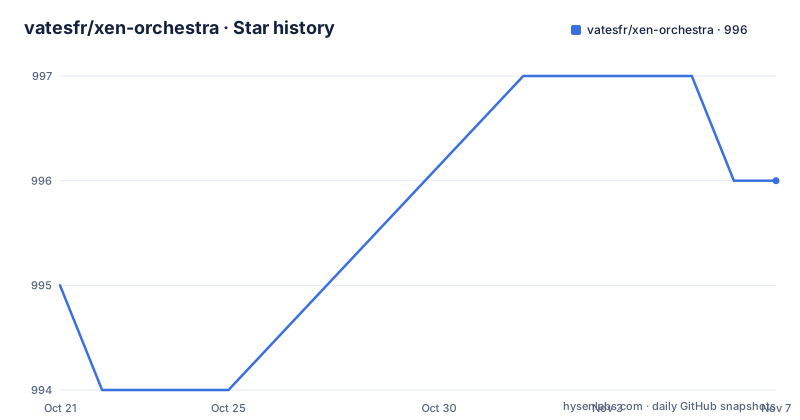
- vatesfr/xen-orchestra996 ★ · +1
| Repository | 2026-10-21 | 2026-11-07 |
|---|---|---|
| vatesfr/xen-orchestra | 995 | 996 |
1 Stars in the last 17 days, measured from the daily GitHub snapshot. Compare with other projects
Editorial analysis
A control plane that installs nothing on the hypervisor hosts
Xen Orchestra, usually shortened to XO, is described as a complete solution to visualise, manage, back up and delegate XCP-ng or XenServer infrastructure, and the sentence that matters most in that description is that no agent is required for it to work. That single design choice shapes everything else. There is no client to deploy to the hosts, no agent version to keep in step with the pool, and no per-host footprint to plan for. Instead you get a centralised interface that can span datacenters in different locations, with XO proxies handling remote sites. On the management side the project lists VM creation, management, migration, metrics and statistics. On the access side it exposes three surfaces over the same product: a web interface, a command line interface and a REST API, plus a Terraform provider and other connectors and plugins. That last combination is what makes the tool usable from more than a browser, and it is the reason the REST API matters for anyone who wants to drive infrastructure from a pipeline rather than by hand.
Backup modes decide how much protection a pool actually gets
The backup feature set is where the product earns its keep, and the README describes it as the essential component for the security of your infrastructure. The documented modes are rolling snapshot, full backup with replication, incremental backup with replication, mirror backup and S3 support. Each of those is a different compromise between protection, storage cost and recovery time, and the choice is per deployment rather than global, since the project says you select the backup mode that suits you. Rolling snapshots are fast and local, full and incremental with replication move copies off the pool, mirror backup keeps a second copy, and S3 support moves the destination to object storage. The framing of the feature as a choice between modes rather than a single backup button is the useful part, because a virtualisation estate that mixes a fast local snapshot schedule for daily use with a replicated full backup for disaster recovery is the normal case, and that combination is what these modes allow.
Group management and delegation for teams that share a pool
The third feature area is what the project calls the Cloud Enabler, and it is about people rather than machines. XO is presented as a cloud initiator for XCP-ng and XenServer, with group management, resource delegation and group administration as the named capabilities. In practice this is the layer that lets an organisation run a shared pool without giving everyone root on the hypervisor: users or teams are attached to groups, groups are granted permissions over pools, VMs and storage, and a limited set of users can create and manage resources without seeing the rest of the estate. The screenshots referenced in the README show a dashboard with network statistics and storage repository statistics, which suggests the daily work is monitoring rather than clicking through a wizard. The README also splits the product into two editions in the translation section, XO Lite and XO 6, so the feature set you get depends on which one you are running.
Getting a running instance starts with a Vates account
The quick start is short and points outward rather than inward. You log in to your account and use the deploy form available from the Vates website, which is the path the README documents for standing up an instance. The documentation itself lives at docs.xen-orchestra.com, and the README notes that documentation updates are deployed automatically once per day, so the published docs track the product rather than lagging behind a release. The project homepage is xen-orchestra.com, and the community material is gathered in the same README, including a translation widget hosted at translate.vates.tech with a request for help translating XO Lite and XO 6 into more languages. The absence of a from source install guide in the README is the notable gap. For an operator the practical consequence is that XO is a product you deploy through the vendor's path, and the public repository is where the implementation lives rather than where a self hosted build is documented.
The monorepo layout, two npm scopes and a yarn and turbo toolchain
The repository is a large JavaScript monorepo with two scoped package namespaces, @vates/ and @xen-orchestra/, alongside a packages directory. The build and release tooling is visible in the configuration files: turbo.json drives task orchestration, yarn.lock pins the dependency tree, and the root package.json declares the runtime expectations:
  "engines": {
    "node": ">=14",
    "yarn": "^1.7.0"
  }
The quality tooling is equally conventional for a project of this size, with eslint and its Vue, TypeScript, import and promise plugins, prettier, commitlint with a conventional config, husky hooks and lint-staged to run changed package tests and formatting on commit. The changelog is split into a released CHANGELOG.md and an unreleased CHANGELOG.unreleased.md, with older CHANGELOG.v3, v4 and v5 files kept for history, so a change can be traced back to the version it shipped in. The root package version is 0.0.0, which is a monorepo placeholder rather than a product version, so the meaningful versions live in the tags and in the individual package manifests.
Filesystem backends are configured through environment variables
The .env.example file in the repository is nearly empty, which is itself informative: it carries two commented out lines that name the optional filesystem backends the product can use for storage:
# xo_fs_nfs=nfs://ip:/folder
# xo_fs_smb=smb://login:pass@domain\\ip\folder
The variable names are prefixed with xo_fs and the values are URLs, an nfs scheme pointing at a host and folder, and an smb scheme carrying credentials and a Windows style path with escaped backslashes. Both are commented out, so the defaults do not assume either backend. For an operator this is the first thing to look at when a deployment cannot reach a remote file store, and it is also a reminder that these variables carry a share credential in clear text in the environment, which is worth thinking about before copying the pattern into a production .env file. The rest of the configuration surface is not in the repository, since the settings that matter are described in the published documentation rather than in the example file.
AGPL3, an ISC file and a licence GitHub cannot classify
The licence picture needs two sentences of care. The README states AGPL3, copyright Vates, and the repository root carries an AGPL.txt alongside an ISC.txt and a LICENSE.md. The result is that GitHub cannot classify the repository under a single standard licence and labels it as other, which is a metadata effect rather than a contradiction, since a project can distribute part of its tree under one licence and another part under another. For anyone planning to run XO as a service for their own organisation, the AGPL obligations on modified versions distributed to users are the part to read carefully, and the LICENSE file is the authoritative text rather than the badge. On the release side, the public tags visible here are for the Lite edition, xo-lite-v0.26.0 on 2026-10-01, xo-lite-v0.25.0 on 2026-09-01 and xo-lite-v0.24.0 on 2026-07-30, and the last push to the repository was on 2026-10-19.
Editorial conclusion
xen-orchestra suits administrators who run several XCP-ng or XenServer pools, possibly across datacenters, and who want backup, resource delegation and remote site management in one place without installing anything on the hypervisor hosts. It does not suit a single-host lab that only needs the built-in management of XCP-ng, and it does not suit a team that wants to self-host the whole stack from this repository, since the README documents a deploy form and an account rather than a source build. Verify three things before you commit: that the backup mode you need is one of the documented ones, rolling snapshot, full, incremental, mirror or S3, that the REST API or Terraform provider is available in the edition you are getting rather than only the web UI, and which licence file governs your use, since the repository carries AGPL3 alongside ISC and a LICENSE file that GitHub cannot classify. The last push was on 2026-10-19 and the newest public tag is xo-lite-v0.26.0 from 2026-10-01.
Frequently asked questions
Does Xen Orchestra need an agent installed on the XCP-ng hosts?
No. The project states that no agent is required for it to work, and the central interface connects to the hosts directly, with XO proxies used for remote sites.
Which backup modes does Xen Orchestra support?
The documented modes are rolling snapshot, full backup with replication, incremental backup with replication, mirror backup and S3 support. The project describes backup as an essential component and says you select the mode that suits you.
How do I install Xen Orchestra?
The quick start says to log in to your account and use the deploy form available from the Vates website. The documentation is at docs.xen-orchestra.com, and the README does not describe installing the stack from the repository itself.
What licence is Xen Orchestra released under?
The README states AGPL3, copyright Vates, and the repository root holds AGPL.txt, ISC.txt and a LICENSE.md, which is why GitHub reports the licence as custom. The last push was on 2026-10-19 and the newest public tag is xo-lite-v0.26.0 from 2026-10-01.
Official sources
Add this badge to your README
If you maintain this project, the badge below links readers to this analysis and shows its maintenance status from the daily GitHub snapshot. Paste the markdown into your README; add ?metric=license or ?metric=stars to the image URL for a different field.

[](https://hysenlabs.com/projects/vatesfr-xen-orchestra)Star history chart for your README
[](https://hysenlabs.com/projects/vatesfr-xen-orchestra)Was this useful?