vbgate/learn-opencode: A Chinese OpenCode Practical Course
OpenCode 中文实战课源码与内容仓库:一课一页,覆盖入门到实战工作流。
At a glance
- What is it?
- vbgate/learn-opencode is a Chinese, source-based course for learning OpenCode from installation through practical work. It combines VitePress lessons, exercises, prompt templates, notes, and documentation for connecting several Chinese AI models, but its license and audience should be checked before adoption.
- Who is it for?
- This repository fits Chinese-speaking beginners, developers, creators, and office users who want a guided OpenCode introduction and local course material. It is less suitable for teams requiring an already packaged production integration, since this repository is primarily a tutorial site with optional AI chat configuration.
- Can I use it commercially?
- Check first. The repository uses a licence we do not classify automatically, so read its LICENSE file before any commercial use.
- Is it still maintained?
- Yes. The repository last received commits 75 days ago.
- What is it written in?
- Mainly Shell, according to GitHub's language statistics.
Answers come from the project's GitHub data, last synced on November 7, 2026, and from our analysis. They are not legal advice.
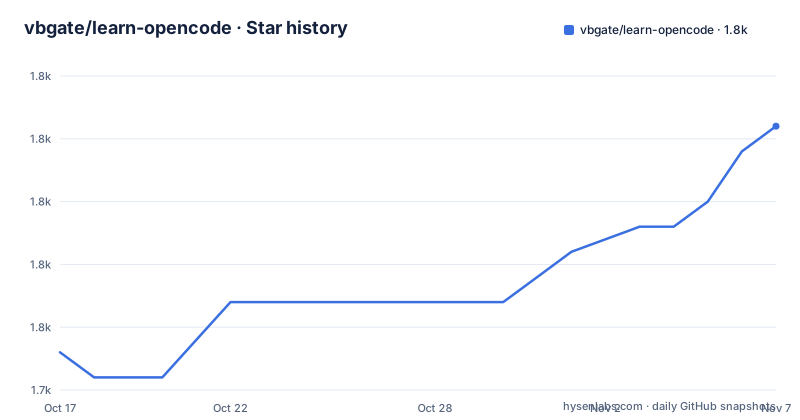
Star history
- vbgate/learn-opencode1,758 ★ · +9
| Repository | 2026-10-17 | 2026-11-07 |
|---|---|---|
| vbgate/learn-opencode | 1.7k | 1.8k |
9 Stars in the last 21 days, measured from the daily GitHub snapshot. Compare with other projects
Editorial analysis
What learn-opencode teaches
vbgate/learn-opencode is a Chinese course repository about OpenCode, an AI-assisted coding and work environment. Its stated problem is instructional rather than infrastructural: people may know that AI can write code, create articles, or automate repetitive work without knowing how to begin, connect a model, or turn a prompt into a repeatable workflow. The course addresses that gap with a staged path covering installation, network configuration, model connection, first conversations, interface operation, session management, file references, Plan and Build modes, Agent collaboration, project initialization, and extension work.
The intended audience is broad. The README describes complete beginners who have not used the command line, content creators working on public accounts, Xiaohongshu posts, fiction, scripts, or marketing copy, programmers handling development, bug fixing, refactoring, tests, documentation, Git, and CI/CD, and office users who want help with files, data, or automation scripts. The course is therefore not limited to software developers, but its examples still center on using OpenCode as a work assistant.
The repository is better understood as a course publication than as an OpenCode distribution. The README describes 138,000 Chinese characters, 18 exercise projects, more than 20 prompt templates, and 66 learner notes. Those are the publisher's stated content counts, not independently measured evidence of instructional quality. The actual source is organized around documentation and site tooling, so a reader should expect lessons and examples rather than a separate production application.
How the course site is assembled
Based on the repository layout, the course is built with VitePress. The top-level package is named `opencode-tutorial`, uses ES modules, and declares `vitepress` and `vue` as development dependencies. The npm scripts show the site pipeline directly. `npm run dev` first runs `bash scripts/stats.sh`, then starts VitePress against the `docs` directory. `npm run build` runs the same statistics script before building the site, while `npm run preview` starts VitePress's preview mode.
This structure separates course content from the publication layer. The `docs/` directory is the VitePress root, so Markdown and site configuration are expected to live there. The `scripts/` directory contains the Shell step used to calculate statistics before development and builds. The repository's primary language being Shell does not mean the lessons are written in Shell. It reflects the scripting entry point used by the site tooling, while the README describes instructional material about OpenCode and AI workflows.
The `.env.example` file shows one optional application feature: an AI chat assistant for the course site. It says the file should be copied to `docs/.env` and explains that VitePress needs environment files in that directory. The visible keys are `VITE_AI_CHAT_ENABLED` and `VITE_AI_API_URL`. The example enables chat and points to a local endpoint, but it does not specify the server implementation, authentication method, model credentials, or production deployment procedure.
Installing and running the course locally
The README gives a complete local-start sequence. It recommends cloning the repository, installing npm dependencies, and starting the VitePress development server. These commands are for running the course publication, not for installing OpenCode itself. The README does not provide OpenCode installation commands in the visible documentation.
Clone the repository and enter its directory:
git clone https://github.com/vbgate/learn-opencode.git
cd learn-opencode
Install the dependencies declared in `package.json`:
npm installStart the local development server:
npm run devThe `dev` script runs `bash scripts/stats.sh` and then invokes `vitepress dev docs`. The reader should expect the repository to build its statistics before VitePress starts. The README does not state the expected local URL for this development server, so a specific browser address should not be assumed. For a production-style local build, the available package script is:
npm run buildThis runs the statistics script and builds the VitePress site from `docs/`. The script list also contains `npm run preview`, which invokes `vitepress preview docs`. The visible material does not document deployment, Node.js version requirements, npm version requirements, or the output directory.
The optional AI chat configuration
The course site includes a documented configuration path for an AI chat assistant, but the repository data does not include the server-side implementation needed to operate it. The `.env.example` file instructs contributors to copy it as `docs/.env` and modify it as needed. That placement matters because the file explicitly states that VitePress requires the environment file inside `docs/`.
The example configuration is:
VITE_AI_CHAT_ENABLED=true
VITE_AI_API_URL=http://localhost:3000/api/ai/chat
`VITE_AI_CHAT_ENABLED` controls whether the chat feature is displayed. The example says that `true` shows it, while omission or another value hides it. `VITE_AI_API_URL` identifies the API endpoint. The example gives `http://localhost:3000/api/ai/chat` for local development and `/api/ai/chat` as the production path, which the comments attribute to an Nginx proxy.
The limits are significant. No authentication scheme, request format, response format, provider name, API key variable, rate limit, error handling, or deployment instructions appear in the visible material. Enabling the visible control therefore does not establish that a working assistant is available. A course reader who only wants the documentation can omit the environment file, while a site maintainer who wants chat must obtain the missing server-side implementation or define it separately.
Model choices and practical boundaries
The README says that the course supports direct connections to Chinese models including Zhipu, DeepSeek, minimax, Tongyi Qianwen, and other named services. This is an explicit instructional claim, but the visible repository files do not show the OpenCode configuration files, provider credentials, API endpoints, or exact settings for each service. The course may explain those topics inside the documentation, but this repository summary does not provide enough detail to reproduce every connection independently.
That distinction matters for OpenCode itself. The repository teaches a work environment and documents model integration, but `package.json` contains VitePress, Vue, and `medium-zoom` dependencies. It does not declare the OpenCode application as an npm dependency. The local commands therefore start the course site; they should not be interpreted as installing the OpenCode client.
There are also scope limits around claims. The README presents estimated completion times such as 3 hours for a complete beginner and 5 to 6 hours for programmers, but those are course-positioning figures rather than verified performance measurements. It advertises workflow improvements for coding and content work, but it does not provide benchmark results, quality measurements, or a controlled comparison with another assistant. Users should treat the exercises and prompts as teaching assets and evaluate their own results.
OpenCode course versus a maintained OpenCode application
The closest alternative is to use OpenCode's own documentation or an application distribution and learn directly from that source, instead of adopting this course repository as the implementation. The difference is instructional and structural. This repository provides a Chinese sequence, exercise projects, prompt templates, learner notes, and a VitePress publication site. A direct OpenCode setup is centered on the tool and its own configuration, so it may be a better fit when an organization already knows OpenCode and needs an official or narrowly scoped implementation path.
This course has a different value when language, guided progression, or examples across several work domains matter. The five-stage structure separates compulsory basics from optional specialization. That organization can help a new user decide whether to spend time on content creation, programming, office automation, or deep customization. The repository also states that the online edition contains some advertising and that a local clone can be run without ads. That is a presentation choice, not a guarantee about every hosted or third-party deployment.
The repository is not archived, and the last push was on 2026-08-25. However, there are no GitHub releases, so the available evidence does not support treating it as a versioned software product with a predictable upgrade cadence. Its content can change independently of any release.
License, maintenance, and upgrade considerations
The README states that the tutorial uses `CC BY-NC-SA 4.0`, allowing sharing and adaptation with attribution and requiring the same license for adaptations, while prohibiting commercial uses such as paid courses, paid columns, and publications. Repository metadata labels the license as `Other` because the GitHub classifier cannot map the custom or repository-specific terms automatically. The README points to the Creative Commons license page, but the actual `LICENSE` file should be read before reuse.
This license has a direct consequence for adoption. A company may be able to study the material internally while still needing to examine whether redistribution, internal publication, training, or commercial packaging falls within the stated permissions. This is a licensing boundary to verify, not legal advice. The noncommercial restriction is particularly important for teams considering paid documentation, customer enablement, or incorporation into another commercial product.
Maintenance is modest by the visible evidence. The repository is not archived, and its last push was on 2026-08-25. There are no GitHub releases, so there is no documented release history or upgrade path to follow. The package version is `1.0.0`, but that version describes the tutorial package and does not indicate an OpenCode release. The main upgrade cost is likely to involve checking whether the VitePress dependencies, documentation examples, model configuration, and online site behavior remain aligned with current OpenCode usage.
Editorial conclusion
This repository fits Chinese-speaking beginners, developers, creators, and office users who want a guided OpenCode introduction and local course material. It is less suitable for teams requiring an already packaged production integration, since this repository is primarily a tutorial site with optional AI chat configuration. Check the LICENSE file first, then verify the documented model access, local development environment, and the maintenance status before depending on the course for an ongoing internal curriculum. The last push was on 2026-08-25, and the repository has no GitHub releases.
Frequently asked questions
How do I install and run vbgate/learn-opencode locally?
The README documents cloning the repository, running `npm install`, and starting the site with `npm run dev`. The development script runs `bash scripts/stats.sh` and then starts VitePress for the `docs` directory.
Does vbgate/learn-opencode install OpenCode itself?
The visible repository commands install dependencies for the course publication and start its VitePress site. The README's local-running section does not provide OpenCode client installation commands, so it should not be treated as an OpenCode installer.
Can I use the OpenCode course materials commercially?
The README states that the tutorial uses `CC BY-NC-SA 4.0` and prohibits commercial uses, including paid courses, paid columns, and publications. Read the repository's `LICENSE` file before redistributing or incorporating the material.
Official sources
Add this badge to your README
If you maintain this project, the badge below links readers to this analysis and shows its maintenance status from the daily GitHub snapshot. Paste the markdown into your README; add ?metric=license or ?metric=stars to the image URL for a different field.

[](https://hysenlabs.com/projects/vbgate-learn-opencode)Star history chart for your README
[](https://hysenlabs.com/projects/vbgate-learn-opencode)Was this useful?