Three protocol lists of three different lengths
🖥 A feature rich terminal UI file transfer and explorer with support for SCP/SFTP/FTP/S3/SMB/WebDAV
At a glance
- What is it?
- termscp is a terminal file transfer tool with a two-pane explorer, a built-in editor and an embedded shell, and it can mount a Kubernetes cluster as a directory. Its front page lists the protocols it supports three times and the three lists do not agree, five of its fourteen dependencies are the same author's own crates, and the default feature set requires a system library that the shipped binaries claim not to need.
- Who is it for?
- termscp suits someone who lives in a terminal and wants one tool for transferring and editing files across many kinds of host, and the embedded editor and shell mean you can do a whole change on a remote machine without a second connection. Three things to know before you install it.
- Can I use it commercially?
- Yes. MIT is a permissive licence: you can use, modify and sell software built on it, as long as you keep its copyright and licence notices.
- Is it still maintained?
- Yes. The repository last received commits 20 days ago.
- What is it written in?
- Mainly Rust, according to GitHub's language statistics.
Answers come from the project's GitHub data, last synced on November 22, 2026, and from our analysis. They are not legal advice.
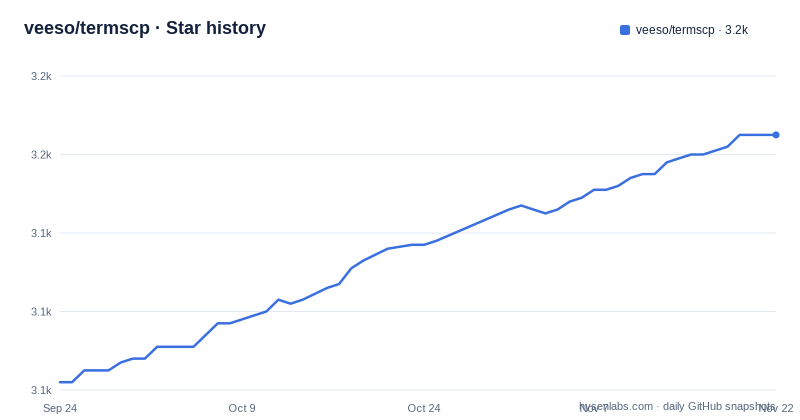
Star history
- veeso/termscp3,165 ★ · +63
| Repository | 2026-09-24 | 2026-11-22 |
|---|---|---|
| veeso/termscp | 3.1k | 3.2k |
63 Stars in the last 59 days, measured from the daily GitHub snapshot. Compare with other projects
Editorial analysis
The same front page lists its protocols three times and gets three answers
Here is a small thing that will cost a reader fifteen minutes if they are trying to answer one question: does this tool speak to my server?
The repository description names six: file copy over SSH, file transfer over SSH, file transfer, an object store, a network file share, and a web-based protocol.
The summary paragraph under the title names seven, adding a container platform but dropping the network file share.
The features list names eight, because it counts encrypted file transfer separately from unencrypted, and counts one cloud object store separately from the other.
The packaging metadata names eight again, and is the only one of the four that mentions everything at once.
So the network file share is in the description, the features and the packaging but missing from the paragraph directly under the title, and the container platform is in the paragraph and the packaging but missing from the description. Neither omission is fatal, but they are in the wrong order: the description is what people read first, and it is the one that omits the most interesting capability on the page.
It mounts a Kubernetes cluster as a directory
Most people scan the protocol list, see file transfer and object stores, and move on. One entry is not in that family.
There is a container platform backend, and in the dependency list it appears twice over: once as the client library for talking to a cluster, and once as the filesystem backend that plugs that client into the app's own remote filesystem abstraction.
What that means in practice is that the cluster appears in the file browser like any other remote host. You select a pod's volume and it is a directory you can walk into, upload into and edit, using the same keys and the same two panes as an SFTP session.
That is a genuinely unusual thing for a transfer tool to do, and it comes from the same design decision as the object store support: the abstraction underneath is a virtual filesystem with pluggable backends rather than a set of protocol-specific code paths.
It also means the permissions story is the cluster's, not the tool's. Whatever the credential you configured is allowed to do in that cluster, the tool will do, because it is presenting the cluster as a filesystem and offering the same operations.
Five of the fourteen dependencies are the author's own crates
The acknowledgements section lists fourteen projects that the tool is powered by. Read the authors rather than the names and five of them share an owner, who is also this repository's author.
Those five are not incidental. One is the remote filesystem abstraction that provides file transfer, the web-based protocol and the object stores. Four are its per-backend crates, one each for the object store, the second object store, the cluster and the network share. Two more are a library for talking to that network share at a low level and a fork of a terminal UI library.
So the honest architecture is: the author maintains a filesystem library with a backend per protocol, and termscp is the application layer on top of it, contributing the two-pane interface, the file editor, the themes, the key vault integration and the self-updater.
That explains the breadth. Eight protocols from one author is not eight integrations written by one person for one application; it is one abstraction plus the application that uses it. It also means the protocol support and the application share a release cadence whether or not the application needs it.
Network file sharing is on by default and needs a system library
The feature list has a line for it, and the packaging configuration makes it a default.
The default feature set is two items: the key vault integration, and network file sharing. The sharing feature pulls in the backend crate, and there is a second variant that asks that crate to vendor its underlying library instead of linking the system's.
Now look at the build requirements, which are only needed to compile from source. On Linux they are a message bus development library, the package configuration tool, and the client library for server message blocks, which is the system library that network file sharing talks to.
So the default build of this project, from source, needs a system library that is not in the base system of most distributions. That is a real cost for someone who wanted a single static binary and is now compiling against three development packages, one of which is easy to miss in a build log.
The vendored variant exists precisely to avoid this, and it is not in the default set.
The binaries claim no runtime requirements, and the default features disagree
The requirements section makes a strong claim about the official builds: the Linux binaries and the packages are statically linked against the alternative C library and have no runtime requirements, so they run on any distribution and any version of the main one.
That is a good claim and it is probably true of the published artifacts. But it is in tension with the feature configuration, where network file sharing is on by default and links the system client library named in the build requirements.
Both statements are consistent if the release build enables the vendored variant and the local source build does not. The repository contains a configuration file for the packaging that turns on release builds, and the vendored variant is right there in the feature list, so the most likely explanation is exactly that.
What is missing is a sentence saying so. As written, a reader has to reconcile a no-dependencies claim with a default feature that needs a library, and the reconciliation is one flag in a file.
There is a second, smaller tension in the same section: the key vault integration is a default feature, while the keyring daemon it needs appears in the list of optional requirements.
Six install routes, and the updater asks for root
The installation section is the widest in this project and the most carefully done in places.
For the Unix side there is a single command that fetches an installer script and pipes it into a shell, and the fetch is pinned: the protocol is forced to HTTPS and the minimum TLS version is given. That is the right way to write that line.
curl --proto '=https' --tlsv1.2 -sSLf https://termscp.rs/install.sh | shFor Windows there are two: a PowerShell command that fetches a script and executes it, and a package manager install. The PowerShell form has no equivalent of the protocol and TLS pinning that the shell form has, which is a small asymmetry in a section that otherwise looks considered.
Then there are package repositories for two BSDs and for Arch, and the project site is the fallback for everything else.
And then the update line, which asks you to run the tool through sudo to update itself. That is the one instruction in the section with a real consequence: an in-application updater that needs root is an updater that can rewrite the binary the tool is currently running from, on a machine where the person running it may not be an administrator.
The published crate contains five paths and nothing else
The packaging file has an include list, and it is short enough to read at a glance.
Five things ship: the source directory, the build script, the licence, the readme and the changelog. Everything else in the repository stays in the repository.
That means the themes directory, the documentation site, the installer scripts, the assets and the distribution configuration are development-time only. If you install this from a language package manager you get the compiled program, not the website and not the shell installers.
It is the right default and it is worth noticing for a different reason: the crate is the binary, and the repository is the project. Anything that documents how to install from source, and there are five such routes, is documentation for the repository rather than for the published artifact.
The manifest also declares a fairly recent language edition and a matching toolchain floor, and classifies the package as a command line utility even though the interface is a full-screen terminal application with an embedded editor and shell.
Three files about AI, and a dependency checker
The repository root has accumulated the artefacts you would expect from a project with an explicit policy about this.
There is an agent instruction file, a second one for a different assistant, and a separate policy file specifically about AI. Most projects have one or none; three with a named policy is a deliberate stance, and it is the kind of thing a company contributor will care about before making a pull request.
Next to those is a configuration file for a dependency checker, which in this ecosystem means auditing the dependency graph for licences and security advisories in continuous integration. For an application that links a low-level network library and pulls in cloud and cluster SDKs, having that check configured is one of the more valuable files in the root.
The rest is process: git hooks in their own directory, a task runner file with a directory of recipes beside it, a changelog generator configuration, a pinned Rust toolchain, formatting configuration for Rust and for Markdown and for other assets, and a committed lockfile for a binary crate.
So the housekeeping is modern and mostly good. The only oddity is that a repository this size ships three separate files whose purpose is to be read by a machine rather than a person.
Editorial conclusion
termscp suits someone who lives in a terminal and wants one tool for transferring and editing files across many kinds of host, and the embedded editor and shell mean you can do a whole change on a remote machine without a second connection. Three things to know before you install it. Count the protocols on the page rather than trusting the description, because the three lists disagree about which backends exist. On Linux, expect SMB to be compiled in by default and to have pulled a system library into the build, while the prebuilt binaries take a different path. And treat the in-application updater carefully, because the documented command runs the tool through sudo, which means an upgrade needs root on the machine.
Frequently asked questions
Is SCP the same as SFTP?
This repository does not explain the protocols. It implements clients for both, plus encrypted file transfer, two object stores, a network file share, a web-based protocol and Kubernetes, and it lists those backends in three places on the page with three different counts.
Is SCP faster than SFTP?
No comparison appears anywhere in this repository. What it states is that it supports both, authenticating with a key or with a username and password, and that saved passwords go into the operating system's key vault rather than a configuration file.
How do I install termscp on Linux?
One shell command fetches an installer script with the protocol and minimum TLS version pinned and runs it. The project site lists the alternatives: a PowerShell one-liner and a package-manager install for Windows, package repositories for two BSDs and for Arch, and prebuilt binaries for any platform.
What are the alternatives to termscp?
It names none. Instead it credits the fourteen libraries it is built on, five of which are the same author's own crates for the filesystem abstraction, its four protocol backends, and its terminal interface layer.
Official sources
Add this badge to your README
If you maintain this project, the badge below links readers to this analysis and shows its maintenance status from the daily GitHub snapshot. Paste the markdown into your README; add ?metric=license or ?metric=stars to the image URL for a different field.

[](https://hysenlabs.com/projects/veeso-termscp)Star history chart for your README
[](https://hysenlabs.com/projects/veeso-termscp)Was this useful?