iBackupExtractor reads a SQLite manifest out of a directory, and its only release is from September 2023
A simple tool for extracting files from iOS backup archive. Build Locally To build the project locally, use Cargo: Usage First, locate the backup archive you want to extract.
At a glance
- What is it?
- A small Rust command line tool for getting at files inside unencrypted iOS backups, where the original directory layout is not preserved and the index lives in a SQLite manifest. Four subcommands, one of which writes. The manifest file is read read-only so the archive can sit on a read-only filesystem, and the encryption FAQ stops one sentence before naming the setting you need to change.
- Who is it for?
- This is the right shape of tool for the job it does: it never reconstructs a fake directory tree, it tells you what is actually in the archive before you extract anything, and it refuses to overwrite a file you already have. Two things to know before you start.
- Can I use it commercially?
- Yes. MIT is a permissive licence: you can use, modify and sell software built on it, as long as you keep its copyright and licence notices.
- Is it still maintained?
- Activity is slowing. The repository last received commits 8 months ago.
- What is it written in?
- Mainly Rust, according to GitHub's language statistics.
Answers come from the project's GitHub data, last synced on November 14, 2026, and from our analysis. They are not legal advice.
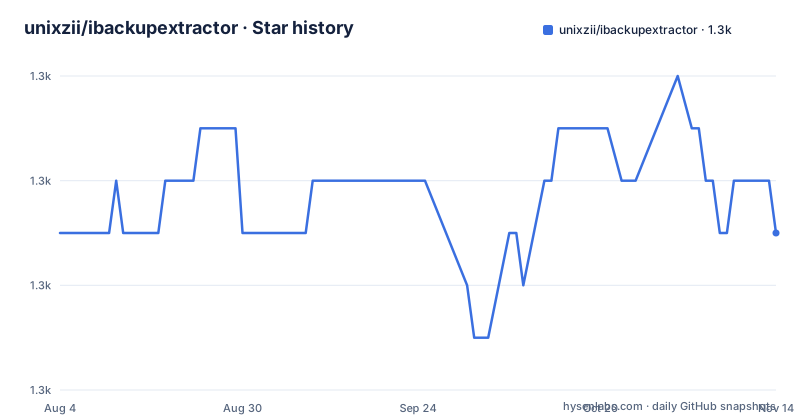
Star history
- unixzii/ibackupextractor1,331 ★ · +0
| Repository | 2026-08-04 | 2026-11-14 |
|---|---|---|
| unixzii/ibackupextractor | 1.3k | 1.3k |
0 Stars in the last 102 days, measured from the daily GitHub snapshot. Compare with other projects
Editorial analysis
The backup is a directory, and the index inside it is SQLite
The reason this tool exists is a specific property of how iOS stores backups.
A backup does not keep the original directory layout of the device. Files are grouped into what the format calls domains, roughly one per app, and the mapping from domain to file lives in a manifest. So the files you want from an app sandbox are present, but they are not where you left them, and finding one by hand is awkward.
Two practical facts follow from that, and both are stated plainly in the readme. The archive is a directory, not a single file, and it contains a manifest database inside it. On a Mac the usual location is a path under the user's library support directory for mobile synchronisation.
The manifest is opened read-only except when you are performing a migration, which is what lets the tool work against an archive on a read-only filesystem, and the readme names that case explicitly as a legacy filesystem on Linux. Mounting a backup read-only is the cheap way to be certain nothing you care about is modified, and this tool cooperates with that.
The warning that follows the read-only note is the one to take seriously: never work on the only copy of your data.
Four subcommands, and only one of them writes anything
The command surface is small and the write behaviour is deliberately uneven, which is worth understanding before you pick one.
The first reports on the archive as a whole: the manifest location, timestamps, device and computer metadata, total file and domain counts, and the overall size on disk. The readme is careful to distinguish this from the next command, which is about domains rather than the archive.
The second lists the domains in an archive, sorted by how much exportable data each one holds. That sort order is the useful part: it tells you where your disk space went before you extract anything, which is exactly the question you have when a backup is unexpectedly large.
The third extracts files, either one domain or every domain that has data, writing to a destination directory you choose.
The fourth migrates files by domain from one archive into another, preserving the original directory structure. It is the only one that writes, and it writes to the destination archive, which therefore needs read and write access while the source does not.
So the risk profile is clean: three commands are read-only against your archive and one writes only to the copy you name.
Extract copies by default, links on request, and refuses to overwrite
The extraction behaviour has three decisions in it, and two of them save real disk space.
First, how much you take. One domain, named on the command line, or every domain that holds data:
ibackupextractor extract --all /path/to/your_backup_archive /path/to/dest_dirSecond, what lands on disk. By default each file is copied to the destination. There is a short flag and a long one that switch to symbolic links instead, which the readme recommends when disk space matters, since a backup and its extraction otherwise occupy twice the space.
Third, and this is the part that shows care: an empty destination directory is recommended, and an error results if the tool attempts to write over an existing file. There is no prompt and no overwrite flag. A tool that walks thousands of files out of a manifest and into a directory tree is exactly the kind of program where a silent overwrite is expensive, and this one refuses by default.
The same flag applies to migration, where symbolic links instead of real files in the destination archive is the equivalent trade when you are duplicating domains across backups.
The encryption FAQ ends one sentence before the answer
There is a question in the readme that every reader needs, and its answer is cut off mid-sentence.
The question is how to create a backup archive this tool can use. The answer starts correctly: only unencrypted archives are supported. Then it says that to back up without encryption you should uncheck a particular option before starting, and the sentence ends there with a colon and nothing after it.
So the constraint is clear and the action is missing. A reader who has never turned encrypted backups off in their device or desktop backup tool now has to go and find the setting themselves, which is the single most likely reason someone concludes the tool does not work.
It is worth saying plainly that this is a documentation defect rather than a functional one. The tool's refusal to open encrypted archives is correct behaviour: an encrypted iOS backup is protected by design, and a tool that extracted it without the passcode would be the actual problem. What is missing is the name of the setting.
The second question in that section is answered completely, and it is the one that matters most for anyone nervous about their data. The read-only commands do not write to the archive and need only read access. Migration writes to the destination only.
Prebuilt binaries are offered for Mac, but the tool is written for Linux too
The install section and the usage section disagree about how wide the platform support is.
Install offers two routes. Mac users can download prebuilt binaries directly from the releases page. Anyone can build locally, and the build command is a single release build through Cargo.
Then the usage section mentions, as a supported case, a legacy filesystem on Linux being read-only. That is not an aside: making the manifest open read-only is exactly what lets the tool work against that filesystem, so the author clearly expects people to run it on Linux against archives mounted from elsewhere.
The readme names Mac as the platform with prebuilt binaries and says nothing about prebuilt binaries for Linux or Windows, so the practical reading is that the platform support is wider than the binary distribution. A Linux user builds from source.
That is a small thing, and the source build is one command, but it means the install experience is not uniform. Anyone scripting this across machines should not assume the release page has an artefact for their platform.
The build itself is pinned: the repository carries a toolchain file, so the compiler version is fixed rather than whatever the machine happens to have.
One release in 2023, version 0.2.0 in the manifest, last commit in March 2026
The activity signals disagree with each other, and none of them point to recent work.
There is exactly one published release, version 0.1.0, dated September 2023. The crate manifest declares version 0.2.0. So the published artifact and the source tree disagree, and if you install the release you get code a version behind whatever the repository currently contains.
The last commit to the main branch was on 10 March 2026, and that is not active development. The most recent activity recorded anywhere in this repository is therefore seven months old, so treat it as a finished small tool rather than one that will respond to an issue.
The dependency list explains the design better than the readme does. A SQLite driver and a fallible iterator, because the manifest is a database and iterating it should not panic on a corrupt row. A property list parser, because device and computer metadata is stored in Apple's property list format. A read-only file opening helper, for the manifest. Two console libraries, one of which is a progress bar renderer, so a long extraction shows progress. And an error handling crate plus a derive-based argument parser.
The release profile is tuned hard for size: optimisation for size over speed, symbols stripped, full link time optimisation, a single codegen unit so the compiler optimises the whole binary as one unit, and aborting on panic instead of unwinding. Every one of those trades runtime performance for a smaller, faster-starting binary.
Editorial conclusion
This is the right shape of tool for the job it does: it never reconstructs a fake directory tree, it tells you what is actually in the archive before you extract anything, and it refuses to overwrite a file you already have. Two things to know before you start. It only handles unencrypted archives, and the readme's answer to how to produce one is truncated one sentence before the setting name, so find that option in your own backup tool. And check the version you are installing, since the only published release is from 2023 while the crate manifest is at a later version and the last commit to the branch is dated March 2026.
Frequently asked questions
What is ibackup extractor?
A small MIT licensed Rust command line tool for extracting files from unencrypted iOS backup archives. Because iOS backups do not preserve the original directory layout and group files by app domain, with the index held in a SQLite manifest inside the backup directory, the tool lets you list what is actually in an archive and then write those files out into a normal directory tree.
How do I use ibackup extractor?
Point it at the backup directory, which contains the manifest database. The info subcommand reports archive level metadata, the list-domains subcommand lists the domains sorted by how much exportable data each holds, the extract subcommand takes either one named domain or every domain and writes to a destination directory you choose, and the migrate subcommand moves a domain from one archive into another.
Does ibackup extractor work with encrypted iOS backups?
No. It handles unencrypted archives only, which is the correct behaviour for a format that is passcode protected by design. The readme's answer to producing an unencrypted backup ends by telling you to uncheck a particular option without ever naming it, so you will need to find that setting in your own backup tool.
Will ibackup extractor modify my original backup?
Not unless you use the migrate subcommand. The info, list-domains and extract commands never write to the archive and need only read access, and the manifest is opened read-only so the tool works against an archive on a read-only filesystem. Migration writes only to the destination archive, which therefore needs read and write access while the source does not.
How do I install ibackup extractor?
Mac users can download prebuilt binaries from the releases page. Otherwise build it locally with a release build through Cargo, which needs the toolchain the repository pins. Note that only one release has ever been published, it dates from September 2023, and the crate manifest is at a later version than that release.
What are iOS backup domains and how do I extract one?
iOS groups backup files by domain, roughly one per app, rather than by directory. The list-domains subcommand shows them sorted by the amount of exportable data in each, and the extract subcommand takes a domain name to pull one, or a flag to pull every domain that holds data. By default files are copied, and a flag switches to symbolic links to save disk space.
Official sources
Add this badge to your README
If you maintain this project, the badge below links readers to this analysis and shows its maintenance status from the daily GitHub snapshot. Paste the markdown into your README; add ?metric=license or ?metric=stars to the image URL for a different field.

[](https://hysenlabs.com/projects/unixzii-ibackupextractor)Star history chart for your README
[](https://hysenlabs.com/projects/unixzii-ibackupextractor)Was this useful?