Vellum Assistant: 28 workspaces, one dev build, and a proxy that allows one wildcard
An AI Assistant that s easy to setup, does your work 24/7, knows your preferences and gets better over time.
At a glance
- What is it?
- Vellum Assistant is a self-hostable personal AI with eight memory types, an hourly re-read pass, and a sandboxed tool layer, shipped as a Bun workspace of 28 packages. The interesting parts are where its own files disagree: two channel tables that list different sets, a Windows download wired to a development environment, and a root package.json that does dependency surgery on every install.
- Who is it for?
- Vellum Assistant is worth reading if you have already built a personal agent on OpenClaw, Hermes Agent, or Claude Code and know what the setup cost looks like, because the memory model here is the most concrete part of the repository: eight named types, each with its own staleness window, hybrid dense and sparse retrieval, and per-user and per-channel isolation. Three things to check before you point it at a real machine.
- Can I use it commercially?
- Yes. MIT is a permissive licence: you can use, modify and sell software built on it, as long as you keep its copyright and licence notices.
- Is it still maintained?
- Yes. The repository last received commits 6 days ago.
- What is it written in?
- Mainly TypeScript, according to GitHub's language statistics.
Answers come from the project's GitHub data, last synced on November 13, 2026, and from our analysis. They are not legal advice.
Star history
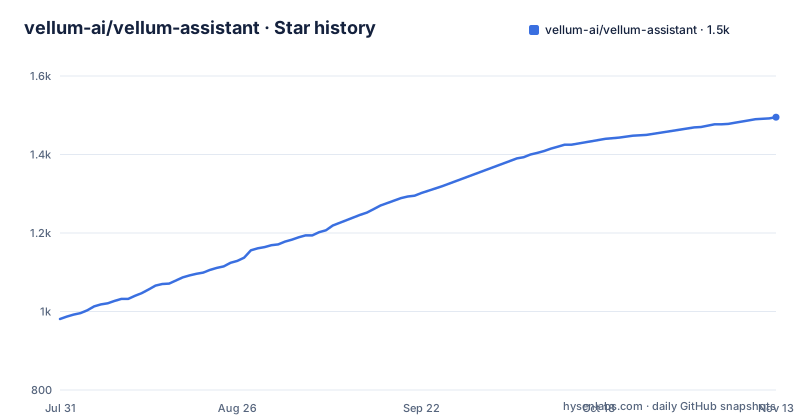
- vellum-ai/vellum-assistant1,495 ★ · +514
| Repository | 2026-07-31 | 2026-11-13 |
|---|---|---|
| vellum-ai/vellum-assistant | 981 | 1.5k |
514 Stars in the last 105 days, measured from the daily GitHub snapshot. Compare with other projects
Editorial analysis
Two tables in the same file list different channels
The summary table near the top gives the Channels row as macOS, Windows, iOS, Web, Voice, Email, Telegram, Slack, Twilio, under the claim of one assistant, one memory, every channel. Further down, the infra table's Channels row describes the same assistant as reachable from the macOS or Windows app, Telegram, or Slack. Five entries appear in one list and not the other: iOS, Web, Voice, Email and Twilio.
The gap is not only in prose. packages/twilio-client is one of the 28 workspaces, and patchedDependencies carries @capacitor-community/camera-preview at 8.0.1, a Capacitor plugin for camera preview, so Twilio and the phone camera path both have code behind them. Voice and Email have neither a workspace entry nor an explanation anywhere in the file. The sentence about starting a thought in one channel and picking it up in another appears only under the narrower list, and per-channel isolation of memory only earns its place in the design if the channel set is settled. Two tables, one claim, no note about which one is current.
The Windows download is wired to a development environment
The Get Started section says the desktop app is available for macOS and Windows, then qualifies the second half in the same paragraph: the Windows download is currently a dev build connected to the development environment, with x64 installers for Intel and AMD and ARM64 installers alongside them. Two architectures are covered, so the build is real, but it is pointed at a shared backend rather than at a release artifact.
Nothing in the file says what changes when it stops being a dev build, or whether the memory, notes and uploads written through it land in that development environment next to other people's data. There is no separate storage key for it in the .env.example, which only carries SENTRY_DSN_ASSISTANT, PROXY_ALLOWED_HOSTS and a commented VELLUM_DOCS_BASE_URL override. The three deployment keys the macOS path needs are the same three. So a Windows user and a macOS user who both type the same keys get different amounts of isolation, and the difference is stated once, in a parenthetical, and never revisited.
A Linux client workspace exists with no download path
The root package.json is named vellum-workspace, marked private, and lists 28 workspace paths. Five of them are clients: clients/docs, clients/macos, clients/linux, clients/windows and clients/web. The install instructions name the macOS and Windows desktop app, and the summary table adds Web and Voice as channels.
clients/linux has no counterpart in any of that. No download link, no line in either Channels row, no mention in the hosting row, which offers a managed runtime on Vellum Platform or self-hosted without splitting by operating system. So the repository carries a package that exists to be built for Linux, and the user-facing document never says how to obtain it or whether the desktop app is expected to arrive there. The nested entry assistant/src/api, listed inside the assistant workspace, points the same way: the tree is wider than the documentation, and in the case of the Linux client, wider than the channels the project advertises.
bun install -g vellum sits next to .nvmrc and .tool-versions
There are two install routes and they converge on the same command. Globally:
bun install -g vellum
vellum hatch
From source:
git clone https://github.com/vellum-ai/vellum-assistant.git
cd vellum-assistant
./setup.sh
source ~/.bashrc
vellum hatch
Three of those source steps are Unix shaped. Running setup.sh and sourcing ~/.bashrc are both shell conventions, and the Windows note about opening a new terminal after first launch is the same reload of the profile under a different name. Meanwhile the root carries .nvmrc, .tool-versions, bun.lock and bunfig.toml at once, so version pinning is expressed for three toolchains simultaneously, and the command the install section leads with is the Bun one. Every command in the common list targets the default assistant, and the file notes that a second argument selects a different one, which is the only multi-assistant instruction anywhere in it. The rest of the list covers the service lifecycle: wake starts services, sleep stops them while keeping data, ps shows running assistants, client opens a terminal session and upgrade moves to the latest version. Pairing a device to reach a self-hosted assistant from a phone or another computer is delegated to a tunnel guide rather than described here, which is the point where this file stops and the docs site takes over.
The default egress allowlist is one wildcard
.env.example sets PROXY_ALLOWED_HOSTS=*.vellum.ai and states that localhost is always allowed. Every other host an assistant might need to reach is outside the default until someone writes more patterns into that line, which makes the shipped value a real constraint rather than a sample. The same file says existing environment variables take precedence over the values written in it, so an already exported PROXY_ALLOWED_HOSTS overrides the narrow default without any warning at startup.
The other two entries show the same attention to what happens when configuration is wrong. SENTRY_DSN_ASSISTANT is left empty to disable crash reporting in local builds, which is the honest way to ship a reporting key. And VELLUM_DOCS_BASE_URL is documented as ignored unless it parses as an absolute http(s) URL carrying no query and no fragment, so a malformed override is discarded in favour of the default instead of breaking the app. The egress rule has no equivalent fallback described, which is the asymmetry worth noticing: a bad docs URL is swallowed, and a missing allowlist entry is simply a blocked request.
A lodash override and four patches apply to every workspace
Beyond listing workspaces, the root package does dependency surgery in three places. overrides pins es-toolkit at 1.46.1, lodash at 4.18.1 and path-to-regexp at 8.4.2. patchedDependencies carries four entries, app-builder-lib at 26.8.1, storybook at 10.4.0, @capacitor-community/camera-preview at 8.0.1 and @sentry/capacitor at 4.1.0, each pointing at a file under patches/. trustedDependencies lists exactly one package, @playwright/browser-chromium, so the browser binary download is the only install script permitted to run.
An override is a statement the installer trusts without asking, and lodash is the line to confirm first against the registry, because a fresh clone resolves it before anything else runs and there is no prompt to interrupt it. Two of the four patches sit on Capacitor packages and two on build tooling, which says the patch set is aimed at the mobile client and the packaging path rather than at the assistant core. That split is consistent with the workspace layout, where the mobile and desktop clients are separate packages from the assistant itself. The three overrides and four patches are declared at the root, so they apply to all 28 workspaces rather than to one package that asked for them, and no comment in the file explains what any of them repairs.
A shell into the container, granted in ten minute slices
The common commands include vellum terminal, described as opening a shell into a managed assistant container. That is the sharpest item in the list, because it hands a person the same environment the agent works in. The permission model around computer use is stated in three grants: once, for ten minutes, or always. Files can be read and edited, commands run and the browser driven, all inside the assistant's own sandbox unless you approve otherwise, and the default is to deny.
The security row adds that actor identity, whether guardian, trusted or unknown, is resolved once and enforced everywhere, that unknown actors can neither read memory nor trigger tools nor escalate, and that credentials live in a separate process that never reaches the model. Skills are plugins defined by a SKILL.md and a TOOLS.json, installable from a catalog, bundled, or dropped into the workspace, sandboxed like everything else. The design is coherent. The always grant is the setting that turns it into a system which acts on its own, and it is one click from the same menu as the ten minute one.
Test logs and agent directories are tracked at the root
The top level of the tree carries assistant-tests.log and web-tests.log beside bun.lock, which means two test output files ship with every clone rather than being produced on your machine. Around them sit .claude/ and .cursor/, then AGENTS.md, ARCHITECTURE.md, CONSTITUTION.md, GLOSSARY.md, SECURITY.md, CONTRIBUTING.md and CODE_OF_CONDUCT.md, so seven governance documents and two assistant configuration directories sit at the same level as the code. Also present are socket.yml, test-preload.ts, a patches/ directory that matches the four patch entries, plus plugins/, skills/, benchmarking/, meta/ and credential-executor/.
The Foundational documents section introduces a table with the columns Doc and What it is and no rows beneath them, so the set of documents the project calls canonical is not visible in the file. The one line summary attached to the project reads: An AI Assistant that s easy to setup, does your work 24/7, knows your preferences and gets better over time. The first s has lost its apostrophe. Small things, but this is a repository whose pitch is that it writes down who it is, and the identity files it points at are described rather than shown.
Editorial conclusion
Vellum Assistant is worth reading if you have already built a personal agent on OpenClaw, Hermes Agent, or Claude Code and know what the setup cost looks like, because the memory model here is the most concrete part of the repository: eight named types, each with its own staleness window, hybrid dense and sparse retrieval, and per-user and per-channel isolation. Three things to check before you point it at a real machine. The Windows app is described in the install section as a dev build connected to the development environment, so treat anything you type into it as not private. PROXY_ALLOWED_HOSTS ships as a single *.vellum.ai wildcard with localhost added, which is a narrow default you will widen deliberately or not at all. And the root package.json overrides three transitive dependencies and patches four more across every workspace, so read those lines before install rather than after. The credit handling is stated plainly: credentials live in a separate process, unknown actors cannot read memory or trigger tools, and every tool call runs in a sandbox. What is not stated anywhere is what happens to the data already in that development environment, and that is the question to ask before running this on Windows for anything real.
Frequently asked questions
How many kinds of memory does Vellum Assistant keep?
Eight, each with its own staleness window: episodic, semantic, procedural, emotional, prospective, behavioral, narrative and shared. Retrieval is hybrid dense and sparse, isolation is per-user and per-channel, and structured items such as identity, preferences, projects and events are pulled from conversations with source attribution and dedup. Embeddings run locally by default.
How do I install Vellum Assistant from a terminal?
Two routes are given. Globally, bun install -g vellum followed by vellum hatch. From source, clone the repository, cd vellum-assistant, run ./setup.sh, source ~/.bashrc, then run vellum hatch. All commands act on the default assistant, and a second argument selects a different one when several exist.
Which model providers can Vellum Assistant run on?
Anthropic, OpenAI, Google Gemini, Fireworks, OpenRouter, MiniMax, Atlas Cloud, and any OpenAI-compatible endpoint, with local models through Ollama. Embeddings run on local ONNX by default and fall back to cloud providers automatically. Hosting is either the managed runtime on Vellum Platform or self-hosted, on the same codebase and data model.
What can the assistant do on my own computer?
It works in its own sandbox and, with your approval, reaches the actual machine: reading and editing files, running commands and driving the browser. Every action is permission gated, and a grant can be once, for ten minutes, or always. Actor identity is resolved once and enforced everywhere, unknown actors cannot read memory or trigger tools, and credentials live in a separate process.
How many packages are in the vellum-assistant repository?
The root package.json lists 28 workspace paths under the name vellum-workspace. They include the assistant and assistant/src/api, the cli, credential-executor and gateway, clients for docs, macOS, Linux, Windows and web, and packages for storage, contracts, design and platform concerns.
What is Vellum Assistant actually for?
It is a personal assistant meant to run continuously rather than be reconfigured. Every hour it re-reads its notes, looks for anything unfinished or due soon, and messages you if something needs attention, routing the notification to the right channel without interrupting an active conversation. Personality lives in SOUL.md, written during onboarding, with a per-user journal of reflections and NOW.md as a scratchpad for current focus.
Official sources
Add this badge to your README
If you maintain this project, the badge below links readers to this analysis and shows its maintenance status from the daily GitHub snapshot. Paste the markdown into your README; add ?metric=license or ?metric=stars to the image URL for a different field.

[](https://hysenlabs.com/projects/vellum-ai-vellum-assistant)Star history chart for your README
[](https://hysenlabs.com/projects/vellum-ai-vellum-assistant)Was this useful?