elizaOS packs an agent runtime, an app, a cloud and bootable OS images into one Bun monorepo
Open source agentic operating system. Apps on elizaOS elizaOS runs apps, not just an agent.
At a glance
- What is it?
- elizaOS/eliza is a MIT-licensed TypeScript monorepo for autonomous AI agents: the AgentRuntime core, the Eliza app, Eliza Cloud services, first-party plugins and Linux and AOSP distribution tooling. It is model-agnostic and plugin-driven, but what any single install can actually do depends on its platform, plugins, permissions and configured providers.
- Who is it for?
- elizaOS fits TypeScript developers who want one codebase spanning an agent runtime, a user-facing app, plugins and optional hosted services, and who are willing to run the exact Node and Bun versions the repository pins. It is a poor fit for someone who only wants a small chatbot library, because cloning brings the whole stack, from native bridges to OS distribution tooling.
- Can I use it commercially?
- Yes. MIT is a permissive licence: you can use, modify and sell software built on it, as long as you keep its copyright and licence notices.
- Is it still maintained?
- Yes. The repository received new commits within the last day.
- What is it written in?
- Mainly TypeScript, according to GitHub's language statistics.
Answers come from the project's GitHub data, last synced on November 13, 2026, and from our analysis. They are not legal advice.
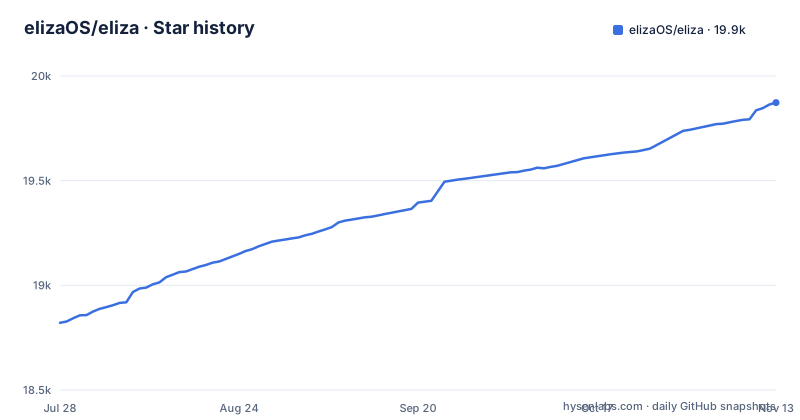
Star history
- elizaOS/eliza19,873 ★ · +1,052
| Repository | 2026-07-28 | 2026-11-13 |
|---|---|---|
| elizaOS/eliza | 18.8k | 19.9k |
1,052 Stars in the last 108 days, measured from the daily GitHub snapshot. Compare with other projects
Editorial analysis
One monorepo carries the runtime, the app, the cloud and the OS images
elizaOS describes itself as an open-source TypeScript framework and product stack for autonomous AI agents, and the repository holds all of it. packages/ contains the runtime, hosts, UI, CLI, docs, cloud, native code and tooling. plugins/ holds first-party model, connector, domain, app and device plugins. packages/scripts/ carries repository-wide checks, test orchestration and release tools, and patches/ holds dependency patches applied during installation.
The framework layer splits into four packages. @elizaos/core defines AgentRuntime, the canonical types, authorization, memory and state primitives, and the plugin contracts. @elizaos/agent assembles a standalone agent and HTTP backend around that core. @elizaos/app provides shared application hosting, API and platform orchestration for Eliza app targets, and @elizaos/ui contains the shared React UI. packages/os goes further than most agent projects: it owns bootable Linux and AOSP distributions, installers, release manifests and OS toolchains.
If all you need is the runtime inside your own program, the project points you at importing @elizaos/core directly without an application host. Cloning the repository is the right move only if you want the app, the plugins or the distributions. The default branch is develop, so a fresh clone lands there.
Running from source pins exact Node and Bun versions and does heavy work inside bun install
The root package.json sets engines.node to 24.15.0, an exact version rather than a range, and the README asks you to install the pinned Bun and Node versions before anything else. The source path is four commands:
git clone --filter=blob:none https://github.com/elizaos/eliza.git
cd eliza
bun install
bun run dev
bun install is not a plain dependency fetch. It prepares submodules and patches, provisions supported host build prerequisites, and builds or verifies the staged desktop libelizainference. The postinstall script chains seven Bun scripts, including patch-punycode-deprecation.ts, patch-llama-cpp-capacitor.ts, patch-electrobun-linux-cef-profile.ts, ensure-workspace-symlinks.ts and build-views.ts. Because install time also means patching dependencies and building native pieces, treat the Node and Bun pins as hard requirements rather than suggestions.
Archived artifact fixtures are not fetched by default. When you need them, run bun packages/scripts/fetch-archive-artifacts.ts. For people who only want to use Eliza, the web app at cloud.eliza.app, the downloads page and published GitHub releases are the listed routes. Note that the three newest entries on the releases page, pr-evidence-12 through pr-evidence-14 from September 2026, are PR review evidence bundles rather than app builds, so pick a release by reading its title.
dev, dev:local and start launch three different things
The root scripts look similar but start different processes:
bun run dev:local   # app + API with the runtime chooser (local agent, own provider keys; Cloud sign-in not required)
bun run start       # run the standalone agent host (API only, no UI; use bun run dev for the app)
bun run build       # build the workspace with Turbo
bun run verify      # dependency, type, lint, and audit gates
bun run test        # repository end-to-end test lane
bun run test:e2e    # end-to-end lane
bun run cloud:mock  # local Eliza Cloud stack with mocks
In package.json, dev runs packages/app/scripts/dev-ui.ts with the eliza-source condition, and dev:local runs the same script with --cloud-target=offline. That flag is the difference between an app that offers Cloud sign-in and one that runs a local agent on your own provider keys. start is shorthand for bun run --cwd packages/agent start, which gives you the HTTP backend with no UI at all. There is also dev:ui with --ui-only, and dev:desktop, which sets ELIZA_DEV_SOURCE=1 and ELIZA_NAMESPACE=eliza before launching the desktop platform script.
Package-level build and test commands are not repeated at the root. Each package documents its own, and bun run --cwd <package> <script> scopes a command to one package.
Eliza Cloud is optional, and .env.example is how you run without it
Eliza Cloud provides account and authentication services, hosted model routing, application and agent deployment, remote connectivity and cross-device product services. The project states that the local runtime and direct model-provider configuration remain first-class paths, and each model capability can be routed to local, direct-provider or Eliza Cloud backends.
The direct path runs through .env.example, which you copy to .env and uncomment selectively. The provider block lists OPENAI_API_KEY, ANTHROPIC_API_KEY, GOOGLE_GENERATIVE_AI_API_KEY, OPENROUTER_API_KEY, CEREBRAS_API_KEY, GROQ_API_KEY, XAI_API_KEY, OLLAMA_API_ENDPOINT and ELEVENLABS_API_KEY. Storage overrides include POSTGRES_URL, PGLITE_DATA_DIR, ELIZA_DATA_DIR and ELIZA_DATABASE_DIR, with SERVER_PORT=3000 shown as the commented example; leaving them unset uses host defaults. Connector credentials follow the same pattern for Discord, Slack, Telegram, WhatsApp and X, and ELIZA_CODING_REMOTE_RUNNER accepts eliza-cloud or home.
The app manifest in package.json marks the text-large capability as required while messaging, wallet and browser-automation are optional, and it enables the scheduling and personal-assistant defaults with requiredForReady set to true. In practice, whichever route you pick, a large text model has to be reachable before the app has what it declares as required.
The capability list is conditional on plugins, permissions and platform
A plugin exports a Plugin object, and plugins can register actions, providers, evaluators, services, model handlers, routes, events, tests and app views. Everything Eliza can do arrives this way: chat, voice, memory and document workflows; messaging and workspace connectors; calendar, reminders, inbox, goals and health; browser and desktop automation; camera, phone, contacts and location bridges; non-custodial EVM and Solana wallet operations with approval boundaries; scheduled workflows and coding-agent orchestration.
That list is not a guarantee for any given install. Availability depends on the operating system, the installed plugins, the permissions granted and the model or service providers configured. A connector such as Discord or Telegram needs its token in .env before it can do anything, and the camera, phone and contacts bridges depend on the device and on permissions the user grants. The exact support and setup for each capability sits in the owning package's README, not at the root.
The consequence for evaluation is that the top-level feature list tells you what the stack can host, not what you will get. Pick the three or four capabilities you need, open their plugin READMEs under plugins/, and check platform and permission requirements before you build on them.
Eliza-1 local inference works offline only after the assets download, and only on eligible hardware
@elizaos/plugin-local-inference provides the on-device Eliza-1 path. The current registry contains 2B, 4B, 9B and 27B text tiers based on Gemma 4, plus local embeddings, speech, vision and image-generation assets. Hardware detection and model routing select supported backends, and once the required assets are downloaded, eligible operations can run without a network connection.
Two conditions sit inside that sentence. First, the assets have to arrive before offline use is possible; the embedding GGUF is runtime-managed and downloads automatically during local-inference warmup, so the first local run needs a network connection. Second, local inference is not forced on hardware that cannot support it. On a machine that does not qualify, those capabilities have to be routed to a direct provider or to Eliza Cloud instead.
For anyone planning an air-gapped or privacy-first deployment, that means two checks: whether the target hardware is eligible for the tier you want, and whether you can pre-stage the downloads. The phrase eligible operations also matters; offline coverage applies to the operations that have a local backend, not automatically to every capability a plugin adds.
Tests default to a free deterministic lane, while live tests and benchmarks cost money
The testing setup separates runs that need no paid keys from runs that call real services. .env.example states that tests default to the deterministic PR lane without paid provider keys, through TEST_LANE=pr, ELIZA_LIVE_TEST=0 and SCENARIO_USE_DETERMINISTIC_MODEL=1. Switching to TEST_LANE=post-merge, ELIZA_LIVE_TEST=1, ELIZA_REAL_APIS=1 and SCENARIO_USE_DETERMINISTIC_MODEL=0, or running bun run test:live, moves to live models and real APIs. The scenario runner provides integration coverage against a real runtime and, when configured, live models.
Benchmarks are a separate Python tool that needs Python 3.11 or newer plus the dependencies of the chosen suite:
PYTHONPATH=packages python3 -m benchmarks.orchestrator list-benchmarks
PYTHONPATH=packages python3 -m benchmarks.orchestrator run --benchmarks <id> --provider <provider> --model <model>
Live benchmarks require the selected provider's credentials and may incur usage costs, so wiring them into a job that runs on every change puts provider charges on each run. Contributors face one more constraint: the contribution rules in CONTRIBUTING.md are required for all issues and pull requests and ask work to stay within the approved MVP and PRD, and the root AGENTS.md is the only agent guide, with nested AGENTS.md files disallowed.
Editorial conclusion
elizaOS fits TypeScript developers who want one codebase spanning an agent runtime, a user-facing app, plugins and optional hosted services, and who are willing to run the exact Node and Bun versions the repository pins. It is a poor fit for someone who only wants a small chatbot library, because cloning brings the whole stack, from native bridges to OS distribution tooling. Before committing, check the README of each plugin you depend on for its platform and permission requirements, decide whether you will use Eliza Cloud, local Eliza-1 models or your own provider keys, and confirm your hardware qualifies before planning around offline inference.
Frequently asked questions
What is elizaOS (eliza)?
elizaOS is an open-source TypeScript framework and product stack for autonomous AI agents, released under the MIT license. Its monorepo contains the core runtime, the Eliza app, the CLI, cloud services, native bridges, first-party plugins and Linux and Android distribution tooling.
How does elizaOS relate to an LLM?
elizaOS is not itself a language model; its framework is model-agnostic and routes each model capability to local, direct-provider or Eliza Cloud backends. For on-device use, its Eliza-1 registry offers 2B, 4B, 9B and 27B text tiers based on Gemma 4.
Does elizaOS require an Eliza Cloud account?
No. Eliza Cloud is optional, and bun run dev:local starts the app with a local agent and your own provider keys without Cloud sign-in.
Which Node version does elizaOS need to run from source?
The root package.json pins engines.node to 24.15.0, and the repository also pins a Bun version. Install those exact versions before running bun install.
Official sources
Add this badge to your README
If you maintain this project, the badge below links readers to this analysis and shows its maintenance status from the daily GitHub snapshot. Paste the markdown into your README; add ?metric=license or ?metric=stars to the image URL for a different field.

[](https://hysenlabs.com/projects/elizaos-eliza)Star history chart for your README
[](https://hysenlabs.com/projects/elizaos-eliza)Was this useful?