Escrcpy: a scrcpy front end that keeps its advanced features behind a paid extension
📱 Display and control your Android device graphically with scrcpy.
At a glance
- What is it?
- Escrcpy wraps scrcpy, adbkit and Electron in a desktop app that mirrors and drives Android devices, with multi-device control, keyboard mapping and visual automation. The catch is stated on the front page: the stable integration base is open, and some advanced features come from a private extension repository sold separately.
- Who is it for?
- Use it if you want a graphed scrcpy with an inset window, multi-device broadcast and key mapping, and you can live with an irregular update cadence and limited support. Hold off if the features you actually need are the ones the front page hands off to the paid extension, because that part of the feature list will not be auditable from the open repository.
- Can I use it commercially?
- Yes. Apache-2.0 is a permissive licence: you can use, modify and sell software built on it, as long as you keep its copyright and licence notices.
- Is it still maintained?
- Yes. The repository last received commits 20 days ago.
- What is it written in?
- Mainly JavaScript, according to GitHub's language statistics.
Answers come from the project's GitHub data, last synced on November 15, 2026, and from our analysis. They are not legal advice.
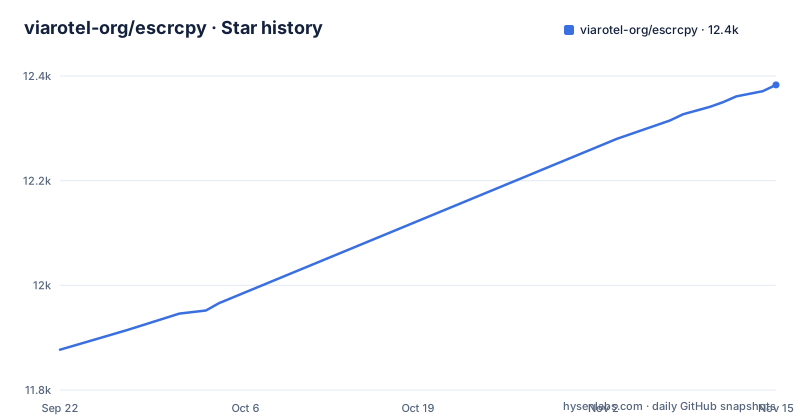
Star history
- viarotel-org/escrcpy12,383 ★ · +506
| Repository | 2026-09-22 | 2026-11-15 |
|---|---|---|
| viarotel-org/escrcpy | 11.9k | 12.4k |
506 Stars in the last 54 days, measured from the daily GitHub snapshot. Compare with other projects
Editorial analysis
The front page splits the feature list in two, and the paid half is not in this repository
Read the line under the title before the feature bullets, because it decides what you are looking at. Escrcpy positions itself as a stable integration foundation, and states that some advanced features come from a private extension repository called EscrcpyX and are offered on a paid basis. That is the honest boundary of the open code. The bullets that follow list features without saying which belong to the paid extension, including an inset embedded mirror window that auto-fits screen resolution and orientation, a compact draggable control sidebar with reorderable controls for rotation, screenshot, apps, files, terminal, AI assistant and automation, and configurable global hotkeys. For your evaluation this matters concretely: if the capability you need is in the paid tier, you cannot read its implementation, you cannot build it yourself from this tree, and you are evaluating a feature list rather than code.
Wireless ADB and reverse tethering are the two places the project reaches past plain scrcpy
The baseline mirroring and control is scrcpy itself, which the project acknowledges as one of the open-source projects it depends on, alongside adbkit, Electron, Vue, gnirehtet, yadb and tangoadb. On top of that baseline, the wireless story is where the extra machinery shows: wireless ADB connections with LAN auto-discovery, and reverse tethering through gnirehtet, which has its own documentation section under reference. Consequence for anyone planning a lab setup: a cable-free workflow depends on ADB being reachable over the network first. Read that as a network boundary in your setup, not a missing feature in the app.
Multi-device control broadcasts input, which is the part to think about twice
Multi-device control puts every connected device in a single window, with input broadcast and batch screenshot and APK install support. Broadcast is the capability that deserves attention, because it applies one input stream across several screens at once. That is exactly what you want for a device lab or a demo wall, and exactly what you do not want when two phones hold different accounts or different states. There is also a separate visual window orchestration view for managing all connected devices centrally, plus a visual step-by-step automation script runner with screen image recognition that can batch execute across devices. The practical point: nothing in the feature list describes a confirmation step, a device filter or an allowlist, so treat broadcast and batch install as operations you invoke deliberately on a known device set.
Building from source needs pnpm, turbo and a pinned package manager
The repository is a workspace, not a single app, and the root package.json shows exactly how it is put together. It is a private module named @escrcpy/workspace at version 3.3.1, its description is "Scrcpy Powered by Electron", and its main entry is dist-electron/main.js. Development runs through turbo:
"dev": "turbo dev",
"build": "turbo build:electron",
"build:win": "turbo build:electron -- --win",
"build:mac": "turbo build:electron -- --mac",
"build:linux": "turbo build:electron -- --linux"
The package manager is pinned to a specific pnpm release with an integrity hash, and pnpm-workspace.yaml, turbo.json and a .nvmdrc file sit at the top level alongside packages/ and desktop/. Expect to have that exact pnpm version available, and expect the Linux, macOS and Windows builds to be three separate invocations rather than one command.
Release cadence is irregular and the gap between major versions is wide
The release feed tells you what to expect. v3.0.8 landed on 2026-08-03, v3.2.0 on 2026-09-01 and v3.3.1 on 2026-10-10, and the repository's last push was on 2026-09-01. That is roughly four weeks between v3.0.8 and v3.2.0 and about five weeks to v3.3.1. The help section says outright that the project is powered by passion, that support is limited, and that updates are irregular. For a tool you plan to depend on in a lab or a team workflow, the practical move is to pin a release and check the changelog and the milestones page before upgrading, since a version you adopted months ago may be several releases behind.
Documentation is a separate VitePress site, not the repository README
If you are evaluating this project, the README is the short version and the real instructions live elsewhere. There is a docs directory in the tree, and the root scripts build it with VitePress:
"docs:dev": "vitepress dev docs",
"docs:build": "vitepress build docs",
"docs:preview": "vitepress preview docs",
"lang-sync": "node ./scripts/lang-sync.js"
Five named pages carry the detail: getting started, shortcuts, device operations, preferences, and reverse tethering. A lang-sync script and vitepress-i18n in the dev dependencies explain the Chinese and Russian readmes at the top level, so translations are part of the workflow. Two consequences for readers: preferences and shortcuts, the places where this tool is actually configured, are documented off the repository, and you need the docs site running locally or online before you can answer most configuration questions.
The AI assistant is built on MCP, and that names a dependency you inherit
One bullet in the list is not a UI feature at all: the Copilot assistant is described as an AI assistant built on the MCP protocol, with multi-model chat support, for device control. It is also the only item in the feature list that depends on a model provider outside the project, and the README says nothing about which models, what credentials it needs, or whether any prompt data leaves the machine. The control sidebar lists AI assistant as one of its reorderable controls alongside rotation, screenshot, apps, files and terminal. For a security review, this is the entry worth stopping at: a device-control assistant wired to your ADB session and an external model is a different trust boundary from the mirroring code, and the documentation does not spell out the boundary for you.
A paid extension repo means the feature list you read is partly a sales page
Assemble the picture from the acknowledgments and the help links. The build depends on scrcpy, adbkit, Electron, Vue, gnirehtet, yadb and tangoadb, and two projects are listed as friendly links, ADB Device Manager 2 and FreeControl2. Support for Escrcpy itself is an FAQ page, a GitHub issue tracker and one contact email, plus a donation route. Where EscrcpyX is concerned, none of that applies, since it lives in a private repository on a paid basis. So the practical reading is that the open project gives you a maintained integration shell with good free fundamentals, while the parts that differentiate it in a paid environment are the parts you will have to evaluate without source access or issue history.
Editorial conclusion
Use it if you want a graphed scrcpy with an inset window, multi-device broadcast and key mapping, and you can live with an irregular update cadence and limited support. Hold off if the features you actually need are the ones the front page hands off to the paid extension, because that part of the feature list will not be auditable from the open repository. Before you commit to a release, check the releases page for the version you get, confirm your device is reachable over wireless ADB or cable, and expect to build from source if you want the developer workflow.
Frequently asked questions
Is scrcpy safe to use?
Escrcpy is the Electron front end built on scrcpy, adbkit and gnirehtet. The project itself notes that support is limited and updates are irregular, so review what you install and check the releases page for the version you get.
Can I control my phone using scrcpy?
Yes, that is the core function: scrcpy provides low-latency screen mirroring and control, and Escrcpy wraps it in an inset window that auto-fits resolution and orientation, with a control sidebar for rotation, screenshot, apps, files and terminal.
How can I mirror my Android screen to another Android phone?
Escrcpy covers multi-device control in a single window, with input broadcast plus batch screenshot and APK install, and wireless ADB connections with LAN auto-discovery. The README does not describe mirroring one phone's screen onto another phone.
What does scrcpy stand for?
The README does not expand the name. Escrcpy is described as Scrcpy Powered by Electron, so scrcpy is the underlying project it builds on and wraps.
Official sources
Add this badge to your README
If you maintain this project, the badge below links readers to this analysis and shows its maintenance status from the daily GitHub snapshot. Paste the markdown into your README; add ?metric=license or ?metric=stars to the image URL for a different field.

[](https://hysenlabs.com/projects/viarotel-org-escrcpy)Star history chart for your README
[](https://hysenlabs.com/projects/viarotel-org-escrcpy)Was this useful?