TikTok-Unlock: four rule lists for four proxy clients, and a node that does the actual work
Unlock TikTok on iPhone and iPad without removing the SIM card - works with TikTok and TikTok TestFlight, including region switching, video posting, livestreaming, likes, comments, and direct messaging.
At a glance
- What is it?
- Semporia/TikTok-Unlock is a set of TikTok.list rule files, one per iOS proxy client, that route TikTok traffic to a node you supply yourself. Region switching is a node switch: the project no longer asks for a certificate or HTTPS decryption, and it cannot help when the exit IP is one TikTok refuses.
- Who is it for?
- Adopt it if you already run one of the four supported iOS proxy clients and you have a node whose exit IP TikTok accepts, since the repository adds nothing beyond routing and saves you the old certificate and rewrite steps. Skip it if you have no working node or you need Douyin on the same phone without extra rules, because it ships no node of its own and its Douyin fix lives in another repository.
- Can I use it commercially?
- Not without permission. GitHub finds no licence file in the repository, and without a licence all rights are reserved by default: you may read the code but not reuse it. Check the README, or ask the authors, before using it.
- Is it still maintained?
- Yes. The repository last received commits 130 days ago.
- What is it written in?
- Mainly JavaScript, according to GitHub's language statistics.
Answers come from the project's GitHub data, last synced on November 15, 2026, and from our analysis. They are not legal advice.
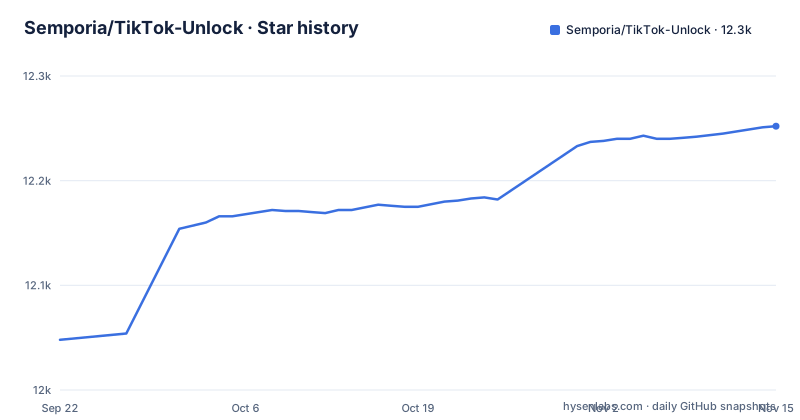
Star history
- Semporia/TikTok-Unlock12,252 ★ · +204
| Repository | 2026-09-22 | 2026-11-15 |
|---|---|---|
| Semporia/TikTok-Unlock | 12k | 12.3k |
204 Stars in the last 54 days, measured from the daily GitHub snapshot. Compare with other projects
Editorial analysis
Four directories named after proxy clients, and a rule file in each
Everything this project offers sits in four directories named after iOS proxy clients: Loon/, Quantumult-X/, Shadowrocket/ and Surge/, next to a README.md and nothing else. There is no script to run, no package manifest, no configuration file of its own and no software to install. GitHub reports JavaScript as the primary language, yet the artifact the README asks you to fetch is a rule list ending in .list, pulled from the master branch over raw.githubusercontent.com. One client gets one file, which means four separate copies of the same routing idea that can drift apart with nobody noticing. Nothing in the repository pins which revision of a rule list you received, and there are no GitHub releases, so what sits behind those four URLs can change between two visits.
The MitM certificate step is gone, so the node carries the whole load
The unlock path changed shape, and the change is the real story. The older approach needed a downloaded historical TikTok build, a proxy certificate installed and trusted on the device, and HTTPS decryption with URL rewriting to defeat the region check. The README now says none of that is required: take the latest TikTok from the App Store, add the rule list, and traffic reaches a node that natively supports TikTok. Dropping certificate installation removes the step that used to break other apps on the phone. It also moves the hard part off this repository and onto the user. The rule file does not unlock anything by itself; it steers TikTok traffic to the proxy node you already pay for, and when that node's IP is refused, nothing here changes the outcome.
Region switching is a node swap, not a setting inside TikTok
The README associates content region with the proxy exit IP, but platform behavior can also depend on account, device, app and other signals. A node's location alone does not guarantee a particular feed or regional experience. The mapping it gives is a node swap rather than an in-app option, so a Japan, US or Taiwan exit is intended to influence the apparent network location. No switch inside TikTok is configured by this project, and the repository gives no table of store regions or codes for any of them. Wanting two regions at once means carrying a working node for each, and every change is made in the proxy client. The number of usable regions is therefore a property of your subscription, not of these four files.
Adding TikTok.list in Quantumult X, Loon, Surge and Shadowrocket
Each client reads its own file, so pick the URL that matches the app you run. Quantumult X: open the app, enter settings, go to the resource and split rules screen, and add the TikTok entry there. The file for that client is:
https://raw.githubusercontent.com/Semporia/TikTok-Unlock/master/Quantumult-X/TikTok.listLoon: add it under [Remote Rule], then make sure the policy group in use points at a node that supports TikTok.
https://raw.githubusercontent.com/Semporia/TikTok-Unlock/master/Loon/TikTok.listSurge: add the same kind of entry under its rule section and attach it to the matching policy group.
https://raw.githubusercontent.com/Semporia/TikTok-Unlock/master/Surge/TikTok.listShadowrocket takes the most steps: open 配置, tap the `i` behind the configuration file you use, go to 規則, tap `+` at the top right, set 類型 to `RULE-SET`, set 策略 to `PROXY` or to a policy group you built for TikTok, paste the rule set URL, then tap 儲存 and confirm the configuration is applied. Its URL is:
https://raw.githubusercontent.com/Semporia/TikTok-Unlock/master/Shadowrocket/TikTok.listAll four paths end at the master branch, so a later edit to any file reaches your client without you touching anything.
Spinning, black screen, no connection: the node is blamed every time
The README describes one failure mode and gives it a single cause. If TikTok spins forever, shows a black screen or reports that there is no network connection, the README suggests the proxy node may not support TikTok or its IP may be blocked or recognised as a datacenter address. Those symptoms can also result from routing, connectivity, account or application issues. The advice is to ask your provider whether the node supports TikTok, or to move to a native IP node. Two consequences follow. There is no second diagnosis anywhere in the project, so a mistyped rule set and a dead node look identical from the app, and the fix sits with the provider rather than with these files. The repository ships rules but no node, no subscription and no check that tells you whether the exit IP you paid for is one TikTok accepts.
The Douyin workaround points at a different repository
Running Chinese Douyin on the same device is the one collateral case the project addresses. The same proxy can break domestic Douyin playback, and the stated remedy is to add a direct route for Douyin with the policy set to `DIRECT`, using this subscription:
https://raw.githubusercontent.com/Semporia/Quantumult-X/master/Filter/DouYin.listNotice where that URL lives. It is not in TikTok-Unlock, it sits in a separate repository, Semporia/Quantumult-X, under Filter/. So the documented fix for a side effect of this project sends you into a different repository. Read that file before importing it, because a rule set is opaque by design: you cannot see what it matches until your client has already applied it.
No LICENSE file, no releases, and a disclaimer that caps reuse
Settle the licensing question before you redistribute anything. The top-level entries are the four client directories and README.md, with no LICENSE file present, and the license is reported as unknown. With no license text, default copyright applies: you may read the rule lists and point a client at them, and nothing grants you the right to republish or alter them. The README also carries a disclaimer that the project is for learning and exchange, that local laws apply and that it must not be used for illegal purposes, which matters before you attach it to a work account. The last push was on 2026-07-08 and there are no GitHub releases, so copy any file you depend on and note the date rather than trusting the URL to hold still. The homepage field points at semporia.github.io/iTunes.html, a page the README never mentions.
Editorial conclusion
Adopt it if you already run one of the four supported iOS proxy clients and you have a node whose exit IP TikTok accepts, since the repository adds nothing beyond routing and saves you the old certificate and rewrite steps. Skip it if you have no working node or you need Douyin on the same phone without extra rules, because it ships no node of its own and its Douyin fix lives in another repository. Before importing anything, open the TikTok.list file your client will fetch and read what it matches, and copy it locally, since all four URLs point at the master branch and the project has no LICENSE file and no releases, with the last push on 2026-07-08.
Frequently asked questions
How can I get my TikTok unlocked with TikTok-Unlock?
TikTok-Unlock supplies one rule list per iOS proxy client and leaves the unlocking to your node. What it asks for is the latest TikTok from the App Store, an Apple ID from outside mainland China, a client such as Quantumult X, Loon, Surge or Shadowrocket, and a node whose IP natively supports TikTok.
How does TikTok-Unlock handle locked videos on TikTok?
It handles region access rather than individual videos. The region you see depends on the country of your proxy node IP, and the project says nothing about unlocking specific videos.
Does TikTok-Unlock still need a certificate and HTTPS decryption?
No. The README states that downloading a historical version and running HTTPS decryption (MitM) are both unnecessary now, and that the current route is the App Store version plus the rule list plus a node that supports TikTok.
Why does TikTok still fail after I add the TikTok.list rule?
The README attributes spinning, black screen and no network connection messages entirely to a node that does not support TikTok, with its IP blocked or identified as a datacenter address. It offers no second cause and sends you to your provider or to a native IP node.
Official sources
Add this badge to your README
If you maintain this project, the badge below links readers to this analysis and shows its maintenance status from the daily GitHub snapshot. Paste the markdown into your README; add ?metric=license or ?metric=stars to the image URL for a different field.

[](https://hysenlabs.com/projects/semporia-tiktok-unlock)Star history chart for your README
[](https://hysenlabs.com/projects/semporia-tiktok-unlock)Was this useful?