Siftly shipped a 1.0.1 and then a 0.2.0, and its Docker auth step calls a macOS binary
Local Twitter/X bookmark organizer with AI categorization and mindmap visualization
At a glance
- What is it?
- A self-hosted reader for your own X bookmarks, with a four-stage AI pipeline that turns an export into searchable, categorised, visually explorable data. Its zero-configuration path reads a Claude subscription token out of the macOS keychain, its access control is off unless you set two variables, and three model providers appear in the configuration file while one is documented.
- Who is it for?
- Siftly fits someone with an existing archive of bookmarks who wants it searchable and organised on their own machine, and who is content to point the pipeline at a model provider. Three things to know before running it.
- Can I use it commercially?
- Yes. MIT is a permissive licence: you can use, modify and sell software built on it, as long as you keep its copyright and licence notices.
- Is it still maintained?
- Activity is slowing. The repository last received commits 7 months ago.
- What is it written in?
- Mainly TypeScript, according to GitHub's language statistics.
Answers come from the project's GitHub data, last synced on November 15, 2026, and from our analysis. They are not legal advice.
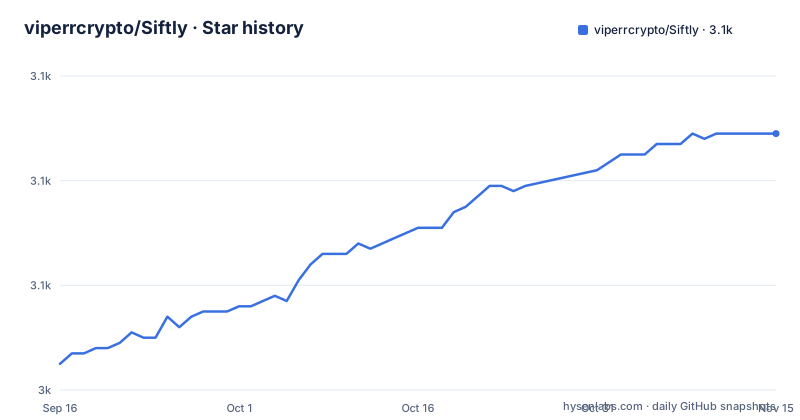
Star history
- viperrcrypto/Siftly3,089 ★ · +44
| Repository | 2026-09-16 | 2026-11-15 |
|---|---|---|
| viperrcrypto/Siftly | 3k | 3.1k |
44 Stars in the last 60 days, measured from the daily GitHub snapshot. Compare with other projects
Editorial analysis
A 1.0.1 release, then two releases numbered below it
The release history runs backwards, and that is visible in the three most recent tags.
A 1.0.1 was published on 2026-03-10. Then a 0.2.0 on 2026-03-28, and a 0.3.0 on 2026-04-08. So a project that had tagged a one-point-zero followed it with two tags in the zero series, eighteen and twenty-nine days later.
The manifest is behind even those. The package metadata carries version 0.2.0, so the newest tag and the version in the source do not match, and a build from the default branch reports a number one release behind the tag that exists.
The last push to the default branch is dated 2026-04-08, about six months before this was written, and it is the same day as the newest tag. So nothing has changed in the branch since the last release, which is a different situation from a project where the branch runs ahead of its tags.
The practical consequence is that a version number is not a reliable ordering here, and anyone pinning should choose a tag deliberately rather than following whatever the latest release happens to be called.
The zero-config path reads a Claude subscription token from the macOS keychain
The authentication section is a priority table with four rows, and the first row is the one to understand.
Row one is the command-line coding assistant, marked as needing no configuration. If you are already signed in, the table says the app reads your session from the macOS keychain automatically. Row two is pasting a key into the settings page, row three is an environment variable, and row four is pointing a base URL at any compatible endpoint, which is the local-proxy or local-model route.
The first row is not a login. It is the app reading an existing credential belonging to a different program and using your Claude subscription to make model calls, which is what lets the README say the AI features work with no API key. The settings page makes the state visible: when that path is active it shows a green badge saying no API key is needed, along with your subscription tier.
The README also states the limit, and it is a hard one: this works on macOS, and on Linux or Windows you add an API key in settings instead. So the credential-reading behaviour is available on exactly one of the three desktop platforms, and everyone else lands on the metered path.
If you do supply a key, the README quotes a cost: new accounts include a small amount of free credit, and at the smallest model's pricing that works out to a fraction of a cent per bookmark, so the free credit covers a few thousand bookmarks.
The Docker instruction runs a command that does not exist in a Linux container
The environment example file documents the keychain route in more detail than the README does, and the detail contains a mistake.
The file explains that the app reads the credential from the macOS keychain automatically when running locally, and then adds a line for the container case: in Docker, extract it manually. What follows is a command that invokes the macOS keychain tool to read a named generic password, pipes its output into a short Python program, and prints one field from the parsed JSON, the access token, under a nested object name.
The keychain tool is the macOS command-line utility for reading keychain entries. A Linux container does not have it, so the instruction cannot work inside the container where it is meant to apply. Whatever is inside that JSON is not a container secret store, and the command assumes the host's keychain is reachable from inside the image.
The manual variable that the section is about is commented out with a name that does not match the section title, which refers to a command-line OAuth token. So the file gives you a variable to set, a shell command that cannot set it in the environment it is documented for, and a JSON path into someone else's credential store.
Access control is off by default, and the file recommends a tunnel with auth added
The last section of the environment file is the one that decides whether the app is private, and it is written as an opt-in.
There is an access control heading with the instruction to set both variables to enable HTTP basic authentication across the entire application. Both. Leaving them unset is described as unrestricted local access, and it is named as the default. The recommendation is to set them when exposing the app through a public URL, and a specific tunnel service is given as the example.
So the shipped default is an unauthenticated application on a local port, and the file's own guidance is that this stops being acceptable the moment the port is reachable from elsewhere. There is no session, no per-user identity and no rate limiting mentioned anywhere in the document, which for an app that stores a full bookmark archive and can spend money on model calls is the whole security surface.
The repository root does contain a middleware file, which in this framework is where request-level authentication would be enforced, so the mechanism exists even though the default leaves it inactive.
Three providers are configurable and one is documented
The authentication section of the README describes four methods, all of them Anthropic-flavoured: the command-line session, a key in settings, an environment variable, and a base URL for a compatible endpoint.
The environment file tells a longer story. It has a section for Anthropic, a section for a second provider with its own key variable, its own base URL variable and a documented default endpoint, and a section for a third provider with the same pair of variables. So three model services are configurable, and the README explains only the first.
The manifest agrees with the file rather than with the README. Alongside the first provider's SDK it depends on a second provider's SDK, and the export tooling pulls in a zip library and a graph library, which match the ZIP export and the force-directed mindmap the README describes.
The third-party service's endpoint in the configuration file also carries its own base URL override, so the routing to it is meant to be changeable in the same way as the first provider's. The practical gap is documentation rather than capability: a reader choosing between the three providers has to read the environment file to learn that two more exist.
Four pipeline stages, one of them free, all with per-item counts
The pipeline is the product, and the README specifies what each stage produces.
Import comes first and is free. It is described as coming from a built-in bookmarklet or console script, with no extension required.
The first AI stage extracts entities, and it is also free: it mines hashtags, URLs, mentions and a list of more than a hundred known tool names out of the stored tweet data, and the table says it makes zero API calls. It reads the stored JSON rather than the rendered bookmark, which matters because that JSON is what the import produces.
The second stage is vision. It reads every image, animated image and video thumbnail, and produces between thirty and forty visual tags per item, covering text found in the image, objects, scene, mood and meme templates.
The third stage generates between twenty-five and thirty-five search tags per bookmark, combining the text with the image context, and also extracts sentiment, people and company names. The fourth assigns one to three categories per bookmark with confidence scores, using everything the earlier stages produced.
Two operational details come with that. The pipeline is incremental, so an interrupted run resumes where it stopped, and there is a force option to re-analyse everything already processed.
Search then runs across text, image text, visual tags, semantic tags and categories at once, through a full-text index with semantic reranking on top, and every result comes with a generated explanation. The mindmap is a force-directed graph of the whole archive by category.
Import works by driving your own logged-in bookmarks page
There is no extension and no access token for the social site, and the mechanism is worth being precise about.
The recommended route is a bookmarklet. You open the import page in the app, drag a link onto the browser's bookmark bar, go to your logged-in bookmarks page, click it, and a button appears on that page. Clicking the auto-scroll control makes the tool scroll through the page and capture your bookmarks, and when it finishes you click a second button and a JSON file downloads. You then upload that file back into the app.
The alternative is the same page with a script pasted into the browser's developer console. The script is copied from the app's own import page, the auto-scroll runs, and the export downloads without a second click.
Both routes work inside a session you are already logged into, in your own browser, and both produce the same JSON file. Re-importing is supported: duplicates are skipped and only new bookmarks are added.
Three installation routes are given for the app itself, and they differ in who does the work. One runs a shell script from the repository that installs dependencies, creates the database, checks whether the command-line assistant is authenticated and opens a local port. One hands the folder to the assistant, which reads the instruction file in the repository. The third is manual:
git clone https://github.com/viperrcrypto/Siftly.git
cd Siftly
npm install
npx prisma generate
npx prisma migrate dev --name init
npx next dev
The stated floor is Node 18 or newer, which is worth checking against the framework version the manifest pins.
One more thing the manifest has that the README does not mention: a script named after the project that runs a TypeScript command-line file from a directory in the repository.
Editorial conclusion
Siftly fits someone with an existing archive of bookmarks who wants it searchable and organised on their own machine, and who is content to point the pipeline at a model provider. Three things to know before running it. The zero-configuration authentication path reads a Claude subscription token out of another application's keychain entry, and it works only on macOS, so on any other system you supply a key yourself. Access control is off unless you set two variables, and the configuration file's own advice is to set them before exposing the app through a tunnel. And the version history is inconsistent: a 1.0.1 was published in March 2026 followed by 0.2.0 and 0.3.0, the manifest sits at 0.2.0, and the last push to the default branch was on 2026-04-08, so pin deliberately rather than tracking a branch.
Frequently asked questions
What is Siftly?
A self-hosted manager for your own X bookmarks that runs on your machine and turns them into a searchable, categorized, visually explorable knowledge base. Everything stays local except the model API calls you configure, and the import needs no browser extension.
How do I install Siftly?
Three routes are documented, all starting from a clone: run a shell script in the repository that installs dependencies, sets up the database, checks for command-line authentication and opens a local port; hand the folder to Claude Code, which reads the repository's own instruction file; or do it manually with npm install, two database commands and the development server. The stated floor is Node.js 18 or newer.
How does Siftly import my bookmarks?
Two methods, neither needing an extension. Either drag a bookmarklet to your browser's bookmark bar, open your logged-in bookmarks page, click it, run the auto-scroll capture and export the resulting JSON; or paste a console script into the developer tools on the same page and export. Then upload the file on the import page. Re-importing skips duplicates and adds only new bookmarks.
Official sources
Add this badge to your README
If you maintain this project, the badge below links readers to this analysis and shows its maintenance status from the daily GitHub snapshot. Paste the markdown into your README; add ?metric=license or ?metric=stars to the image URL for a different field.

[](https://hysenlabs.com/projects/viperrcrypto-siftly)Star history chart for your README
[](https://hysenlabs.com/projects/viperrcrypto-siftly)Was this useful?