VNT 2.0.10: three binaries, one optional password, two plaintext escape hatches
An efficient VPN and tool for simple, fast remote LAN networking and NAT traversal.
At a glance
- What is it?
- VNT is a Rust virtual LAN and intranet tunneling tool that ships as a desktop client, a browser managed server binary, and a command line pair. Its security notes are unusually candid, including the two flags that hand plaintext IPv4 to the server.
- Who is it for?
- VNT fits someone who needs a flat virtual LAN across home, office, and NAS hardware and is willing to host their own server, since the endpoint printed in the quick start is a shared third party host.
- Can I use it commercially?
- Yes. Apache-2.0 is a permissive licence: you can use, modify and sell software built on it, as long as you keep its copyright and licence notices.
- Is it still maintained?
- Yes. The repository last received commits 6 days ago.
- What is it written in?
- Mainly Rust, according to GitHub's language statistics.
Answers come from the project's GitHub data, last synced on November 23, 2026, and from our analysis. They are not legal advice.
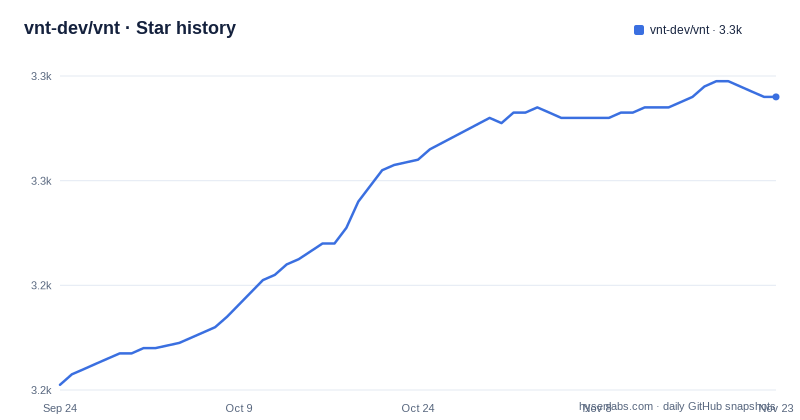
Star history
- vnt-dev/vnt3,276 ★ · +55
| Repository | 2026-09-24 | 2026-11-23 |
|---|---|---|
| vnt-dev/vnt | 3.2k | 3.3k |
55 Stars in the last 60 days, measured from the daily GitHub snapshot. Compare with other projects
Editorial analysis
A default cargo build produces no binaries at all
The root Cargo.toml names the package `vnt2` at version 2.0.10, edition 2024, Apache-2.0, which lines up with the newest published tag v2.0.10 dated 2026-09-27 and a last push on 2026-09-29. What is unusual is the feature table. `[features]` sets `default = []`, and all three `[[bin]]` entries carry a `required-features` gate: `vnt2_cli` and `vnt2_ctrl` sit behind `vnt-ipc`, and `vnt2_web` sits behind `vnt-web`. A plain `cargo build` therefore compiles the library surface and nothing a user can actually run, so the three programs the quick start names appear only once those features are switched on. No feature command appears in the docs, which means the flags for a local build have to be read out of the manifest. The same file declares a five member workspace (`vnt-web`, `vnt-ipc`, `vnt-core`, `vnt-jni`, `vnt-desktop/src-tauri`) and a Windows only `windows-service` dependency, so a Tauri desktop client, an Android JNI bridge, and the command line tools all come out of one repository.
allow_ikev2 and allow_wireguard are documented plaintext trust hatches
Two opt in switches get their own paragraphs in the security notes, and both describe the same tradeoff. `--allow-ikev2`, written as `allow_ikev2 = true` in the config file, makes a node trust plaintext IPv4 data injected by an already authenticated server, and pins traffic aimed at IKEv2 type devices through that server. `--allow-wireguard` does the same for WireGuard type devices and is independent of the first. Both default to off. Both also sit outside the node to node encryption that a network password turns on, which the text states rather than leaves implied: this path is not covered by the end to end encryption described for password protected networks. The trust boundary here is therefore not merely that a server forwards ciphertext it cannot read. It is that a server can inject plaintext that the node installs as if a peer had sent it. Enabling either flag for interop with an IKEv2 or WireGuard client means treating the server as fully trusted for those routes. Note that the separate protection against an impostor server, certificate pinning over tcp-tls, quic, or wss, does not cover this case.
One opt in password, shared by every device on the network
Encryption between nodes stays off until it is asked for. The password enters as `-p` or `--password` on the command line, or as `password` in the config file, and once it is set node traffic uses ChaCha20-Poly1305 while the server only relays ciphertext. Without it, the docs say node to node data is not encrypted and traffic relayed through the server can in principle be read there, and they limit that omission to trusted network environments. The operational catch is that a virtual network behaves like one shared secret: every device on the same network number and server must hold the identical password or the devices cannot communicate at all. Changing it is a coordinated event across every phone, NAS, and server in the network. No key exchange, no per device identity, and no revocation path appear anywhere in the docs, so there is no supported way to add one rogue device to a live network or to retire one.
The two field quick start lands every reader on the same server
Building a network takes two values: a network number (`-k`, for instance `123456`) and a server address (`-s`). Devices matching on both join the same virtual LAN and each receives a virtual IP drawn from a subnet the server picks. The example endpoint is `101.35.230.139:6660`, offered as the thing to use when no public server of your own exists, while a self hosted server is what the docs point at for anything else. That default path therefore puts every reader who copies it onto one third party host, where the operator chooses the subnet, sees connection metadata for every device, and stays on the path of every packet. Device count is given as unlimited with no per network quota described. Verification is a ping of the other device's virtual IP, yet the troubleshooting entry warns that a firewall can drop ICMP and suggests testing with an actual shared folder, so a failed ping proves nothing by itself.
# 启动组网
./vnt2_cli -k 123456 -s 101.35.230.139:6660
Run in the background, the same pair reports state through a separate control binary:
# vnt2_cli 后台运行时,使用 vnt2_ctrl 查看组网状态
./vnt2_ctrl info
device_mode picks a data plane, and each platform allows a different one
The config key is `device_mode = "no|tun|tap"`, the default is `tun`, and `--device-mode` overrides it. `no` creates no virtual interface at all and offers traffic egress plus port mapping, which answers the FAQ entry about not wanting to change system network settings, and it needs no administrator rights. `tun` is a layer 3 interface carrying IPv4 packets. `tap` is layer 2, passes whole Ethernet frames, and converts IPv4 and handles ARP so it can interop with TUN and `no` nodes. Platform support is uneven. Linux and macOS use the system TUN/TAP facility, Windows TUN mode ships its own `wintun.dll`, Windows TAP mode needs administrator rights plus a preinstalled `tap-windows` with hardware ID `tap0901`, and Android VpnService supports TUN only. The retired `no_tun` key was removed rather than reinterpreted, and the program prints a migration prompt instead of quietly starting in TUN mode, so an old config file fails loudly.
vnt2_web prints the token that guards it into the log
`vnt2_web` brings up a browser managed interface on `127.0.0.1:19099` by default and prints a startup URL carrying `?token=...`. The token can be pinned with `--token` or with the `VNT_WEB_TOKEN` environment variable instead, which matters on a headless box where the log is the only place the value surfaces. Whoever can read that log can add a network configuration and start or stop networking through the page, so on a shared host the log is about as sensitive as the config file itself. Loopback is the default bind, which keeps the page off the network unless someone changes it. The desktop client solves the same problem in process: the Tauri workbench calls `vnt-core` over Tauri IPC, and a "Web 访问" toggle starts an in process HTTP service when browser access is wanted, so `vnt2_web` need not run beside it. During frontend work the Vite dev server proxies `/api` to `127.0.0.1:19099`, and the docs tell you to start `vnt2_web` with a token and type the same token into the browser login page.
opt-level = 'z' makes the size claim measurable and the speed claim not
The release profile is spelled out: `opt-level = 'z'`, `lto = true`, `codegen-units = 1`, `strip = true`, `rpath = false`, `incremental = false`, `debug-assertions = false`. That is a size first build, and it matches the change list entry about shrinking the program while keeping full function. Sitting beside it is a separate line about performance gains and linux-offload support, and the manifest carries nothing that measures either, so a reader comparing VNT against another Rust tunneling tool gets no basis for the comparison. The release cadence is tight and consistent with the version in the manifest: v2.0.8 on 2026-09-07, v2.0.9 on 2026-09-13, v2.0.10 on 2026-09-27. The project also states that 2.0 was a full rewrite with no compatibility with 1.0, and that vnt-link and vnt were merged into one program, so 1.0 era config files and habits do not carry across.
A fixed virtual IP starts the local network before the server answers
Two connection features change startup behaviour. With a fixed virtual IP the local network comes up immediately and the server connects in the background; a bare IP implies `/24`, and CIDR is accepted. Several servers can be connected at once for disaster recovery and load balancing. The more interesting one is the serverless mode: give a node a fixed virtual IP plus at least one `peer_address` seed, and nodes build a multi hop connectivity graph through a direct handshake that carries identity and through Gossip announcements, with no server in the path. That path needs somebody to publish a reachable seed, so it is not fully serverless in the sense of needing no coordination. The hole punching and transport pieces live in separate credited projects: `tun-rs` for the virtual interface, `route_manager` for routing, a user space TCP/IP stack for the quic proxy and for egress in `no` mode, and `rustp2p-core` for the punching channel. FEC redundant transport and a quic proxy are listed for traffic stability.
Editorial conclusion
VNT fits someone who needs a flat virtual LAN across home, office, and NAS hardware and is willing to host their own server, since the endpoint printed in the quick start is a shared third party host. Before deploying, check three things: whether the network needs the IKEv2 or WireGuard interop flags, because those accept plaintext injected by the server, whether every device can be given the same network password, because nodes holding different passwords cannot reach each other, and whether Windows TAP is needed, because that path needs tap-windows installed in advance. Treat the public server as a trial path rather than a production one.
Frequently asked questions
Does VNT need administrator rights on Windows?
Creating a virtual network adapter does, which is why the docs tell Windows users to run the program as administrator. Setting device mode to `no` avoids it, because that mode creates no adapter and only provides traffic egress and port mapping. Windows TAP mode needs administrator rights as well, plus tap-windows installed in advance with hardware ID tap0901.
Is traffic between VNT nodes encrypted when I use the public server?
Only after you set a network password with `-p` or `--password`. Then node traffic uses ChaCha20-Poly1305 and the server forwards ciphertext it cannot decrypt. With no password, node to node data is unencrypted and the server can in principle read relayed traffic. The `--allow-ikev2` and `--allow-wireguard` paths accept server injected plaintext IPv4 and are not covered by that encryption even when a password is set.
What is the difference between the VNT desktop client, vnt2_web, and vnt2_cli?
The desktop client is the graphical option with a Windows installer that works out of the box. `vnt2_web` serves a browser interface on 127.0.0.1:19099 for servers and NAS boxes with no desktop, and `vnt2_cli` with `vnt2_ctrl` is the pure command line pair meant for scripted and automated deployment. All three take the same network number and server address.
Can VNT build a network without any server?
Yes, with two conditions: a fixed virtual IP and at least one `peer_address` seed. Nodes then form a multi hop graph over a direct handshake carrying identity plus Gossip announcements, so no server sits in the path. You still need one reachable peer address to bootstrap from. The server implementation itself lives in the separate vnts repository.
Official sources
Add this badge to your README
If you maintain this project, the badge below links readers to this analysis and shows its maintenance status from the daily GitHub snapshot. Paste the markdown into your README; add ?metric=license or ?metric=stars to the image URL for a different field.

[](https://hysenlabs.com/projects/vnt-dev-vnt)Star history chart for your README
[](https://hysenlabs.com/projects/vnt-dev-vnt)Was this useful?