This personal management system's containers stay alive by launching an editor, and its demo login is in the readme
Your web application for managing personal data.
At a glance
- What is it?
- The Volmarg personal management system is a PHP backend for personal data, written by one person for their own use with the explicit goal of running on a home network with no internet access. The compose file is candid about being a development setup: the database root password is a single word, a database admin tool is published on a host port, the mail catcher allows insecure authentication, and the PHP container's entrypoint finishes by opening an interactive editor to keep it from exiting.
- Who is it for?
- This project fits one person with one set of data who wants a single place for goals, notes, contacts, schedules and money, and who would rather run it on hardware they control than depend on a hosted service. Two things to weigh.
- Can I use it commercially?
- Yes. MIT is a permissive licence: you can use, modify and sell software built on it, as long as you keep its copyright and licence notices.
- Is it still maintained?
- Yes. The repository last received commits 2 days ago.
- What is it written in?
- Mainly PHP, according to GitHub's language statistics.
Answers come from the project's GitHub data, last synced on November 14, 2026, and from our analysis. They are not legal advice.
Star history
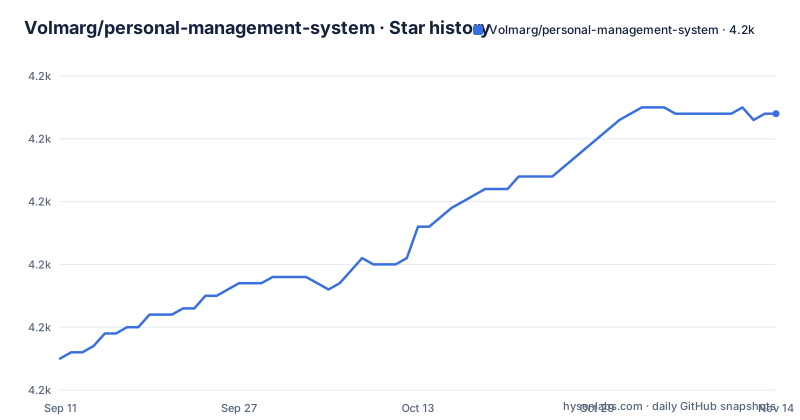
- Volmarg/personal-management-system4,194 ★ · +39
| Repository | 2026-09-11 | 2026-11-14 |
|---|---|---|
| Volmarg/personal-management-system | 4.2k | 4.2k |
39 Stars in the last 64 days, measured from the daily GitHub snapshot. Compare with other projects
Editorial analysis
The demo login and password are printed in the readme
The readme opens with three links and then, underneath the demo link, two lines of credentials. The login for the demonstration instance is an address built from the word admin repeated, and the password field is labelled to cover two things at once, the login password and the lock password. Both values are the same single word.
Publishing credentials for a demo is normal and often necessary, since a demo nobody can log into proves nothing. The thing worth noticing is the second half of that label. A lock password alongside the login password implies the application has a second, separate credential for unlocking something, and the demo sets both to the same value.
For anyone evaluating the project, that makes the demonstration the fastest way to see the whole module surface: goals, notes, contacts, passwords, health records, achievements, schedules, issues, travels, payments, shopping lists, work hours, images and files. What it cannot tell you is anything about how the encryption of the password module behaves under a real key, or what happens on a shared deployment.
The rest of the header points at a separate frontend repository, a documentation site, and the demo itself. The readme's own subtitle is emphatic that this repository is backend only.
The PHP container keeps itself alive by opening an editor
The compose file contains one of the more unusual entrypoints in a development stack, and it comes with a comment block explaining itself line by line.
The chain runs the stock PHP image entrypoint first, then starts the process manager in daemon mode, then runs the project's own entrypoint script, and finally opens an interactive editor on a file in the temporary directory. The comments justify each step conditionally: without the first the PHP installation does not work, without the second the project's own entrypoint does not work, and without the last the container would exit.
So the mechanism keeping the container alive is a text editor sitting in the foreground.
The rest of the stack is conventional. There is a MariaDB service with a named volume for the data directory, an nginx image from a community user with the repository mounted into it and its own configuration file mounted over the default, a database admin tool published on a host port, and a mail catcher with its own build directory and a named volume for its database file.
The database root password in the compose file is one word
The database service sets two environment variables: the database name, and the root password, which is the word password. There is no separate application user in this file, and no password for the application itself.
That is the single most important line in the compose file for anyone about to run this, and it is the kind of default that is fine on a laptop and unacceptable anywhere else. It is worth pairing with the neighbouring detail: the database admin tool, a web interface for browsing and editing a database, is published on a host port. Together those two lines mean that on a machine with a routable network interface, a database is reachable and its root account has a password anyone can guess.
The mail service has a comparable default. It runs with a flag that explicitly allows insecure authentication for sending mail, which is right for a local catcher that you want to be able to point an application at without TLS, and wrong for anything that relays.
Two smaller notes. The compose file still carries a version key at the top, which current tooling ignores. And there is a second compose file in the repository named for a Raspberry Pi, which is the deployment the author describes wanting and the one worth looking at if that is your target.
The stated goal is a box on your network with no internet access
The reasoning section explains why the author wrote this rather than configured something else, and the reasons are more specific than a feature list.
The first is arithmetic about effort. Assembling a large number of plugins for an existing content system, and writing customisations against an existing customer management system, would take as much time as writing a new system, and knowing the logic from the core makes extensions easier. The second is that no existing system matched, and the author did not want to end up integrating a container-based cloud system with a content manager. The third is the one that shapes the architecture: the end goal is an application running continuously on a terminal or a Raspberry Pi, plugged into a home network, without access to the internet.
That last constraint explains several choices that would otherwise look odd. There is no cloud dependency to call, no external identity provider, and no reason for the mail configuration to be careful about relays. It also means the password module's security model is a host's security model rather than an application's, which is coherent as long as the box is yours.
The author is also candid that the system offers fewer possibilities than a content system or a customer management system, and that it does what he wants it to do.
A passwords module decrypts to a copy button on the frontend
One module deserves its own paragraph because of what it does. The passwords module is described as keeping passwords encrypted in the database, with the frontend providing a copy button that fetches the original password back.
So the plaintext exists in the browser by design, at the moment the button is pressed. That is the correct behaviour for a password manager you control, and it is also the reason the deployment context matters: the encryption key, the session handling, and whatever protects the frontend are the whole security boundary.
The neighbouring modules show the same pattern of small, specific tools. Contacts is for the phone numbers and addresses you want backed up somewhere other than your phone. Health tracks illnesses, doctors and appointments, and supports linking uploaded files. Schedules is for recurring obligations such as oil changes and payments, and its entries surface on the dashboard and in a notification bell. Job has an afterhours module where you can allocate extra hours to a named goal, with a general pool for anything unassigned, plus a holidays module counting days used from a yearly allowance.
Payments is the most elaborate, with a monthly summary, a submodule for watching the price of particular products, one for money owed in either direction, and one for recording spending on specific things separately from the monthly totals.
A committed .env, a committed composer binary, and a directory of dependency patches
Three root entries tell you how this repository is worked on, and each would be worth a look before you deploy it.
There is an environment file committed at the root. A committed environment file is where database credentials and application keys usually end up, and this project's development compose file already defaults the database root password to a single word.
There is a Composer archive binary committed as well, which means the dependency installer itself is version-controlled rather than fetched. That is a deliberate choice for reproducibility, and it is also a binary blob in the history that anyone auditing the repository has to trust.
The third is a directory whose name says what it is: a place for fixes applied to vendored dependencies. When a bug in a library has to be patched before the upstream release lands, keeping the patch in the repository is the honest approach, better than silently editing code in a dependency directory.
The rest of the tree is a Symfony-shaped application: a composer manifest and lock file, a lock file for the Symfony recipe system, configuration, source, public assets, translations, a private directory for non-public files, and separate directories for binaries, assets and Docker builds.
The backend is half the project
The readme's own subtitle says this repository is backend only, and the header links to a separate repository for the frontend. That is worth internalising before reading the module descriptions, because several of them describe user interface behaviour that lives somewhere else.
The passwords module's copy button, the masonry galleries with a lightbox for images, the data table showing extension and file size for uploads, the notification bell for schedules: all of that is the frontend's work, described here so a reader knows what the backend supports. The Files module description lists renaming and downloading.
That split has consequences for anyone evaluating it. The modules are the interesting part and they are documented here, but the experience of using them cannot be judged from this repository, only from the demo. And a two-repository setup means two release cycles: a backend release and a frontend release that has to be compatible with it.
The release history shows the backend side moving on its own, with a 2.1.0 release in late September 2026 after patch releases earlier in the year, and the branch pushed in late October.
Editorial conclusion
This project fits one person with one set of data who wants a single place for goals, notes, contacts, schedules and money, and who would rather run it on hardware they control than depend on a hosted service. Two things to weigh. It stores passwords, decrypting them to the frontend on request, so the security of the whole thing rests on the host it runs on, which the author intends to be a box on their own network without internet access rather than a public server. And the compose file is a development file: a one-word database password, an exposed database admin tool, and a mail catcher allowing insecure authentication all have to change before this is reachable by anything but you.
Frequently asked questions
what is personal management system
In this repository it is one person's web application for managing personal data, written in PHP and released under the MIT licence. The readme suggests thinking of it as a smaller cousin of a content management system or a customer management system, with modules for goals, notes, contacts, passwords, health, achievements, schedules, issues, travels, payments, shopping, work hours, images and files. It is the backend half; the frontend is a separate repository.
What is the best personal knowledge management system?
The repository does not compare systems. It gives the author's reasoning for writing his own: assembling many plugins for an existing content system and customising an existing customer management system would take as much time as writing a new one, no existing system matched, and the goal was an application running continuously on a home network without internet access.
Does the personal management system have a demo with credentials?
Yes. The readme links a demonstration instance and prints the login as an address built from the word admin repeated, with the password field covering both the login password and the lock password, both set to the same single word. It is the fastest way to see the module surface, and it means the demo is open to anyone who reads the file.
Does the personal management system store passwords?
There is a passwords module, described as keeping passwords encrypted in the database while the frontend provides a copy button that fetches the original password back. Several other modules also accept or list uploads: health records can link stored files, and the files module presents uploads as a table with extension, an icon where one is defined, and file size.
How do I run the personal management system?
With the compose file in the repository: a MariaDB service, an nginx image with the repository mounted into it, a PHP process-manager container built from a directory in the repository, a database admin tool published on a host port, and a mail catcher with insecure sending allowed. A second compose file exists for a Raspberry Pi, which matches the author's stated goal of a box on a home network with no internet access.
Official sources
Add this badge to your README
If you maintain this project, the badge below links readers to this analysis and shows its maintenance status from the daily GitHub snapshot. Paste the markdown into your README; add ?metric=license or ?metric=stars to the image URL for a different field.

[](https://hysenlabs.com/projects/volmarg-personal-management-system)Star history chart for your README
[](https://hysenlabs.com/projects/volmarg-personal-management-system)Was this useful?