Piwigo: the PHP photo gallery you unzip into a web root
Manage your photos with Piwigo, a full featured open source photo gallery application for the web. Star us on Github! More than 200 plugins and themes available. Join us and contribute!
At a glance
- What is it?
- Piwigo is GPL-2.0 photo gallery software written in PHP, installed by unzipping a release into your web space. The trade is a thin dependency footprint against an upgrade procedure the project never writes down.
- Who is it for?
- Piwigo suits an organisation that already runs PHP and MySQL and wants a gallery it can unzip into a web root and patch through a fork. Check two things first: whether your host has PHP 7.4 or newer instead of an end-of-life release, and whether your proxy forwards every one of those root scripts rather than only index.php.
- Can I use it commercially?
- Yes, with conditions. GPL-2.0 is a copyleft licence: if you distribute software that includes it, you must release that software's source code under the same licence. Running it internally without distributing it does not trigger that obligation.
- Is it still maintained?
- Yes. The repository last received commits 1 day ago.
- What is it written in?
- Mainly PHP, according to GitHub's language statistics.
Answers come from the project's GitHub data, last synced on November 13, 2026, and from our analysis. They are not legal advice.
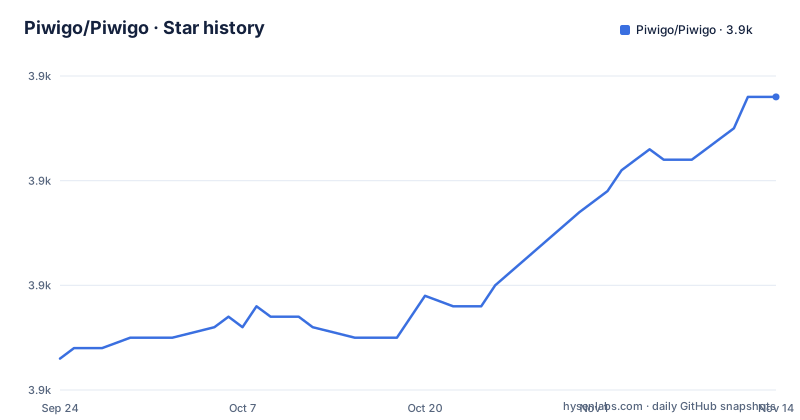
Star history
- Piwigo/Piwigo3,888 ★ · +25
| Repository | 2026-09-24 | 2026-11-13 |
|---|---|---|
| Piwigo/Piwigo | 3.9k | 3.9k |
25 Stars in the last 50 days, measured from the daily GitHub snapshot. Compare with other projects
Editorial analysis
The install path is unzip, transfer, open the URL
There is no build step and no dependency manifest at the top level of this repository. The manual route is three moves: download the latest stable version, unzip it, transfer everything to your web space with any FTP client, then open the site in a browser and follow the wizard. The tree is arranged to match that story. install.php and install/ sit at the root, and every feature is a plain PHP file: index.php, picture.php, admin.php, register.php, search.php. An operator who wants version control rather than FTP still has to treat the release archive as the artifact, because nothing at the top level gives a package manager a file to read. Plan on reconciling whatever the installer writes on disk against your own deployment process.
Two image backends, one of them a PHP extension
The requirements block is direct about its floor. It asks for PHP 7.4 or newer, then adds that Piwigo can run on PHP 7.0 or newer but that those end-of-life versions are no longer maintained and may expose your site to security vulnerabilities. That single sentence is the whole upgrade argument for a host still parked on an old distribution. Image handling has two paths: ImageMagick, which the requirements mark as recommended, or the PHP GD extension. Neither is pinned to a version, so decide which one the host actually has before assuming thumbnails and any bulk regeneration will behave. The database line is equally loose: MySQL 5 or greater, or its MariaDB equivalent, with no charset named. A webserver is required, Apache or nginx recommended, and no configuration file is specified for either.
Sixteen scripts at the web root, each directly addressable
Most PHP applications funnel every request through one front controller. Piwigo does not. The top level lists about.php, action.php, comments.php, feed.php, identification.php, password.php, picture.php, profile.php, qsearch.php, random.php, register.php, search.php, tags.php and ws.php beside index.php and admin.php, each as its own addressable entry point. Put the gallery behind nginx, a CDN or a shared host and this shape bites: a rewrite rule that forwards only the site root and index.php will break search, tags, random and the feed, because those requests never touch index.php at all. The same list tells you where to put rate limiting or an IP allowlist, since the guard has to cover admin.php and the scripts that trigger writes, not just the login form. ws.php is the one to name first there, being the entry point whose whole job is answering other programs.
Extensions are directories you drop into the same tree
There is no package registry in this project. plugins/ and themes/ are directories sitting beside the core, with template-extension/ for template overrides and language/ for translations, so adding an extension means placing its files where the application already looks. local/ sits with them, which is where an operator's own changes belong rather than in tracked core files. That arrangement keeps an FTP update simple: unzipping a newer release over the directory replaces core code and leaves the plugin and theme directories alone. It also means nothing stops an extension from editing files the next release will overwrite, which is why forking the repository and sending changes to master, rather than patching a live install, carries more weight here than in a project with a plugin marketplace. More than 200 plugins and themes are said to be available.
upgrade.php sits next to the installer, with no procedure written down
The tree ships upgrade.php and upgrade_feed.php at the root beside install.php, so the code that moves an existing gallery onto a new release is part of the distribution. What is missing is the write-up. There is no stated order of operations for an in-place upgrade, no named backup step, and no rollback instruction. For a gallery holding years of original uploads, that is the gap to watch, because the archive you unpacked at install time is often the only pre-upgrade state anyone can point to. The release cadence is regular enough to plan around: 16.2.0 on 30 December 2025, 16.3.0 on 24 February 2026, 16.4.0 on 3 May 2026, with the last push to master landing on 24 September 2026. Copy the database yourself before touching upgrade.php.
Piwigo Cloud is the one path that is not your own server
Without a server to give it, the project sends you to Piwigo Cloud and calls it a ready-to-use solution, linked from the first lines of the quick start install section. It is the only hosted option named, and nothing is said about what it costs, what it stores, or what happens to your gallery if you leave. Both self-hosted routes leave the page at once for doc.piwigo.org, one guide for a manual install and another for Docker, and neither guide's contents appear in the repository. The Docker route is named without description, so whether you get a compose file, a single image, or an image beside a separate database is something you learn by following the link rather than by reading the project's own page.
Contributions target master, and the docs sit in two directories
To change the code, the route is a fork and a pull request against master, with the mechanics in docs/CONTRIBUTING.md and the wider involvement pages on piwigo.org. Two structural details deserve a second look. The tree carries both doc/ and docs/ at the top level, so the documentation an operator is reading may not sit where a contributor expects it. Legal text appears twice, as COPYING.txt and LICENSE.txt, which is the usual arrangement for a GPL v2 project and makes the license claim easy to confirm without leaving the repository. A security contact lives in SECURITY.md. The scale shows in the counters: 3,865 stars, 485 forks and 752 open issues, and that last number is what to weigh before planning to lean on the issue tracker for support.
Editorial conclusion
Piwigo suits an organisation that already runs PHP and MySQL and wants a gallery it can unzip into a web root and patch through a fork. Check two things first: whether your host has PHP 7.4 or newer instead of an end-of-life release, and whether your proxy forwards every one of those root scripts rather than only index.php. What the README leaves undocumented is the upgrade path, so take your own copy of the database before running upgrade.php on a library you cannot rebuild.
Frequently asked questions
How do I manually install Piwigo?
Unzip the latest stable release, transfer the whole tree to your web space with any FTP client, then open the site in a browser and follow the wizard steps. No build step or package install is part of that path.
what is piwigo
Piwigo is open source photo gallery software for the web, written in PHP and released under GPL v2. It is aimed at organisations, teams and individuals, and more than 200 plugins and themes are available according to the project description.
is piwigo free
The source is released under the GPL v2 license. The README also points at Piwigo Cloud as a ready-to-use hosted option and does not state what that service costs.
how to install piwigo on ubuntu
The manual path needs a webserver, PHP 7.4 or newer, MySQL 5 or greater or its MariaDB equivalent, and ImageMagick or PHP GD. No Ubuntu package list or distribution-specific setup is written down; a separate Docker installation guide is linked instead.
is piwigo safe
The repository carries a SECURITY.md file at the top level. The requirements section warns that end-of-life PHP releases may expose a site to vulnerabilities and asks for PHP 7.4 or newer; no disclosure timeline is stated.
Official sources
Add this badge to your README
If you maintain this project, the badge below links readers to this analysis and shows its maintenance status from the daily GitHub snapshot. Paste the markdown into your README; add ?metric=license or ?metric=stars to the image URL for a different field.

[](https://hysenlabs.com/projects/piwigo-piwigo)Star history chart for your README
[](https://hysenlabs.com/projects/piwigo-piwigo)Was this useful?