LOD Server Support puts Voxy terrain on a multiplayer server, on both ends
LOD Server Support (aka LSS) is a Fabric client/server mod and Paper/Purpur/Folia plugin that provides unofficial multiplayer support for Voxy.
At a glance
- What is it?
- LOD Server Support is the Fabric, Paper and NeoForge layer that lets Voxy clients pull rendered terrain over a server instead of exploring it first. It ships one artifact per Minecraft line, needs installing on server and client alike, and its Xaero map bridge starts switched off.
- Who is it for?
- Choose LOD Server Support when your players already run Voxy and want far terrain without exploring, and you can commit to installing LSS on the server and on every client. Skip it for a Folia server on any supported line, where it is unsupported on 1.21.10 and experimental elsewhere, and treat NeoForge far players as a 1.21.1 feature.
- Can I use it commercially?
- Yes. MIT is a permissive licence: you can use, modify and sell software built on it, as long as you keep its copyright and licence notices.
- Is it still maintained?
- Yes. The repository received new commits within the last day.
- What is it written in?
- Mainly Java, according to GitHub's language statistics.
Answers come from the project's GitHub data, last synced on October 23, 2026, and from our analysis. They are not legal advice.
Star history
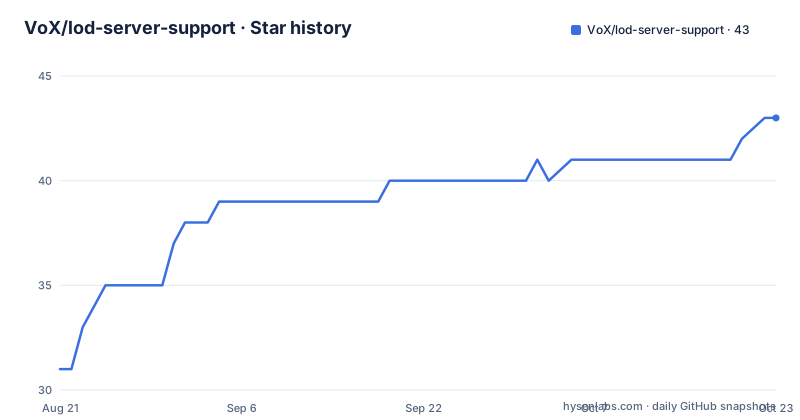
- VoX/lod-server-support43 ★ · +12
| Repository | 2026-08-21 | 2026-10-23 |
|---|---|---|
| VoX/lod-server-support | 31 | 43 |
12 Stars in the last 63 days, measured from the daily GitHub snapshot. Compare with other projects
Editorial analysis
Both ends need LSS, because the terrain download service lives inside it
Voxy renders terrain from data the client downloads, and on a multiplayer server nobody has that data until they walk there. LOD Server Support, abbreviated LSS, is the missing half: a server-side terrain download service plus the client mod that consumes it. The README states the requirement without hedging, installing LSS on both the server, whether Fabric, Paper or NeoForge on a line that ships it, and on every participating client.
The result is that a player sees fully rendered terrain out to hundreds of chunks without exploring first. A second feature rides along under the name Far Players: people beyond normal render distance show up in that LOD terrain with name tags, equipment and mounts.
There is a public test server for checking the plumbing before you commit, `lod-server-support.modrinth.gg`, which expects Voxy and this mod on the client. It supports Minecraft 26.2, 26.1, 1.21.11, 1.21.10 and 1.21.1.
The server matrix says Folia is unsupported on one line and experimental on four
Compatibility is published as a table rather than a promise, with five Minecraft lines against four support questions: Fabric or Paper, Folia, whether NeoForge ships, and whether the Neo far renderer exists.
Fabric and Paper are marked maintained on every line. Folia is the weak column: unsupported on 1.21.10 and experimental on 1.21.11, 26.1 and 26.2. NeoForge ships on 1.21.1, 26.1 and 26.2 with a best-effort label, and on 1.21.10 and 1.21.11 the module is a maintained build only. The far renderer column has exactly one entry marked available, NeoForge on 1.21.1, and unsupported everywhere else.
Client side is simpler than the table suggests: the Fabric mod works on every version, and a NeoForge client is an option on 26.2, 26.1 and 1.21.1. Other NeoForge lines keep intentional renderer stubs, which is a deliberate state rather than a missing feature.
One release, three artifacts, each suffixed with its Minecraft line
The versioning convention carries the compatibility matrix in the artifact name. Version 0.16.0 was published three times over on 2026-09-29, as v0.16.0+mc26.1, v0.16.0+mc1.21.11 and v0.16.0+mc1.21.10. The project version is the same in all three; the suffix says which Minecraft line the build targets. The last push to the repository landed on 2026-09-29 as well.
That scheme matters when you pin a server plugin, because upgrading the base version does not upgrade the line you are running. Read the suffix before assuming a 0.16.0 artifact from a mirror matches your server.
Compatibility across versions is stated as symmetric: LSS is backwards and forwards compatible from v0.4.0 through the current version, so operators can update for improvements without stranding clients on older builds, and clients can update without breaking against older servers. Licensing is MIT, with third-party and upstream terms collected in a THIRD-PARTY-NOTICES file at the repository root.
The Xaero map bridge starts off and back-pressures the download when you turn it on
With Xaero's World Map 1.42.0 or newer on the client, downloaded LOD terrain can also be written into the world map, so the map fills in far past vanilla render distance. It works even without Voxy, since Xaero's Map plus this mod alone will download and map the server's terrain.
The bridge is off by default. Enable it with the Write LODs to Xaero's Map toggle on the LSS Sodium options page, or by setting `integrations.xaero.enabled` in `lss-client-config.yaml`, then run `/lss reload` and reconnect.
The behavior has edges worth knowing. Tiles go to the map's surface layer, so while the map shows a cave layer, underground with auto cave mode on and the Nether by default, arriving terrain is not written and is not retried. Revisiting the area or running `/lss clearcache` backfills it. Delivery is then paced to what the map can draw through `enableXaeroMapBackpressure`, which defaults on and includes brief full pauses of a few seconds while the map writes the terrain around you. On a world explored before you installed the mod, run `/lss clearcache` once while connected, and expect a full re-download.
Far players stop at the game's far plane, and shader packs can break their depth
Far Players draws other players as models in the LOD terrain on a Fabric client, lit as if under open sky. The Full Bright Far Players option, or `far_players.full_bright` in `lss-client-config.yaml`, raises that to full brightness for the models and their mounts. Name tags come along too, and they are drawn over players still in normal range once those players pass the game's own name-tag distance.
Two limits are documented rather than discovered. Skin overlay layers only resolve within about 80 blocks, because farther out the depth buffer cannot separate that thin shell from the body. And players past the game's far plane, calculated as your render distance times 64 blocks with Iris shaders extending it, are not drawn at all, whatever the far-player render limit says.
The second limit interacts badly with some shader packs. Where a pack's Voxy integration keeps LOD depth out of the vanilla depth buffer, Complementary being the named example, far players are drawn on top of the LOD terrain instead of behind it. The option to raise the far-player limit will not change that.
Sodium 0.6/0.7 and Sodium 0.8+ put the settings page in different places
Since v0.13.0 the in-game settings page renders on both Sodium generations, and where it appears depends on which one is running. On Sodium 0.8 and newer it sits under LSS's own entry in the video settings screen. On Sodium 0.6 and 0.7, covering Minecraft up to 1.21.10 and the 1.21.1 Voxy-fork pairing, it appears as LSS tabs beside Sodium's own. On Fabric the ModMenu Configure button is the other route in.
NeoForge is the awkward case, because the page renders on both generations there too and the pairing decides which one you get: the 0.6 and 0.7 tabs on the Voxy-fork pairing, and LSS's own entry on native NeoForge Sodium 0.8+ builds, which is what the Connector stack pairs with. Far-player options are included where the renderer is available, which currently means NeoForge on 1.21.1.
If you cannot find the settings page, this paragraph is the diagnostic: identify the Sodium generation and the loader pairing first, because the entry exists in all of them and sits in a different place in each.
Native and Connector routes are separate profiles, and jars must not be mixed by filename
NeoForge 1.21.1 has two distinct dependency routes, native and Connector, and the README treats mixing them as a real hazard rather than a theoretical one. It records a 2026-09-08 trial of native Voxy 0.2.9-alpha that was rejected, then adds the sentence that matters for anyone reading old reports: older successful reports do not establish current compatibility, and they do not establish the upstream cause of that failure.
Two further profiles exist alongside them, the Xaero-only legacy Sodium route and the modern Connector Voxy route. The instruction is to work from the dated profile inventory at `docs/testing/astra-live-profiles.md` and from exact dependency locks, and not to combine their jars by filename.
The reason to care is that the two routes present the same settings page under different arrangements, as described above, and the far renderer only exists on the NeoForge 1.21.1 line. Identifying which profile you are on is a prerequisite for reading any other part of the documentation, and the loader and artifact matrix at `docs/planning/per-version-surfaces.md` is where the separate packaging and live-test boundaries are set out.
Source sets split by loader: common, fabric, neoforge, paper, xplat
The repository is a Gradle multi-project build with `build.gradle`, `settings.gradle`, `gradle.properties` and the `gradlew` and `gradlew.bat` wrappers, and the loader split is visible in the directory names rather than hidden in configuration: `common/`, `fabric/`, `neoforge/`, `paper/` and `xplat/`.
Around them sit the parts a server operator is unlikely to read but useful to know exist. `config/` holds configuration assets, `docs/` holds the planning and testing documents the README points at, and `scripts/` covers packaging and automation. `test-server.sh`, `test-fixtures/` and `tools/` indicate a live test harness rather than unit tests alone, which matches the README's habit of recording dated trials rather than asserting compatibility.
Compatibility with other mods is broad and named: AntiXray, Moonrise, C2ME, ViaVersion and ViaBackwards, and most others. LSS can also run alongside Distant Horizons on the same server so that Distant Horizons clients and Voxy clients are supported at once, which matters for servers with a mixed player base.
Editorial conclusion
Choose LOD Server Support when your players already run Voxy and want far terrain without exploring, and you can commit to installing LSS on the server and on every client. Skip it for a Folia server on any supported line, where it is unsupported on 1.21.10 and experimental elsewhere, and treat NeoForge far players as a 1.21.1 feature. Before rolling out, copy the three /lsslod commands into your admin notes and read docs/testing/astra-live-profiles.md, because mixing a native jar with a Connector jar by filename is the mistake the project warns about twice.
Frequently asked questions
Can Voxy work on servers?
Yes, through LOD Server Support, which the project describes as unofficial multiplayer support for Voxy. LSS has to be installed on the server and on every participating client, because both sides need it for the terrain download service.
Which Minecraft versions does LOD Server Support cover?
Minecraft 26.2, 26.1, 1.21.11, 1.21.10 and 1.21.1. NeoForge ships on 1.21.1, 26.1 and 26.2, while the 1.21.10 and 1.21.11 modules remain maintained builds.
How do I write downloaded LOD terrain into Xaero's World Map?
With Xaero's World Map 1.42.0 or newer on the client, turn on the Write LODs to Xaero's Map toggle on the LSS Sodium options page, or set integrations.xaero.enabled in lss-client-config.yaml, then run /lss reload and reconnect. The bridge is off by default.
Why does LOD Server Support draw far players on top of the terrain?
With Iris shaders, packs whose Voxy integration keeps LOD depth out of the vanilla depth buffer, such as Complementary, draw far players on top of LOD terrain instead of behind it. Players past the game's far plane, your render distance times 64 blocks, are not drawn at all.
What do the LOD Server Support server commands do?
The server commands cover statistics, diagnostics and reconfiguration. /lsslod stats shows per-player transfer statistics, /lsslod diag shows config, bandwidth and queue depths, and /lsslod reload validates the server YAML and applies supported changes.
Official sources
Add this badge to your README
If you maintain this project, the badge below links readers to this analysis and shows its maintenance status from the daily GitHub snapshot. Paste the markdown into your README; add ?metric=license or ?metric=stars to the image URL for a different field.

[](https://hysenlabs.com/projects/vox-lod-server-support)Star history chart for your README
[](https://hysenlabs.com/projects/vox-lod-server-support)Was this useful?