Poedit: the gettext catalog editor and the build it demands
Simple translation editor for PO, XLIFF, JSON etc. for Mac/Windows/Unix
At a glance
- What is it?
- Poedit is a cross-platform GUI for gettext catalogs, XLIFF and JSON, aimed at maintainers and translators who edit strings by hand. Its source build is the real cost: wxWidgets, ICU, LucenePlusPlus, a per platform submodule choice and a bootstrap step.
- Who is it for?
- Poedit earns a place on a desktop where a person curates gettext catalogs by hand, and on Windows and macOS it arrives with the gettext binaries already bundled, so the editor is usable without a separate gettext install. It does not serve a pipeline, because the README documents no command line for batch work.
- Can I use it commercially?
- Yes. MIT is a permissive licence: you can use, modify and sell software built on it, as long as you keep its copyright and licence notices.
- Is it still maintained?
- Yes. The repository last received commits 4 days ago.
- What is it written in?
- Mainly C++, according to GitHub's language statistics.
Answers come from the project's GitHub data, last synced on October 23, 2026, and from our analysis. They are not legal advice.
Star history
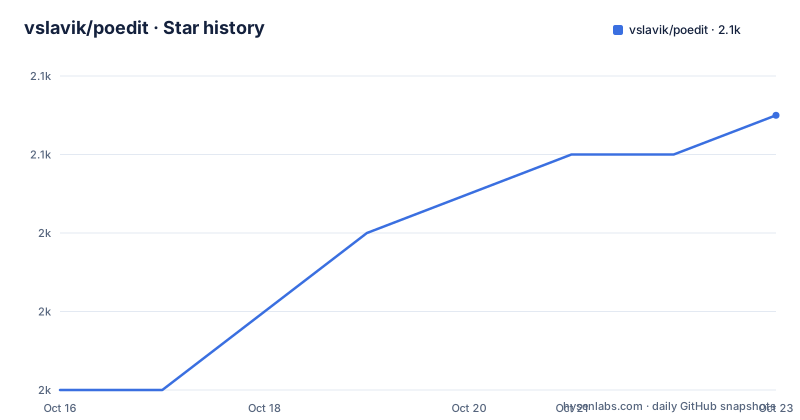
- vslavik/poedit2,051 ★ · +7
| Repository | 2026-10-16 | 2026-10-23 |
|---|---|---|
| vslavik/poedit | 2k | 2.1k |
7 Stars in the last 7 days, measured from the daily GitHub snapshot. Compare with other projects
Editorial analysis
What Poedit edits, and what it leaves to gettext
Poedit is a desktop editor for catalog files rather than a translation service. It handles gettext PO files first, then XLIFF, Qt catalogs and JSON, and in the same process it works as a GUI frontend to the GNU gettext utilities, with a catalogs editor and a source code parser built in. For the reasoning behind all of that, the project hands you back to the GNU gettext documentation instead of restating it. That boundary matters when you evaluate the tool: the file formats, the merge semantics and the plural rules come from gettext, and the contribution here is a person sitting in front of them.
The reader who benefits is the maintainer of an application that already ships strings through gettext, and the translator asked to localise it. The Windows and macOS builds carry GNU gettext binaries inside the distribution, so the editor is usable on a machine where those command line tools were never installed. Crowdin is the only external service named anywhere in the build documentation: a translation badge, a `crowdin.yaml` file at the top level, and the optional C++REST SDK for that integration. No other hosted platform appears.
One detail rewards a closer look. The prose names XLIFF without a version, while the repository topics go further and list gettext, po, translation, xliff, xliff-editor and xliff2. XLIFF 2 is claimed at the topic level, while the format list in the project text stays narrower.
Two optional dependencies quietly change the editor's behaviour
The build requirements split into four mandatory pieces and two optional ones, and the optional pair is where behaviour changes rather than binary size. Boost, a Unicode build of wxWidgets at version 3.2 or newer, ICU and LucenePlusPlus are needed to compile. cld2 is optional, and it buys better language autodetection and better handling of non-English source languages. Leave it out and the program still builds, but the language guess rests on a weaker mechanism.
The second optional dependency is the C++REST SDK at version 2.5 or newer, and it exists for one feature, the Crowdin integration. A narrow dependency for a narrow feature, worth knowing before you choose a build target.
Spell checking is narrower still. GtkSpell is named as the requirement on Unix, and no spell checking backend is named for Windows or macOS. The requirement list therefore gives you two quality of life features that do not travel across platforms with equal support, and the platform you build on decides which of them you actually get.
Prebuilt packages, a Snap, or a full checkout from Git
Most people never run the build. Prebuilt binaries for Windows and macOS are offered at poedit.com/download, official Linux binaries are published as a Snap at snapcraft.io/poedit, and most Linux distributions also carry native Poedit packages. Three routes, and the first two need no compiler at all.
The third route starts with two commands, and which submodules you pull is the first real decision:
git clone https://github.com/vslavik/poedit.git
git submodule update --init --recursive
Windows and macOS need every submodule. Linux and other Unices need a subset, and the project names two of them, `deps/json` and `deps/pugixml`, as a way to save time and disk space:
git submodule update --init deps/json deps/pugixmlRead that saving next to the next paragraph of the build notes and it shrinks. A Unix build taken straight from the Git repository has generated files missing, so the `./bootstrap` script has to run first, and that script needs AsciiDoc, xsltproc and xmlto to generate the manual page, plus the gettext tools to create `.mo` files. The submodule trim removes repository content, not the toolchain.
Windows needs Developer Mode before the solution will build
The Windows instructions open with a git configuration line, because the repository uses symlinks and a checkout that drops them produces a tree the build cannot use. Developer Mode has to be enabled and git has to be told to keep them:
git config --global core.symlinks trueWith that set, the solution to open is `Poedit.slnx`. A `Poedit.vcxproj`, its filters file, `Poedit.props` and `Poedit.Targets` also sit at the top level, so the tree carries both the newer solution format and the classic project files.
Packaging is a separate, manual step. The installer is produced by opening `win32/poedit.iss` in Inno Setup and compiling the project there, and the build notes give no command line for that last hop. A Windows build therefore ends with a person sitting in a Windows installer tool, not in a shell. The same notes say the Windows distribution includes the GNU gettext binaries, which is why the editor needs no separate gettext install there.
macOS builds through a workspace and an unpinned Xcode
The macOS path carries its own precondition: you need a full git checkout to build there, which is why the recursive submodule command is not optional on Apple machines. After checkout you open `Poedit.xcworkspace` and use the latest version of Xcode. The `Poedit.xcodeproj` directory sits right next to that workspace in the repository, and bootstrapping is explicitly not needed on macOS.
That instruction is the loosest constraint in the whole build documentation, because latest is not a version. Every other requirement is a floor: wxWidgets at 3.2 or newer, the C++REST SDK at 2.5 or newer. A build that depends on whatever Xcode shipped this quarter, on a source tree compiled from scratch, is the step most exposed to an Xcode update you did not ask for.
The comparison with the Unix path is instructive. On Unix, `./configure`, `make` and `make install` are the documented sequence, and the dependency set has to sit where configure can find it, which is what `CPPFLAGS` and `LDFLAGS` are for. On macOS no such flags are mentioned; the workspace decides where the libraries come from.
Repository layout hints at four Linux desktop integration pieces
Read the top level listing and the Linux story becomes concrete. `net.poedit.Poedit.desktop` is the ordinary desktop entry, `net.poedit.PoeditURI.desktop` is a second entry whose name marks it as a URI handler, and `net.poedit.Poedit.appdata.xml` carries the application metadata that software centres read. A `snap/` directory matches the Snap route the installation notes point at, and a `locales/` directory sits at the top level next to the gettext tooling `bootstrap` uses to create `.mo` files.
Two other entries deserve naming because the build notes never explain them. `tests/` and `docs/` both sit at the top level, and the build sequence stops at `make install` without saying how either is used. `SECURITY.md`, `SUPPORT.md` and `packages.config` are present too, and the documentation does not say what they contain or how the packages file feeds a build. If you need to know whether the test suite runs in your environment, that answer is not written down anywhere in the files described here.
The editor has no documented command line, which rules out CI
Everything the build documentation covers ends at compiling and installing. No headless mode, no batch conversion and no command line flag are documented, which means a project that regenerates its catalogs on every commit has nothing to call here.
The alternative is the gettext command line utilities themselves, and the project points at them twice: once as the source of the principles behind the solution, once as the tools the GUI wraps. The difference in approach is direct rather than cosmetic. The utilities are scriptable and unattended, one invocation per operation, which is what a build server wants. Poedit is interactive and file by file. On Windows and macOS the two routes arrive in the same package, because those builds carry the gettext binaries.
Two further gaps are worth naming by their source rather than guessing at answers. The documentation does not explain how to migrate catalogs between Poedit versions, and it does not explain how to roll back when a merge goes wrong. For a tool whose output lands in version control, those are the first two questions to put to whoever runs the project.
Redistribution terms cover code you did not write
Poedit's own code is released under the MIT license, while the Windows and macOS builds contain GNU gettext binaries distributed under the GNU General Public License with their source available from the GNU site, so anyone redistributing a build handles a second licence for code they did not write. See the `COPYING` file for the terms on the first component.
The last push was on 2026-10-02 and the newest listed tag, v3.9.1-oss, is dated 2026-06-04, which puts master several months ahead of the newest packaged build; all three recent tags carry the same oss suffix, v3.9-oss and v3.8.2-oss below it. The working tree you compile and the binary a user downloads can therefore differ, and the tag names tell you which side of that line you are on.
Nothing else constrains adoption. There is no support contract, no statement about which platforms are fixed first, and no migration tooling between versions.
Editorial conclusion
Poedit earns a place on a desktop where a person curates gettext catalogs by hand, and on Windows and macOS it arrives with the gettext binaries already bundled, so the editor is usable without a separate gettext install. It does not serve a pipeline, because the README documents no command line for batch work. A team that keeps every string in version control will find no migration or rollback notes in the documentation. Verify the build chain first: on Unix that means ICU, LucenePlusPlus, GtkSpell plus the bootstrap tools AsciiDoc, xsltproc and xmlto.
Frequently asked questions
What file formats can Poedit open, and is it only for gettext?
It opens gettext PO files first, then XLIFF, Qt catalogs and JSON, and it also works as a GUI frontend to the GNU gettext utilities with a catalogs editor and source code parser built in. The repository topics also list xliff and xliff2.
Does Poedit have a command line mode for build servers?
None is documented. The installation and build notes cover prebuilt binaries, the Snap package and compiling from source, with no headless or batch mode described.
What do I need to build Poedit from source on Linux?
Boost, a Unicode build of wxWidgets at version 3.2 or newer, ICU and LucenePlusPlus, plus GtkSpell for spell checking. A build from the Git repository also runs the `./bootstrap` script, which needs AsciiDoc, xsltproc, xmlto and the gettext tools.
Which translation platforms does Poedit connect to?
Crowdin is the only one named in the build documentation, through a translation badge, a `crowdin.yaml` file at the top level and the optional C++REST SDK. No other hosted platform appears.
When was Poedit last updated and what is the newest version?
The last push was on 2026-10-02, and the newest listed tag is v3.9.1-oss dated 2026-06-04, with v3.9-oss and v3.8.2-oss before it.
Official sources
Add this badge to your README
If you maintain this project, the badge below links readers to this analysis and shows its maintenance status from the daily GitHub snapshot. Paste the markdown into your README; add ?metric=license or ?metric=stars to the image URL for a different field.

[](https://hysenlabs.com/projects/vslavik-poedit)Star history chart for your README
[](https://hysenlabs.com/projects/vslavik-poedit)Was this useful?