Vue Vine: A Component Style for Vue TypeScript
Another style of writing Vue components.
At a glance
- What is it?
- Vue Vine is a TypeScript-first way to define multiple Vue components in one file, backed by compiler, bundler, language, linting, and editor integrations. It fits projects that want SFC flexibility without treating every small component as a separate `.vue` file.
- Who is it for?
- Vue Vine is a reasonable fit for Vue teams that deliberately prefer TypeScript-based component definitions and can add its compiler, language tooling, and lint configuration. It is a poor match for a standard SFC codebase that needs predictable tooling with minimal configuration.
- Can I use it commercially?
- Yes. MIT is a permissive licence: you can use, modify and sell software built on it, as long as you keep its copyright and licence notices.
- Is it still maintained?
- Yes. The repository last received commits 1 day ago.
- What is it written in?
- Mainly TypeScript, according to GitHub's language statistics.
Answers come from the project's GitHub data, last synced on November 7, 2026, and from our analysis. They are not legal advice.
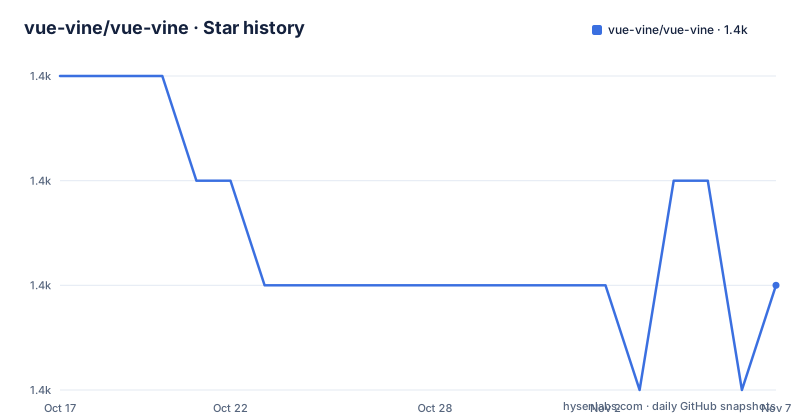
Star history
- vue-vine/vue-vine1,441 ★ · -2
| Repository | 2026-10-17 | 2026-11-07 |
|---|---|---|
| vue-vine/vue-vine | 1.4k | 1.4k |
-2 Stars in the last 21 days, measured from the daily GitHub snapshot. Compare with other projects
Editorial analysis
Why Vue Vine Collapses the Vue Component Boundary
Vue Vine addresses a specific source-organization problem: writing several Vue components in one file. Its README positions the approach as a parallel style to Vue Single-File Components, rather than as a general replacement for every Vue feature. That distinction matters because Vue Vine is aimed at developers who want more freedom in component placement, especially when a page contains small components that would otherwise become separate files.
The project is most relevant to TypeScript-based Vue applications and component authors who value keeping related component definitions together. Its repository is organized around `@vue-vine/compiler`, `@vue-vine/language-server`, `@vue-vine/language-service`, bundler integrations, ESLint packages, `vue-vine-tsc`, and a Nuxt module. The breadth shows that Vue Vine is not only a source-code syntax experiment. It includes the compiler and editor-facing pieces needed to make this component style visible during development.
This does make Vue Vine a tradeoff rather than a transparent shorthand. A standard Vue SFC keeps template, script, and style boundaries in an established file format. Vue Vine instead asks a project to accept its TypeScript-oriented authoring model and connect the appropriate plugin, type definitions, editor extension, and possibly lint configuration. The README does not quantify editor latency, compile speed, or the behavior of every Vue feature, so those points need direct checking in a real project.
The Compiler, Bundler, and Editor Package Chain
Based on the repository layout, Vue Vine distributes its behavior across several focused packages. `@vue-vine/compiler` is the compiler layer, while `@vue-vine/language-server` and `@vue-vine/language-service` handle editor and TypeScript-facing language support. The `vue-vine-tsc` package provides a TypeScript CLI checker, and the ESLint parser, plugin, and config packages make the syntax available to static analysis.
The build integration is not hidden behind a runtime-only package. `@vue-vine/vite-plugin` supplies `VineVitePlugin`, while `@vue-vine/rspack-loader` and `@vue-vine/rsbuild-plugin` cover the other documented build paths. The README is especially specific about the Rsbuild adapter. According to its description, `pluginVueVine` configures loaders for `.vine.ts` files, installs style-processing rules, and injects Vue runtime flags through `DefinePlugin`. Those are concrete responsibilities in the build pipeline.
For Nuxt applications, the repository includes `@vue-vine/nuxt`. This suggests that Vue Vine accounts for framework integration rather than limiting itself to plain Vite projects. Even so, the README excerpt does not document the complete Nuxt configuration, editor fallback behavior, or source-map behavior. Those omissions are relevant for teams evaluating migration, because the source syntax is only one part of adopting the approach.
Creating a Vue Vine Project and Connecting Vite
The README says `create-vue-vine` provides an interactive starter command, and it links that generator as the recommended way to create a first project. The shortest documented installation command uses `ni`, which the README also recommends installing if it is not already present.
The documented installation command is:
ni vue-vineFor an existing Vite project, add the documented plugin to `vite.config.ts`. The plugin call is placed inside the configuration's `plugins` array:
import { VineVitePlugin } from 'vue-vine/vite'

export default defineConfig({
  plugins: [
    // ...Other plugins
    VineVitePlugin()
  ],
})
A project also needs the macro type definitions for TypeScript. Add the documented `vue-vine/macros` entry under `compilerOptions` in `tsconfig.json`:
{
  "compilerOptions": {
    "types": ["vue-vine/macros"]
  }
}
That is the usable first-use path documented here: generate or open the project, enable the correct build integration, and configure TypeScript. The README excerpt does not include a complete `.vine.ts` component example, so it does not establish a safe way to invent syntax. The linked Vue Vine Playground is the documented place to inspect executable examples before writing the first component by hand.
The Rsbuild Route Handles More Integration Work
Rsbuild users can choose `pluginVueVine` instead of configuring the lower-level pieces separately. The documented configuration imports the plugin from `vue-vine/rsbuild` and passes it compiler options when needed:
import { defineConfig } from '@rsbuild/core'
import { pluginVueVine } from 'vue-vine/rsbuild'

export default defineConfig({
  plugins: [
    pluginVueVine({
      // Optional compiler options
      // compilerOptions: { ... }
    })
  ],
})
The distinction is practical. The README calls the Rsbuild integration simpler and higher-level because it automatically configures loaders for `.vine.ts`, style rules, and runtime flags through `DefinePlugin`. Advanced Rspack users are instead directed to the Rspack loader documentation for finer control.
This setup choice affects evaluation cost. A Vite project needs the documented `VineVitePlugin` path, while an Rsbuild project can begin with a higher-level adapter. The README does not document equivalent automatic setup for every supported tool, so choosing Vue Vine does not remove the need to inspect which integration matches the application's build system.
ESLint, VS Code, and Repository Maintenance Boundaries
Static analysis and editor support are separate adoption concerns from compilation. The README documents installing `@vue-vine/eslint-config` as a development dependency and spreading the result of `VueVine()` through `@antfu/eslint-config`:
ni -D @vue-vine/eslint-configThe documented flat configuration imports `VueVine` from `@vue-vine/eslint-config` and spreads `VueVine()` into the Antfu configuration:
import antfu from '@antfu/eslint-config'

// `VueVine()` returns an ESLint flat config
import VueVine from '@vue-vine/eslint-config'

export default antfu(
  {
    // First option is not Linter.FlatConfig,
    // it's a setting for antfu's config itself
  },
  ...VueVine(),
)
The README also links a VS Code extension named Vue Vine. Its presence confirms an editor integration exists, not that every editor or language-server scenario is covered.
The repository is not archived, and its last push was on 2026-10-16. Recent listed releases include v1.7.27 on 2026-04-12, v1.7.26 on 2025-11-27, and v1.7.25 on 2025-11-26. That release history indicates ongoing package publication, although upgrade planning still requires checking compatibility between the compiler, plugin, language tooling, and framework integration rather than updating only one package. The project is MIT licensed. The repository's `LICENSE` file is the appropriate place to review the exact permissions and notice conditions; this review does not interpret those terms as legal advice.
Where Vue Vine Differs from Conventional Vue SFC Organization
The direct alternative is Vue's conventional Single-File Component workflow. An SFC places a component's template, script, and styles in a dedicated `.vue` file, with Vue's established tooling and file-based conventions. Vue Vine takes a parallel approach centered on TypeScript and permits multiple components in one file. The difference is not simply formatting: it changes which compiler and integration packages a project must configure.
This makes Vue Vine suitable when co-locating component definitions is an intentional design decision. It is the wrong tool when a codebase depends on unchanged `.vue` file conventions, has no appetite for Vue Vine-specific lint and TypeScript integration, or needs behavior that the README does not establish. The README does not claim full compatibility for every Vue feature, nor does it document migration tooling or rollback procedures, so an existing application should not assume that installing a plugin is a reversible file-level change.
The repository's own development environment also raises a concrete onboarding constraint. Its workspace `package.json` specifies Node `>=24.15.0` and `[email protected]`. Those versions apply to this repository workspace, and the README does not state whether every consuming application has identical runtime requirements. Contributors and evaluators should read the relevant package metadata rather than copy workspace constraints blindly into an application.
Editorial conclusion
Vue Vine is a reasonable fit for Vue teams that deliberately prefer TypeScript-based component definitions and can add its compiler, language tooling, and lint configuration. It is a poor match for a standard SFC codebase that needs predictable tooling with minimal configuration. Before adoption, check the project generated by `create-vue-vine`, confirm that `.vine.ts` components fit its module and editor conventions, and review the repository's required Node and pnpm versions. The first concrete adoption checkpoint is a successful editor and TypeScript experience in a `.vine.ts` file.
Frequently asked questions
What problem does Vue Vine solve?
It provides a TypeScript-oriented style for writing Vue components and supports placing multiple components in one file. The README describes it as a parallel style to Vue Single-File Components.
How do I create a new Vue Vine project?
The README directs users to the interactive `create-vue-vine` starter. It also documents `ni vue-vine` as an installation command.
Which build tools does Vue Vine document?
The README documents Vite, Rsbuild, and lower-level Rspack integrations. It also lists a Nuxt module in the repository's package table.
Official sources
Add this badge to your README
If you maintain this project, the badge below links readers to this analysis and shows its maintenance status from the daily GitHub snapshot. Paste the markdown into your README; add ?metric=license or ?metric=stars to the image URL for a different field.

[](https://hysenlabs.com/projects/vue-vine-vue-vine)Star history chart for your README
[](https://hysenlabs.com/projects/vue-vine-vue-vine)Was this useful?